> For the complete documentation index, see [llms.txt](https://help.connected.illumina.com/llms.txt). Markdown versions of documentation pages are available by appending `.md` to page URLs; this page is available as [Markdown](https://help.connected.illumina.com/clarity-lims/library-prep/ampliseq/custom-dna-panel/ampliseq-custom-equ-v1.1.md).
# Equalizer v1.1
## Protocol 1: Equalizer Workflow (AmpliSeq for Illumina Custom DNA Panel v1.1)
Protocol Type = Library Prep
**Next Steps Configuration**
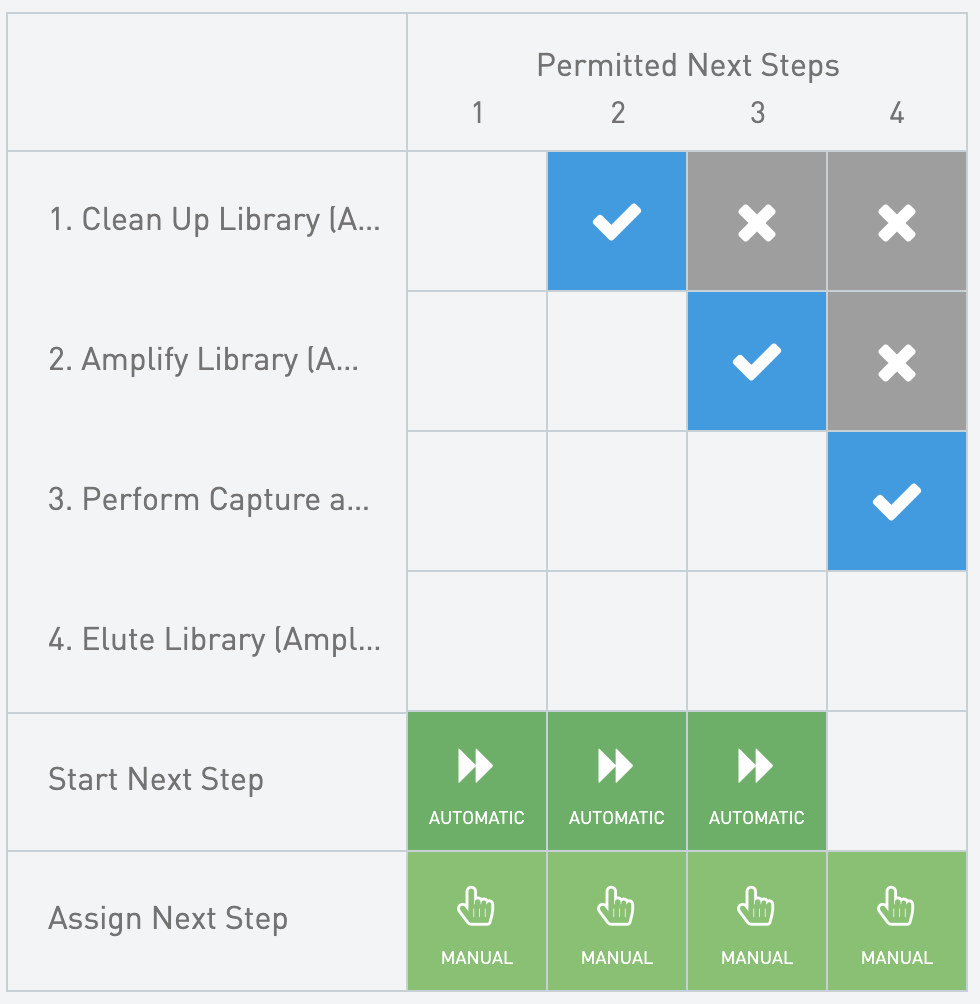 ### Step 1: Clean Up Library (AmpliSeq for Illumina Custom DNA Panel v1.1)
* Master Step Name = Clean Up Library (AmpliSeq for Illumina v1.1)
* Step Type = No Outputs
* Reagent Kits
* Agencourt AMPure XP Beads
* Supplier = Thermo
* Catalog Number = NC9959336; NC9933872
#### Automations
### Step 1: Clean Up Library (AmpliSeq for Illumina Custom DNA Panel v1.1)
* Master Step Name = Clean Up Library (AmpliSeq for Illumina v1.1)
* Step Type = No Outputs
* Reagent Kits
* Agencourt AMPure XP Beads
* Supplier = Thermo
* Catalog Number = NC9959336; NC9933872
#### Automations

Set Next Step - Advance
* Trigger Location = Record Details
* Trigger Style = Automatic upon exit
{% code overflow="wrap" %}
```markup
bash -l -c "/opt/gls/clarity/bin/java -jar /opt/gls/clarity/extensions/ngs-common/v5/EPP/ngs-extensions.jar -i {stepURI:v2} -u {username} -p {password} \
script:evaluateDynamicExpression \
-t false \
-h false \
-exp 'nextStep = ::ADVANCE::' \
-log {compoundOutputFileLuid0}"
```
{% endcode %}
#### Queue/Ice Bucket
* Defaults
* Sample Grouping = Group by Containers
* Well Sort Order = Row
* Sample Table (Column Headers)
| **Category** | **Field Name** | **Field Type** | **Options** | **Additional Options and Dropdown Items** |
| -------------- | ------------------- | -------------- | ----------- | ----------------------------------------- |
| Container | Container Name | Built-in | | |
| Container | LIMS ID (Container) | Built-in | | |
| Container | Well | Built-in | | |
| Derived Sample | Sample Name | Built-in | | |
| Derived Sample | Waiting | Built-in | | |
| Project | Project Name | Built-in | | |
#### Record Details
* Step Data (Master Step Fields)
| **Field Name** | **Field Type** | **Options** | **Additional Options and Dropdown Items** |
| ------------------ | -------------- | ----------- | ----------------------------------------- |
| 70% EtOH Prep Date | Date | | |
* Step File Placeholders
* Log - Automatically attached
* Sample Table
* Sample Display Default = Expand
* Well Sort Order = Row
* Table Columns - Global Fields
| **Category** | **Field Name** | **Field Type** | **Options** | **Additional Options and Dropdown Items** |
| -------------- | ------------------- | -------------- | ----------- | ----------------------------------------- |
| Container | Container Name | Built-in | | |
| Container | LIMS ID (Container) | Built-in | | |
| Container | Well | Built-in | | |
| Derived Sample | Sample Name | Built-in | | |
| Project | Project Name | Built-in | | |
### Step 2: Amplify Library (AmpliSeq for Illumina Custom DNA Panel v1.1)
* Master Step Name = Amplify Library (AmpliSeq for Illumina v1.1)
* Step Type = No Outputs
#### Automations

Count Samples and Calculate Master Mix
* Trigger Location = Record Details
* Trigger Style = Automatic upon entry
{% code overflow="wrap" %}
```markup
bash -l -c "/opt/gls/clarity/bin/java -jar /opt/gls/clarity/extensions/ngs-common/v5/EPP/ngs-extensions.jar -i {stepURI:v2} -u {username} -p {password} \
script:evaluateDynamicExpression \
-t false \
-h false \
-exp 'step.::Total Samples:: = step.::Total Samples:: + 1' \
-log {compoundOutputFileLuid0} && /opt/gls/clarity/bin/java -jar /opt/gls/clarity/extensions/ngs-common/v5/EPP/ngs-extensions.jar -i {stepURI:v2} -u {username} -p {password} \
script:evaluateDynamicExpression \
-t false \
-h false \
-exp 'step.::1X Lib AMP Mix (uL):: = step.::Total Samples:: * 1.1 * 45 ; \
step.::10X Library Amp Primers (uL):: = step.::Total Samples:: * 1.1 * 5' \
-log {compoundOutputFileLuid0}"
```
{% endcode %}
Set Next Step - Advance
* Trigger Location = Record Details
* Trigger Style = Automatic upon exit
{% code overflow="wrap" %}
```markup
bash -l -c "/opt/gls/clarity/bin/java -jar /opt/gls/clarity/extensions/ngs-common/v5/EPP/ngs-extensions.jar -i {stepURI:v2} -u {username} -p {password} \
script:evaluateDynamicExpression \
-t false \
-h false \
-exp 'nextStep = ::ADVANCE::' \
-log {compoundOutputFileLuid0}"
```
{% endcode %}
Calculate Total Samples and Calculate Master Mix
* Trigger Location = Not Used
{% code overflow="wrap" %}
```markup
bash -l -c "/opt/gls/clarity/bin/java -jar /opt/gls/clarity/extensions/ngs-common/v5/EPP/ngs-extensions.jar -i {stepURI:v2} -u {username} -p {password} \ script:evaluateDynamicExpression \ -t false \ -h false \ -exp 'step.::Total Samples:: = step.::Total Samples:: + 1' \ -log {compoundOutputFileLuid0} && /opt/gls/clarity/bin/java -jar /opt/gls/clarity/extensions/ngs-common/v5/EPP/ngs-extensions.jar -i {stepURI:v2} -u {username} -p {password} \ script:evaluateDynamicExpression \ -t false \ -h false \ -exp 'step.::1X Lib Amp Mix:: = step.::Total Samples:: * 1.1 * 45 ; \ step.::10X Library Amp Primers:: = step.::Total Samples:: * 1.1 * 5' \ -log {compoundOutputFileLuid0}"
```
{% endcode %}
#### Queue/Ice Bucket
* Defaults
* Sample Grouping = Group by Containers
* Well Sort Order = Row
* Sample Table (Column Headers)
| **Category** | **Field Name** | **Field Type** | **Options** | **Additional Options and Dropdown Items** |
| -------------- | ------------------- | -------------- | ----------- | ----------------------------------------- |
| Container | Container Name | Built-in | | |
| Container | LIMS ID (Container) | Built-in | | |
| Container | Well | Built-in | | |
| Derived Sample | Sample Name | Built-in | | |
| Derived Sample | Waiting | Built-in | | |
| Project | Project Name | Built-in | | |
#### Record Details
**Group of Defaults**
AmpliSeq for CHS V2
* Thermal Cycler Program = AMP
Equalizer Workflow
* Thermal Cycler Program = EQUAL
Standard Workflow
* Thermal Cycler Program = AMP\_7
* Step Data
* Group of Defaults = Equalizer Workflow
* Master Step Fields
| **Field Name** | **Field Type** | **Options** | **Additional Options and Dropdown Items** |
| ---------------------------- | -------------- | -------------- | ---------------------------------------------------------------- |
| 1X Lib AMP Mix (uL) | Numeric | | Decimal Places Displayed = 2 |
| 10X Library Amp Primers (uL) | Numeric | | Decimal Places Displayed = 2 |
| Thermal Cycler Program | Text Dropdown | Custom Entries | Presets
|
| Total Samples | Numeric | | Default = 0 |
* Step File Placeholders
* Log - Automatically attached
* Sample Table
* Sample Display Default = Expand
* Well Sort Order = Row
* Table Columns - Global Fields
| **Category** | **Field Name** | **Field Type** | **Options** | **Additional Options and Dropdown Items** |
| -------------- | ------------------- | -------------- | ----------- | ----------------------------------------- |
| Container | Container Name | Built-in | | |
| Container | LIMS ID (Container) | Built-in | | |
| Container | Well | Built-in | | |
| Derived Sample | Sample Name | Built-in | | |
| Project | Project Name | Built-in | | |
### Step 3: Perform Capture and Clean Up (AmpliSeq for Illumina Custom DNA Panel v1.1)
* Master Step Name = Perform Capture and Clean Up (AmpliSeq for Illumina v1.1)
* Step Type = Standard
* Derived Sample Generation = Fixed, 1
* Naming Convention = {InputItemName}
* Reagent Kits
* AmpliSeq Library Equalizer for Illumina
* Supplier = Illumina
* Website = [www.illumina.com](https://help.connected.illumina.com/clarity-lims/library-prep/ampliseq/custom-dna-panel/www.illumina.com)
#### Automations

Set Next Step - Advance
* Trigger Location = Record Details
* Trigger Style = Automatic upon exit
{% code overflow="wrap" %}
```markup
bash -l -c "/opt/gls/clarity/bin/java -jar /opt/gls/clarity/extensions/ngs-common/v5/EPP/ngs-extensions.jar -i {stepURI:v2} -u {username} -p {password} \
script:evaluateDynamicExpression \
-t false \
-h false \
-exp 'nextStep = ::ADVANCE::' \
-log {compoundOutputFileLuid0}"
```
{% endcode %}
#### Queue/Ice Bucket
* Defaults
* Sample Grouping = Group by Containers
* Well Sort Order = Row
* Sample Table (Column Headers)
| **Category** | **Field Name** | **Field Type** | **Options** | **Additional Options and Dropdown Items** |
| -------------- | ------------------- | -------------- | ----------- | ----------------------------------------- |
| Container | Container Name | Built-in | | |
| Container | LIMS ID (Container) | Built-in | | |
| Container | Well | Built-in | | |
| Derived Sample | Sample Name | Built-in | | |
| Derived Sample | Waiting | Built-in | | |
| Project | Project Name | Built-in | | |
#### Record Details
* Step File Placeholders
* Log - Automatically attached
* Sample Table
* Sample Display Default = Expand
* Well Sort Order = Row
* Table Columns - Global Fields
| **Category** | **Field Name** | **Field Type** | **Options** | **Additional Options and Dropdown Items** |
| -------------- | ------------------- | -------------- | ----------- | ----------------------------------------- |
| Container | Container Name | Built-in | | |
| Container | LIMS ID (Container) | Built-in | | |
| Container | Well | Built-in | | |
| Derived Sample | Sample Name | Built-in | | |
| Project | Project Name | Built-in | | |
### Step 4: Elute Library (AmpliSeq for Illumina Custom DNA Panel v1.1)
* Master Step Name = Elute Library (AmpliSeq for Illumina v1.1)
* Step Type = Standard
* Derived Sample Generation = Fixed, 1
* Naming Convention = {InputItemName}
#### Automations

Set Next Step - Advance
* Trigger Location = Record Details
* Trigger Style = Automatic upon exit
{% code overflow="wrap" %}
```markup
bash -l -c "/opt/gls/clarity/bin/java -jar /opt/gls/clarity/extensions/ngs-common/v5/EPP/ngs-extensions.jar -i {stepURI:v2} -u {username} -p {password} \
script:evaluateDynamicExpression \
-t false \
-h false \
-exp 'nextStep = ::ADVANCE::' \
-log {compoundOutputFileLuid0}"
```
{% endcode %}
#### Queue/Ice Bucket
* Defaults
* Sample Grouping = Group by Containers
* Well Sort Order = Row
* Sample Table (Column Headers)
| **Category** | **Field Name** | **Field Type** | **Options** | **Additional Options and Dropdown Items** |
| -------------- | ------------------- | -------------- | ----------- | ----------------------------------------- |
| Container | Container Name | Built-in | | |
| Container | LIMS ID (Container) | Built-in | | |
| Container | Well | Built-in | | |
| Derived Sample | Sample Name | Built-in | | |
| Derived Sample | Waiting | Built-in | | |
| Project | Project Name | Built-in | | |
#### Placement = Enabled
* Defaults
* Sample Grouping = Group by Containers
* Well Sort Order = Row
* Placement Pattern = Row
* Destination Containers
* 96 well plate
#### Record Details
* Step Data (Master Step Fields)
| **Field Name** | **Field Type** | **Options** | **Additional Options and Dropdown Items** |
| ---------------------- | -------------- | ----------- | ----------------------------------------- |
| Thermal Cycler Program | Text | | Default = ELUTE |
* Step File Placeholders
* Log - Automatically attached
* Sample Table
* Sample Display Default = Expand
* Well Sort Order = Row
* Table Columns - Global Fields
| **Category** | **Field Name** | **Field Type** | **Options** | **Additional Options and Dropdown Items** |
| -------------- | ------------------- | -------------- | ----------- | ----------------------------------------- |
| Container | Container Name | Built-in | | |
| Container | LIMS ID (Container) | Built-in | | |
| Container | Well | Built-in | | |
| Derived Sample | Sample Name | Built-in | | |
| Project | Project Name | Built-in | | |
---
# Agent Instructions
This documentation is published with GitBook. GitBook is the documentation platform designed so that both humans and AI agents can read, navigate, and reason over technical content effectively. Learn more at gitbook.com.
## Querying This Documentation
If you need additional information that is not directly available in this page, you can query the documentation dynamically by asking a question.
Perform an HTTP GET request on the current page URL with the `ask` query parameter, and the optional `goal` query parameter:
```
GET https://help.connected.illumina.com/clarity-lims/library-prep/ampliseq/custom-dna-panel/ampliseq-custom-equ-v1.1.md?ask=&goal=
```
`ask` is the immediate question: it should be specific, self-contained, and written in natural language.
`goal` is optional and describes the broader end goal you are ultimately trying to accomplish on behalf of the user. GitBook uses it to tailor the answer towards what is most useful for that goal.
The response will contain a direct answer to the question and relevant excerpts and sources from the documentation.
Use this mechanism when the answer is not explicitly present in the current page, you need clarification or additional context, or you want to retrieve related documentation sections.