> For the complete documentation index, see [llms.txt](https://help.connected.illumina.com/llms.txt). Markdown versions of documentation pages are available by appending `.md` to page URLs; this page is available as [Markdown](https://help.connected.illumina.com/clarity-lims/library-prep/truseq/truseq-stranded-mrna-v2.1.md).
# TruSeq Stranded mRNA v2.0
## Overview
TruSeq Stranded mRNA v2.1 includes the following functionality:
* Preconfigured TruSeq Stranded mRNA v2.1.
* Protocol explaining how to convert the mRNA in total RNA into a library of template molecules of known strand origin. The library is suitable for subsequent cluster generation and DNA sequencing.
* Automated calculation of sample and buffer volumes.
* Automated calculation or display of reagents at every step in the protocol.
* Automatic step transition when required.
* Automatic placement of samples (when necessary).
* Automated assignment of QC Pass/Fail, based on user-selected threshold values. A routing script that allows sequencing of libraries using any Illumina sequencing instrument.
## Protocol 1: TruSeq Stranded mRNA v2.1
Protocol Type = Library Prep
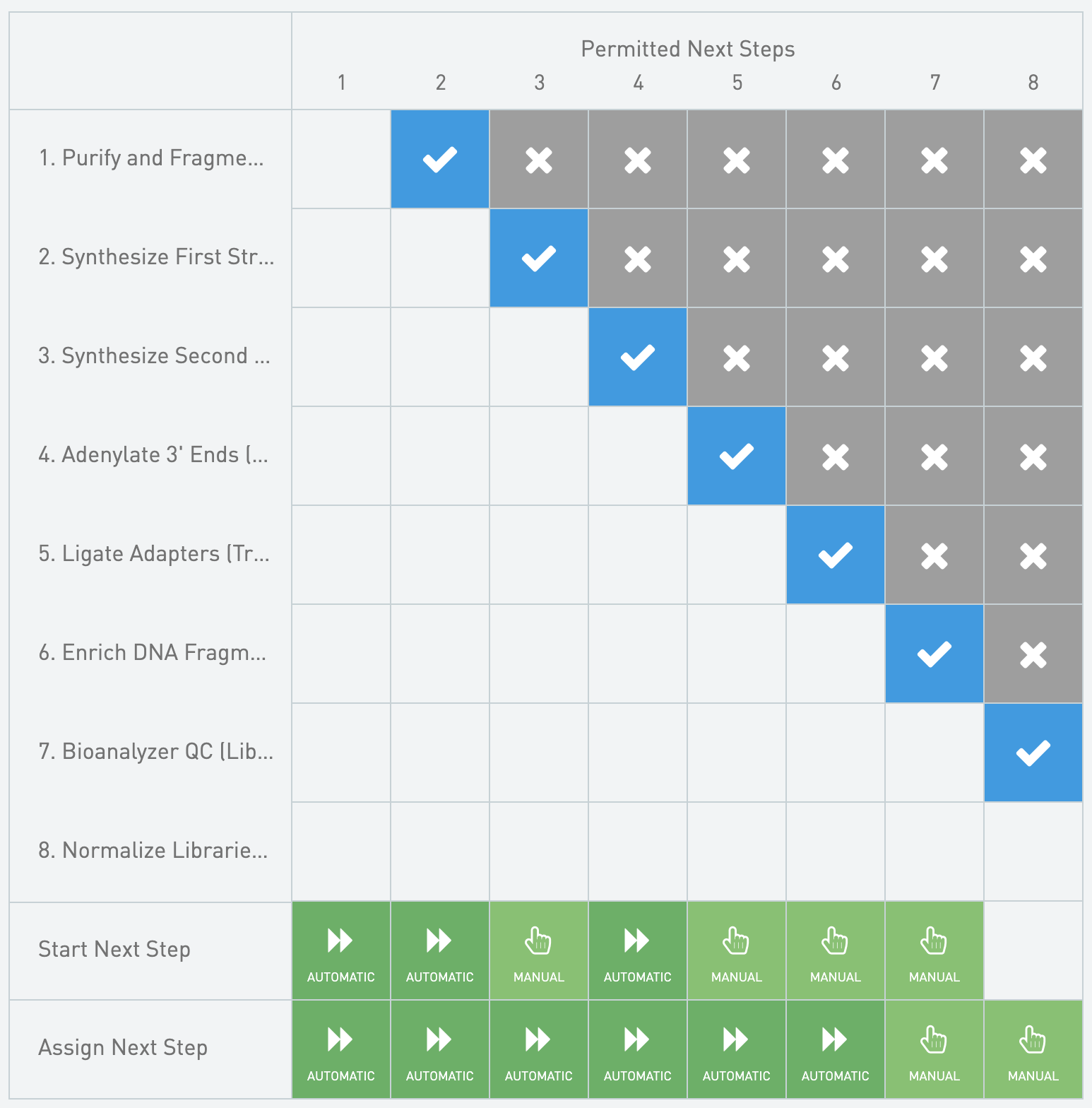
**Next Steps Configuration**
* TruSeq Stranded mRNA Sample Prep Kit Box 1 of 2
* Supplier = Illumina
* Catalog Number = HT: 15032624 or LT: 15027078
* Website =
* TruSeq Stranded mRNA Sample Prep Kit Box 2 of 2
* Supplier = Illumina
* Catalog Number = HT: 15032623 or LT: 15032614
* Website =
#### Automations
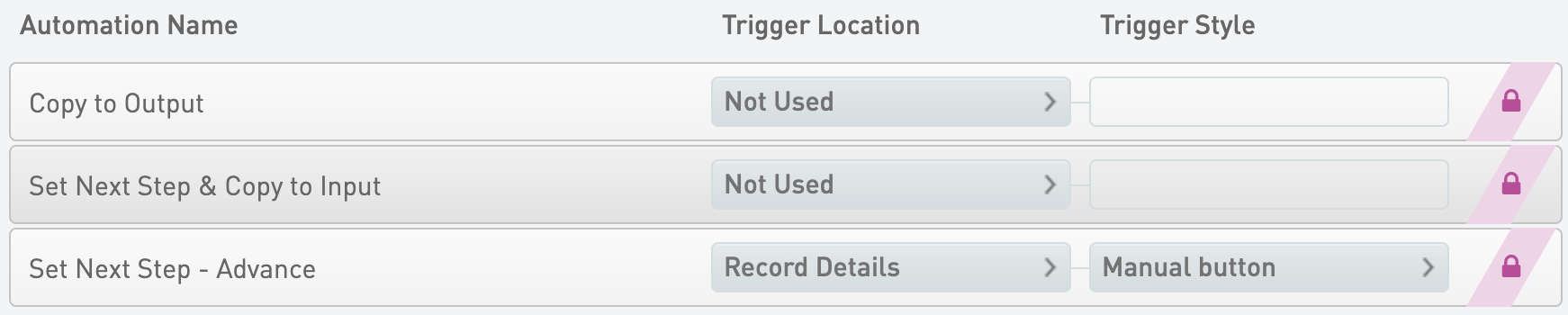
Set Next Step - Advance
* Trigger Location = Record Details
* Trigger Style = Automatic upon exit
{% code overflow="wrap" %}
```markup
bash -l -c "/opt/gls/clarity/bin/java -jar /opt/gls/clarity/extensions/ngs-common/v5/EPP/ngs-extensions.jar -i {stepURI:v2} -u {username} -p {password} \
script:evaluateDynamicExpression \
-t false \
-h false \
-exp 'nextStep = ::ADVANCE::' \
-log {compoundOutputFileLuid0}"
```
{% endcode %}
#### Queue/Ice Bucket
* Defaults
* Sample Grouping = Group by Containers
* Well Sort Order = Column
* Sample Table
* Column Headers
| **Category** | **Field Name** | **Field Type** | **Options** | **Additional Options and Dropdown Items** |
| -------------- | -------------- | -------------- | ----------- | ----------------------------------------- |
| Container | Container Name | Built-in | | |
| Container | Well | Built-in | | |
| Derived Sample | Sample Name | Built-in | | |
| Derived Sample | Waiting | Built-in | | |
* Expanded View Fields
| **Category** | **Field Name** | **Field Type** | **Options** | **Additional Options and Dropdown Items** |
| ------------ | ------------------- | -------------- | ----------- | ----------------------------------------- |
| Container | LIMS ID (Container) | Built-in | | |
| Project | Project Name | Built-in | | |
#### Record Details
* Step Data (Master Step Fields)
| **Field Name** | **Field Type** | **Options** | **Additional Options and Dropdown Items** |
| ------------------------ | -------------- | ----------- | ----------------------------------------- |
| Comment | Multiline Text | | |
| Thermal Cycler Program 1 | Text | | Default = mRNA Denaturation |
| Thermal Cycler Program 2 | Text | | Default = mRNA Elution 1 |
| Thermal Cycler Program 3 | Text | | Default = Elution 2 - Frag - Prime |
* Step File Placeholders
* Log File - Automatically attached
* Sample Table
* Sample Display Default = Expand
* Well Sort Order = Column
* Table Columns - Global Fields
| **Category** | **Field Name** | **Field Type** | **Options** | **Additional Options and Dropdown Items** |
| -------------- | ------------------- | -------------- | ----------- | ----------------------------------------- |
| Container | Container Name | Built-in | | |
| Container | LIMS ID (Container) | Built-in | | |
| Container | Well | Built-in | | |
| Derived Sample | Sample Name | Built-in | | |
| Project | Project Name | Built-in | | |
### Step 2: Synthesize First Strand cDNA (TruSeq Stranded mRNA v2.1)
* Master Step Name = First Strand cDNA Synthesis v2.0
* Step Type = No Outputs
* Reagent Kits
* TruSeq Stranded mRNA cDNA Synthesis PCR Box
* Supplier = Illumina
* Catalog Number = HT: 15032621 or LT: 15032611
* Website =
#### Automations
Set Next Step - Advance
* Trigger Location = Record Details
* Trigger Style = Automatic upon exit
{% code overflow="wrap" %}
```markup
bash -l -c "/opt/gls/clarity/bin/java -jar /opt/gls/clarity/extensions/ngs-common/v5/EPP/ngs-extensions.jar -i {stepURI:v2} -u {username} -p {password} \
script:evaluateDynamicExpression \
-t false \
-h false \
-exp 'nextStep = ::ADVANCE::' \
-log {compoundOutputFileLuid0}"
```
{% endcode %}
#### Queue/Ice Bucket
* Defaults
* Sample Grouping = Group by Containers
* Well Sort Order = Column
* Sample Table
* Column Headers
| **Category** | **Field Name** | **Field Type** | **Options** | **Additional Options and Dropdown Items** |
| -------------- | -------------- | -------------- | ----------- | ----------------------------------------- |
| Container | Container Name | Built-in | | |
| Container | Well | Built-in | | |
| Derived Sample | Sample Name | Built-in | | |
| Derived Sample | Waiting | Built-in | | |
* Expanded View Fields
| **Category** | **Field Name** | **Field Type** | **Options** | **Additional Options and Dropdown Items** |
| ------------ | ------------------- | -------------- | ----------- | ----------------------------------------- |
| Container | LIMS ID (Container) | Built-in | | |
| Project | Project Name | Built-in | | |
#### Record Details
* Step Data (Master Step Fields)
| **Field Name** | **Field Type** | **Options** | **Additional Options and Dropdown Items** |
| ---------------------- | -------------- | -------------- | ------------------------------------------------------------------------------------------------------------------------- |
| Comment | Multiline Text | | |
| Thermal Cycler Program | Text Dropdown | Custom Entries | Presets
Synthesize 1st Strand 1stSS Default = mRNA Denaturation
* TruSeq Stranded mRNA cDNA Synthesis PCR Box
* Supplier = Illumina
* Catalog Number = HT: 15032621 or LT: 15032611
* Website =
* TruSeq Stranded mRNA Sample Prep Kit - Set A, B or Core Box
* Supplier = Illumina
* Catalog Number = Core: 15032620, Set A: 15032612 or Set B: 15032613
* Website =
#### Automations
Set Next Step - Advance
* Trigger Location = Record Details
* Trigger Style = Automatic upon exit
{% code overflow="wrap" %}
```markup
bash -l -c "/opt/gls/clarity/bin/java -jar /opt/gls/clarity/extensions/ngs-common/v5/EPP/ngs-extensions.jar -i {stepURI:v2} -u {username} -p {password} \
script:evaluateDynamicExpression \
-t false \
-h false \
-exp 'nextStep = ::ADVANCE::' \
-log {compoundOutputFileLuid0}"
```
{% endcode %}
#### Queue/Ice Bucket
* Defaults
* Sample Grouping = Group by Containers
* Well Sort Order = Column
* Sample Table
* Column Headers
| **Category** | **Field Name** | **Field Type** | **Options** | **Additional Options and Dropdown Items** |
| -------------- | -------------- | -------------- | ----------- | ----------------------------------------- |
| Container | Container Name | Built-in | | |
| Container | Well | Built-in | | |
| Derived Sample | Sample Name | Built-in | | |
| Derived Sample | Waiting | Built-in | | |
* Expanded View Fields
| **Category** | **Field Name** | **Field Type** | **Options** | **Additional Options and Dropdown Items** |
| ------------ | ------------------- | -------------- | ----------- | ----------------------------------------- |
| Container | LIMS ID (Container) | Built-in | | |
| Project | Project Name | Built-in | | |
#### Record Details
* Step Data (Master Step Fields)
| **Field Name** | **Field Type** | **Options** | **Additional Options and Dropdown Items** |
| ------------------ | -------------- | ----------- | ----------------------------------------- |
| Comment | Multiline Text | | |
| 80% EtOH Prep Date | Date | | |
* Step File Placeholders
* Log File - Automatically attached
* Sample Table
* Sample Display Default = Expand
* Well Sort Order = Column
* Table Columns - Global Fields
| **Category** | **Field Name** | **Field Type** | **Options** | **Additional Options and Dropdown Items** |
| -------------- | ------------------- | -------------- | ----------- | ----------------------------------------- |
| Container | Container Name | Built-in | | |
| Container | LIMS ID (Container) | Built-in | | |
| Container | Well | Built-in | | |
| Derived Sample | Sample Name | Built-in | | |
| Project | Project Name | Built-in | | |
### Step 4: Adenylate 3' Ends (TruSeq Stranded mRNA v2.1)
* Master Step Name = Adenylate 3' Ends v2.0
* Step Type = No Outputs
* Reagent Kits
* TruSeq Stranded mRNA Sample Prep Kit - Set A, B or Core Box
* Supplier = Illumina
* Catalog Number = Core: 15032620, Set A: 15032612 or Set B: 15032613
* Website =
#### Automations
Set Next Step - Advance
* Trigger Location = Record Details
* Trigger Style = Automatic upon exit
{% code overflow="wrap" %}
```markup
bash -l -c "/opt/gls/clarity/bin/java -jar /opt/gls/clarity/extensions/ngs-common/v5/EPP/ngs-extensions.jar -i {stepURI:v2} -u {username} -p {password} \
script:evaluateDynamicExpression \
-t false \
-h false \
-exp 'nextStep = ::ADVANCE::' \
-log {compoundOutputFileLuid0}"
```
{% endcode %}
#### Queue/Ice Bucket
* Defaults
* Sample Grouping = Group by Containers
* Well Sort Order = Column
* Sample Table
* Column Headers
| **Category** | **Field Name** | **Field Type** | **Options** | **Additional Options and Dropdown Items** |
| -------------- | -------------- | -------------- | ----------- | ----------------------------------------- |
| Container | Container Name | Built-in | | |
| Container | Well | Built-in | | |
| Derived Sample | Sample Name | Built-in | | |
| Derived Sample | Waiting | Built-in | | |
* Expanded View Fields
| **Category** | **Field Name** | **Field Type** | **Options** | **Additional Options and Dropdown Items** |
| ------------ | ------------------- | -------------- | ----------- | ----------------------------------------- |
| Container | LIMS ID (Container) | Built-in | | |
| Project | Project Name | Built-in | | |
#### Record Details
* Step Data (Master Step Fields)
| **Field Name** | **Field Type** | **Options** | **Additional Options and Dropdown Items** |
| ---------------------- | -------------- | ----------- | ----------------------------------------- |
| Comment | Multiline Text | | |
| Thermal Cycler Program | Text | | Default = ATAIL70 |
* Step File Placeholders
* Log File - Automatically attached
* Sample Table
* Sample Display Default = Expand
* Well Sort Order = Column
* Table Columns - Global Fields
| **Category** | **Field Name** | **Field Type** | **Options** | **Additional Options and Dropdown Items** |
| -------------- | ------------------- | -------------- | ----------- | ----------------------------------------- |
| Container | Container Name | Built-in | | |
| Container | LIMS ID (Container) | Built-in | | |
| Container | Well | Built-in | | |
| Derived Sample | Sample Name | Built-in | | |
| Project | Project Name | Built-in | | |
### Step 5: Ligate Adapters (TruSeq Stranded mRNA v2.1)
* Master Step Name = Ligate Adapters v2.0
* Step Type = Add Labels
* Derived Sample Generation = Fixed, 1
* Naming Convention = {SubmittedSampleName}
* Reagent Kits
* AMPure XP Beads
* Supplier = Beckman Coulter Genomics
* Catalog Number = A63881
* Website =
* TruSeq Stranded mRNA Sample Prep Kit - Set A, B or Core Box
* Supplier = Illumina
* Catalog Number = Core: 15032620, Set A: 15032612 or Set B: 15032613
* Website =
#### Automations
Set Next Step - Advance
* Trigger Location = Record Details
* Trigger Style = Manual button
{% code overflow="wrap" %}
```markup
bash -l -c "/opt/gls/clarity/bin/java -jar /opt/gls/clarity/extensions/ngs-common/v5/EPP/ngs-extensions.jar -i {stepURI:v2} -u {username} -p {password} \
script:evaluateDynamicExpression \
-t false \
-h false \
-exp 'nextStep = ::ADVANCE::' \
-log {compoundOutputFileLuid0}"
```
{% endcode %}
Copy to Output
* Trigger Location = Not Used
{% code overflow="wrap" %}
```markup
bash -l -c "/opt/gls/clarity/bin/java -jar /opt/gls/clarity/extensions/ngs-common/v5/EPP/ngs-extensions.jar -i {stepURI:v2} -u {username} -p {password} script:evaluateDynamicExpression -t false -h false -exp 'output.::Target Insert Size (bp):: = input.::Target Insert Size (bp)::' -log {compoundOutputFileLuid0}"
```
{% endcode %}
Set Next Step & Copy to Input
* Trigger Location = Not Used
{% code overflow="wrap" %}
```markup
bash -l -c "/opt/gls/clarity/bin/java -jar /opt/gls/clarity/extensions/ngs-common/v5/EPP/ngs-extensions.jar -i {stepURI:v2} -u {username} -p {password} script:evaluateDynamicExpression -t false -h false -exp 'nextStep = ::ADVANCE:: ; output.::Target Insert Size (bp):: = input.::Target Insert Size (bp)::' -log {compoundOutputFileLuid0}"
```
{% endcode %}
#### Queue/Ice Bucket
* Defaults
* Sample Grouping = Group by Containers
* Well Sort Order = Column
* Sample Table
* Column Headers
| **Category** | **Field Name** | **Field Type** | **Options** | **Additional Options and Dropdown Items** |
| -------------- | -------------- | -------------- | ----------- | ----------------------------------------- |
| Container | Container Name | Built-in | | |
| Container | Well | Built-in | | |
| Derived Sample | Sample Name | Built-in | | |
| Derived Sample | Waiting | Built-in | | |
* Expanded View Fields
| **Category** | **Field Name** | **Field Type** | **Options** | **Additional Options and Dropdown Items** |
| ------------ | ------------------- | -------------- | ----------- | ----------------------------------------- |
| Container | LIMS ID (Container) | Built-in | | |
| Project | Project Name | Built-in | | |
#### Add Labels
* Label Groups
* TruSeq Stranded mRNA HT
* TruSeq Stranded mRNA LT
#### Record Details
* Step Data (Master Step Fields)
| **Field Name** | **Field Type** | **Options** | **Additional Options and Dropdown Items** |
| ---------------------- | -------------- | ----------- | ----------------------------------------- |
| Comment | Multiline Text | | |
| Thermal Cycler Program | Text | | Default = LIG |
| 80% EtOH Prep Date | Date | | |
* Step File Placeholders
* Log File - Automatically attached
* Sample Table
* Sample Display Default = Expand
* Well Sort Order = Column
* Table Columns - Global Fields
| **Category** | **Field Name** | **Field Type** | **Options** | **Additional Options and Dropdown Items** |
| -------------- | ------------------- | -------------- | ----------- | ----------------------------------------- |
| Container | Container Name | Built-in | | |
| Container | LIMS ID (Container) | Built-in | | |
| Container | Well | Built-in | | |
| Derived Sample | Reagent Name | Built-in | | |
| Derived Sample | Sample Name | Built-in | | |
| Project | Project Name | Built-in | | |
### Step 6: Enrich DNA Fragments (TruSeq Stranded mRNA v2.1)
* Master Step Name = PCR Amplification v2.0
* Step Type = Standard
* Derived Sample Generation = Fixed, 1
* Naming Convention = {SubmittedSampleName}
* Reagent Kits
* AMPure XP Beads
* Supplier = Beckman Coulter Genomics
* Catalog Number = A63881
* Website =
* TruSeq Stranded mRNA cDNA Synthesis PCR Box
* Supplier = Illumina
* Catalog Number = HT: 15032621 or LT: 15032611
* Website =
* TruSeq Stranded mRNA Sample Prep Kit - Set A, B or Core Box
* Supplier = Illumina
* Catalog Number = Core: 15032620, Set A: 15032612 or Set B: 15032613
* Website =
#### Automations
Set Next Step - Advance
* Trigger Location = Record Details
* Trigger Style = Automatic upon exit
{% code overflow="wrap" %}
```markup
bash -l -c "/opt/gls/clarity/bin/java -jar /opt/gls/clarity/extensions/ngs-common/v5/EPP/ngs-extensions.jar -i {stepURI:v2} -u {username} -p {password} \
script:evaluateDynamicExpression \
-t false \
-h false \
-exp 'nextStep = ::ADVANCE::' \
-log {compoundOutputFileLuid0}"
```
{% endcode %}
#### Queue/Ice Bucket
* Defaults
* Sample Grouping = Group by Containers
* Well Sort Order = Column
* Sample Table
* Column Headers
| **Category** | **Field Name** | **Field Type** | **Options** | **Additional Options and Dropdown Items** |
| -------------- | -------------- | -------------- | ----------- | ----------------------------------------- |
| Container | Container Name | Built-in | | |
| Container | Well | Built-in | | |
| Derived Sample | Sample Name | Built-in | | |
| Derived Sample | Waiting | Built-in | | |
* Expanded View Fields
| **Category** | **Field Name** | **Field Type** | **Options** | **Additional Options and Dropdown Items** |
| ------------ | ------------------- | -------------- | ----------- | ----------------------------------------- |
| Container | LIMS ID (Container) | Built-in | | |
| Project | Project Name | Built-in | | |
#### Record Details
**Group of Defaults**
NIPT 16 Manual v1.0
* Thermal Cycler Program = cfDNA
TruSeq Stranded mRNA v1.0
* Thermal Cycler Program = PCR
TruSeq Stranded RNA v1.0
* Thermal Cycler Program = PCR
TruSeq Stranded Total RNA v1.0
* Thermal Cycler Program = PCR
* Step Data
* Group of Defaults = TruSeq Stranded mRNA v1.0
* Master Step Fields
| **Field Name** | **Field Type** | **Options** | **Additional Options and Dropdown Items** |
| ---------------------- | -------------- | -------------- | ------------------------------------------------- |
| Comment | Multiline Text | | |
| Thermal Cycler Program | Text Dropdown | Custom Entries | Presets
|
| 70% EtOH Prep Date | Date | | |
* Step File Placeholders
* Log File - Automatically attached
* Sample Table
* Sample Display Default = Expand
* Well Sort Order = Column
* Table Columns - Global Fields
| **Category** | **Field Name** | **Field Type** | **Options** | **Additional Options and Dropdown Items** |
| -------------- | ------------------- | -------------- | ----------- | ----------------------------------------- |
| Container | Container Name | Built-in | | |
| Container | LIMS ID (Container) | Built-in | | |
| Container | Well | Built-in | | |
| Derived Sample | Sample Name | Built-in | | |
| Project | Project Name | Built-in | | |
### Step 7: Bioanalyzer QC (Library Validation) (TruSeq Stranded mRNA v2.1)
* Master Step Name = Bioanalyzer QC (Library Validation) v2.0
* Step Type = Standard QC
* Measurement Generation = Fixed, 1
* Naming Convention = {InputItemName} Bioanalyzer
#### Automations
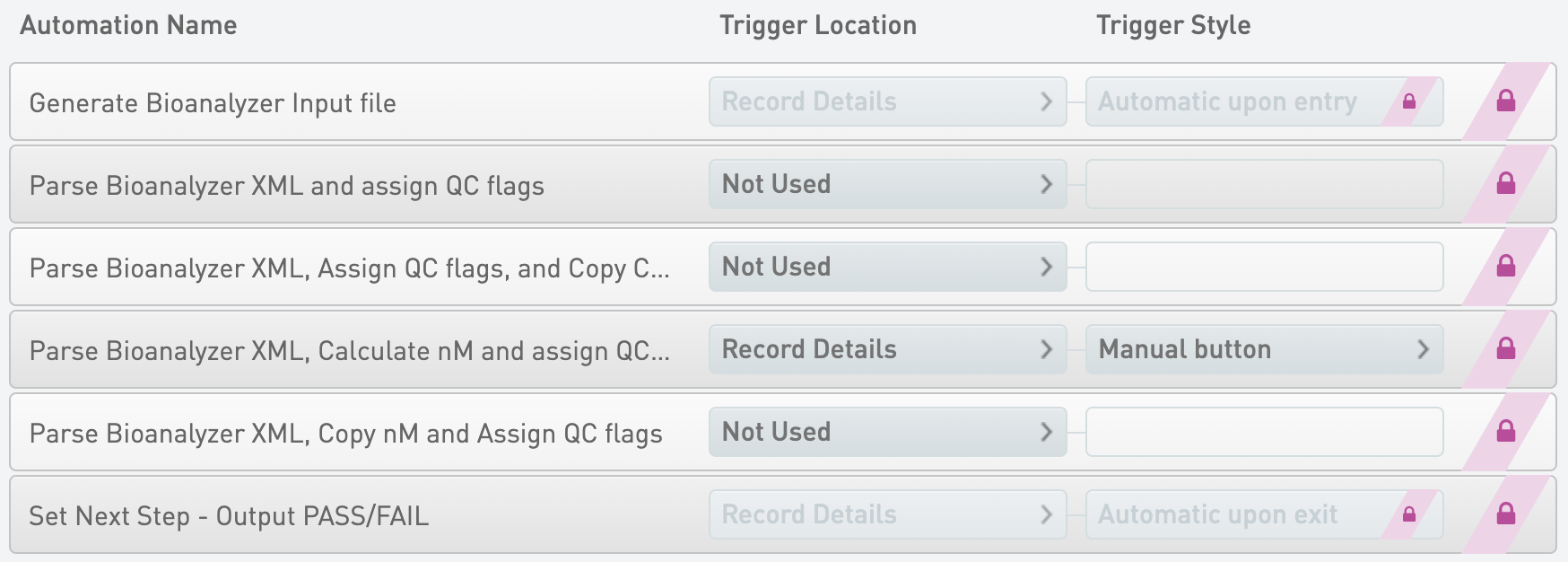
Generate Bioanalyzer Input file
* Trigger Location = Record Details
* Trigger Style = Automatic upon entry
{% code overflow="wrap" %}
```markup
bash -l -c "/opt/gls/clarity/bin/java -jar /opt/gls/clarity/extensions/ngs-common/v5/EPP/DriverFileGenerator.jar script:driver_file_generator -i {processURI:v2} -u {username} -p {password} -t /opt/gls/clarity/extensions/ngs-common/v5/EPP/conf/readonly/bioA_driver_file_template.csv -o {compoundOutputFileLuid0}.csv -l {compoundOutputFileLuid1} && /opt/gls/clarity/bin/java -jar /opt/gls/clarity/extensions/ngs-common/v5/EPP/ngs-extensions.jar script:addBlankLines -i {stepURI:v2} -u {username} -p {password} -f {compoundOutputFileLuid0}.csv -l {compoundOutputFileLuid1} -sep COMMA -b ',False,' -h 1 -c LIMSID -pre 'Sample '"
```
{% endcode %}
Parse Bioanalyzer XML, Calculate nM and assign QC flags
* Trigger Location = Record Details
* Trigger Style = Manual button
{% code overflow="wrap" %}
```markup
bash -l -c "/opt/gls/clarity/bin/java -jar /opt/gls/clarity/extensions/ngs-common/v5/EPP/ngs-extensions.jar -i {processURI:v2} -u {username} -p {password} script:parseBioAnalyzer -inputFile {compoundOutputFileLuid2} -log {compoundOutputFileLuid5} -configFile '/opt/gls/clarity/extensions/conf/v5/bioanalyzer/defaultBioAnalyzerDNAConfig.groovy' && /opt/gls/clarity/bin/java -jar /opt/gls/clarity/extensions/ngs-common/v5/EPP/ngs-extensions.jar -i {stepURI:v2} -u {username} -p {password} script:evaluateDynamicExpression -t true -h false -exp 'output.::Concentration:: = output.::Region 1 Conc.:: ; output.::Molarity (nM):: = (output.::Concentration:: * 1000000) / (660 * output.::Region 1 Average Size - bp::) ; input.::Molarity (nM):: = output.::Molarity (nM):: ; output.::Conc. Units:: = ::ng/ul::' -log {compoundOutputFileLuid8} && /opt/gls/clarity/bin/java -jar /opt/gls/clarity/extensions/ngs-common/v5/EPP/ngs-extensions.jar -i {processURI:v2} -u {username} -p {password} script:assignQC -log {compoundOutputFileLuid6} -qcResult {compoundOutputFileLuid7}"
```
{% endcode %}
Set Next Step - Output PASS/FAIL
* Trigger Location = Record Details
* Trigger Style = Automatic upon exit
{% code overflow="wrap" %}
```markup
bash -l -c "/opt/gls/clarity/bin/java -jar /opt/gls/clarity/extensions/ngs-common/v5/EPP/ngs-extensions.jar -i {stepURI:v2} -u {username} -p {password} script:evaluateDynamicExpression -t true -h false -excludeControls true -exp 'if (output.QC == true) { nextStep = ::ADVANCE:: } else { nextStep = ::ESCALATE:: }' -log {compoundOutputFileLuid0}"
```
{% endcode %}
Parse Bioanalyzer XML and assign QC flags
* Trigger Location = Not Used
{% code overflow="wrap" %}
```markup
bash -l -c "/opt/gls/clarity/bin/java -jar /opt/gls/clarity/extensions/ngs-common/v5/EPP/ngs-extensions.jar -i {processURI:v2} -u {username} -p {password} script:parseBioAnalyzer -inputFile {compoundOutputFileLuid2} -log {compoundOutputFileLuid5} -configFile '/opt/gls/clarity/extensions/conf/v5/bioanalyzer/defaultBioAnalyzerDNAConfig.groovy' script:assignQC -log {compoundOutputFileLuid6} -qcResult {compoundOutputFileLuid7}"
```
{% endcode %}
Parse Bioanalyzer XML, Assign QC flags, and Copy Concentrations
* Trigger Location = Not Used
{% code overflow="wrap" %}
```markup
bash -l -c "/opt/gls/clarity/bin/java -jar /opt/gls/clarity/extensions/ngs-common/v5/EPP/ngs-extensions.jar -i {processURI:v2} -u {username} -p {password} script:parseBioAnalyzer -inputFile {compoundOutputFileLuid2} -log {compoundOutputFileLuid5} -configFile '/opt/gls/clarity/extensions/conf/v5/bioanalyzer/defaultBioAnalyzerDNAConfig.groovy' script:assignQC -log {compoundOutputFileLuid6} -qcResult {compoundOutputFileLuid7} && /opt/gls/clarity/bin/java -jar /opt/gls/clarity/extensions/ngs-common/v5/EPP/ngs-extensions.jar -i {stepURI:v2} -u {username} -p {password} script:evaluateDynamicExpression -t true -h false -exp 'output.::Concentration:: = output.::Region 1 Conc.:: ; input.::Concentration:: = output.::Concentration:: ; output.::Conc. Units:: = ::ng/ul:: ; input.::Conc. Units:: = output.::Conc. Units::' -log {compoundOutputFileLuid8}"
```
{% endcode %}
Parse Bioanalyzer XML, Copy nM and Assign QC flags
* Trigger Location = Not Used
{% code overflow="wrap" %}
```markup
bash -l -c "/opt/gls/clarity/bin/java -jar /opt/gls/clarity/extensions/ngs-common/v5/EPP/ngs-extensions.jar -i {processURI:v2} -u {username} -p {password} script:parseBioAnalyzer -inputFile {compoundOutputFileLuid2} -log {compoundOutputFileLuid5} -configFile '/opt/gls/clarity/extensions/conf/v5/bioanalyzer/defaultBioAnalyzerDNAConfig.groovy' && /opt/gls/clarity/bin/java -jar /opt/gls/clarity/extensions/ngs-common/v5/EPP/ngs-extensions.jar -i {stepURI:v2} -u {username} -p {password} script:evaluateDynamicExpression -t true -h false -exp 'if (output.::Conc. Units::.contains(::pg::)) {output.::Molarity (nM):: = output.::Region 1 Molarity:: / 1000} else {output.::Molarity (nM):: = output.::Region 1 Molarity::} ; (input.::Molarity (nM):: = output.::Molarity (nM)::) ' -log {compoundOutputFileLuid8} && /opt/gls/clarity/bin/java -jar /opt/gls/clarity/extensions/ngs-common/v5/EPP/ngs-extensions.jar -i {processURI:v2} -u {username} -p {password} script:assignQC -log {compoundOutputFileLuid6} -qcResult {compoundOutputFileLuid7}"
```
{% endcode %}
#### Queue/Ice Bucket
* Defaults
* Sample Grouping = Group by Containers
* Well Sort Order = Row
* Sample Table (Column Headers)
| **Category** | **Field Name** | **Field Type** | **Options** | **Additional Options and Dropdown Items** |
| -------------- | ------------------- | -------------- | ----------- | ----------------------------------------- |
| Container | Container Name | Built-in | | |
| Container | LIMS ID (Container) | Built-in | | |
| Container | Well | Built-in | | |
| Derived Sample | Sample Name | Built-in | | |
| Derived Sample | Waiting | Built-in | | |
| Project | Project Name | Built-in | | |
#### Placement = Enabled
* Defaults
* Sample Grouping = Group by Containers
* Well Sort Order = Column
* Placement Pattern = Column
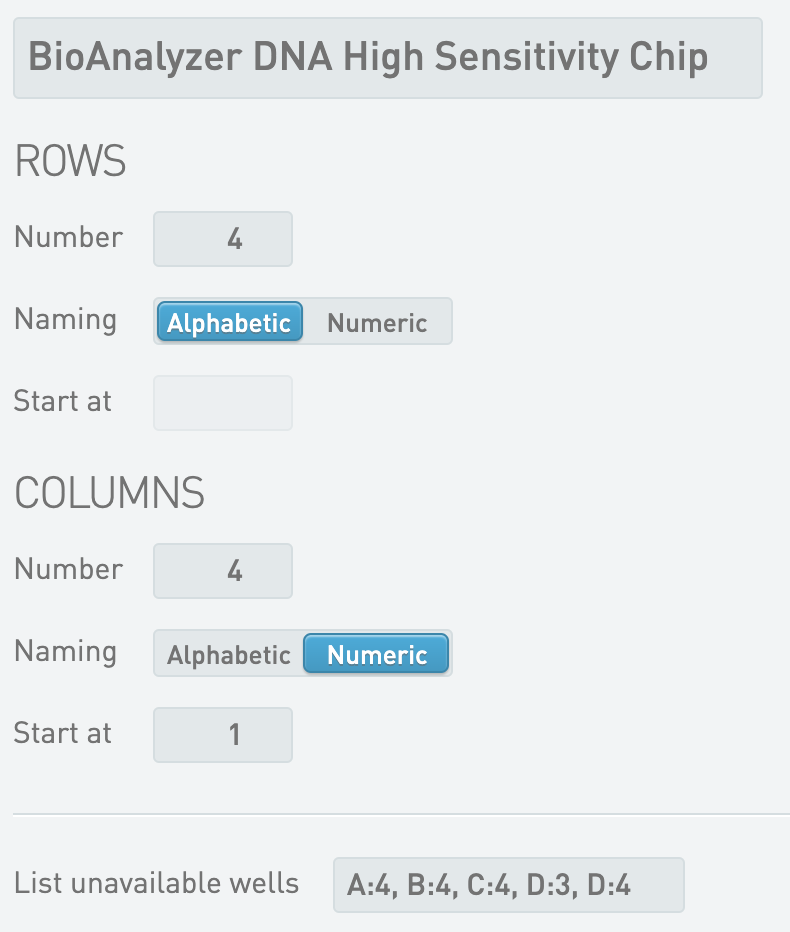
* Destination Containers
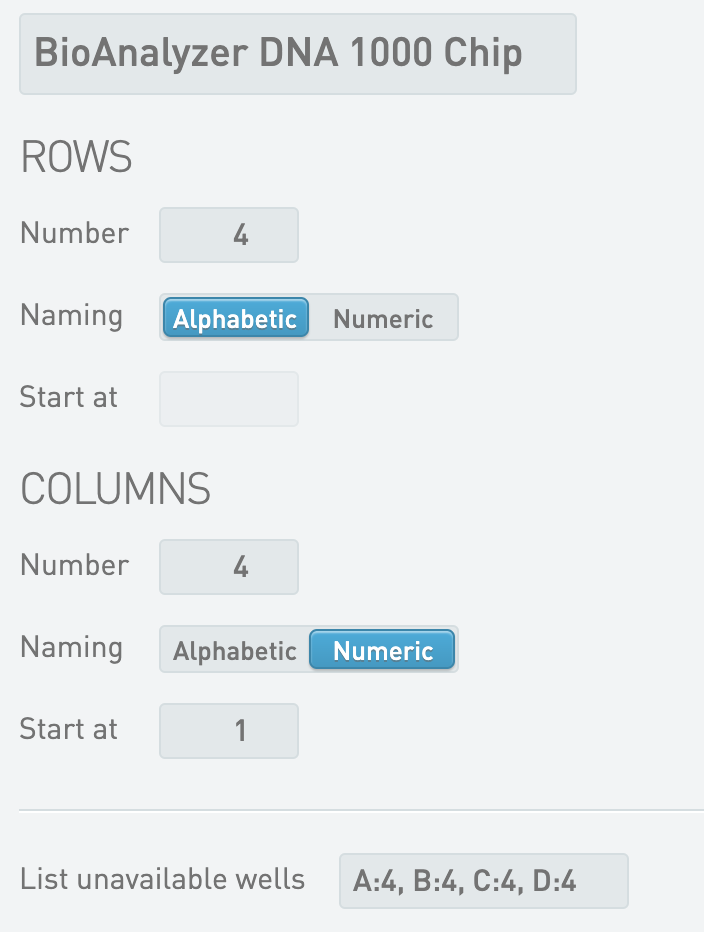
* BioAnalyzer DNA High Sensitivity Chip
Nextera DNA Flex Library Validation
* Criteria 1 - Operator = >=
* Criteria 1 - Source Data Field = Peak 2 Size - bp
* Criteria 1 - Threshold Value = 150.00
* Criteria 2 - Operator = <=
* Criteria 2 - Source Data Field = Peak 2 Size - bp
* Criteria 2 - Threshold Value = 1,500.00
Nextera Mate Pair Library Validation
* Criteria 1 - Operator = >=
* Criteria 1 - Source Data Field = Region 1 Average Size - bp
* Criteria 1 - Threshold Value = 150.00
* Criteria 2 - Operator = <=
* Criteria 2 - Source Data Field = Region 1 Average Size - bp
* Criteria 2 - Threshold Value = 400.00
Nextera XT DNA Library Validation
* Criteria 1 - Operator = >=
* Criteria 1 - Source Data Field = Peak 2 Size - bp
* Criteria 1 - Threshold Value = 250.00
* Criteria 2 - Operator = <=
* Criteria 2 - Source Data Field = Peak 2 Size - bp
* Criteria 2 - Threshold Value = 1,000.00
NRCC Library Validation
* Criteria 1 - Operator = >=
* Criteria 1 - Source Data Field = Peak 2 Size - bp
* Criteria 1 - Threshold Value = 350.00
* Criteria 2 - Operator = <=
* Criteria 2 - Source Data Field = Peak 2 Size - bp
* Criteria 2 - Threshold Value = 1,000.00
TruSeq ChIP-Seq Library Validation
* Criteria 1 - Operator = >=
* Criteria 1 - Source Data Field = Region 1 Average Size - bp
* Criteria 1 - Threshold Value = 150.00
* Criteria 2 - Operator = <=
* Criteria 2 - Source Data Field = Region 1 Average Size - bp
* Criteria 2 - Threshold Value = 400.00
TruSeq Exome Library Validation
* Criteria 1 - Operator = >=
* Criteria 1 - Source Data Field = Peak 2 Size - bp
* Criteria 1 - Threshold Value = 150.00
* Criteria 2 - Operator = <=
* Criteria 2 - Source Data Field = Peak 2 Size - bp
* Criteria 2 - Threshold Value = 1,000.00
TruSeq Methyl Capture EPIC Library Validation
* Criteria 1 - Operator = >=
* Criteria 1 - Source Data Field = Peak 2 Size - bp
* Criteria 1 - Threshold Value = 200.00
* Criteria 2 - Operator = <=
* Criteria 2 - Source Data Field = Peak 2 Size - bp
* Criteria 2 - Threshold Value = 300.00
TruSeq Rapid Exome Library Validation
* Criteria 1 - Operator = >=
* Criteria 1 - Source Data Field = Peak 2 Size - bp
* Criteria 1 - Threshold Value = 200.00
* Criteria 2 - Operator = <=
* Criteria 2 - Source Data Field = Peak 2 Size - bp
* Criteria 2 - Threshold Value = 500.00
TruSeq RNA Access Library Validation
* Criteria 1 - Operator = >=
* Criteria 1 - Source Data Field = Peak 2 Size - bp
* Criteria 1 - Threshold Value = 200.00
* Criteria 2 - Operator = <=
* Criteria 2 - Source Data Field = Peak 2 Size - bp
* Criteria 2 - Threshold Value = 320.00
TruSeq RNA Exome Library Validation
* Criteria 1 - Operator = >=
* Criteria 1 - Source Data Field = Peak 2 Size - bp
* Criteria 1 - Threshold Value = 200.00
* Criteria 2 - Operator = <=
* Criteria 2 - Source Data Field = Peak 2 Size - bp
* Criteria 2 - Threshold Value = 320.00
TruSeq Small RNA Library Validation
* Criteria 1 - Operator = >=
* Criteria 1 - Source Data Field = Region 1 Average Size - bp
* Criteria 1 - Threshold Value = 100.00
* Criteria 2 - Operator = <=
* Criteria 2 - Source Data Field = Region 1 Average Size - bp
* Criteria 2 - Threshold Value = 200.00
TruSeq Stranded mRNA Library Validation
* Criteria 1 - Operator = >=
* Criteria 1 - Source Data Field = Region 1 Average Size - bp
* Criteria 1 - Threshold Value = 250.00
* Criteria 2 - Operator = <=
* Criteria 2 - Source Data Field = Region 1 Average Size - bp
* Criteria 2 - Threshold Value = 275.00
TruSeq Stranded Total RNA Library Validation
* Criteria 1 - Operator = >=
* Criteria 1 - Source Data Field = Region 1 Average Size - bp
* Criteria 1 - Threshold Value = 250.00
* Criteria 2 - Operator = <=
* Criteria 2 - Source Data Field = Region 1 Average Size - bp
* Criteria 2 - Threshold Value = 275.00
TruSeq Targeted RNA Expression Library Validation
* Criteria 1 - Operator = >=
* Criteria 1 - Source Data Field = Peak 2 Size - bp
* Criteria 1 - Threshold Value = 100.00
* Criteria 2 - Operator = <=
* Criteria 2 - Source Data Field = Peak 2 Size - bp
* Criteria 2 - Threshold Value = 300.00
TruSight Myeloid Library Validation
* Criteria 1 - Operator = >=
* Criteria 1 - Source Data Field = Region 1 Average Size - bp
* Criteria 1 - Threshold Value = 150.00
* Criteria 2 - Operator = <=
* Criteria 2 - Source Data Field = Region 1 Size - bp
* Criteria 2 - Threshold Value = 400.00
TruSight RNA Fusion Library Validation
* Criteria 1 - Operator = >=
* Criteria 1 - Source Data Field = Region 1 Average Size - bp
* Criteria 1 - Threshold Value = 160.00
* Criteria 2 - Operator = <=
* Criteria 2 - Source Data Field = Region 1 Size - bp
* Criteria 2 - Threshold Value = 700.00
TSCA Library Validation
* Criteria 1 - Operator = >=
* Criteria 1 - Source Data Field = Region 1 Average Size - bp
* Criteria 1 - Threshold Value = 300.00
* Criteria 2 - Operator = <=
* Criteria 2 - Source Data Field = Region 1 Size - bp
* Criteria 2 - Threshold Value = 400.00
* Step Data
* Group of Defaults = TruSeq Stranded mRNA Library Validation
* Master Step Fields
| **Field Name** | **Field Type** | **Options** | **Additional Options and Dropdown Items** |
| ------------------------------------------- | -------------- | -------------- | --------------------------------------------------------------------------------------------------------------------------------------------------------------------------------------------------------------------------------------------------------------------------------------------------------------------------------------------------------------------------------------------------------------------------------------------------------------------------------------------------------------------------------------------------------------------------------------------------------------------------------------------------------------------------------------------------------------------------------------------------------------------------------------------------------------------------------------------------------------------------------------------------------------------------------- |
| Criteria 1 - Operator | Text Dropdown | Custom Entries | Presets
|
| Criteria 1 - Source Data Field | Text Dropdown | | Presets
Concentration Conc. Units Number of Peaks found Peak 1 Size - bp Peak 1 Conc. Peak 1 Molarity Peak 2 Size - bp Peak 2 Conc. Peak 2 Molarity Peak 3 Size - bp Peak 3 Conc. Peak 3 Molarity Peak 4 Size - bp Peak 4 Conc. Peak 4 Molarity Peak 5 Size - bp Peak 5 Conc. Peak 5 Molarity Number of Regions found Region 1 Average Size - bp Region 1 Conc. Region 1 Molarity Region 2 Average Size - bp Region 2 Conc. Region 2 Molarity Region 3 Average Size - bp Region 3 Conc. Region 3 Molarity Region 4 Average Size - bp Region 4 Conc. Region 4 Molarity Region 5 Average Size - bp Region 5 Conc. Region 5 Molarity Presets
|
| Criteria 2 - Source Data Field | Text Dropdown | | Presets
Concentration Conc. Units Number of Peaks found Peak 1 Size - bp Peak 1 Conc. Peak 1 Molarity Peak 2 Size - bp Peak 2 Conc. Peak 2 Molarity Peak 3 Size - bp Peak 3 Conc. Peak 3 Molarity Peak 4 Size - bp Peak 4 Conc. Peak 4 Molarity Peak 5 Size - bp Peak 5 Conc. Peak 5 Molarity Number of Regions found Region 1 Average Size - bp Region 1 Conc. Region 1 Molarity Region 2 Average Size - bp Region 2 Conc. Region 2 Molarity Region 3 Average Size - bp Region 3 Conc. Region 3 Molarity Region 4 Average Size - bp Region 4 Conc. Region 4 Molarity Region 5 Average Size - bp Region 5 Conc. Region 5 Molarity
Normalization Calculations - Option 2
* Trigger Location = Record Details
* Trigger Style = Manual button
{% code overflow="wrap" %}
```markup
bash -l -c "/opt/gls/clarity/bin/java -jar /opt/gls/clarity/extensions/ngs-common/v5/EPP/ngs-extensions.jar -i {stepURI:v2:http} -u {username} -p {password} script:evaluateDynamicExpression -t true -h false -exp 'output.::Molarity (nM):: = input.::Molarity (nM):: ; if (output.::Molarity (nM):: <= step.::Target Normalization (nM)::) {output.::Sample Volume (ul):: = step.::Sample Volume (ul):: ; output.::Buffer Volume (ul):: = 0 ; output.::Normalized Molarity (nM):: = output.::Molarity (nM)::} else {output.::Sample Volume (ul):: = step.::Sample Volume (ul):: ; output.::Buffer Volume (ul):: = ((output.::Molarity (nM):: * step.::Sample Volume (ul)::) / step.::Target Normalization (nM)::) - step.::Sample Volume (ul):: ; output.::Normalized Molarity (nM):: = step.::Target Normalization (nM)::}' -log {compoundOutputFileLuid0}"
```
{% endcode %}
Set Next Step - Remove
* Trigger Location = Record Details
* Trigger Style = Automatic upon exit
{% code overflow="wrap" %}
```markup
bash -l -c "/opt/gls/clarity/bin/java -jar /opt/gls/clarity/extensions/ngs-common/v5/EPP/ngs-extensions.jar -i {stepURI:v2} -u {username} -p {password} script:evaluateDynamicExpression -t false -h false -exp 'nextStep = ::REMOVE::' -log {compoundOutputFileLuid0}"
```
{% endcode %}
Routing script - Normalize Libraries
* Trigger Location = Step
* Trigger Style = Automatic upon exit
{% code overflow="wrap" %}
```markup
bash -c "/opt/gls/clarity/bin/java -jar /opt/gls/clarity/extensions/ngs-common/v5/EPP/ngs-extensions.jar -u {username} -p {password} -i {stepURI:v2} -l {compoundOutputFileLuid0} script:changeWorkflow \
\
--FIELD_NAME 'Sequencing Instrument' \
--FIELD_VALUE 'MiSeq' \
--WORKFLOW 'MiSeq Sequencing v3.2' \
--STEP 'Library Pooling (MiSeq v3.2)' \
--INPUTS_OR_OUTPUTS 'OUTPUTS' \
\
--FIELD_NAME 'Sequencing Instrument' \
--FIELD_VALUE 'NextSeq' \
--WORKFLOW 'NextSeq 500/550 Sequencing v1.2' \
--STEP 'Library Pooling (NextSeq 500/550 v1.2)' \
--INPUTS_OR_OUTPUTS 'OUTPUTS' \
\
--FIELD_NAME 'Sequencing Instrument' \
--FIELD_VALUE 'NovaSeq 2.0' \
--WORKFLOW 'NovaSeq 6000 v2.3' \
--STEP 'Define Run Format (NovaSeq 6000 v2.3)' \
--INPUTS_OR_OUTPUTS 'OUTPUTS' \
\
--FIELD_NAME 'Sequencing Instrument' \
--FIELD_VALUE 'NovaSeq 3.0' \
--WORKFLOW 'NovaSeq 6000 v3.8' \
--STEP 'Define Run Format (NovaSeq 6000 v3.8)' \
--INPUTS_OR_OUTPUTS 'OUTPUTS' \
\
--FIELD_NAME 'Sequencing Instrument' \
--FIELD_VALUE 'NovaSeqDx' \
--WORKFLOW 'NovaSeqDx v1.2' \
--STEP 'Define Run Format (NovaSeqDx v1.2)' \
--INPUTS_OR_OUTPUTS 'OUTPUTS' \
\
--FIELD_NAME 'Sequencing Instrument' \
--FIELD_VALUE 'NextSeq 1000/2000' \
--WORKFLOW 'NextSeq 1000/2000 Sequencing v2.4' \
--STEP 'Library Pooling and Dilution (NextSeq 1000/2000 Sequencing v2.4)' \
--INPUTS_OR_OUTPUTS 'OUTPUTS' \
\
--FIELD_NAME 'Sequencing Instrument' \
--FIELD_VALUE 'NovaSeq X Series' \
--WORKFLOW 'NovaSeq X Series v1.1' \
--STEP 'Assign Analysis Configuration Template (NovaSeq X Series Sequencing v1.1)' \
--INPUTS_OR_OUTPUTS 'OUTPUTS' \
\
--FIELD_NAME 'Sequencing Instrument' \
--FIELD_VALUE 'NextSeq 1000/2000 On-Prem' \
--WORKFLOW 'NextSeq 1000/2000 On-Prem Sequencing v1.0' \
--STEP 'Library Pooling and Dilution (NextSeq 1000/2000 On-Prem Sequencing v1.0)' \
--INPUTS_OR_OUTPUTS 'OUTPUTS'"
```
{% endcode %}
> ℹ The field value and actual version of the workflows and steps in the routing automation script may be different depending on the version of IPP installed.
#### Queue/Ice Bucket
* Defaults
* Sample Grouping = Group by Containers
* Well Sort Order = Row
* Sample Table (Column Headers)
| **Category** | **Field Name** | **Field Type** | **Options** | **Additional Options and Dropdown Items** |
| -------------- | ------------------- | -------------- | ----------- | ----------------------------------------- |
| Container | Container Name | Built-in | | |
| Container | LIMS ID (Container) | Built-in | | |
| Container | Well | Built-in | | |
| Derived Sample | Sample Name | Built-in | | |
| Derived Sample | Waiting | Built-in | | |
| Project | Project Name | Built-in | | |
#### Record Details
* Step Data (Master Step Fields)
| **Field Name** | **Field Type** | **Options** | **Additional Options and Dropdown Items** |
| ------------------------- | -------------- | -------------- | ------------------------------------------------------------------- |
| Comment | Multiline Text | | |
| Sample Volume (ul) | Numeric | Required Field | Default = 10 Decimal Places Displayed = 0 Default = 10 Decimal Places Displayed = 0 Presets
MiSeq NextSeq NextSeq 1000/2000 NextSeq 1000/2000 On-Prem NovaSeq 2.0 NovaSeq 3.0 NovaSeq X Series NovaSeqDx &goal=
```
`ask` is the immediate question: it should be specific, self-contained, and written in natural language.
`goal` is optional and describes the broader end goal you are ultimately trying to accomplish on behalf of the user. GitBook uses it to tailor the answer towards what is most useful for that goal.
The response will contain a direct answer to the question and relevant excerpts and sources from the documentation.
Use this mechanism when the answer is not explicitly present in the current page, you need clarification or additional context, or you want to retrieve related documentation sections.