> For the complete documentation index, see [llms.txt](https://help.connected.illumina.com/llms.txt). Markdown versions of documentation pages are available by appending `.md` to page URLs; this page is available as [Markdown](https://help.connected.illumina.com/clarity-lims/api-and-database/api-docs/application-examples/page-15/automatic-sample-placement-into-existing-containers.md).
# Automatic Sample Placement into Existing Containers
There are often cases where empty containers are received and added into Clarity LIMS before being used in a protocol. This application example describes how to use the API to place samples into existing containers automatically. The application uses a CSV file that describes the mapping between the sample and its destination container.
Furthermore, the API allows accessioning into multiple container categories, something that is not possible through the web interface.
### Prerequisites
* If you use Python version 2.6x, you must install the argparse package. Python 2.7 and later include this package by default.
* Also make sure that you have the latest glsapiutil.py Python API library on the Clarity LIMS server, in the **/opt/gls/clarity/customextensions** folder. You can download the latest glsapiutil library from our [GitHub page](https://github.com/Illumina/BaseSpace_Clarity_LIMS).
* Check the list of allowed containers for the step and make sure that all expected container categories are present. The API cannot place samples into containers that are not allowed for the step!
### Structure of the Input File
The suggested input format is a four-column CSV with the following columns:
*Sample Name, Container Category, Container Name, Well Position*
The sample name should match the name as shown in the **Ice Bucket**/**Queue** screen.
### Step Setup Screen Configuration
First, make sure that the **Step Setup** screen has been activated and is able to accept a file for upload:
#### EPP / Automation Command Line
Assuming the file is `compoundOutputFileLuid0`, the EPP / automation command line would be structured as follows:
{% code overflow="wrap" %}
```
bash -l -c "/usr/bin/env python /opt/gls/clarity/customextensions/placeSamplesIntoExistingContainers.py -u {username} -p {password} -s {stepURI:https} -f {compoundOutputFileLuid0}"
```
{% endcode %}
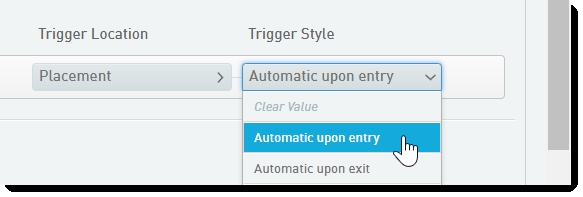
The automation should be configured to trigger automatically when the **Placement** screen is entered.
### The Script
**NOTE**: The attached Python script uses the **prerelease** API endpoint (instead of **v2**), which allows placement of samples into existing containers.
The script performs the following operations:
1. Parses the file and create an internal map (Python dict) between sample name and container details:
* **Key:** sample name
* **Value:** (container name, well position) tuple
2. Retrieves the URI of each container.
3. Accesses the step's 'placements' XML using a GET request.
4. Performs the following modifications to the XML:
* Populates the **\** node with child nodes for each retrieved container.
* Populates each **\