> For the complete documentation index, see [llms.txt](https://help.connected.illumina.com/llms.txt). Markdown versions of documentation pages are available by appending `.md` to page URLs; this page is available as [Markdown](https://help.connected.illumina.com/clarity-lims/api-and-database/api-docs/application-examples/page-15/routing-output-artifacts-to-specific-workflows-stages.md).
# Routing Output Artifacts to Specific Workflows/Stages
Samples progressing through workflows can branch off and must be directed to different workflows or stages within a workflow.
Example: If it is not known at the initiation of a workflow if a sample is to be sequenced on a HiSeq or MiSeq. Rerouting the derived samples could be necessary.
### Solution
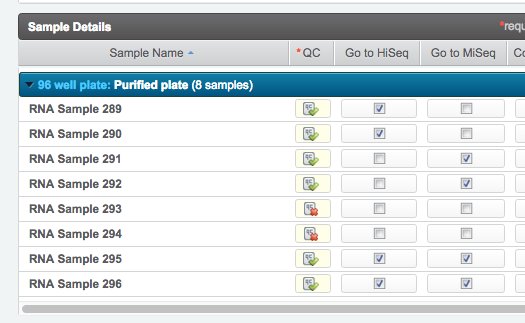
This example provides the user with the opportunity to route samples individually to the HiSeq, MiSeq, or both stages from the **Record Details** screen.
#### Step Configuration
The step is configured to display two checkbox analyte UDFs / derived sample custom fields. The fields are used to select the destination workflow/stages for each derived sample. You can choose to queue the sample for HiSeq, MiSeq, or both.
In this example, you select the following:
* Two samples to be queued for HiSeq
* Two samples for MiSeq
* Two that are not routed
* Two samples for both HiSeq and MiSeq
#### Parameters
The script accepts the following parameters:
-u
The username of the current user (Required)
-p
The password of the current user (Required)
-s
The URI of the step that launches the script - the {stepURI:v2} token (Required)
An example of the full syntax to invoke the script is as follows:
{% code overflow="wrap" %}
```
bash -c "/usr/bin/python /opt/gls/clarity/customextensions/Route_to_HiSeq_MiSeq.py -u {username} -p {password} -s {stepURI:v2}"
```
{% endcode %}
### User Interaction
On the **Record Details** screen, you use the analyte UDF / derived sample custom field checkboxes to decide which workflow/stage combination to send each derived sample.
### About the Code
The first important piece of information required is the URI of the destination stage.
A stage URI can change across LIMS instances (such as switching from Dev to Prod). Therefore, the script gathers the stage URI from the **workflow and stage name**. This process occurs even when the workflows are identical.
The main method in the script is **routeAnalytes**. This method in turn carries out several operations:
* Gathers the information for the process / master step that triggered the script, including output analytes.
* For each analyte, evaluates which UDFs / custom fields have been set, and adds the analyte to a list of analytes to route.
* Creates the XML message for each stage.
* Does a POST to the REST API in order to add the analytes to the queue in Clarity LIMS.
**Modifications**
This script can be modified to look for a process level UDF (master step custom field), in which case all outputs from the step would be routed to the same step.
This example also serves to demonstrate a more general concept. Routing artifacts is valuable in any situation where a sample needs to be queued for a stage outside of the usual order of a workflow - or even routing newly submitted samples to the first stage in a workflow.
For more information about how to use the **artifact/route** endpoint, see [REST](/clarity-lims/api-and-database/api-docs/rest.md).
### Assumptions and Notes
* You are running a version of Python that is supported by Clarity LIMS, as documented in the *Clarity LIMS Technical Requirements*.
* The attached file is placed on the LIMS server, in the **/opt/gls/clarity/customextensions** folder.
* The Python API Library (glsapiutil.py) is placed on the Clarity LIMS server, in the **/opt/gls/clarity/customextensions** folder. You can download the latest glsapiutil library from our [GitHub page](https://github.com/Illumina/BaseSpace_Clarity_LIMS).
* The example code is provided for illustrative purposes only. It does not contain sufficient exception handling for use 'as is' in a production environment.
* Samples can be inadvertently duplicated in the next step. This duplication occurs if:
* The sample is being routed at the last step of a protocol and;
* If the action of next steps is Mark Protocol as Complete.
This duplication is due to:
* The next step is routing the artifact to its default destination and;
* The script is routing the same artifact.
The solution here is to set the default next steps action to **Remove from Workflow** instead. This solution can be automated using Lab Logic Toolkit or the API.
### Attachments
Route\_to\_HiSeq\_MiSeq.py:
{% file src="/files/QV7PNE99vAPZArJeT2Ga" %}
---
# Agent Instructions
This documentation is published with GitBook. GitBook is the documentation platform designed so that both humans and AI agents can read, navigate, and reason over technical content effectively. Learn more at gitbook.com.
## Querying This Documentation
If you need additional information that is not directly available in this page, you can query the documentation dynamically by asking a question.
Perform an HTTP GET request on the current page URL with the `ask` query parameter, and the optional `goal` query parameter:
```
GET https://help.connected.illumina.com/clarity-lims/api-and-database/api-docs/application-examples/page-15/routing-output-artifacts-to-specific-workflows-stages.md?ask=&goal=
```
`ask` is the immediate question: it should be specific, self-contained, and written in natural language.
`goal` is optional and describes the broader end goal you are ultimately trying to accomplish on behalf of the user. GitBook uses it to tailor the answer towards what is most useful for that goal.
The response will contain a direct answer to the question and relevant excerpts and sources from the documentation.
Use this mechanism when the answer is not explicitly present in the current page, you need clarification or additional context, or you want to retrieve related documentation sections.