> For the complete documentation index, see [llms.txt](https://help.connected.illumina.com/llms.txt). Markdown versions of documentation pages are available by appending `.md` to page URLs; this page is available as [Markdown](https://help.connected.illumina.com/clarity-lims/api-and-database/api-docs/getting-started-with-api/the-life-cycle-of-a-sample-stages-versus-steps.md).
# The Life Cycle of a Sample: Stages Versus Steps
As an API programmer, it is important to understand the difference between steps and stages. This distinction is especially important because the concept of stages is hidden from the end user. As such, when receiving requirements from end users, steps sometimes means steps. At other times, steps mean stages. This article highlights the differences between these two entities.
### The Life Cycle of a Sample
We tend to think of a protocol as being a linear collection of steps, as shown below.
Figure 1
However, this illustration is not complete as the life cycle of a sample modeled within Clarity LIMS reflects what happens in reality. The workflow is broken into periods of activity and inactivity. If a workflow is comprised of three steps (A, B, and C—as shown in Figure B), Step B does not begin at the exact time that Step A is complete.
### Stages and Steps
To reflect these inactive periods, Clarity LIMS uses the concept of stages in addition to steps. A more complete representation of a workflow is shown below, with the stages occurring between the steps.
Figure 2
The following phrase simplifies this concept:
If the sample isn't active in a step, it's waiting in a stage.
**NOTE:**
The Clarity LIMS concept of the virtual ice bucket is another state that occurs when a sample leaves a stage, but work on the step has not started. This scenario is represented in the Figure 3, with the virtual ice bucket appearing between stages and steps, as the sample moves from left to right. However, virtual ice buckets are largely irrelevant to this discussion. While recognizing their existence, they are discounted from further explanation.
Figure 3
Having simplified our model of a sample passing through a workflow to resemble Figure 2, we can now add the next layer of complexity.
Protocols are components of workflows. As such, it is easy to imagine two or more workflows sharing a protocol. This detail leads to the following summary:
Steps belong to protocols, whereas stages belong to workflows.
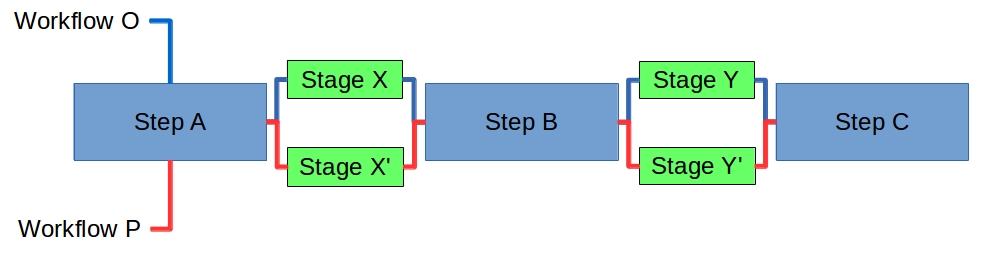
This summary means that the stages that exist between steps are part of the workflow (represented in Figure 4 below). For example, samples passing through Workflow O proceed through Step A, Stage X, Step B, Stage Y, and Step C.
Samples passing through Workflow P (which shares the protocol with Workflow O) pass through the same steps. However, samples pass through a different set of stages (Stage X' and Stage Y').
Figure 4
### Why Stages Are Important
Looking at the counts of samples associated with steps in a protocol (for example, in the Lab View dashboard in Clarity LIMS), the number of samples awaiting a particular step is actually the total number of samples across all relevant stages that feed into the step.
For bioinformaticians and programmers who are using the Clarity LIMS API, stages have an additional function. Route samples in ways that vary from the expected, linear route by manipulating which stages the artifacts are in. For example, using the API via a script, do the following actions:
* Implement a forking workflow by assigning artifacts to one (or more) additional stages.
* Create iterative (or looping) workflows by routing artifacts to an earlier stage for additional work.
---
# Agent Instructions
This documentation is published with GitBook. GitBook is the documentation platform designed so that both humans and AI agents can read, navigate, and reason over technical content effectively. Learn more at gitbook.com.
## Querying This Documentation
If you need additional information that is not directly available in this page, you can query the documentation dynamically by asking a question.
Perform an HTTP GET request on the current page URL with the `ask` query parameter, and the optional `goal` query parameter:
```
GET https://help.connected.illumina.com/clarity-lims/api-and-database/api-docs/getting-started-with-api/the-life-cycle-of-a-sample-stages-versus-steps.md?ask=&goal=
```
`ask` is the immediate question: it should be specific, self-contained, and written in natural language.
`goal` is optional and describes the broader end goal you are ultimately trying to accomplish on behalf of the user. GitBook uses it to tailor the answer towards what is most useful for that goal.
The response will contain a direct answer to the question and relevant excerpts and sources from the documentation.
Use this mechanism when the answer is not explicitly present in the current page, you need clarification or additional context, or you want to retrieve related documentation sections.