> For the complete documentation index, see [llms.txt](https://help.connected.illumina.com/llms.txt). Markdown versions of documentation pages are available by appending `.md` to page URLs; this page is available as [Markdown](https://help.connected.illumina.com/clarity-lims/clarity-lims-v6.3-and-lablink-v2.5/administration/enforcing-unique-sample-names-within-a-project.md).
# Enforcing Unique Sample Names Within a Project
By default, Clarity LIMS allows duplicate sample names within the same project. If you would like to enforce sample name uniqueness within a project, you can do so.
Two scripts have been developed to support this requirement:
* **SampleNamePerProjectUniqueConstraintStep:** Apply this uniqueness constraint to enforce unique sample names within a project.
* **CleanupDuplicatedSampleNamesPerProjectStep:** Prior to running the uniqueness constraint, use this optional cleanup script to clean up a database that already contains duplicate sample names.
Both scripts are available via the **clarity-migrator.jar** tool.
### Cleaning up the database
If your database contains projects in which duplicate sample names exist, run the **CleanupDuplicatedSampleNamesPerProjectStep** script to clean up sample names that would violate the sample uniqueness constraint property. The cleanup script searches the database for sample names that are not unique and renames them.
The cleanup script also renames the corresponding original **submitted sample** name - since there is a one-to-one correspondence between submitted sample and derived sample names in the LIMS interface.
#### **To clean up the database:**
1. As the **glsjboss** user, change to the **clarity-migrator** directory:\\
```
cd /opt/gls/clarity/tools/database/clarity-migrator
```
2. Run the **clarity-migrator.jar** tool, providing the name of the cleanup step as a parameter:\\
```
- java -jar clarity-migrator.jar CleanupDuplicatedSampleNamesPerProjectStep
```
3. The step will run and no validation errors should be reported.
Once cleanup has been performed successfully, you can apply the sample uniqueness constraint.
### Enforcing sample uniqueness
After you have cleaned up the database (if this step was required), you can apply the uniqueness constraint.
{% hint style="info" %}
Applying the sample uniqueness constraint results in a change at the LIMS database / schema level. Once you have applied this change, there is no script available to revert it.
If you need to remove the uniqueness constraint, you will need to submit a request to the Illumina Support team.
{% endhint %}
**To enforce sample uniqueness:**
1. As the **glsjboss** user, change to the **clarity-migrator** directory:\\
```
cd /opt/gls/clarity/tools/database/clarity-migrator
```
2. Run the **clarity-migrator.jar** tool, providing the name of the uniqueness constraint step as a parameter:\\
```
- java -jar clarity-migrator.jar SampleNamePerProjectUniqueConstraintStep
```
3. The step will run and no validation errors should be reported.
### Results
After enforcing sample uniqueness, if a user attempts to accession or update sample names that already exist in the project - via the user interface or the API - an error message displays. The message describes the problem and advises the user to rename the duplicate samples.
The following sections describe and illustrate what happens if an accessioned or updated sample name conflicts with an existing sample name within the same project.
#### Postgres database
If an accessioned or updated sample name conflicts with an existing sample name within the same project:
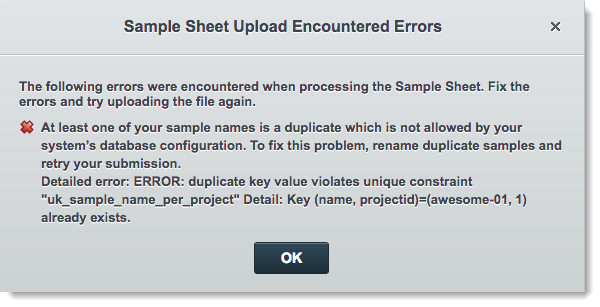
**Upload/modify via a sample sheet** will result in the error shown below.
The sample with duplicate name is named within the parenthesis of the **Detailed error** message.
The quoted string in the **Detailed error** is the database name of the constraint being violated (uk\_sample\_name\_per\_project = unique key on sample table for name and project).
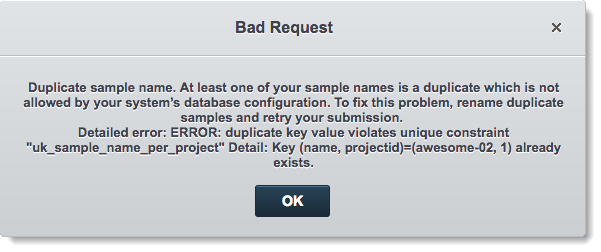
**Sample management accession/modify** will result in the error shown below.
If a user attempts to accession/modify a sample name under similar circumstances via an API operation, the results received would be similar to the content of this error message.
---
# Agent Instructions
This documentation is published with GitBook. GitBook is the documentation platform designed so that both humans and AI agents can read, navigate, and reason over technical content effectively. Learn more at gitbook.com.
## Querying This Documentation
If you need additional information that is not directly available in this page, you can query the documentation dynamically by asking a question.
Perform an HTTP GET request on the current page URL with the `ask` query parameter, and the optional `goal` query parameter:
```
GET https://help.connected.illumina.com/clarity-lims/clarity-lims-v6.3-and-lablink-v2.5/administration/enforcing-unique-sample-names-within-a-project.md?ask=&goal=
```
`ask` is the immediate question: it should be specific, self-contained, and written in natural language.
`goal` is optional and describes the broader end goal you are ultimately trying to accomplish on behalf of the user. GitBook uses it to tailor the answer towards what is most useful for that goal.
The response will contain a direct answer to the question and relevant excerpts and sources from the documentation.
Use this mechanism when the answer is not explicitly present in the current page, you need clarification or additional context, or you want to retrieve related documentation sections.