> For the complete documentation index, see [llms.txt](https://help.connected.illumina.com/llms.txt). Markdown versions of documentation pages are available by appending `.md` to page URLs; this page is available as [Markdown](https://help.connected.illumina.com/clarity-lims/illumina-preset-protocols/ipp-v2.12/ipp-v2.12.0-manual-upgrade.md).
# Manual Upgrade
This section describes the manual upgrade process from IPP v2.11 to IPP v2.12 to enable the changes described in [Illumina Preset Protocols v2.12 Release Notes](/clarity-lims/illumina-preset-protocols/ipp-v2.12/ipp-v2.12.0-release-notes.md). If you do not want to upgrade the latest workflow through IPP, then update the workflow configuration manually using the following information.
Conflicts may occur for the following scenarios when upgrading to IPP v2.12:
1. For previous IPP version, one or more library preparation workflows have been imported.
2. Sequencing Instrument (derived sample global custom field) is already existing in the Clarity LIMS instance
3. NovaSeq X Series Flowcell Type (derived sample global custom field) is already existing in the Clarity LIMS instance
The manual upgrade instructions include steps for supporting the new NovaSeq X Series Sequencing v2.0 workflow:
1. Update existing Sequencing Instrument derived sample global custom field and routing scripts to route libraries to the new workflow.
2. Resolve conflict of existing NovaSeq X Series Flowcell Type derived sample global custom field
## 1. Update Existing Sequencing Instrument (Derived Sample Global Custom Field) and Routing Scripts to Route Libraries to the New NovaSeq X Series Sequencing v2.0 Workflow
In IPP v2.12, [new workflow for NovaSeq X Series is available](/clarity-lims/illumina-preset-protocols/ipp-v2.12/ipp-v2.12.0-release-notes.md). The options for Sequencing Instrument derived sample global custom fields have been updated to support the new workflow.
This can cause a conflict with the Sequencing Instrument derived sample global custom field for the following workflows:
* Illumina DNA Prep (M) Tagmentation v1.0.11
* Nextera Mate Pair v1.0.12
* Nextera XT DNA v2.0.12
* TruSeq DNA PCR-Free v2.0.12
* TruSeq Nano DNA v1.0.12
* Library Prep Validation v2.3.7
* TruSeq ChIP-Seq v1.0.12
* TruSeq Methyl Capture EPIC v2.0.13
* TruSeq Small RNA v1.0.12
* TruSeq Stranded mRNA v2.1.12
* TruSeq Custom Amplicon (TSCA) v1.0.12
* Nextera Rapid Capture Custom Enrichment v2.0.13
* TruSeq DNA Exome v2.0.12
* TruSeq RNA Access v2.0.12
* TruSight Tumor 170 v2.0.12
### Force Import Workflows During Installation
When the expected conflicts are encountered during the IPP workflow installation, enter f to import the workflow when prompted. An example of the prompt is as follows.
{% code overflow="wrap" %}
```markup
Conflicts were detected between this workflow configuration package file and the existing configuration in the LIMS!
What would you like to do with this workflow configuration package file? [(f|Import anyway)|(s|Skip this workflow)|(a|Abort)]:
```
{% endcode %}
### Remove Existing Options in Existing Sequencing Instrument (Derived Sample Global Custom Field)
After the workflow is installed, resolve the conflicts as follows.
1. From Configuration, select the Custom Fields tab, and then select the Global Fields tab.
2. Search for Sequencing Instrument under Derived Sample.
3. Both NovaSeq X Series Integration and NovaSeq X Series On-Prem Integration shall use the new updated NovaSeq X Series Sequencing v2.0 workflow. Remove the redundant option `NovaSeq X Series On-Prem` from the Dropdown Items list.
### Update Routing Script Automations
Existing library preparation workflows (such as Library Prep Validation v2.3.5) may include [routing scripts](https://help.claritylims.illumina.com/instruments-and-integrations/ngs/ngs-routing-script) to integrations. Update these routing scripts to route to the new `NovaSeq X Series Sequencing v2.0` workflow. Modify the automation script as follows.
* \[Optional] If you are using the NovaSeq X Series instrument, update the `WORKFLOW` and `STEP` parameters of the routing script:
\
  --FIELD_NAME 'Sequencing Instrument' \
  --FIELD_VALUE 'NovaSeq X Series' \
  --WORKFLOW 'NovaSeq X Series Sequencing v2.0' \
  --STEP 'Assign Analysis Configuration Template (NovaSeq X Series Sequencing v2.0)' \
  --INPUTS_OR_OUTPUTS 'OUTPUTS'
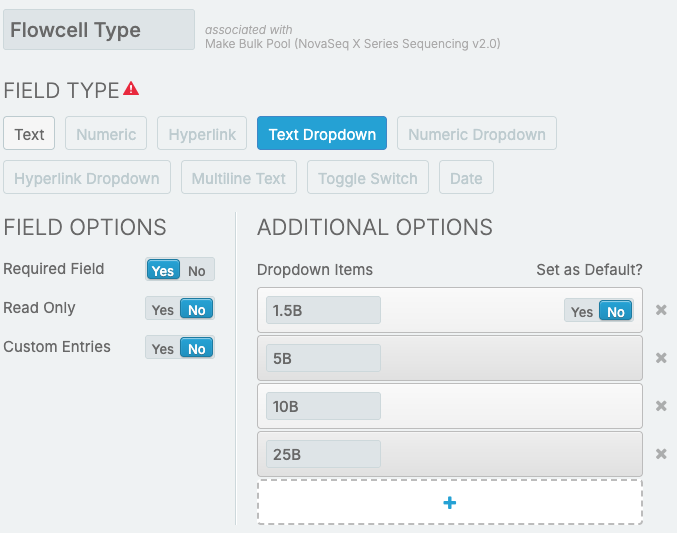
## 2. Resolve Conflict of Existing NovaSeq X Series Flowcell Type (Derived Sample Global Custom Field)
The new NovaSeq X Series Sequencing v2.0 workflow supports the new NovaSeq X Series 5B flowcells. Conflict is expected if the new workflow version is installed on a Clarity LIMS instance with an earlier version of NovaSeq X Series Sequencing workflow.
After the workflow is installed, resolve the conflicts as follows.
1. From Configuration, select the Custom Fields tab, and then select the Global Fields tab.
2. Search for NovaSeq X Series Flowcell Type under Derived Sample.
3. For Additional Options, add the following to the Dropdown Items list:
* 5B
---
# Agent Instructions
This documentation is published with GitBook. GitBook is the documentation platform designed so that both humans and AI agents can read, navigate, and reason over technical content effectively. Learn more at gitbook.com.
## Querying This Documentation
If you need additional information that is not directly available in this page, you can query the documentation dynamically by asking a question.
Perform an HTTP GET request on the current page URL with the `ask` query parameter, and the optional `goal` query parameter:
```
GET https://help.connected.illumina.com/clarity-lims/illumina-preset-protocols/ipp-v2.12/ipp-v2.12.0-manual-upgrade.md?ask=&goal=
```
`ask` is the immediate question: it should be specific, self-contained, and written in natural language.
`goal` is optional and describes the broader end goal you are ultimately trying to accomplish on behalf of the user. GitBook uses it to tailor the answer towards what is most useful for that goal.
The response will contain a direct answer to the question and relevant excerpts and sources from the documentation.
Use this mechanism when the answer is not explicitly present in the current page, you need clarification or additional context, or you want to retrieve related documentation sections.