> For the complete documentation index, see [llms.txt](https://help.connected.illumina.com/llms.txt). Markdown versions of documentation pages are available by appending `.md` to page URLs; this page is available as [Markdown](https://help.connected.illumina.com/clarity-lims/instruments-and-integrations/novaseq-x-series/novaseqx/novaseqx-v1.2.0/novaseqx-v1.2.0-manual-upgrade.md).
# Manual Upgrade
NovaSeq X Series Integration Package v1.2.0 includes modifications to the existing NovaSeq X Series Sequencing workflows to support the following new features:
* PhiX control included in the Dilute and Denature step instead of the Make Bulk Pool step.
* Support for the new 1.5B and 25B flow cells.
* Analysis tracking for the status and high level analysis result summary through the AUTOMATED - Analysis Run step (this is done at the metaworkflow level).
> ⚠ Analysis tracking is a new step in NovaSeq X Series protocol and cannot be added to a non-pending protocol or workflow. For analysis tracking at the metaworkflow level, do not proceed with the manual upgrade. Instead, install the NovaSeq X Series v1.2.0 Integration Package with the NovaSeq X Series Sequencing v1.1 protocol.
* The following workflow updates are included in NovaSeq X Series Integration Package v1.2.0:
* AUTOMATED - Sequencing Run step: Renamed the Library Tube Barcode master step custom field. This field is now named Library Tube Strip Barcode.
* Load to Library Tube Strip step: Removed the Output Folder master step custom field.
* Make Bulk Pool master step: Updated the dropdown items in the Final Loading Concentration (pM) custom field.
Use the following instructions to manually update the workflows.
## Prerequisites
Illumina recommends upgrading to Illumina Preset Protocols (IPP) v2.7 to support the new features. If you do not have IPP v2.7 installed, do the following before starting the manual upgrade:
* Install *ClarityLIMS-NGS-Package-v5* RPM v5.24.
* Replace the following files in */opt/gls/clarity/extensions/conf/driverfiletemplates*:
NovaSeqXSeries\_Bulk\_Pool1.csv:
{% file src="/files/cCSb3gnuXqkpQixezXt6" %}
NovaSeqXSeries\_Bulk\_Pool2.csv:
{% file src="/files/TOLzNJcrzEX2w9KIz6wN" %}
NovaSeqXSeries\_Dilute\_Denature\_Calculate\_Volumes.csv:
{% file src="/files/JlT1qmz14I5YGnKl5bIx" %}
## Add New Containers
1. On the Configuration tab, select **Consumables**, and then select **Containers**.
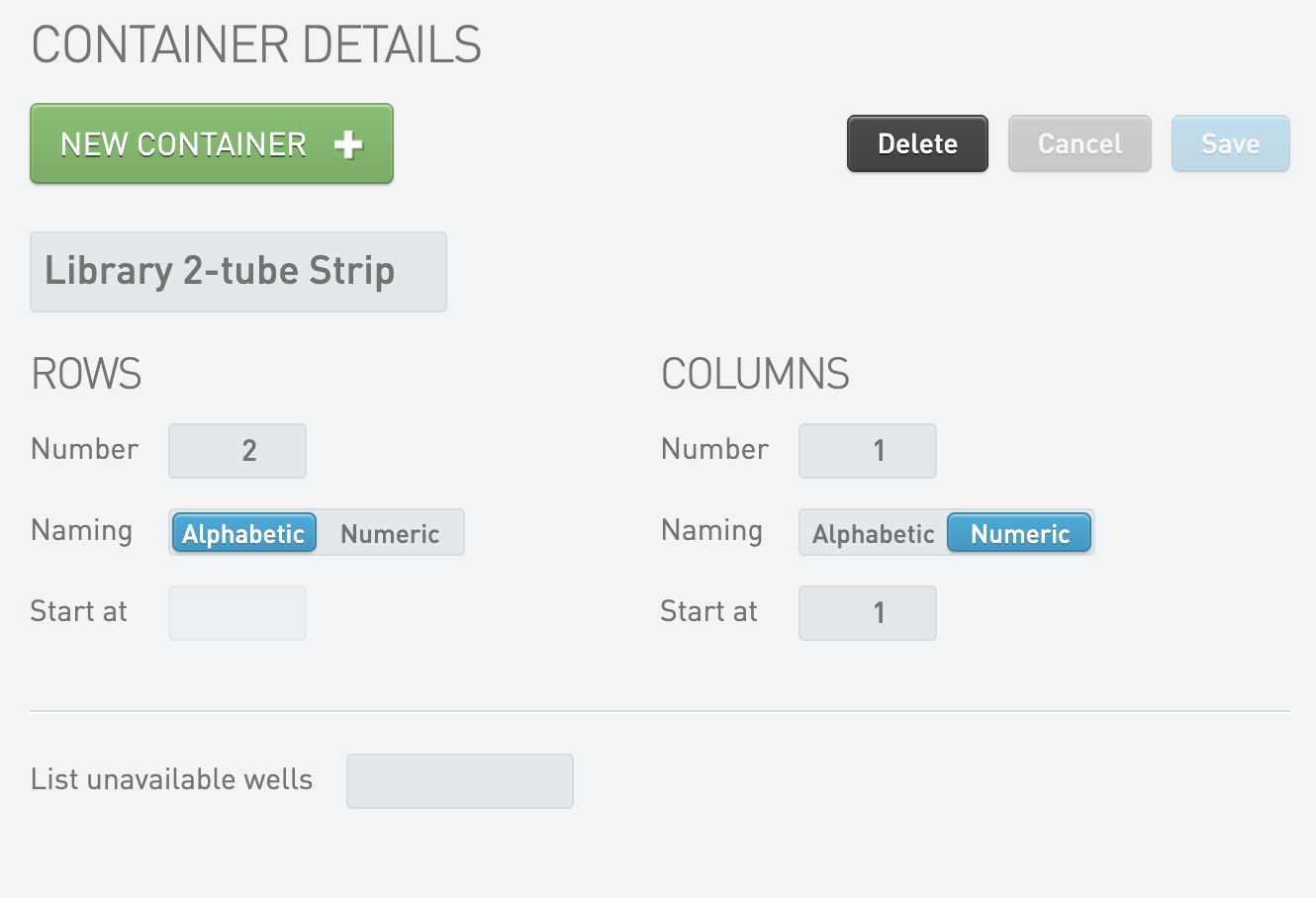
2. Add the following information to enable the Library 2-tube Strip container that supports the 1.5B flow cell:
> ℹ No action is required for the 25B flow cell. The flow cell uses the same Library 8-tube Strip as the 10B flow cell.
1. For Container Name, enter Library 2-tube Strip.
2. For Rows, update the following fields:
* Number: 2
* Naming: Alphabetic
3. For Columns, update the following fields:
* Number: 1
* Naming: Numeric
* Start at: 1
## Add New Master Step Fields
Enable PhiX control in the Dilute and Denature step as follows.
1. On the Configuration tab, select **Custom Fields**, and then select **Master Step Fields**.
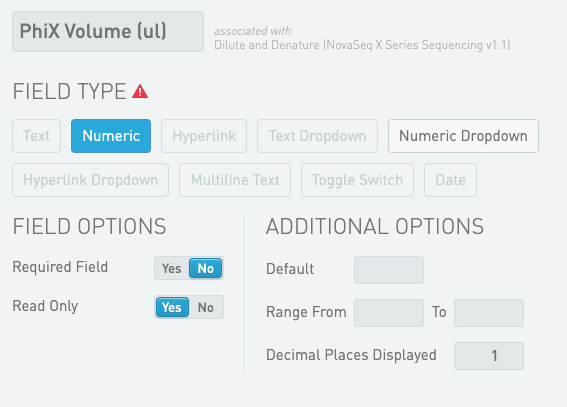
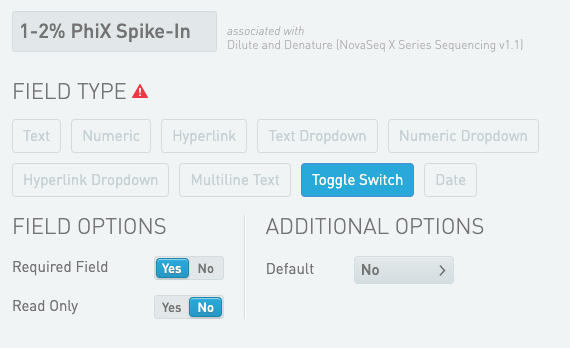
2. Add the following master step fields for the Dilute and Denature (NovaSeq X Series Sequencing v1.x) step:
*Dilute and Denature (NovaSeq X Series Sequencing v1.x) Master Step Field Configuration*
| **Field Name** | **Field Type** | **Options** | **Additional Options and Dropdown Items** |
| ------------------ | -------------- | -------------- | ----------------------------------------- |
| PhiX Volume (ul) | Numeric | Read Only | Decimal places displayed: 1 |
| 1–2% PhiX Spike-In | Toggle Switch | Required Field | Default: No |
## Modify Existing Master Step Fields
1. On the Configuration tab, select **Custom Fields**, and then select **Master Step Fields**.
2. Modify the following master step fields:
*Make Bulk Pool (NovaSeq X Series Sequencing v1.x) Master Step Field Modifications*
| **Field** | **Modification** | **Purpose/Notes** |
| -------------------------------- | ------------------------------------------------------------------------------------------------------------------------------------------------------------------------------------------------------------------------------------------------------------------------------------------ | --------------------------------------------------------------------------------------------------------------------------------------------------------------------------------------------------------------------------------------------------------------- |
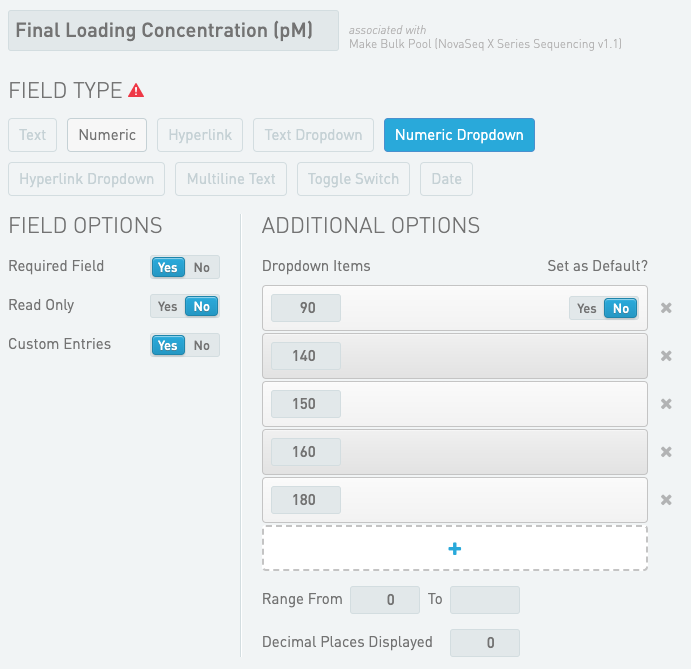
| Final Loading Concentration (pM) |
Update Dropdown Items with the following options:
90
140
150
160
180
|
Only perform this modification if the new Dropdown Items are required.
This modification is not required to enable support for the new flow cells or PhiX control in the Dilute and Denature (NovaSeq X Series Sequencing v1.x) step.
|
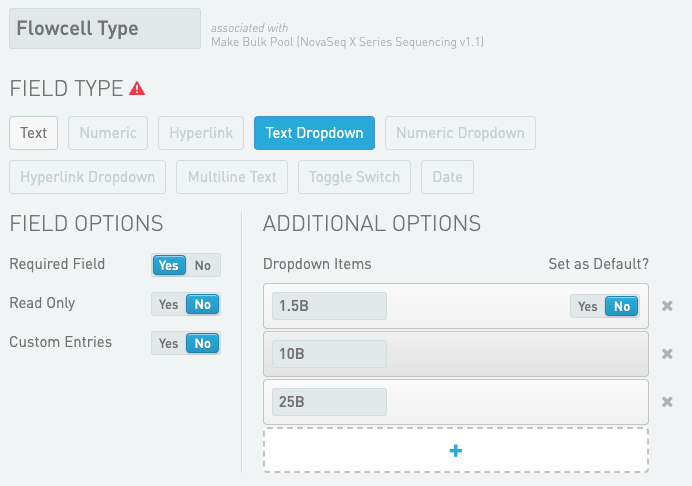
| Flowcell Type |
Change Field Type from Text to Text Dropdown.
Update Field Options as follows.
Read Only = No
Custom Entries = No
Update Dropdown Items with the following options:
1.5B
10B
25B
|
This modification is required to support the new flow cells.
|
*Load to Library Tube Strip (NovaSeq X Series Sequencing v1.x) Master Step Field Modifications*
| **Field** | **Modification** | **Purpose/Notes** |
| ------------- | ----------------------------------- | ---------------------------------------------------------------------------------------------------------------------------------------------------------------------------------------------------------------------------------------------------------------------------------------------------------------------------------------- |
| Output Folder |
Remove the field.
|
If the step has been run previously and this field is used, it cannot be removed. This field does not affect the functionality of the workflow.
This modification is not required to enable support for the new flow cells or PhiX control in the Dilute and Denature (NovaSeq X Series Sequencing v1.x) step.
|
*AUTOMATED - Sequencing Run (NovaSeq X Series Sequencing v1.x) Master Step Field Modifications*
| **Field** | **Modification** | **Purpose/Notes** |
| -------------------- | ------------------------------------------------------------------------------------------- | ------------------------------------------------------------------------------------------------------------------------------------------------------------------------------------------------------------------------------------------------------------------------------------------------------------------------------------------------------------------------------ |
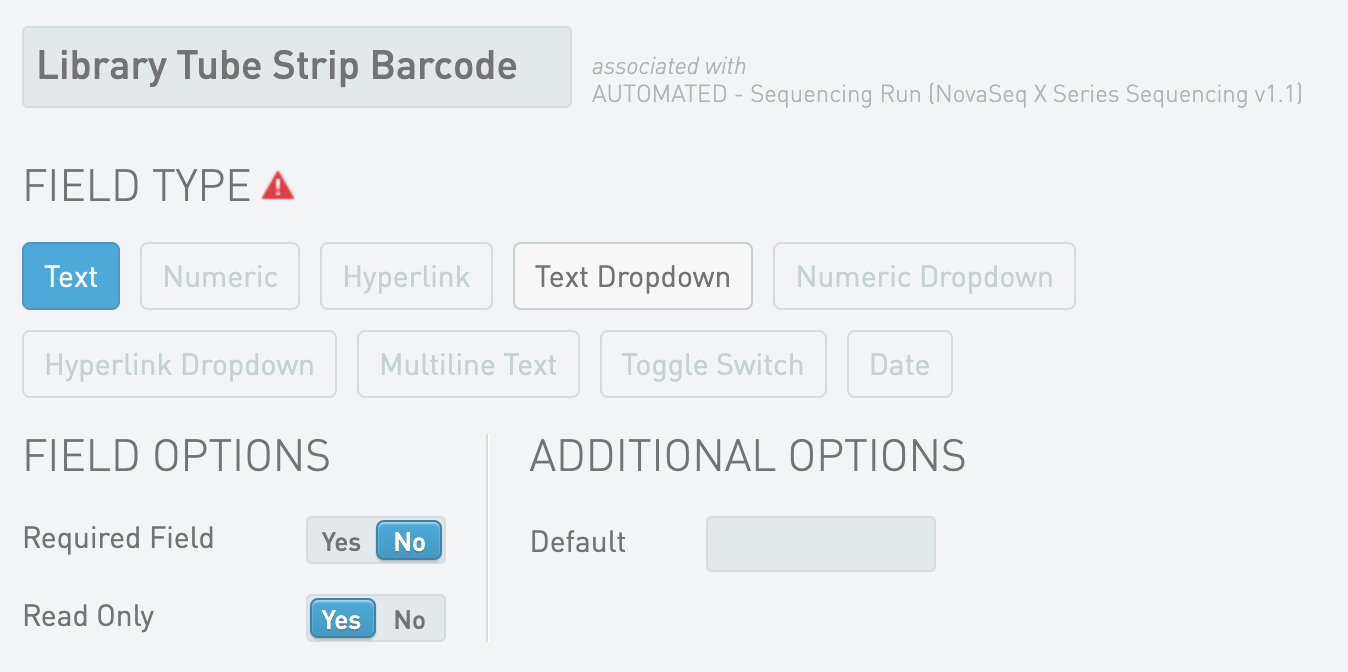
| Library Tube Barcode |
Rename the field from Library Tube Barcode to Library Tube Strip Barcode.
|
If the installed NovaSeq X Series workflow is v1.1 or earlier, this modification is not required to enable support for the new flow cells or PhiX control in the Dilute and Denature (NovaSeq X Series Sequencing v1.x) step.
For NovaSeq X Series workflow v1.2, this modification is required. Run event handling fails without this modification.
|
## Modify Existing Global Field
1. On the Configuration tab, select **Custom Fields**, and then select **Global Fields**.
2. For the NovaSeq X Flowcell Type field, update the Dropdown Items with the following values:
> ℹ A merge conflict is expected when upgrading from IPP v2.6 to v2.7 due to the changes in the NovaSeq X Flowcell Type field.
* 1.5B
* 10B
* 25B
## Add, Configure, and Modify Automations
**Add Automation**
1. On the Configuration tab, select **Automation**, and then select **Step Automation**.
2. On the Load to Library Tube Strip (NovaSeq X Series Sequencing v1.x) step, add the following automation to enable new flow cell types:
* Name: Validate Flowcell Inputs and Validate Analysis Configurations and Register Step Started
* Channel Name: limsserver
* Command line:
**Configure Automation Settings**
1. On the Configuration tab, select **Lab Work**.
2. Configure the trigger location and style for the following automations:
*Load to Library Tube Strip (NovaSeq X Series Sequencing v1.x) Step Automation Configuration*
> ℹ These configuration updates are required to enable the new flow cell types.
| **Automation** | **Setting** |
| --------------------------------------------------------------------------------------- | ------------------------------------------------------------------------------------ |
| Validate Flowcell Inputs and Validate Analysis Configurations and Register Step Started |
Trigger Location: Step
Trigger Style: Automatic upon entry
|
| Validate Input Count and Validate Analysis Configurations and Register Step Started |
Trigger Location: Not used
|
*Dilute and Denature (NovaSeq X Series Sequencing v1.x) Step Automation Configuration*
> ℹ This configuration update is required to enable PhiX control on the Make Bulk Pool (NovaSeq X Series Sequencing v1.x) step.
| **Automation** | **Setting** |
| ----------------- | --------------------------------------------------------------------------------------- |
| Calculate Volumes |
Trigger Location: Record Details
Trigger Style: Manual button
|
**Modify Step Automations**
1. On the Configuration tab, select **Automation**, and then select **Step Automation**.
2. Select the Calculate Volumes automation that is enabled on the Make Bulk Pool (NovaSeq X Series Sequencing v1.x) step.
3. Update the existing command line as follows.
This modification is required to move the PhiX control from the Make Bulk Pool (NovaSeq X Series Sequencing v1.x) step to the Dilute and Denature (NovaSeq X Series Sequencing v1.x) step. Changes are in red.
> bash -l -c "/opt/gls/clarity/bin/java -jar /opt/gls/clarity/extensions/ngs-common/v5/EPP/ngs-extensions.jar -i {stepURI:v2} -u {username} -p {password} -log {compoundOutputFileLuid1} \ script:evaluateDynamicExpression \ -exp 'if (!input.hasValue(::Molarity (nM)::)) { return; }; if (output.hasValue(::Number of Samples in Pool::)) { output.::Number of Samples in Pool:: = output.::Number of Samples in Pool:: + 1; } else { output.::Number of Samples in Pool:: = 1; }' -t true \ script:evaluateDynamicExpression \ -exp 'output.::Bulk Pool Volume (ul):: = 100 \* step.::Number of Lanes to Sequence::; output.::NovaSeq X Flowcell Type:: = step.::Flowcell Type::; output.::Final Loading Concentration (pM):: = step.::Final Loading Concentration (pM)::; input.::Per Sample Volume (ul):: = 2 \* output.::Bulk Pool Volume (ul):: / input.::Molarity (nM):: / output.::Number of Samples in Pool::; output.::Total Sample Volume (ul):: = 0;' -t true \ script:calculate\_multipool\_adjusted\_per\_sample\_volume -t \\ script:evaluateDynamicExpression \ -exp 'if (output.hasValue(::Total Sample Volume (ul)::)) { output.::Total Sample Volume (ul):: = output.::Total Sample Volume (ul):: + input.::Adjusted Per Sample Volume (ul)::; } else { output.::Total Sample Volume (ul):: = input.::Adjusted Per Sample Volume (ul)::; }' -t true \ script:evaluateDynamicExpression \ -exp 'if (output.::Total Sample Volume (ul):: > output.::Bulk Pool Volume (ul)::) { output.::RSB Volume (ul):: = 0 } else { output.::RSB Volume (ul):: = output.::Bulk Pool Volume (ul):: - output.::Total Sample Volume (ul):: }' -t true \ && /opt/gls/clarity/bin/java -jar /opt/gls/clarity/extensions/ngs-common/v5/EPP/DriverFileGenerator.jar -i {stepURI:v2} -u {username} -p {password} -l {compoundOutputFileLuid1} script:driver\_file\_generator \ -t /opt/gls/clarity/extensions/conf/driverfiletemplates/NovaSeqXSeries\_Bulk\_Pool1.csv -o 1.csv \ script:driver\_file\_generator \ -t /opt/gls/clarity/extensions/conf/driverfiletemplates/NovaSeqXSeries\_Bulk\_Pool2.csv -o 2.csv \ && cat 1.csv 2.csv > {compoundOutputFileLuid0}.csv \ && /opt/gls/clarity/bin/java -jar /opt/gls/clarity/extensions/ngs-common/v5/EPP/ngs-extensions.jar -i {stepURI:v2} -u {username} -p {password} -log {compoundOutputFileLuid1} \ script:evaluateDynamicExpression \ -exp 'output.::Number of Samples in Pool:: = ::::; output.::Total Sample Volume (ul):: = ::::; output.::Bulk Pool Volume (ul):: = ::::;' -t true \ && echo 'Calculate Volume completed successfully'"
4. Select the Calculate Volumes automation that is enabled on the Dilute and Denature (NovaSeq X Series Sequencing v1.x) step.
5. Update the existing command line as follows.
This modification is required to move the PhiX control from the Make Bulk Pool (NovaSeq X Series Sequencing v1.x) step to the Dilute and Denature (NovaSeq X Series Sequencing v1.x) step and to enable support for the 1.5B and 25B flow cells. Changes are in red.
> bash -l -c "/opt/gls/clarity/bin/java -jar /opt/gls/clarity/extensions/ngs-common/v5/EPP/ngs-extensions.jar -i {stepURI:v2} -u {username} -p {password} -log {compoundOutputFileLuid1} \ script:evaluateDynamicExpression \ -exp ' if (input.::NovaSeq X Flowcell Type:: == ::10B:: || input.::NovaSeq X Flowcell Type:: == ::1.5B::) { output.::NaOH Volume (ul):: = 8.5; output.::TT2 Volume (ul):: = 127.5; output.::BP Aliquot Volume (ul):: = input.::Final Loading Concentration (pM):: \* 170 / (2 \* 1000); output.::RSB Volume (ul):: = 34 - output.::BP Aliquot Volume (ul)::; if (step.::1-2% PhiX Spike-In::) { output.::PhiX Volume (ul):: = 1; output.::PhiX Concentration (pM):: = 300; } else { output.::PhiX Volume (ul):: = ::::; output.::PhiX Concentration (pM):: = ::::; }; } else { output.::NaOH Volume (ul):: = 14; output.::TT2 Volume (ul):: = 210; output.::BP Aliquot Volume (ul):: = input.::Final Loading Concentration (pM):: \* 280 / (2 \* 1000); output.::RSB Volume (ul):: = 56 - output.::BP Aliquot Volume (ul)::; if (step.::1-2% PhiX Spike-In::) { output.::PhiX Volume (ul):: = 1.6; output.::PhiX Concentration (pM):: = 300; } else { output.::PhiX Volume (ul):: = ::::; output.::PhiX Concentration (pM):: = ::::; }; }' && /opt/gls/clarity/bin/java -jar /opt/gls/clarity/extensions/ngs-common/v5/EPP/DriverFileGenerator.jar -i {stepURI:v2} -u {username} -p {password} \ script:driver\_file\_generator \ -t /opt/gls/clarity/extensions/conf/driverfiletemplates/NovaSeqXSeries\_Dilute\_Denature\_Calculate\_Volumes.csv -o {compoundOutputFileLuid0}.csv -q true -destLIMSID {compoundOutputFileLuid0} -l {compoundOutputFileLuid1} \ && echo; echo 'Calculate Volumes completed successfully.'"
6. Select the Set Next Step automation that is enabled on the Dilute and Denature (NovaSeq X Series Sequencing v1.x) step.
7. Update the existing command line as follows.
This modification is required to enable support for the 1.5B and 25B flow cells and future 8-tube library strips. Changes are in red.
> bash -l -c "/opt/gls/clarity/bin/java -jar /opt/gls/clarity/extensions/ngs-common/v5/EPP/ngs-extensions.jar -i {stepURI:v2} -u {username} -p {password} script:evaluateDynamicExpression -t false -h false -exp 'output.::Run Mode:: = input.::Run Mode::; output.::NovaSeq X Flowcell Type:: = input.::NovaSeq X Flowcell Type::; nextStep = ::ADVANCE::' -log {compoundOutputFileLuid1}"
8. Select the Validate Library Tube Strip Barcode automation that is enabled on the Load to Library Tube Strip Barcode (NovaSeq X Series Sequencing v1.x) step.
9. Update the existing command line as follows.
This modification is required to enable support for the 1.5B and 25B flow cells and future 8-tube library strips. Changes are in red.
> bash -l -c "/opt/gls/clarity/bin/java -jar /opt/gls/clarity/extensions/ngs-common/v5/EPP/ngs-extensions.jar -i {stepURI:v2} -u {username} -p {password} script:validate\_output\_containers -l {compoundOutputFileLuid1} -r 'Library 8-tube Strip:LC\[0-9]{7}-L\[A-Z]{1}1' -r 'Library 2-tube Strip:LC\[0-9]{7}-L\[A-Z]{1}2' -max 1"
## Modify Existing Steps
**Enable PhiX Control**
1. On the Configuration tab, select **Lab Work**.
2. Select the Make Bulk Pool (NovaSeq X Series Sequencing v1.x) step.
3. For Control Types, remove PhiX v3.
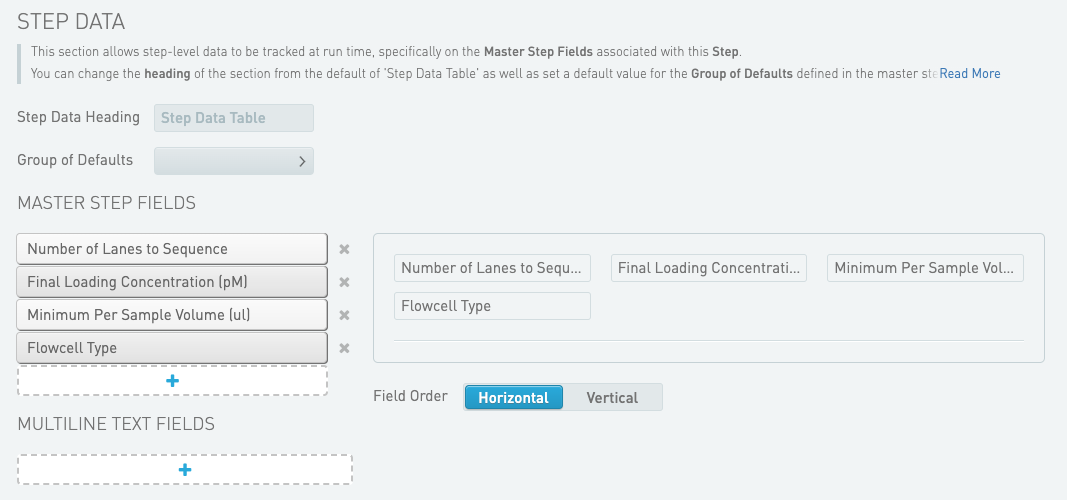
4. For the Record Details milestone, navigate to Step Data and remove the following fields:
* Final Loading Volume (ul)
* % PhiX (2.0 nM) Spike-In
5. Select the Dilute and Denature (NovaSeq X Series v1.x) step.
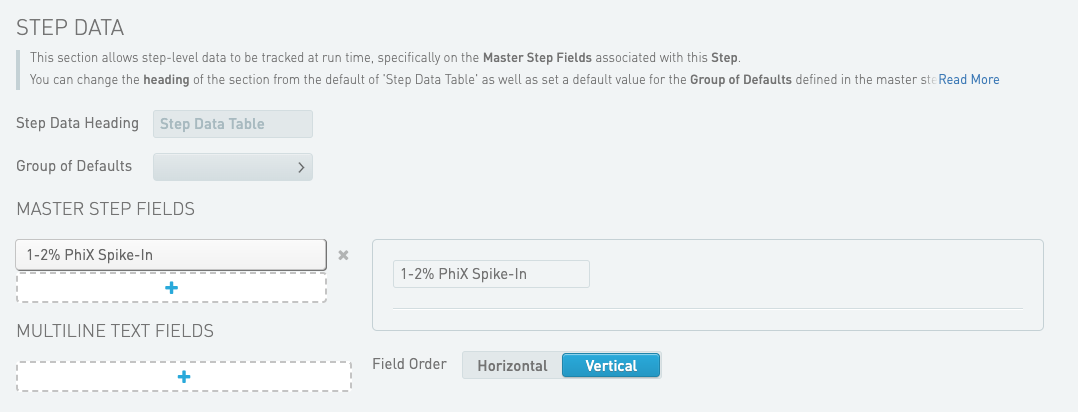
6. Select the **Record Details** milestone.
7. Navigate to Step Data and add 1-2% PhiX Spike-In to Master Step Fields.
**Enable New Flow Cell Types**
1. On the Configuration tab, select **Lab Work**.
2. Select the Load to Library Tube Strip (NovaSeq X Series Sequencing v1.x) step.
3. Select the **Queue** milestone.
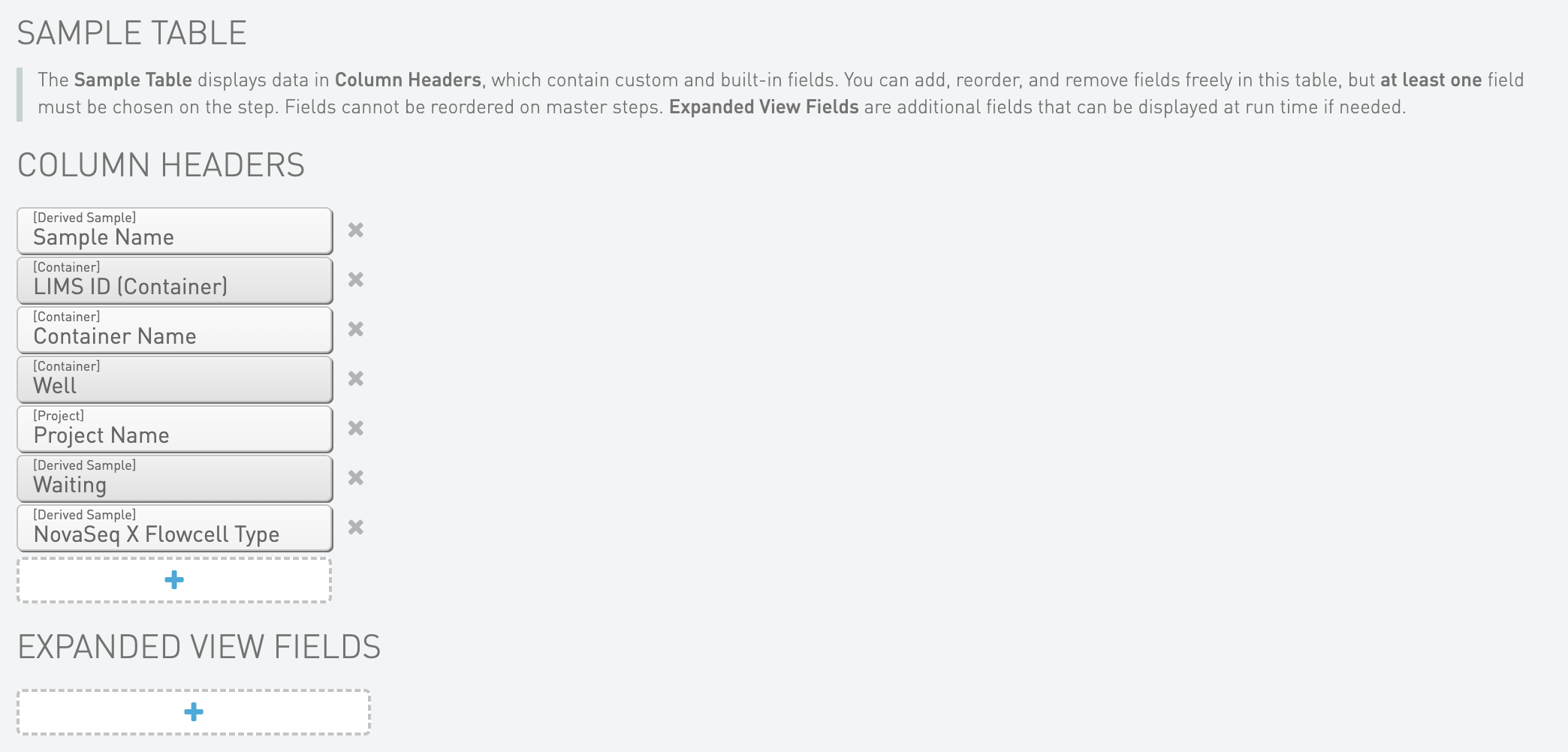
4. Navigate to Sample Table and add the NovaSeqX Flowcell Type field to Column Headers.
5. Select the **Ice Bucket** milestone.
6. Navigate to Sample Table and add the NovaSeqX Flowcell Type field to Column Headers.
7. Select the **Placement** milestone.
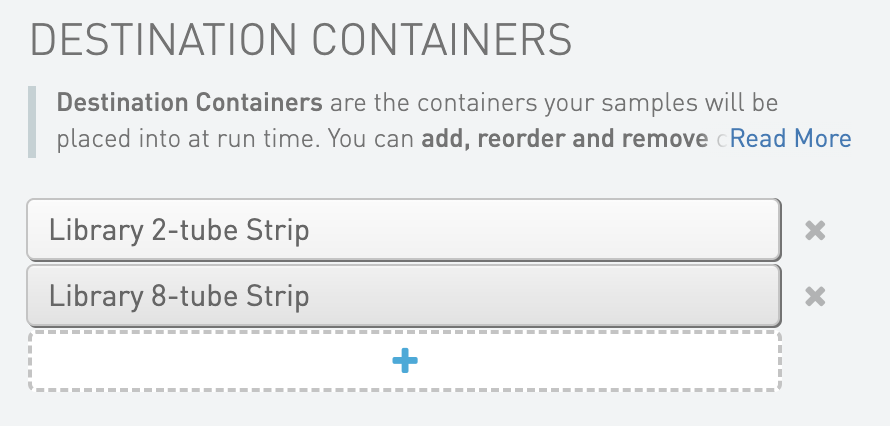
8. Navigate to Destination Containers and add Library 2-tube Strip.
---
# Agent Instructions
This documentation is published with GitBook. GitBook is the documentation platform designed so that both humans and AI agents can read, navigate, and reason over technical content effectively. Learn more at gitbook.com.
## Querying This Documentation
If you need additional information that is not directly available in this page, you can query the documentation dynamically by asking a question.
Perform an HTTP GET request on the current page URL with the `ask` query parameter, and the optional `goal` query parameter:
```
GET https://help.connected.illumina.com/clarity-lims/instruments-and-integrations/novaseq-x-series/novaseqx/novaseqx-v1.2.0/novaseqx-v1.2.0-manual-upgrade.md?ask=&goal=
```
`ask` is the immediate question: it should be specific, self-contained, and written in natural language.
`goal` is optional and describes the broader end goal you are ultimately trying to accomplish on behalf of the user. GitBook uses it to tailor the answer towards what is most useful for that goal.
The response will contain a direct answer to the question and relevant excerpts and sources from the documentation.
Use this mechanism when the answer is not explicitly present in the current page, you need clarification or additional context, or you want to retrieve related documentation sections.