> For the complete documentation index, see [llms.txt](https://help.connected.illumina.com/llms.txt). Markdown versions of documentation pages are available by appending `.md` to page URLs; this page is available as [Markdown](https://help.connected.illumina.com/dragen-mirna/faq/common-questions.md).
# Common Questions
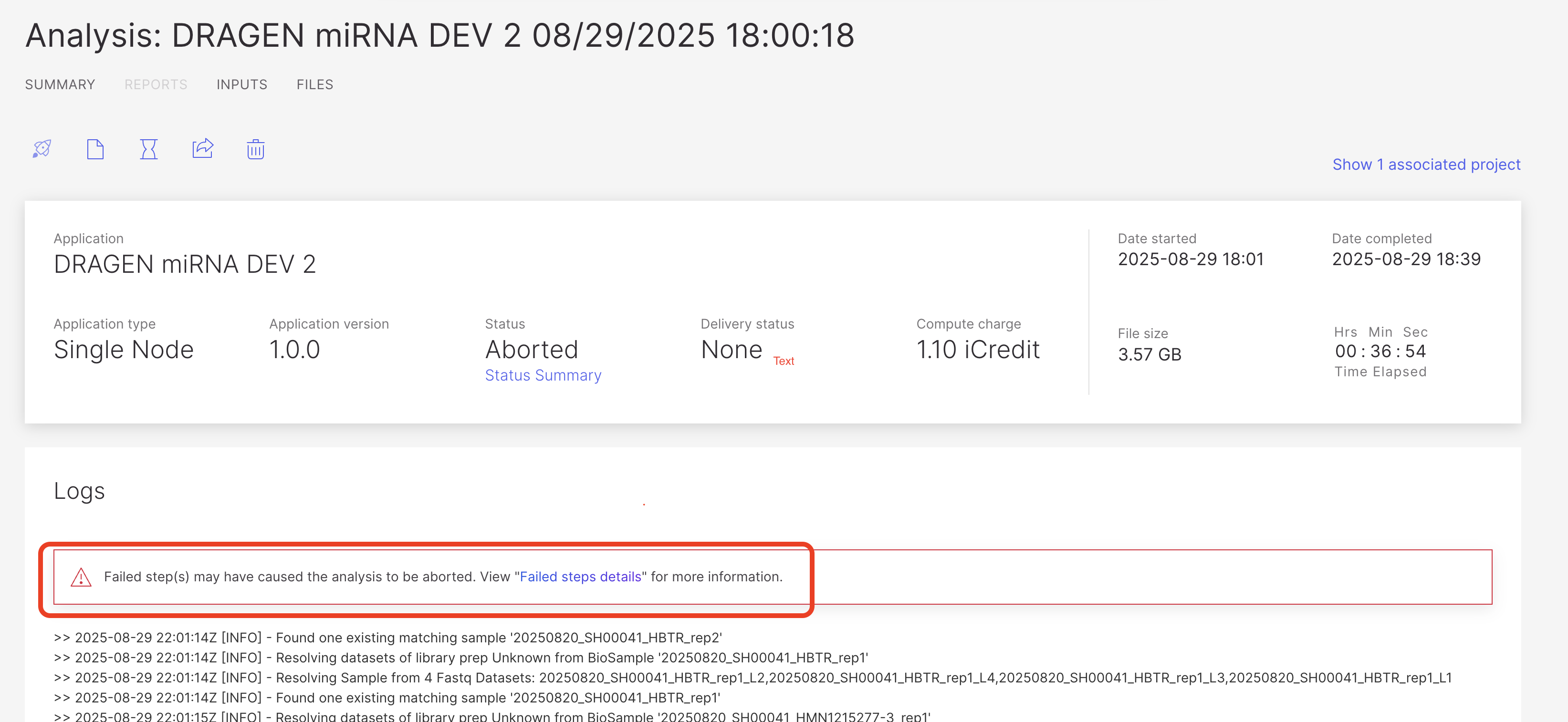
* **Q1. My run failed; how can I troubleshoot it**?
You can access the "Failed steps details" link to review the ICA Analysis Failed Step Logs:
* **Q2. Should I trim adapters beforehand?**
In the E2E workflow, Truseq Adapter trimming is managed by BCL Convert when using a Run Planner-configured sample sheet (when Illumina miRNA prep is selected). Meanwhile, the DRAGEN miRNA software automatically trims the 3' UMI adapter during its process. If the Truseq Adapter is not trimmed before analysis, it does not affect the actual analysis but alters the final read statistics.
* **Q3. What are the most common errors?**
1. Sample Names not following Illumina’s name convention
2. Memory issues at the counting step (fixed during SW verification)
3. Sample sheet configuration mistakes (best to use BSSH Run Planning)
* **Q4. Can DRAGEN miRNA be used to analyze TruSeq Small RNA data?**
* The software was not designed to analyze TruSeq Small RNA and analysis will fail.
* **Q5. How were reference sequences for small RNAs obtained?**
* Check the [Reference Database](/dragen-mirna/readme/reference-database.md) page for further information
* **Q6. What are the software component versions used in DRAGEN miRNA 1.0.0?**
* Reference database: miRBase v21 and v22 available
* Analysis Pipeline Version: 1.0.0
* DRAGEN Report Version: 4.5.0-alpha.7
* Cutadapt Version: 1.10
* Bowtie Version: 1.1.2
* **Q7. What species will the analysis support?**
Supports the following species:
* Human
* Mouse
* Rat
* Zebrafish
* Nematode
* Fruitfly
MiRNA references are based upon the version v21 and v22 of the miRBase, customers can choose between the two versions when running an analysis
* **Q8. How do I demultiplex my samples?**
* One can use the BCLConvert app available in BSSH. Check the following page for further information:
---
# Agent Instructions
This documentation is published with GitBook. GitBook is the documentation platform designed so that both humans and AI agents can read, navigate, and reason over technical content effectively. Learn more at gitbook.com.
## Querying This Documentation
If you need additional information that is not directly available in this page, you can query the documentation dynamically by asking a question.
Perform an HTTP GET request on the current page URL with the `ask` query parameter, and the optional `goal` query parameter:
```
GET https://help.connected.illumina.com/dragen-mirna/faq/common-questions.md?ask=&goal=
```
`ask` is the immediate question: it should be specific, self-contained, and written in natural language.
`goal` is optional and describes the broader end goal you are ultimately trying to accomplish on behalf of the user. GitBook uses it to tailor the answer towards what is most useful for that goal.
The response will contain a direct answer to the question and relevant excerpts and sources from the documentation.
Use this mechanism when the answer is not explicitly present in the current page, you need clarification or additional context, or you want to retrieve related documentation sections.