> For the complete documentation index, see [llms.txt](https://help.connected.illumina.com/llms.txt). Markdown versions of documentation pages are available by appending `.md` to page URLs; this page is available as [Markdown](https://help.connected.illumina.com/dragen-stratamap/dragen-stratamap/run-setup/per-lane-loading.md).
# Per-lane Loading
Multiple Illumina StrataMap libraries can be sequenced on the same flow cell if libraries are separated into individual lanes. This page describes how to set up sequencing and analysis when utilizing per-lane loading.
## Overview
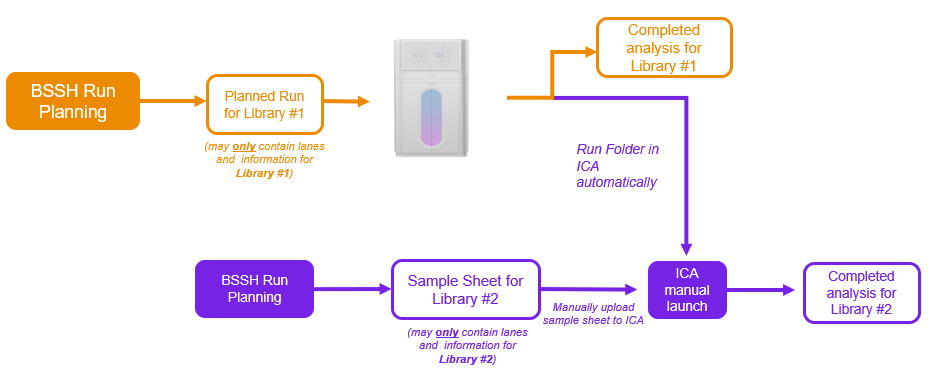
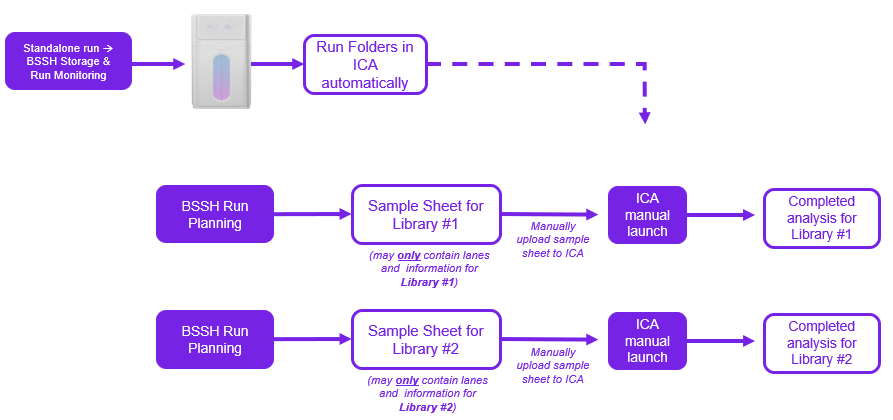
Autolaunch can initiate analysis for one library per sequencing run. Any additional libraries will need to be launched manually in Core. Alternatively, if autolaunch is not preferred, you may perform a standalone run and manually launch analyses in Core for all individual libraries.
**Option 1: Autolaunch one analysis, manually launch additional analyses:**
***
**Option 2: Standalone sequencing run and manually launch all analyses:**
***
## Run Planning for Per-lane Loaded Libraries
Regardless of the chosen approach, the Run Planning tool must be used for each library. Each **planned run and sample sheet must contain details for only one library.** Attempting to include multiple slides in a single sample sheet will result in an error.
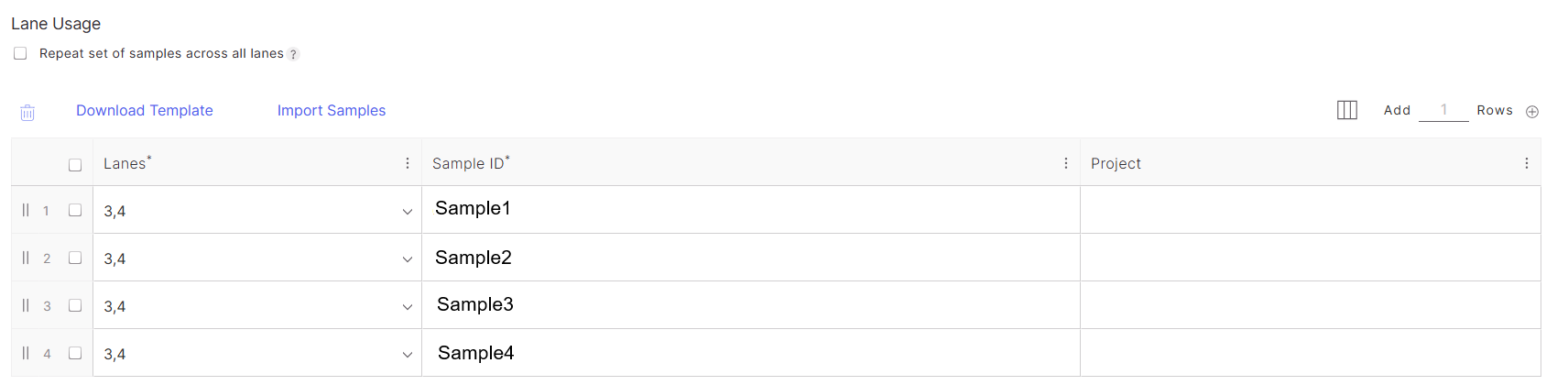
When using the Run Planning tool, follow the instructions on the [Run Planning page](/dragen-stratamap/dragen-stratamap/run-setup/run-planning.md). For Lane Usage, select only the lanes used by the library instead of all lanes. Unspecified lanes will still be sequenced, but their data will be stored for later access and manual launch in Core.
Example of autolaunch usage in the Run Planning tool for a single library loaded in lanes 3 and 4
### Non-standard read lengths
The recommended sequencing configuration for spatial libraries is 130-8-0-0 (100 cycle sequencing kit), however, if a different configuration is needed to share the flowcell with another library, a manual workaround is possible.
The override\_cycles and override\_reads will need to be adjusted to accommodate the differences. This will depend on the sequencing configuration, but here are some examples:
| 130:8 | I30;N22U7Y71;N8 | I30;Y100;I8 |
| ----------- | ------------------------ | ---------------- |
| 200:8 | I30;N22U7Y93N48;N8 | I30;Y170;I8 |
| 300:8 | I30;N22U7Y93N148;N8 | I30;Y270;I8 |
| 150:8:8:150 | I30;N22U7Y91;N8;N158 | I30;Y120;I8;Y158 |
| 250:8:8:250 | I30;N22U7Y93N98;N8;N258 | I30;Y220;I8;Y258 |
| 300:8:8:300 | I30;N22U7Y93N148;N8;N308 | I30;Y270;I8;Y308 |
To adjust the override\_cycles and override\_reads start the analysis manually in Core and update the [analysis config file](/dragen-stratamap/dragen-stratamap/analysis-inputs/analysis-config-file-optional.md).
Example analysis config file:
#### Some example situations:
{% hint style="info" %}
When sequencing StrataMap libraries, we do not recommend using a read length shorter than 117bp for Read1 for any configuration
{% endhint %}
**Enrichment – Exome (200cycle kit)**
Use the 200cycle sequencing kit with a read length structure of 117-10-10-101 (if enrichment library prep utilizes dual 10bp indices) OR 121-8-8-101 (if enrichment library prep utilizes dual 8bp indices). The Statamap and Enrichment – Exome library preps would need to be loaded in separate lanes.
In the analysis\_config.json file, the override\_cycles and override\_reads must be updated to:
117-10-10-101 read length structure:
* "override\_cycles": "I30;N22U7Y58;N10;N111"
* "override\_reads": "I30;Y87;I10;Y111"
121-8-8-101 read length structure:
* "override\_cycles": "I30;N22U7Y62;N8;N109"
* "override\_reads": "I30;Y91;I8;Y109"
**Whole genome (300cycle kit)**\
The customer would need to use the 300cycle sequencing kit with a read length structure of 151-10-10-151 (if whole genome library prep utilizes dual 10bp indices) OR 151-8-8-151 (if whole genome library prep utilizes dual 8bp indices). The Statamap and Whole genome library preps would need to be loaded in separate lanes.
In the analysis\_config.json file, the override\_cycles and override\_reads must be updated to:
151-10-10-151 read length structure:
* "override\_cycles": "I30;N22U7Y58N34;N10;N161"
* "override\_reads": "I30;Y121;I10;Y161"
151-8-8-151 read length structure:
* "override\_cycles": "I30;N22U7Y58N34;N8;N159"
* "override\_reads": "I30;Y121;I8;Y159"
---
# Agent Instructions
This documentation is published with GitBook. GitBook is the documentation platform designed so that both humans and AI agents can read, navigate, and reason over technical content effectively. Learn more at gitbook.com.
## Querying This Documentation
If you need additional information that is not directly available in this page, you can query the documentation dynamically by asking a question.
Perform an HTTP GET request on the current page URL with the `ask` query parameter, and the optional `goal` query parameter:
```
GET https://help.connected.illumina.com/dragen-stratamap/dragen-stratamap/run-setup/per-lane-loading.md?ask=&goal=
```
`ask` is the immediate question: it should be specific, self-contained, and written in natural language.
`goal` is optional and describes the broader end goal you are ultimately trying to accomplish on behalf of the user. GitBook uses it to tailor the answer towards what is most useful for that goal.
The response will contain a direct answer to the question and relevant excerpts and sources from the documentation.
Use this mechanism when the answer is not explicitly present in the current page, you need clarification or additional context, or you want to retrieve related documentation sections.