For the complete documentation index, see llms.txt. This page is also available as Markdown.

Image QC

The Image QC step evaluates uploaded images against quality and registration standards to ensure accuracy and consistency in downstream analyses.

During this process:

  • Images are registered to a standard coordinate system with a resolution of 1 μm/pixel.

  • Each image is transformed into an upright position aligned with the slide, based on detected fiducial markers.

  • A QC status is reported, categorizing image quality and highlighting any issues that may impact analysis.

This evaluation helps identify problems early, reducing the risk of errors in subsequent steps.

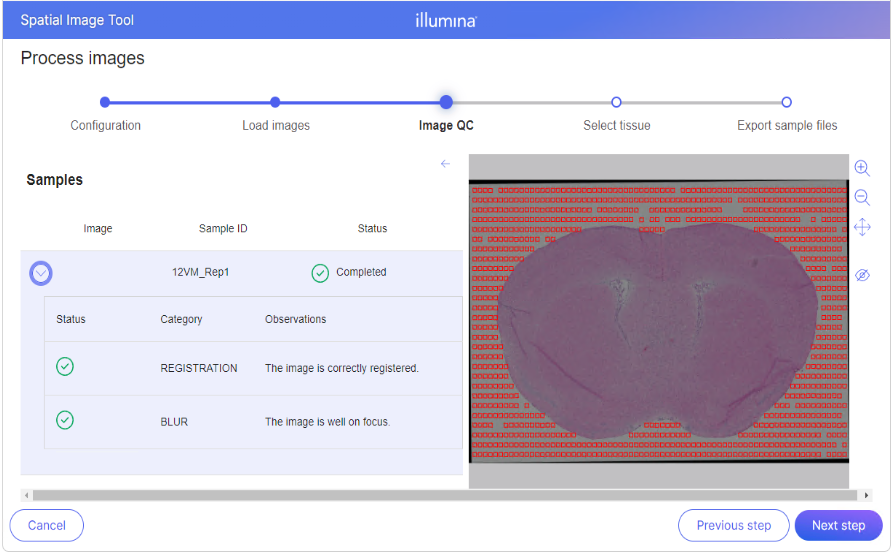
Image QC Page

The Image QC page is designed to streamline the review process and includes:

  • A list of QC results for all uploaded samples displayed on the left panel.

  • An image preview on the right panel, which updates dynamically as you select individual notices from the list.

To view detailed QC information for a sample, click the caret next to the sample name.

QC Result Levels

QC results are grouped into the following categories:

Icon
QC Status
Explanation

Passed

The checks for this category were successful, indicating no identified issues that could impact future analyses.

Warning

Issues were detected. Proceeding is possible, though some experiences may be degraded.

Failed

Critical issues were identified. The image must be corrected before proceeding. This may involve fixing configuration errors or retaking the image.

Types of Image QC

Registration QC

  • Confirms that the image is correctly aligned with the standard coordinate system.

  • Note: If Registration QC fails, the image preview on the right will not be displayed.

Image Quality QC

  • Evaluates whether the image was captured under appropriate conditions.

  • Issues in this category may lead to reduced accuracy in downstream analysis.

Results

Take a screenshot of the Image QC page. The captured image and Image QC page screenshot can be shared with your Illumina representative.

Last updated

Was this helpful?