# Adding patient info for the proband
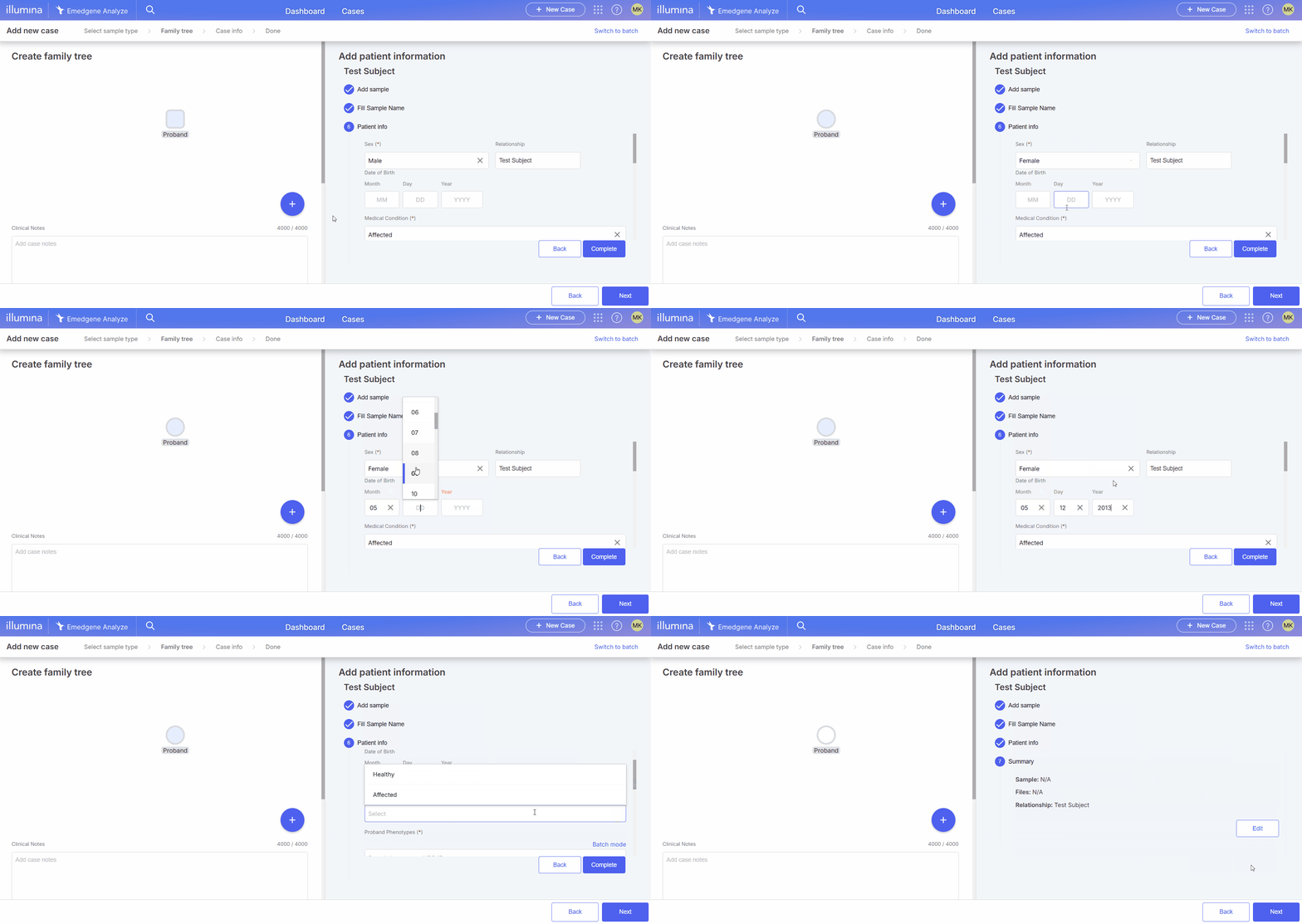
Add new case page > Family tree screen > Add patient information panel > Patient info section
## 1. Fill in the boxes:
{% hint style="warning" %}
**Note:** The fields marked with (**\***) are mandatory.
{% endhint %}
### 1. Sex (\*)
Options: Male, Female, Unknown.
{% hint style="warning" %}
**Handling a proband sample with unknown sex**
When a sample is user-assigned "Unknown" sex, the system assumes "Female". This affects CNV interpretation on sex chromosomes in case *the genetic sex is actually male*:
* **Chromosome X:**\
CN = 2 is considered reference (REF) for a female genome, so CNVs with two copies are hidden by default. This may cause chromosome X duplications to be missed.
* **Chromosome Y:**\
CN = 0 is considered reference (REF) for a female genome, so CNVs with zero copies are hidden by default. This may cause chromosome Y deletions to be missed.
To include these variants in the analysis, enable the [Include Reference Homozygosity and No Coverage Calls toggle](https://help.connected.illumina.com/emedgene/settings/organization_settings_-330+/workbench-and-pipeline/pipeline-versions#include-reference-homozygosity-v36.0) in Workbench & Pipeline Settings.
{% endhint %}
### 2. Relationship
The default fixed value for Proband is Test Subject.
### 3. Date of Birth
Expected format: mm/dd/yyyy.
### 4. Medical Condition (\*)
Options: Affected, Healthy.
The default value for Proband is Affected, but you may change it to Healthy.
### 5. Proband Phenotypes (\*)
To add all relevant phenotypes for the Proband, use one of the following methods:
1. [One by one (Selection mode)](#selection-mode),
2. [In a batch (Batch mode)](#batch-mode), or
3. Automatically infer disease-associated phenotypes (see [Proband Suspected Disease Condition](#id-6.-proband-suspected-disease-condition) below).
{% hint style="info" %}
**Notes:**
* The maximum permissible number of proband phenotypes is 100.
* Some diseases may not suggest phenotypes automatically if the source database does not provide them. You can add phenotypes manually in these cases.
{% endhint %}
{% hint style="warning" %}
**Warning: Select valid HPO phenotypic abnormality terms**
When adding patient phenotypes, ensure that all selected HPO terms originate from the **“Phenotypic abnormality (HP:0000118)”** branch of the HPO ontology.\
Terms outside this branch are **not supported for case analysis**, as they do not represent clinical phenotypes and may lead to incomplete or inaccurate downstream results.
{% endhint %}
#### Selection mode
Please follow the steps described below for each phenotype:
1. Enter an HPO term (e.g., Hypoplasia of the ulna), an HPO ID (e.g., HP:0003022), or a descriptive phenotype name (e.g., Underdeveloped ulna) in the search box.
2. Select a matching term from a dropdown menu and press Complete after you've added all the terms and additional patient information below.

#### Batch mode
Paste a list of comma-separated HPO terms or HPO IDs in the search box and press Complete.
{% hint style="info" %}
**Notes**:
* A popup notification will appear at the bottom of the page if any input HPO term or HPO ID is unknown.
* Only phenotypes from the 'Phenotypic abnormality' HPO branch are currently supported.
{% endhint %}

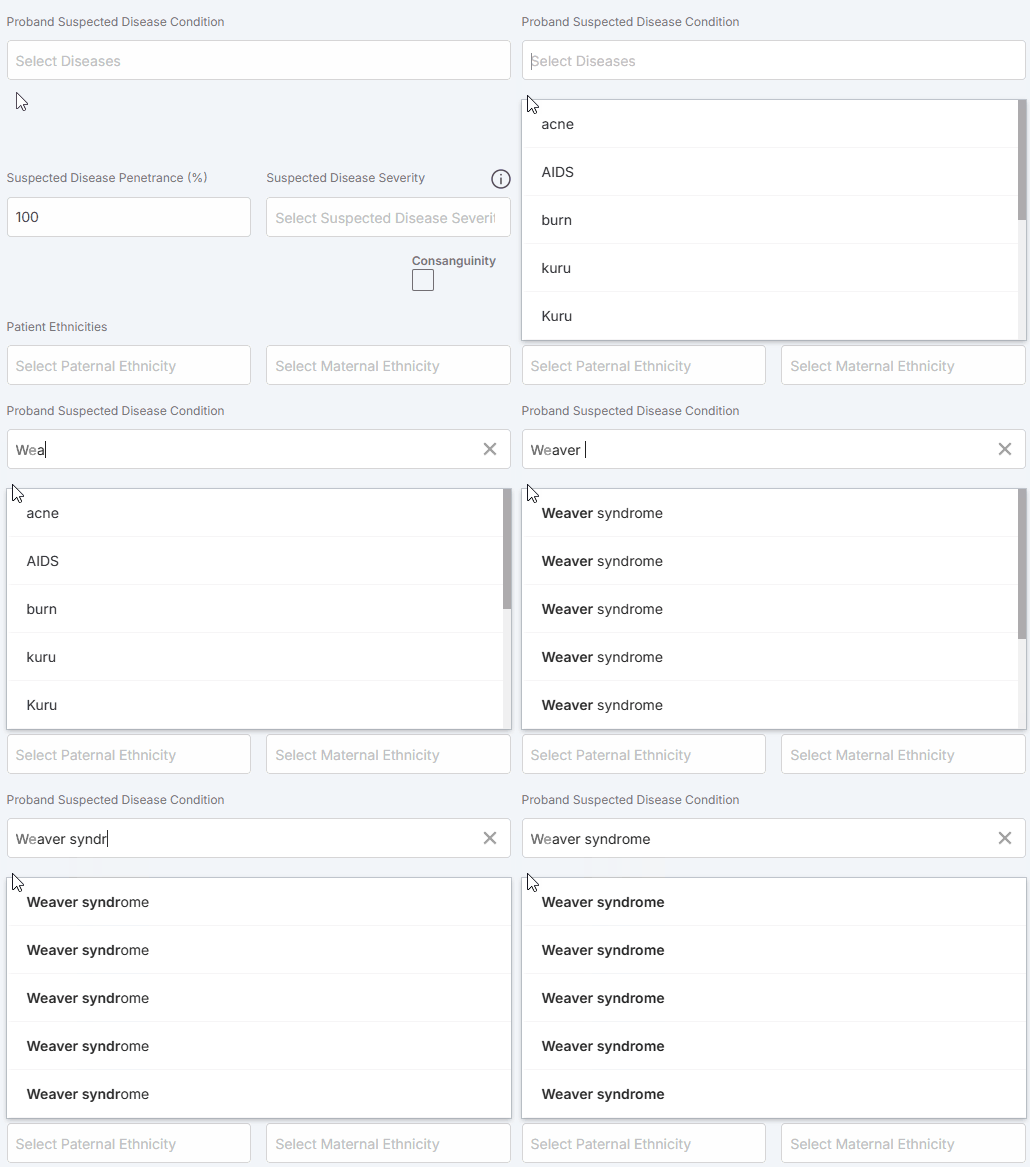
### 6. Proband Suspected Disease Condition.
Enter the disease name in the search box, select a matching term from a dropdown menu and press Complete. All the associated phenotypes will be automatically added to the Proband Phenotypes.
Selecting a disease only fetches its associated phenotypes for convenience—it does **not** affect downstream analysis. You can edit this list to match the proband’s clinical presentation. **Only the phenotypes you keep or add influence analysis, not the disease selection itself.**
To remove any phenotype described for the disease but not observed in your patient, click the :xmark: button next to the HPO term in the Proband Phenotypes list.
{% hint style="info" %}
**Note:**
Searching for a disease name may return several entries with the same title.
This happens because the disease appears in **multiple gene–disease sources**, each with its own identifiers and evidence associations. These entries are not merged automatically, so choosing different items may return **different sets of phenotypes.**
{% endhint %}

### 7. Suspected Disease Penetrance
Enter the suspected disease penetrance as a percentage.
### 8. Suspected Disease Severity
Select the appropriate category to indicate the severity of the disease symptoms observed in the patient: Mild, Moderate, Severe, Profound.
### 9. Consanguinity
Mark the checkbox if applicable.
{% hint style="info" %}
**Note:** If consanguinity is identified in the Proband's parents, but this box is not selected in case creation, this will result in a discrepancy alert in the [Lab tab](https://help.connected.illumina.com/emedgene/emedgene-analyze-manual/reviewing_a_case/lab_tab).
{% endhint %}
### 10. Patient Ethnicities
Paternal and Maternal. Enter the [ethnicity](https://help.connected.illumina.com/emedgene/emedgene-analyze-manual/launching-analysis/creating_a_single_case/supported_parental_ethnicities) name in the search box and select a matching term from a dropdown menu.

## 2. Click on Complete once all the information is added.
 This happens because the disease appears in **multiple gene–disease sources**, each with its own identifiers and evidence associations. These entries are not merged automatically, so choosing different items may return **different sets of phenotypes.**
{% endhint %}

### 7. Suspected Disease Penetrance
Enter the suspected disease penetrance as a percentage.
### 8. Suspected Disease Severity
Select the appropriate category to indicate the severity of the disease symptoms observed in the patient: Mild, Moderate, Severe, Profound.
### 9. Consanguinity
Mark the checkbox if applicable.
{% hint style="info" %}
**Note:** If consanguinity is identified in the Proband's parents, but this box is not selected in case creation, this will result in a discrepancy alert in the [Lab tab](https://help.connected.illumina.com/emedgene/emedgene-analyze-manual/reviewing_a_case/lab_tab).
{% endhint %}
### 10. Patient Ethnicities
Paternal and Maternal. Enter the [ethnicity](https://help.connected.illumina.com/emedgene/emedgene-analyze-manual/launching-analysis/creating_a_single_case/supported_parental_ethnicities) name in the search box and select a matching term from a dropdown menu.

## 2. Click on Complete once all the information is added.
This happens because the disease appears in **multiple gene–disease sources**, each with its own identifiers and evidence associations. These entries are not merged automatically, so choosing different items may return **different sets of phenotypes.**
{% endhint %}

### 7. Suspected Disease Penetrance
Enter the suspected disease penetrance as a percentage.
### 8. Suspected Disease Severity
Select the appropriate category to indicate the severity of the disease symptoms observed in the patient: Mild, Moderate, Severe, Profound.
### 9. Consanguinity
Mark the checkbox if applicable.
{% hint style="info" %}
**Note:** If consanguinity is identified in the Proband's parents, but this box is not selected in case creation, this will result in a discrepancy alert in the [Lab tab](https://help.connected.illumina.com/emedgene/emedgene-analyze-manual/reviewing_a_case/lab_tab).
{% endhint %}
### 10. Patient Ethnicities
Paternal and Maternal. Enter the [ethnicity](https://help.connected.illumina.com/emedgene/emedgene-analyze-manual/launching-analysis/creating_a_single_case/supported_parental_ethnicities) name in the search box and select a matching term from a dropdown menu.

## 2. Click on Complete once all the information is added.