> For the complete documentation index, see [llms.txt](https://help.connected.illumina.com/llms.txt). Markdown versions of documentation pages are available by appending `.md` to page URLs; this page is available as [Markdown](https://help.connected.illumina.com/emedgene/emedgene-analyze-manual/settings/organization_settings_-330+/integration-v100.39.0+/encryption-settings.md).
# Encryption settings
Emedgene supports data encryption with customer-managed keys through [Bring Your Own Key (BYOK)](https://help.emg.illumina.com/emedgene-analyze-manual/managing_data_storage/bring-your-own-key). This gives organizations full control over their encryption and helps meet compliance requirements for data protection regulations such as HIPAA and GDPR.
Encryption is managed through a Key Management Service (KMS)—a secure system that creates and controls cryptographic keys. Currently, [Azure Key Vault](https://azure.microsoft.com/en-us/products/key-vault) is supported, and [AWS Key Management Service (KMS)](https://aws.amazon.com/kms/) will be available soon.
Starting in v100.39.0, users with appropriate [permissions](https://help.emg.illumina.com/emedgene-analyze-manual/settings/user_roles/iam-scopes-emedgene-roles) can configure encryption for their workgroup directly in the platform using a key from Azure Key Vault KMS.
## Manage encryption using your own key
Use this card to set up data encryption and review its details.
{% hint style="warning" %}
## Important notes before you start
* Encryption can be configured by users with **appropriate** [**permissions**](https://help.emg.illumina.com/emedgene-analyze-manual/settings/user_roles/iam-scopes-emedgene-roles) only **once per workgroup**.
* Once encryption is set up, you can [update the client secret](#update-the-client-secret-for-an-existing-configuration), but you **cannot disable encryption or change the KMS type**.
{% endhint %}
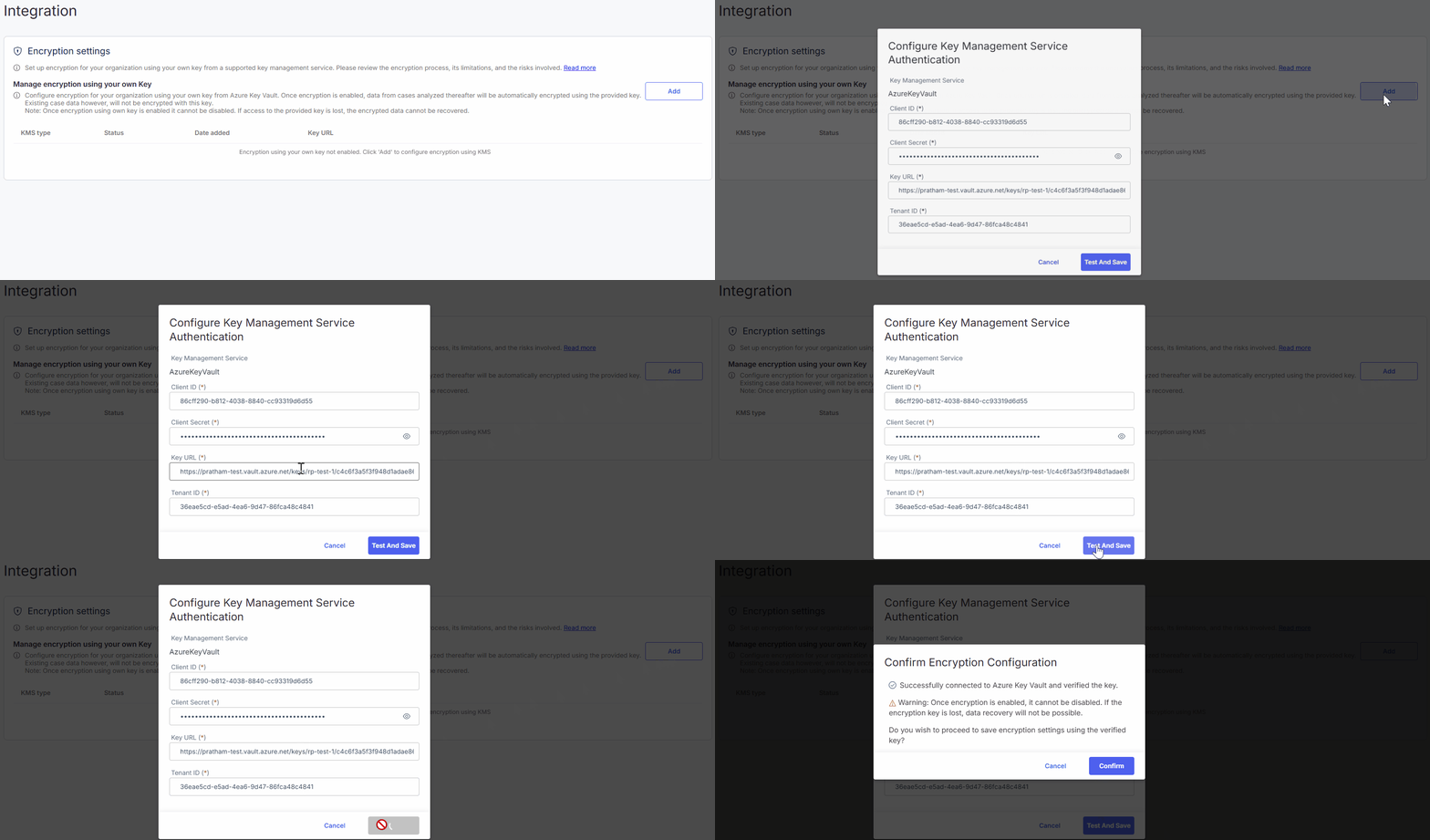
### Set up encryption
{% stepper %}
{% step %}
Click **Add**.
{% endstep %}
{% step %}
Select the KMS type (Azure Key Vault is the default).
{% endstep %}
{% step %}
Enter the required details:
* Client ID
* Tenant ID
* Client secret
* Key URL
{% endstep %}
{% step %}
Click **Test and Save** to validate the credentials.
Emedgene checks KMS accessibility with the given credentials and ensures that it has `encrypt`, `decrypt`, `wrapKey`, and `unwrapKey` permissions for cryptographic operations.
{% endstep %}
{% step %}
Once validated, click **Confirm** to apply the update.
{% endstep %}
{% endstepper %}
{% hint style="success" %}
Encryption is active immediately after configuration.
{% endhint %}
Once encryption is set up, you’ll see the status marked Enabled, plus the date added and the key URL (Azure Key Vault only).
{% hint style="info" %}
**Client secret expiration** is monitored. If expiration is less than 30 days:
* A warning appears in Organization settings.
* Weekly reminders are sent to your organization's point of contact until updated.
{% endhint %}
### Update the **client secret** for an existing Azure Key Vault configuration
You can update the client secret for an active encryption with Azure Key Vault key. Client ID, tenant ID, and key URL can't be updated.
{% stepper %}
{% step %}
Click the :pen: **Edit** icon on the right.
{% endstep %}
{% step %}
Enter the new client secret.
{% endstep %}
{% step %}
Click **Test and Save** to validate the credentials.
{% endstep %}
{% step %}
Once validated, click **Confirm** to apply the update.
{% endstep %}
{% endstepper %}
---
# Agent Instructions
This documentation is published with GitBook. GitBook is the documentation platform designed so that both humans and AI agents can read, navigate, and reason over technical content effectively. Learn more at gitbook.com.
## Querying This Documentation
If you need additional information that is not directly available in this page, you can query the documentation dynamically by asking a question.
Perform an HTTP GET request on the current page URL with the `ask` query parameter, and the optional `goal` query parameter:
```
GET https://help.connected.illumina.com/emedgene/emedgene-analyze-manual/settings/organization_settings_-330+/integration-v100.39.0+/encryption-settings.md?ask=&goal=
```
`ask` is the immediate question: it should be specific, self-contained, and written in natural language.
`goal` is optional and describes the broader end goal you are ultimately trying to accomplish on behalf of the user. GitBook uses it to tailor the answer towards what is most useful for that goal.
The response will contain a direct answer to the question and relevant excerpts and sources from the documentation.
Use this mechanism when the answer is not explicitly present in the current page, you need clarification or additional context, or you want to retrieve related documentation sections.