> For the complete documentation index, see [llms.txt](https://help.connected.illumina.com/llms.txt). Markdown versions of documentation pages are available by appending `.md` to page URLs; this page is available as [Markdown](https://help.connected.illumina.com/emedgene/emedgene-analyze-manual/settings/organization_settings_-330+/kit-management/bed-files.md).
# BED files
Manage BED[^1] files in the BED files card.
These files define your kits and determine which genomic regions are analyzed during case processing. BED files should follow the format as described [here](/emedgene/emedgene-analyze-manual/settings/organization_settings_-330+/kit-management/bed-files/what_is_the_required_format_for_a_bed_file_defining_a_kit.md).
#### Kit BED file applications
* **Region of interest BED determines which genomic regions will be included in the variant analysis.**\
It acts as a filter before annotation and interpretation, defining which variants are processed and thus—the overall cost of the case analysis.
* **Coverage BED**
* **Defines the target regions used to compute coverage**\
It ensures that the required depth of coverage is achieved for quality control purposes. Unlike the Region of interest use case, using a BED file to assess coverage **does not affect** which variants are analyzed.
* **Enables CNV calling for exome and panel FASTQ cases**\
CNV calling for exome or panel analysis from FASTQ files requires a [Panel of Normals](/emedgene/emedgene-analyze-manual/settings/organization_settings_-330+/kit-management/panel-of-normals-pon.md) (PON). The PON is created based on a Coverage BED kit. Therefore, to trigger CNV calling, you must [provide](/emedgene/emedgene-analyze-manual/launching-analysis/creating_a_single_case/3.-case-info/sequencing-information.md) the Coverage BED during case creation.
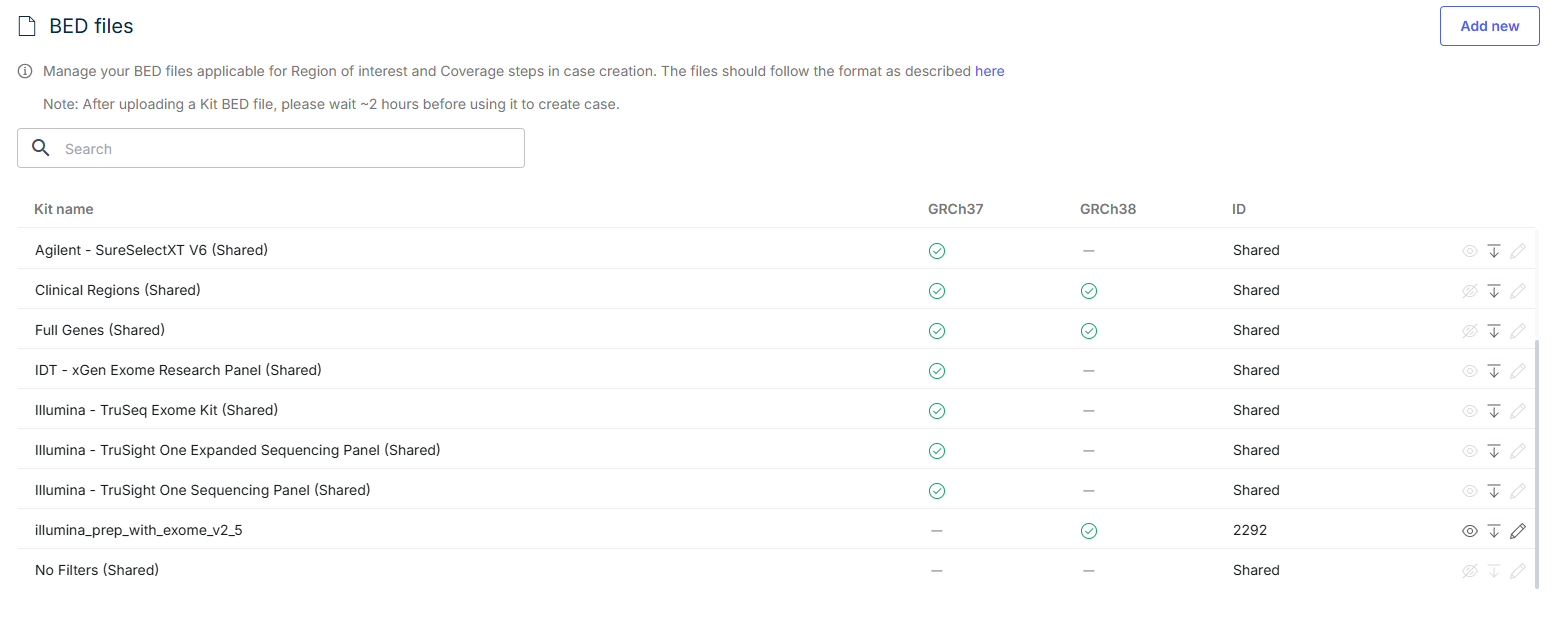
The table on this page lists all available BED files, including their kit name, genome build (GRCh37 or GRCh38), and ID. You can view, edit, or delete files as needed, and add new ones using the **Add New** button.
{% hint style="info" %}
**Note:** After uploading a kit BED file, please wait \~2 hours before using it to create case.
{% endhint %}
[^1]: BED (Browser Extensible Data)—a text file format used to store genomic regions as coordinates and associated annotations
---
# Agent Instructions
This documentation is published with GitBook. GitBook is the documentation platform designed so that both humans and AI agents can read, navigate, and reason over technical content effectively. Learn more at gitbook.com.
## Querying This Documentation
If you need additional information that is not directly available in this page, you can query the documentation dynamically by asking a question.
Perform an HTTP GET request on the current page URL with the `ask` query parameter, and the optional `goal` query parameter:
```
GET https://help.connected.illumina.com/emedgene/emedgene-analyze-manual/settings/organization_settings_-330+/kit-management/bed-files.md?ask=&goal=
```
`ask` is the immediate question: it should be specific, self-contained, and written in natural language.
`goal` is optional and describes the broader end goal you are ultimately trying to accomplish on behalf of the user. GitBook uses it to tailor the answer towards what is most useful for that goal.
The response will contain a direct answer to the question and relevant excerpts and sources from the documentation.
Use this mechanism when the answer is not explicitly present in the current page, you need clarification or additional context, or you want to retrieve related documentation sections.