> For the complete documentation index, see [llms.txt](https://help.connected.illumina.com/llms.txt). Markdown versions of documentation pages are available by appending `.md` to page URLs; this page is available as [Markdown](https://help.connected.illumina.com/emedgene/emedgene-analyze-manual/variant-visualization/variant-visualization-tool.md).
# Variant visualization tool
The **Variant visualization tool** in Emedgene is based on the [Integrative Genomics Viewer (IGV)](http://software.broadinstitute.org/software/igv/home). It provides a high-resolution, interactive genomic view for variant interpretation.
A customizable, [IGV](http://software.broadinstitute.org/software/igv/home)-based viewer enables visual review of alignment and annotation data for validating and interpreting variant calls.
The viewer is embedded in the [**Visualization tab**](/emedgene/emedgene-analyze-manual/variant_page/visualization_section.md) of the **Variant page** and is accessible from the [**Analysis tools tab**](/emedgene/emedgene-analyze-manual/reviewing_a_case/analysis-tools-tab-beta-v100.39.0+.md) in **New mode** (v100.39.0+).
## Popup visualization window (v100.40.0+)
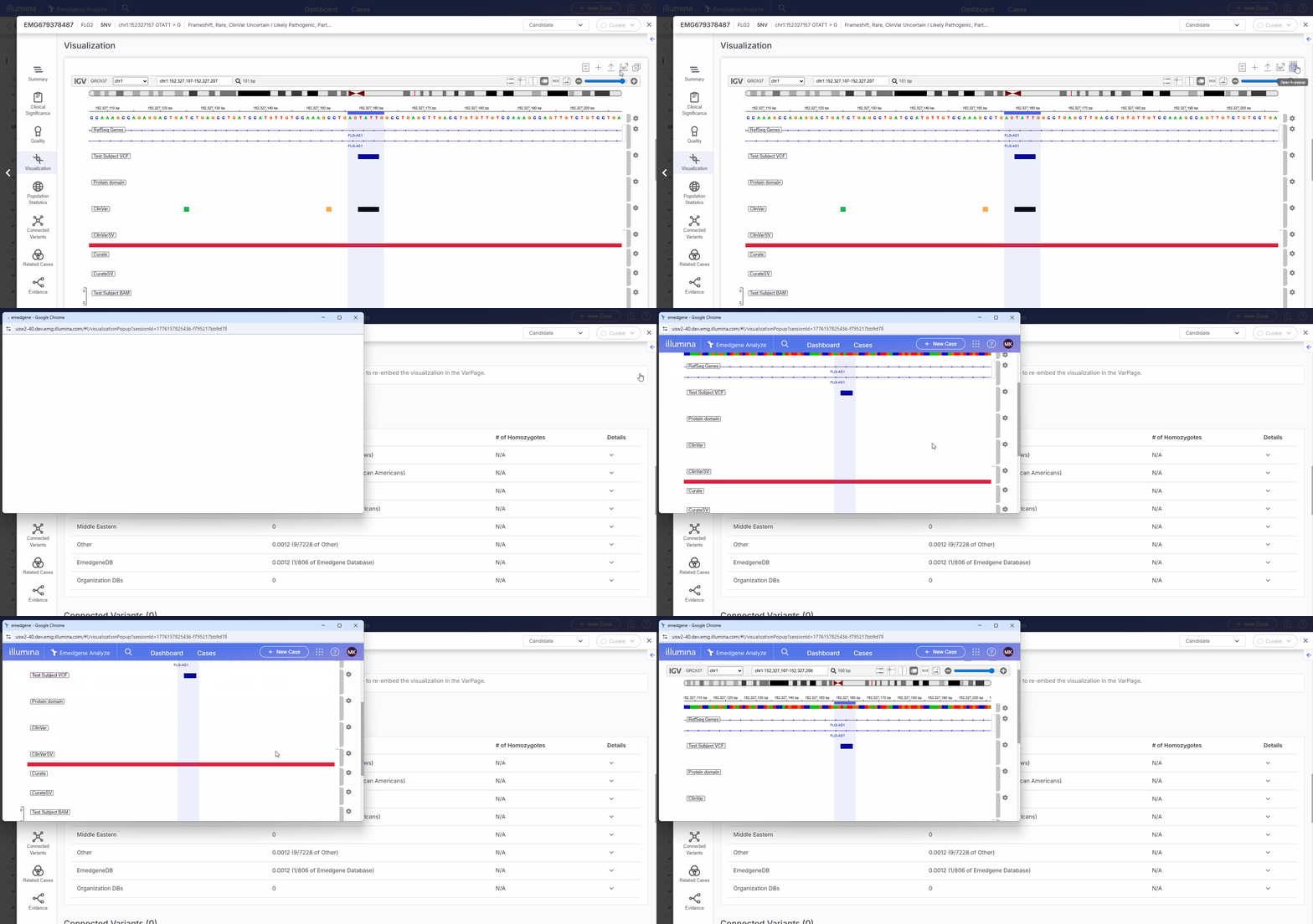
In v100.40.0+, you can open the variant visualization tool in a separate window to support flexible review, including multi-monitor workflows.
* To open the visualization tool in a new window, select **Open in popup** in the top navigation panel. The visualization is moved from the original page into the popup window, and the embedded visualization is hidden.
* Navigating between variants continues to update the visualization in real time.
* Closing the popup returns the visualization to the original page.
Use the tool to review sequencing alignments, population data, functional predictions, curated annotations, and other supporting evidence in genomic context.
The visualization tool supports SNVs, indels, CNVs, STRs, and variants called with DRAGEN MRJD caller or DRAGEN Targeted caller.
## v100.40.0+
In v100.40.0 and newer:
* The **Variant visualization tool** is accessible from the [**Visualization tab**](/emedgene/emedgene-analyze-manual/variant_page/visualization_section.md) on the **Variant page** and from the [**Analysis tools tab**](/emedgene/emedgene-analyze-manual/reviewing_a_case/analysis-tools-tab-beta-v100.39.0+.md) in **New mode**.
* The improved [**Track Manager**](/emedgene/emedgene-analyze-manual/variant-visualization/variant-visualization-tool/track-manager-v100.40.0+.md) lets you control which tracks are displayed and their order, and reset your view to your organization defaults.
* More [visualization tracks](/emedgene/emedgene-analyze-manual/variant-visualization/variant-visualization-tool/visualization-tracks.md) are available.
* You can open the **Variant visualization tool** in a popup window.
## v100.39.0 and older
In v100.39.0:
* The **Variant visualization tool** is accessible from the [**Visualization tab**](/emedgene/emedgene-analyze-manual/variant_page/visualization_section.md) on the **Variant page** and from the [**Analysis tools tab**](/emedgene/emedgene-analyze-manual/reviewing_a_case/analysis-tools-tab-beta-v100.39.0+.md) in **New mode**.
In v100.39.0 and older:
* [**Track Manager**](/emedgene/emedgene-analyze-manual/variant-visualization/variant-visualization-tool/viewing-modes.md) lets you control which tracks are displayed, individually and by category.
---
# Agent Instructions
This documentation is published with GitBook. GitBook is the documentation platform designed so that both humans and AI agents can read, navigate, and reason over technical content effectively. Learn more at gitbook.com.
## Querying This Documentation
If you need additional information that is not directly available in this page, you can query the documentation dynamically by asking a question.
Perform an HTTP GET request on the current page URL with the `ask` query parameter, and the optional `goal` query parameter:
```
GET https://help.connected.illumina.com/emedgene/emedgene-analyze-manual/variant-visualization/variant-visualization-tool.md?ask=&goal=
```
`ask` is the immediate question: it should be specific, self-contained, and written in natural language.
`goal` is optional and describes the broader end goal you are ultimately trying to accomplish on behalf of the user. GitBook uses it to tailor the answer towards what is most useful for that goal.
The response will contain a direct answer to the question and relevant excerpts and sources from the documentation.
Use this mechanism when the answer is not explicitly present in the current page, you need clarification or additional context, or you want to retrieve related documentation sections.