> For the complete documentation index, see [llms.txt](https://help.connected.illumina.com/llms.txt). Markdown versions of documentation pages are available by appending `.md` to page URLs; this page is available as [Markdown](https://help.connected.illumina.com/emedgene/emedgene-analyze-manual/variant-visualization/variant-visualization-tool/visualization-tracks/default-tracks.md).

# Default tracks

These visualization tracks provide the core genomic context for variant review and cannot be hidden from the view in **Track Manager**.

## FASTA

The **FASTA** track displays the reference genome sequence.

<figure><img src="/files/z24G1yPenDck2JI4eIRE" alt=""><figcaption><p><strong>FASTA</strong> track</p></figcaption></figure>

## RefSeq Genes

The **RefSeq Genes** track displays gene(s) and transcript(s) affected by the variant.

<figure><img src="/files/Vxy5U8Bd5vh75aRzJJpm" alt=""><figcaption><p><strong>RefSeq Genes</strong> track</p></figcaption></figure>

## Protein domain

The **Protein domain** track uses data from UniProt GRCh38 with liftover to GRCh37.

Click a domain to open more details:

* Protein domain name
* Start and end positions
* Domain ID
* Link to UniProt

This track is available for cases created with knowledge graph version 73 or later.

<figure><img src="/files/VyuayS6Jgqdjl339klj2" alt=""><figcaption><p><strong>Protein domain</strong> track</p></figcaption></figure>

## Test Subject VCF

The **Test Subject VCF** track shows the proband variants stored in the input VCF.

Use it to review nearby variants, including MNVs and large CNVs.

Click a variant position to open a popup with the variant details.

<figure><img src="/files/JDMDMnZpfYKJBzPwZSIy" alt=""><figcaption><p><strong>Test Subject VCF</strong> track</p></figcaption></figure>

## Test Subject BAM

The **Test Subject BAM** track shows BAM or CRAM read alignment for the proband. Use this track to review read support for variants in the genomic context of the case.

Starting in v100.40.0, the **Test Subject BAM** track supports two views:

* **Standard view**: Shows read alignment without phasing information. This is the default view and matches the **Test Subject BAM** behavior available before v100.40.0.
* **Phased view:** Groups reads by haplotype when phased BAM files are available.

{% hint style="info" %}
In v100.40.0+, for MRJD variants the **Test Subject BAM** track always opens in phased view.
{% endhint %}

### Standard view

In standard view, the **Test Subject BAM** track shows read mapping for the proband without grouping reads by haplotype.

<figure><img src="/files/c6Cq084jU809VCmxGTPC" alt=""><figcaption><p><strong>Test Subject BAM</strong> track in standard view, showing read alignment for the proband.</p></figcaption></figure>

#### Prerequisites for standard view

This track is available in:

* FASTQ cases
* VCF cases with [read alignment view enabled](/emedgene/emedgene-analyze-manual/variant-visualization/variant_visualization_setup/enabling_visualization_for_a_vcf_case.md)

### Phased view

In phased view, the **Test Subject BAM** track groups reads by haplotype and colors reads by phase block. Use this view to compare read support across haplotypes.

* **Red reads** support haplotype 1.
* **Blue reads** support haplotype 2.
* **Gray reads** are not phased. The system cannot confidently assign them to haplotype 1 or haplotype 2.

<figure><img src="/files/hkoYZOUEz27yD4WV2aXO" alt=""><figcaption><p><strong>Test Subject BAM</strong> track in phased view, showing proband reads grouped by haplotype.</p></figcaption></figure>

#### Prerequisites for phased view

To use phased view, upload output from DRAGEN 4.5 or later Germline analysis for Illumina TruPath Genome data with the case VCF. The upload must include one or both of the following file sets:

* Phased BAM and BAI files for phased variants:
  * `<sample_name>.bam`
  * `<sample_name>.bam.bai`
* MRJD phased BAM file for phased small variants in paralogous regions called with the DRAGEN Multi-region Joint Detection caller:
  * `<sample_name>.mrjd.phased.bam`

### Switching between views

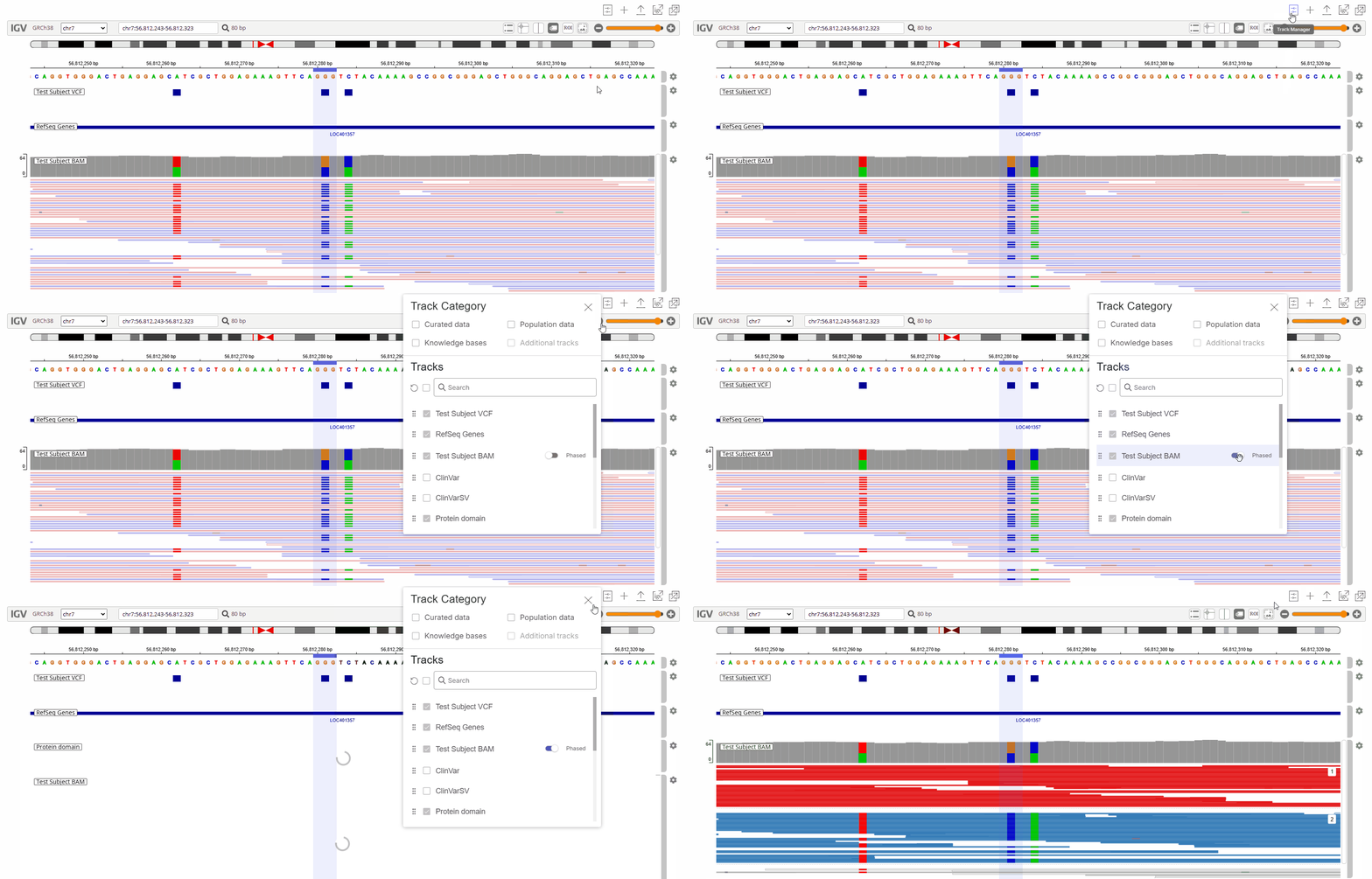
To switch from standard view to phased view, toggle on **Phased** next to **Test Subject BAM** in the [**Track Manager**](/emedgene/emedgene-analyze-manual/variant-visualization/variant-visualization-tool/track-manager-v100.40.0+.md). To switch back to standard view, toggle off **Phased**.

<figure><img src="/files/DdhC7w2WLUvlSK1IB9Ts" alt=""><figcaption><p>Enabling phased view for the <strong>Test Subject BAM</strong> track.</p></figcaption></figure>


---

# Agent Instructions
This documentation is published with GitBook. GitBook is the documentation platform designed so that both humans and AI agents can read, navigate, and reason over technical content effectively. Learn more at gitbook.com.

## Querying This Documentation
If you need additional information that is not directly available in this page, you can query the documentation dynamically by asking a question.

Perform an HTTP GET request on the current page URL with the `ask` query parameter:

```
GET https://help.connected.illumina.com/emedgene/emedgene-analyze-manual/variant-visualization/variant-visualization-tool/visualization-tracks/default-tracks.md?ask=<question>
```

The question should be specific, self-contained, and written in natural language.
The response will contain a direct answer to the question and relevant excerpts and sources from the documentation.

Use this mechanism when the answer is not explicitly present in the current page, you need clarification or additional context, or you want to retrieve related documentation sections.