> For the complete documentation index, see [llms.txt](https://help.connected.illumina.com/llms.txt). Markdown versions of documentation pages are available by appending `.md` to page URLs; this page is available as [Markdown](https://help.connected.illumina.com/emedgene/emedgene-curate-manual/curate_variants/curate_variant_page/acmg-classification-card.md).
# ACMG classification card
## Card contents
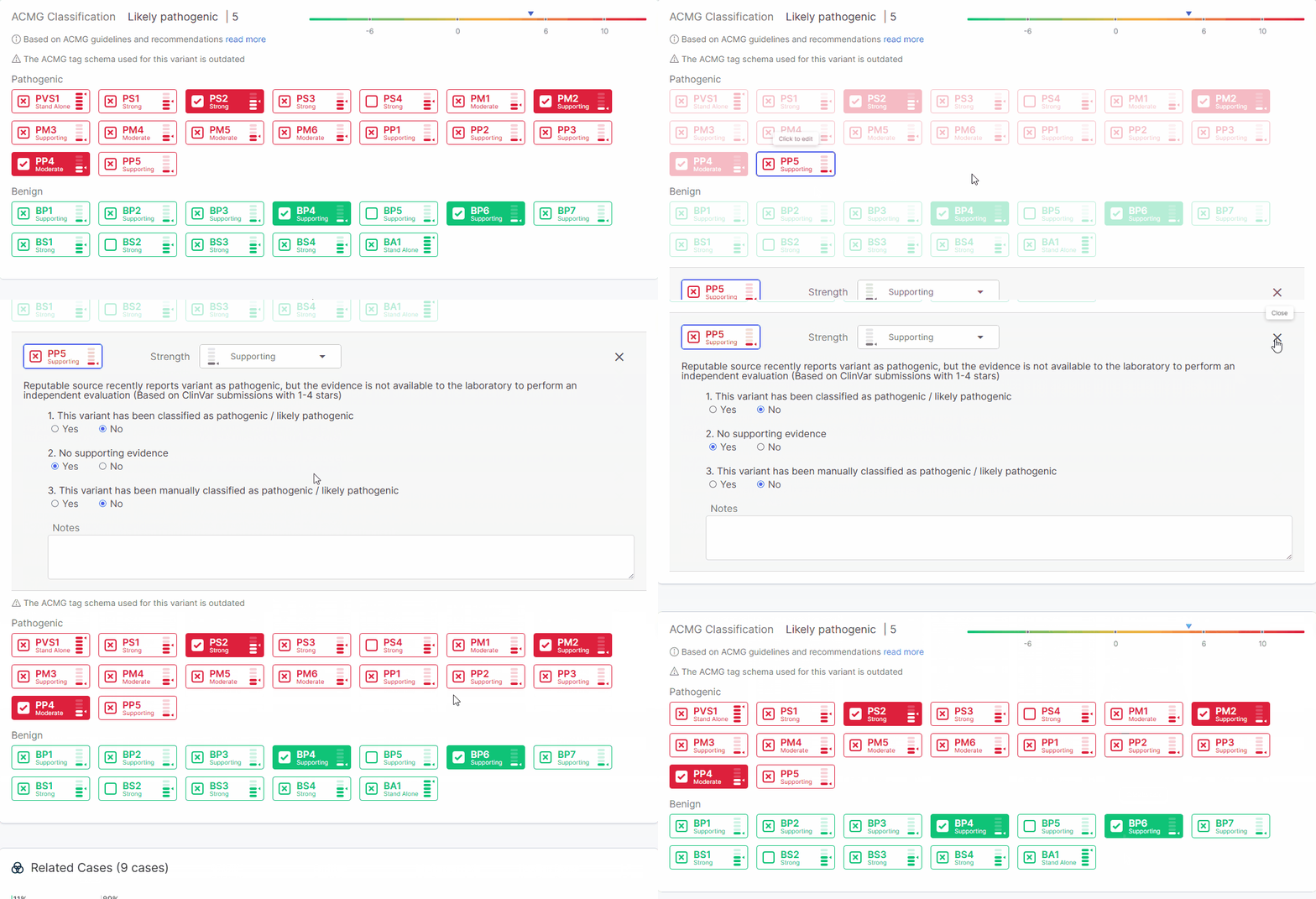
The **ACMG classification card** on the [**Curate Variant page**](/emedgene/emedgene-curate-manual/curate_variants/curate_variant_page.md) lets you apply ACMG evidence tags, review the resulting score and classification, and manage tag details for the variant.
This card appears only for small variants, not copy number variants.
Use it to:
* Review the overall ACMG classification and score, plus per-tag details such as question answers, strength, user notes, and manual update history
* Activate or inactivate ACMG evidence tags, modify tag strength, and update tag notes
ACMG classification card
## ACMG score and classification calculation
The ACMG score and classification are calculated from the applied ACMG tags. When tags are added or updated, the card recalculates both values.
For SNV-specific ACMG logic, see [Logic behind ACMG classification of SNVs](/emedgene/emedgene-analyze-manual/variant_page/evidence_section/logic_behind_acmg_classification_of_snvs.md) and [ACMG SNV criteria evaluation](/emedgene/emedgene-analyze-manual/variant_page/evidence_section/acmg-snv-criteria-evaluation.md).
### Outdated ACMG schema warning
When working in **Curate**, **Emedgene** keeps track of the ACMG schema version used to calculate the ACMG score for each curated variant.
Using an outdated schema may cause the classification to miss updated logic, use outdated strength definitions, or include tags that are no longer supported.
If the variant was curated using an older schema than the one currently active in **Analyze**, you’ll see a warning in the **ACMG classification card**. In that case you may want to review and update the classification, either directly on **Curate Variant page** or through the [**Update**](/emedgene/emedgene-analyze-manual/variant_page/curate-actions-in-analyze/update-in-curate.md) **Curate** **action** in **Analyze**.
## ACMG data synchronization between Curate and Analyze
### How Curate ACMG data appears in Analyze
ACMG tags stored in **Curate** are automatically applied in the [**ACMG SNV Classification wizard**](/emedgene/emedgene-analyze-manual/variant_page/evidence_section/acmg_snv_classification_wizard.md) on the **Variant page** in **Analyze**. This includes:
* Tag status
* Answers to tag questions
* Tag strength
* Tag notes
ACMG classifications from **Curate** are marked with a **Curate icon** ().
### How to update Curate ACMG data from Analyze
After reviewing ACMG data in **Analyze**, you can send updates back to **Curate** through the [**Update**](/emedgene/emedgene-analyze-manual/variant_page/curate-actions-in-analyze/update-in-curate.md) **Curate** **action**. This keeps ACMG annotations synchronized across **Curate** and **Analyze**.
## ACMG data update traceability
The [**Activities panel**](/emedgene/emedgene-curate-manual/curate_variants/curate_variant_page/activities-panel.md) on the **Curate Variant page** logs ACMG data changes made in **Curate** and through the [**Update**](/emedgene/emedgene-analyze-manual/variant_page/curate-actions-in-analyze/update-in-curate.md) **Curate** **action** in **Analyze**.
* Tag activation and inactivation, tag strength changes, and overall classification updates are logged with specific messages.
* Changes to tag notes and question answers are logged as a general update "Variant ACMG tags were updated".
---
# Agent Instructions
This documentation is published with GitBook. GitBook is the documentation platform designed so that both humans and AI agents can read, navigate, and reason over technical content effectively. Learn more at gitbook.com.
## Querying This Documentation
If you need additional information that is not directly available in this page, you can query the documentation dynamically by asking a question.
Perform an HTTP GET request on the current page URL with the `ask` query parameter, and the optional `goal` query parameter:
```
GET https://help.connected.illumina.com/emedgene/emedgene-curate-manual/curate_variants/curate_variant_page/acmg-classification-card.md?ask=&goal=
```
`ask` is the immediate question: it should be specific, self-contained, and written in natural language.
`goal` is optional and describes the broader end goal you are ultimately trying to accomplish on behalf of the user. GitBook uses it to tailor the answer towards what is most useful for that goal.
The response will contain a direct answer to the question and relevant excerpts and sources from the documentation.
Use this mechanism when the answer is not explicitly present in the current page, you need clarification or additional context, or you want to retrieve related documentation sections.
.png?alt=media) ).
### How to update Curate ACMG data from Analyze
After reviewing ACMG data in **Analyze**, you can send updates back to **Curate** through the [**Update**](/emedgene/emedgene-analyze-manual/variant_page/curate-actions-in-analyze/update-in-curate.md) **Curate** **action**. This keeps ACMG annotations synchronized across **Curate** and **Analyze**.
## ACMG data update traceability
The [**Activities panel**](/emedgene/emedgene-curate-manual/curate_variants/curate_variant_page/activities-panel.md) on the **Curate Variant page** logs ACMG data changes made in **Curate** and through the [**Update**](/emedgene/emedgene-analyze-manual/variant_page/curate-actions-in-analyze/update-in-curate.md) **Curate** **action** in **Analyze**.
* Tag activation and inactivation, tag strength changes, and overall classification updates are logged with specific messages.
* Changes to tag notes and question answers are logged as a general update "Variant ACMG tags were updated".
---
# Agent Instructions
This documentation is published with GitBook. GitBook is the documentation platform designed so that both humans and AI agents can read, navigate, and reason over technical content effectively. Learn more at gitbook.com.
## Querying This Documentation
If you need additional information that is not directly available in this page, you can query the documentation dynamically by asking a question.
Perform an HTTP GET request on the current page URL with the `ask` query parameter, and the optional `goal` query parameter:
```
GET https://help.connected.illumina.com/emedgene/emedgene-curate-manual/curate_variants/curate_variant_page/acmg-classification-card.md?ask=
).
### How to update Curate ACMG data from Analyze
After reviewing ACMG data in **Analyze**, you can send updates back to **Curate** through the [**Update**](/emedgene/emedgene-analyze-manual/variant_page/curate-actions-in-analyze/update-in-curate.md) **Curate** **action**. This keeps ACMG annotations synchronized across **Curate** and **Analyze**.
## ACMG data update traceability
The [**Activities panel**](/emedgene/emedgene-curate-manual/curate_variants/curate_variant_page/activities-panel.md) on the **Curate Variant page** logs ACMG data changes made in **Curate** and through the [**Update**](/emedgene/emedgene-analyze-manual/variant_page/curate-actions-in-analyze/update-in-curate.md) **Curate** **action** in **Analyze**.
* Tag activation and inactivation, tag strength changes, and overall classification updates are logged with specific messages.
* Changes to tag notes and question answers are logged as a general update "Variant ACMG tags were updated".
---
# Agent Instructions
This documentation is published with GitBook. GitBook is the documentation platform designed so that both humans and AI agents can read, navigate, and reason over technical content effectively. Learn more at gitbook.com.
## Querying This Documentation
If you need additional information that is not directly available in this page, you can query the documentation dynamically by asking a question.
Perform an HTTP GET request on the current page URL with the `ask` query parameter, and the optional `goal` query parameter:
```
GET https://help.connected.illumina.com/emedgene/emedgene-curate-manual/curate_variants/curate_variant_page/acmg-classification-card.md?ask=