New in Emedgene V100.40.0 (March 30th, 2026)
Introduction
These Release Notes detail the key new features, enhancements, and bug fixes available in Emedgene v100.40.0.
Important: The reporting service has been updated in this version, so please thoroughly test all reports for compatibility before upgrading. Contact Illumina bioinformatics support if you encounter any issues.
Release highlights:
AI-supported interpretation for TruPath Genome, support for phasing information and increased interpretation confidence for singletons.
Emedgene now supports advanced filter operators (OR, Exclude) to enable more streamlined preset filters.
New AI tools: Phenotype hierarchy – users can adjust phenotype weights and Phenomeld will be recalculated on the fly and support for PromotorAI.
Enhanced visualization tools: Save visualization settings per-user, per-org and pop-out embedded IGV to a new window.
Additional voice-of-customer improvements:
View case progress and remaining time on the Cases page
2-way CNV overlap in related cases
Displaying more DRAGEN SV metrics
Support for ingesting DRAGEN HTML reports in Add New Case
Assign case participants in Add New Case batch/API
WGS pipeline speed down to 1.5 hours
Curate batch upload supports ACMG and update features
V36.10 will become obsolete on June 30th, 2026. Please plan your upgrade ahead of this date.
The software release includes the following components, which can be selected independently:
· Workbench 100.40
· Pipeline 100.40
Interpret TruPath Genome in Emedgene
This version provides AI-supported interpretation for TruPath Genome data.
With TruPath data in Emedgene, users can maintain their established workflows, using all existing features including AI shortlisting, while taking advantage from the new key proximity-aware long-range TruPath outputs. Emedgene V100.40 enables a streamlined interpretation path for the new TruPath outputs.
Phasing – enabling interpretation confidence in singletons.
STRs with higher accuracy in size estimation than ever before.
More accurate interpretation with copy resolution in homologous genes.
Quickly zero in on the most relevant SV calls, including BNDs (Q1) and inferred balanced events (Q2).
TruPath SNV phasing in Emedgene
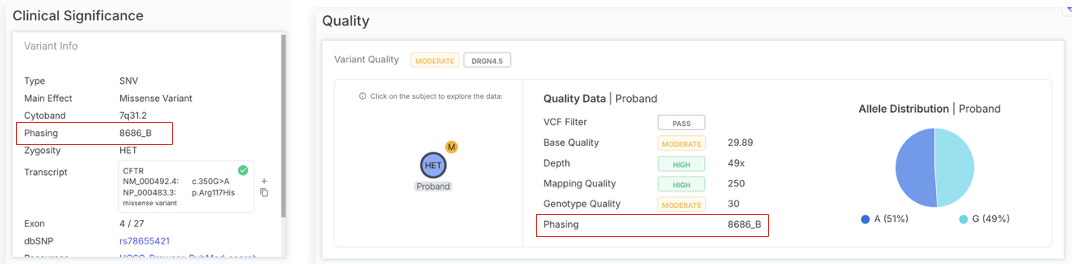
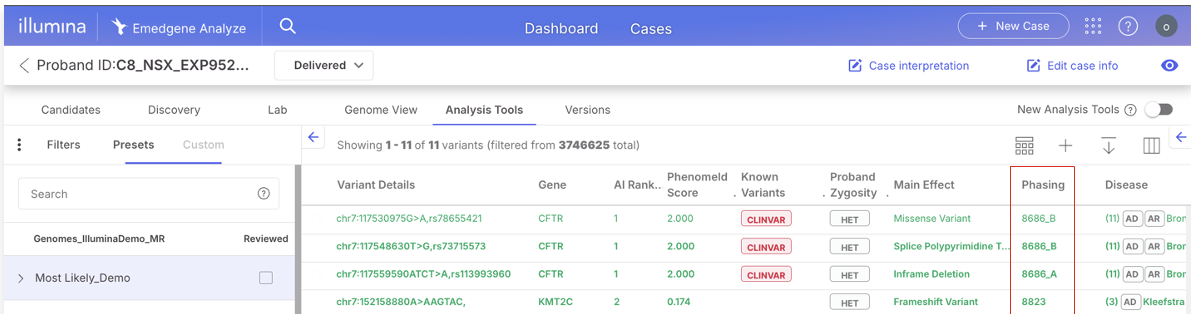
View variant phasing data, the phase set and allele context (PS/GT) in the analysis tools, variant page variant info and quality tabs.


Compound heterozygous logic in has been updated to leverage phase set and allele context for more accurate cis/trans determination in singletons. The AI shortlist will prioritize compound hets from TruPath data, and compound het inheritance filters will return results from singletons.
Note: Connected Variants will support Constellation Compound Het in V100.41.
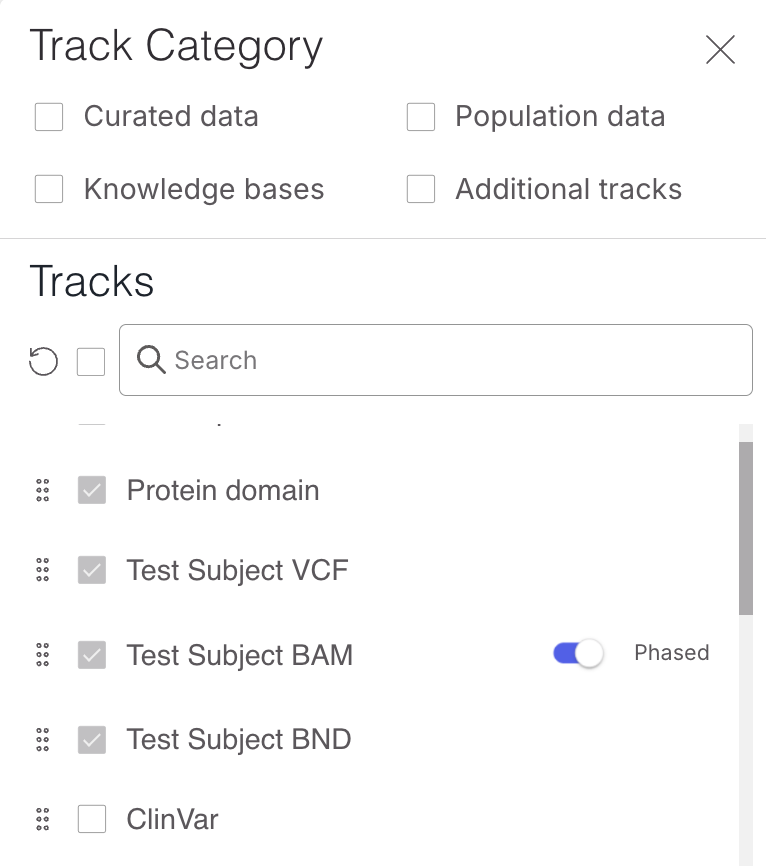
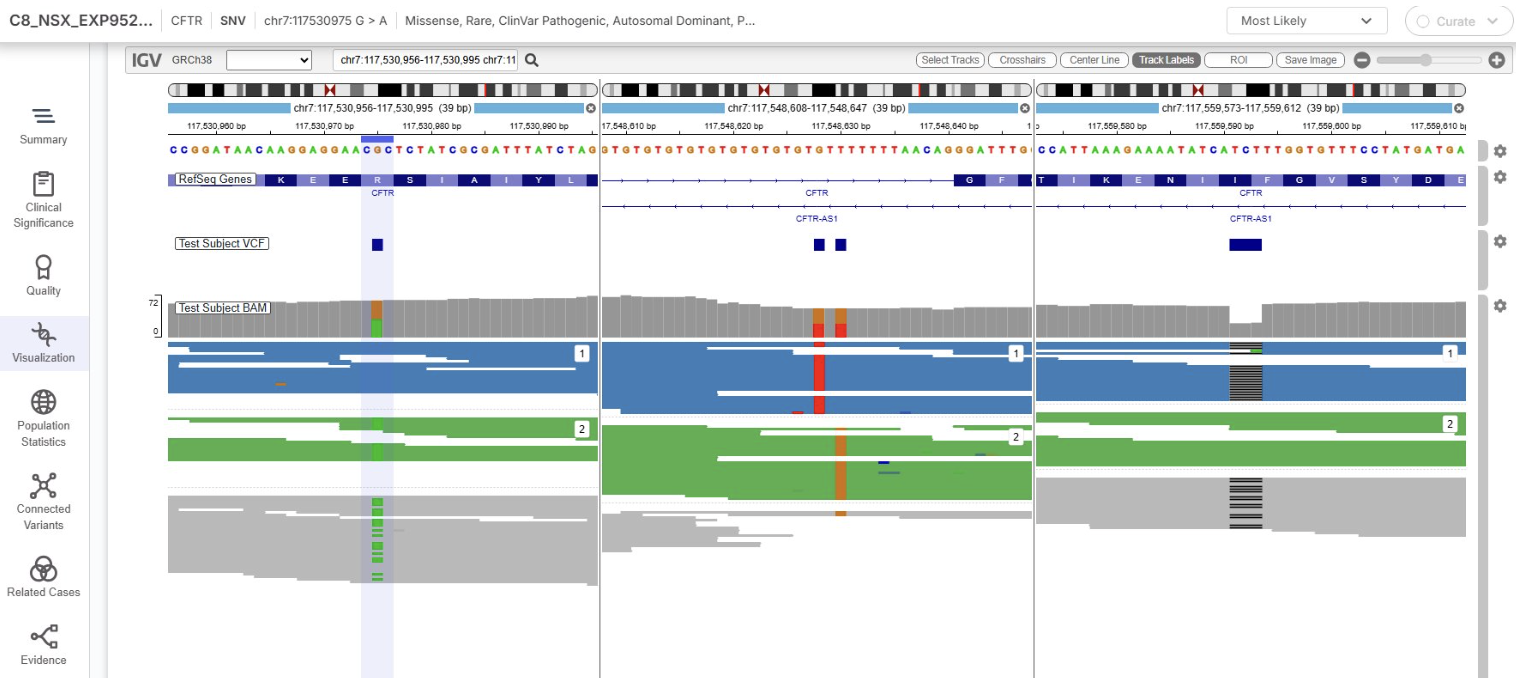
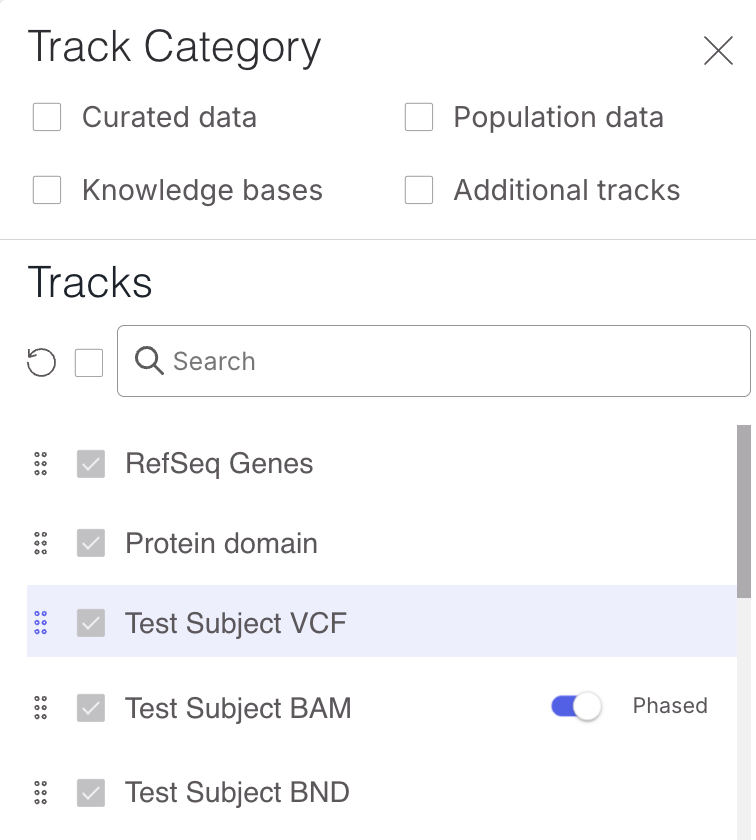
Easily visualize the phased BAM in the embedded IGV in the Analysis Tools and Variant page. In the new visualization track selector, you can display the phased BAM at a click.

This will display the BAM by phasing group. You can further toggle the settings to color by PS and show mismatches to improve visualization capabilities. By pasting multiple coordinates into the IGV window, the screen will automatically split and enable the ability to inspect phased variants side by side (future enhancements are planned to eliminate manual steps).

IGV's default setting is to show <30 kb, you can change view preference.
Phased BAM will color each phasing group and show mismatches by default in V100.40.100 (April 2026).
The phased blocks track will be available in V100.40.100 (April 2026).
TruPath STRs in Emedgene
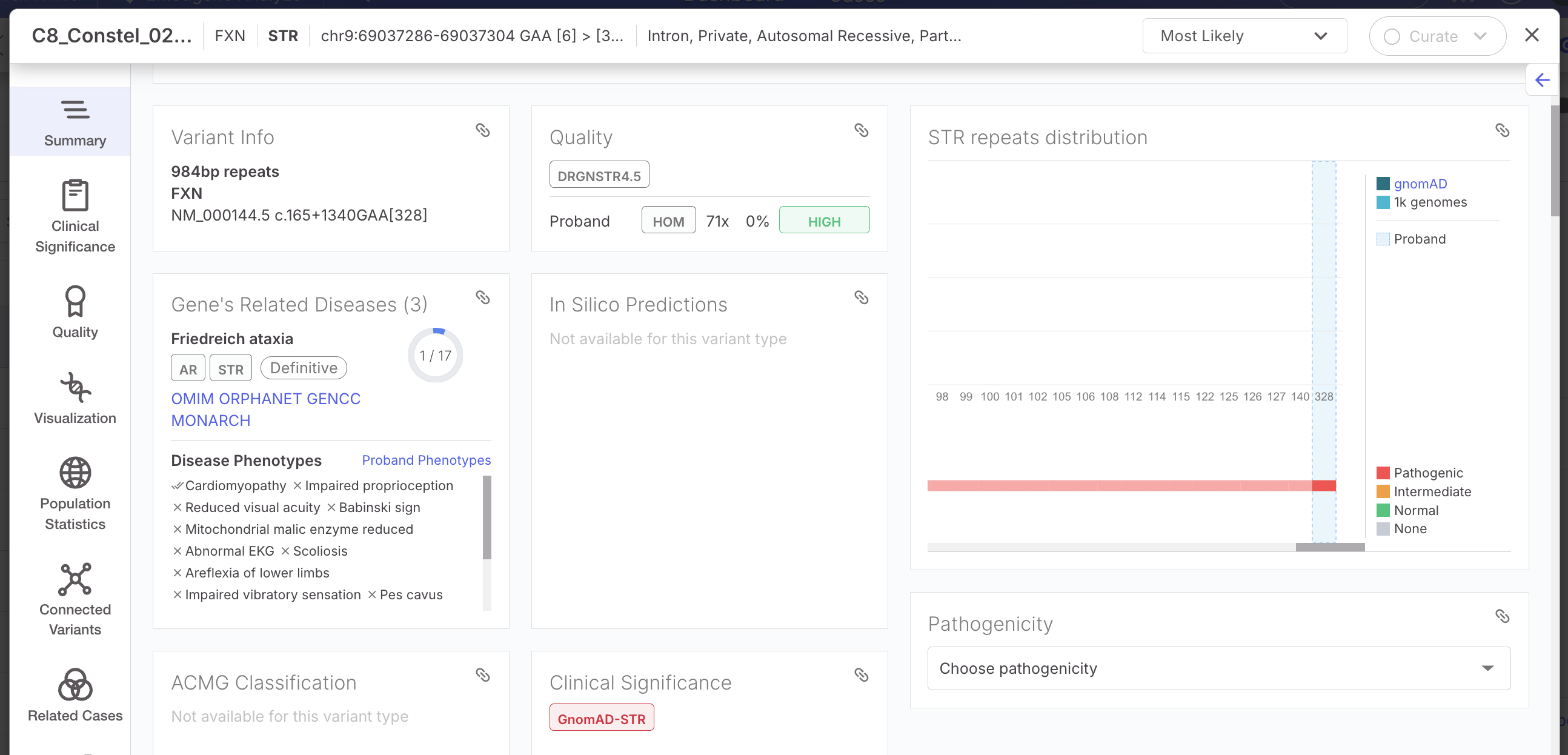
TruPath extends STR length estimation to thousands of KB. AI prioritization and all existing STR features in Emedgene will apply to TruPath outputs.

TruPath MRJD caller in Emedgene – copy resolution in homologous genes
TruPath provides haplotype-resolved small variants in 10 genes at launch: SMN1/2, PMS2, RCCX RCCX locus contains two clinically relevant genes – CYP21A2 and TNXB), STRC, NCF1, CYP2D6, CYP11B1, USP18 and CFHR.
Emedgene will support TruPath MRJD outputs in 100.40.100 (April 2026 patch) and continuously improve the interpretation path in subsequent releases.
Visualization of MRJD BAM in Emedgene is supported in V100.40.
TruPath SVs in Emedgene
TruPath colocation information eliminates 80% of false positive inter-chromosomal translocations and inversions without sensitivity impact.
The significantly improved BND outputs are available to visualize using the ‘Test Subject BND’ track in embedded and desktop IGV.
Supported DRAGEN 4.5 TruPath outputs
Category
Output
File Type
Filename suffix (canonical)
Description
Phasing
Proximity-aware aligned reads
BAM
.bam
Reads annotated with HP (haplotype), PS (phase block), and BX (template id)
Requires .bai in same folder
Phasing
Phase blocks
GTF
.phase_blocks.gtf.gz
Phase block intervals for visualization/metrics
(Will be supported in 100.40.100 Apr26)
Small Variants
Hard-filtered small variants
VCF
.hard-filtered.vcf.gz
Small variants with TruPath phasing support; hard-filtered
Small Variants
gVCF (optional)
gVCF
.gvcf.gz
Reference-confidence output when enabled
Structural Variants
Structural variant calls
VCF
.sv.vcf.gz
SV discovery output (TruPath-specific annotations may be present)
Paralog Resolution (MRJD)
MRJD primary variants
VCF
.mrjd.hard-filtered.vcf.gz
Haplotype/copy-number aware small variants in paralogous regions
Paralog Resolution (MRJD)
MRJD summary
JSON
.mrjd.json
Copy number estimates, region/haplotype assignments, status
Paralog Resolution (MRJD)
MRJD phased reads
BAM
.mrjd.phased.bam
Alignments within paralog regions with copy/haplotype assignment
STR Analysis
STR calls
VCF
.str.vcf.gz
Repeat expansion genotypes (DRAGEN-STR format)
DRAGEN report ingestion is supported for TruPath as expected, and will display unique proximity metrics.
Standard support for DRAGEN 4.5 outputs that do not utilize proximity aware mapping:
Type
DRAGEN Output
FASTQ
VCF (BYOD)
Notes
SV del/dup/ins
sv.vcf.gz
✕
✓
VNTR caller outputs are removed from the SV output and not supported on Emedgene yet.
CNV
CNV ASCN
CNV ASCN with Cytogenetics Modality
cnv.vcf.gz
✕
✓*
When running the new CNV ASCN command line, Emedgene will ingest del, dup and LOH variants.
*The new CNV-SV merged file is also supported. Do not use both the CNV and CNV-SV file.
Note that mosaic fraction is now displayed in the quality tab.
CNV-SV
CNV-SV ASCN
cnv_sv.vcf.gz
✕
✓*
When running the new CNV ASCN command line, Emedgene will ingest del, dup and LOH variants.
*The new CNV-SV merged file is also supported. Do not use both the CNV and CNV-SV file.
Targeted Callers
Targeted.vcf
Targeted.json
✕
✓
SMN, GBA, HBA, CYP21A2 w/o CNV, supported. Need to push both files to get SNV and CNV data.
Although SMN is supported in TruPath MRJD caller, DRAGEN recommends using both callers for complete information.
The targeted.vcf may contain phasing information when running TruPath.
Star Allele
Targeted.json
✕
✓
Star allele caller, CYP2D6 & CYP2B6 and HLA genes are supported.
Ploidy
ploidy.vcf
✕
✓
ROH Viz
roh.bed
✕
✓
BAF BigWig
hard-filtered.baf.bw
✕
✓
B-Allele frequency (BAF) output.
TNS BigWig
tn.bw
✕
✓
Bigwig representation of the tangent normalized signal.
Target Counts BigWig
target.counts.bw
✕
✓
BigWig representation of the target counts bins.
Quality metrics for TruPath and DRAGEN 4.5.2 Outputs
Variant Type/Caller
Emedgene Quality Calculations
SNV and small InDels
A variant is designated as Low quality if:
· The VCF/FILTER is not "PASS" OR the VCF/QUAL is less than 10
A variant is designated as High quality if:
· The VCF/FILTER is "PASS" AND the VCF/QUAL is greater than 30
All other variants are categorized as Moderate quality.
The VCF Filter value will be presented in the Variant Page | Quality tab.
CNVs
(called by the CNV_SV caller for genomes)
A variant will be designated as Low quality if:
· The VCF/FILTER is not "PASS" AND INFO field SVCLAIM = D
A variant will be designated as High quality if:
· The VCF/FILTER is "PASS" AND (INFO field SVCLAIM = D OR INFO field SVCLAIM = DJ) AND QUAL > 100.
All other variants are categorized as Moderate quality.
CNVs
(called by read-depth caller)
A variant will be designated as Low quality if:
· The VCF/FILTER is not "PASS"
A variant will be designated as High quality if:
· The VCF/FILTER is "PASS" AND VCF/QUAL is greater than 30
All other variants are categorized as Moderate quality.
CNV ASCN
CNV ASCN with Cytogenetics Modality
(whether output is in the CNV_SV caller or the read-depth caller)
A variant will be designated as Low quality if:
· The VCF/FILTER is not "PASS" OR VCF/QUAL is under 200
A variant will be designated as High quality if:
· The VCF/FILTER is "PASS" AND VCF/QUAL is greater than 500
All other variants are categorized as Moderate quality.
SVs
A variant will be designated as Low quality if:
· The SVLEN is greater than 50 kb OR the VCF/FILTER is not "PASS"
A variant will be designated as High quality if:
· The VCF/FILTER is "PASS" AND VCF/QUAL is greater than 500
All other variants are categorized as Moderate quality.
Ploidy
A variant will be designated as Low quality if:
· The VCF/FILTER is not "PASS"
A variant will be designated as Medium quality if:
· The VCF/FILTER is "PASS"
STR
A variant will be designated as Low quality if:
· The VCF/FILTER is not "PASS"
A variant will be designated as High quality if:
· The VCF/FILTER is "PASS"
Additional STR loci will always have low quality: ARX, HOXA13
MRJD SBS
A variant will be designated as Low quality if:
· The VCF/FILTER is not "PASS"
· The VARIANT is in “unreliable_loci.vcf” AND JGT is 0/0/0/1 or 0/0/1/1
· The VCF/FILTER is “PASS” AND INFO contains “MRJD_HS;REF_DIFF” AND FORMAT/GT = (0/0/0/1 OR 0/0/1/1 OR 0/0/0/0/0/1 OR 0/0/0/0/1/1 OR 0/0/0/1/1/1 OR 0/0/1/1/1/1)
A variant will be designated as High quality if:
· FILTER=PASS and INFO contains (“UNIQUELY_PLACED” OR “REGION_AMBIGUOUS” OR “MRJD_HS;ALT_LOCATION”)
All other variants are categorized as Moderate quality.
Note: Unreliable loci are sites where a common population allele in the pseudogene would be a pathogenic variant if that were present in the active gene.
In such cases, we would very frequently have a JGT of 0/0/0/1 or 0/0/1/1 due to the ALT allele being frequently present in the pseudogene, and that site would always be annotated as pathogenic in the gene position. Therefore, we mark that locus as low quality unless it's present in at least 3 copies of the segdup.
Targeted
A variant will be designated as Low quality if:
· Filter is not PASS
A variant will be designated as High quality if:
· FILTER=PASS
Star Alleles
All variants (star allele, CYP2D6, CYP2B6, HLA genes) are designated as High quality.
New! Advanced filter operators (OR, NOT) to reduce Preset Filters and case review time
Emedgene v100.40.0 introduces advanced filter operators in the Analysis Tools, giving geneticists the ability to build complex variant filtering strategies.
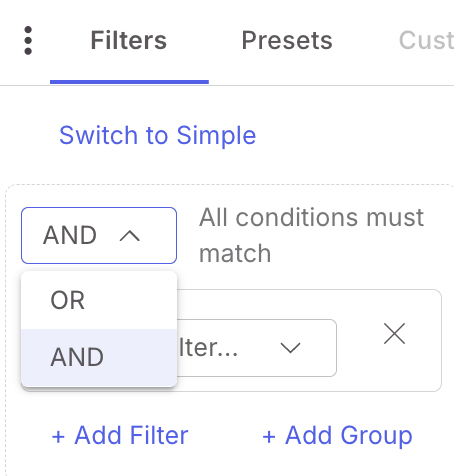
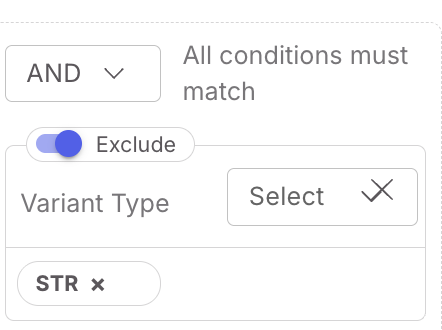
Users can combine multiple filters with logical operators -- AND to intersect results across criteria, or OR to join them, and Include or Exclude for each criteria.
The new presets allows users to nest any of these combinations into condition groups up to three levels deep.
This enables precise, multi-layered filtering logic that matches real-world interpretation workflows, such as filtering for variants that meet a frequency threshold AND belong to the target gene list, with downstream EXCLUSION of any variants classified as ClinVar Benign OR Curate Likely Benign OR Benign, as well as EXCLUSION of synonymous OR intronic variant consequences.
Creating and managing Advanced Operator Presets
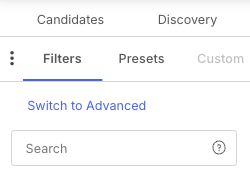
Advanced operator presets are created directly from the Analysis Tools Filters tab. Users with the existing preset role can switch to the new advanced filter interface via the "Switch to Advanced" link in the filter menu. The toggle is bidirectional. Once an advanced filter is configured, it can be saved as a named preset following the same rules as simple operator presets.

All existing preset management operations available under Organization Settings | Lab Workflow | Presets/Preset Groups now apply equally to advanced operator presets. Users can delete, lock, and edit advanced operator presets with the same permission model and behavior as simple operator presets.
Adding filters and configuring operators
In advanced operator mode, users first select whether to intersect queries through an AND or OR operator.

They build filters through a searchable selector that displays all available filtration criteria available. In this initial release, all available criteria are listed, without the category grouping available in simple presets. Please refer to the complete filter list for a definition of all available filters and operators when creating advanced operator presets. A planned V100.41 (July) enhancement will group criteria by category.

Each individual filter can be set to ‘include’ or ‘exclude’ mode, and once a filter and its mode are selected, the user inputs the specific criteria or threshold. Multiple filters can be added, removed, or reconfigured at any step before applying. Pressing "Apply" executes the composed query against the Analysis Tools variant table.

Each filter automatically presents the appropriate operator based on its data type. Available operator types:
Numeric fields with greater-than/lower-than thresholds.
Interval fields that display lower and upper bound operators.
Numeric float fields that can accept values with up to four decimal places of precision.
Boolean fields with True/False selectors.
Multi-select dropdowns populated with existing values.
Logical operators and condition groups.
The core of the advanced operator filter experience is the ability to set a logical operator that governs how all applied filters interact. Selecting AND applies intersection logic, returning only variants that satisfy every filter simultaneously. Selecting OR applies union logic, returning variants that satisfy any one of the applied filters. This operator applies uniformly across all filters at a given nesting level.
For more complex queries, users can create condition groups that bundle a subset of filters under their own logical operator. The operator at the parent level then governs the relationship between individual filters and condition groups at that level. Up to three levels of nesting are supported.
New AI Models: Phenotypic Hierarchy and Promotor AI
User-defined phenotypic hierarchy
In genetics practice, a comprehensive list of phenotypes is provided during case evaluation. However, not all recorded phenotypes carry equal relevance. For example, during the assessment of a pediatric subject with a neurodevelopmental disorder, a secondary or incidental finding may also be documented, such as a mild dermatological condition. While appropriate to record, such phenotypes may be of limited relevance to the primary question.
Most phenotype-driven tools treat all phenotypes as equally informative during gene prioritization. This uniform weighting may result in suboptimal rankings, whereby genes associated with secondary or unrelated phenotypes are prioritized above genes more directly linked to the core presentation. Although geneticists intuitively differentiate between primary and ancillary phenotypes, existing computational approaches have limited capacity to reflect this distinction.
To address this limitation, we introduced User-Defined Phenotype Hierarchy, an enhancement to our Phenomeld model, first available through the Analysis Tools | Phenomatch advanced filters. This feature enables users to directly control the relative weighting of individual patient phenotypes used by the Phenomeld phenotypic matching model.
Users may increase or decrease the influence of specific phenotypes on gene prioritization by assigning predefined weighting factors, including:
Critical: Applies a very high weighting factor (10×).
Strong: Applies an increased weighting factor (4×).
Standard: Default weighting (1×).
Ignore: Excludes the phenotype from the phenotypic matching model (0×).
Negative: Applies a negative weighting factor (−3×).
Add new phenotype: Enables inclusion and evaluation of newly identified phenotypes.
After adjusting phenotype weights, the phenotypic matching score is recalculated and displayed in the new Phenomeld Weighted column, leading to updated gene rankings and variant display within the analysis table. This functionality also allows users to add and evaluate the impact of newly identified phenotypes that were not included at the time of case creation.
Limitation: The Emedgene AI model does not rely on adjusted phenotype weights; therefore, AI-based rankings remain unchanged.
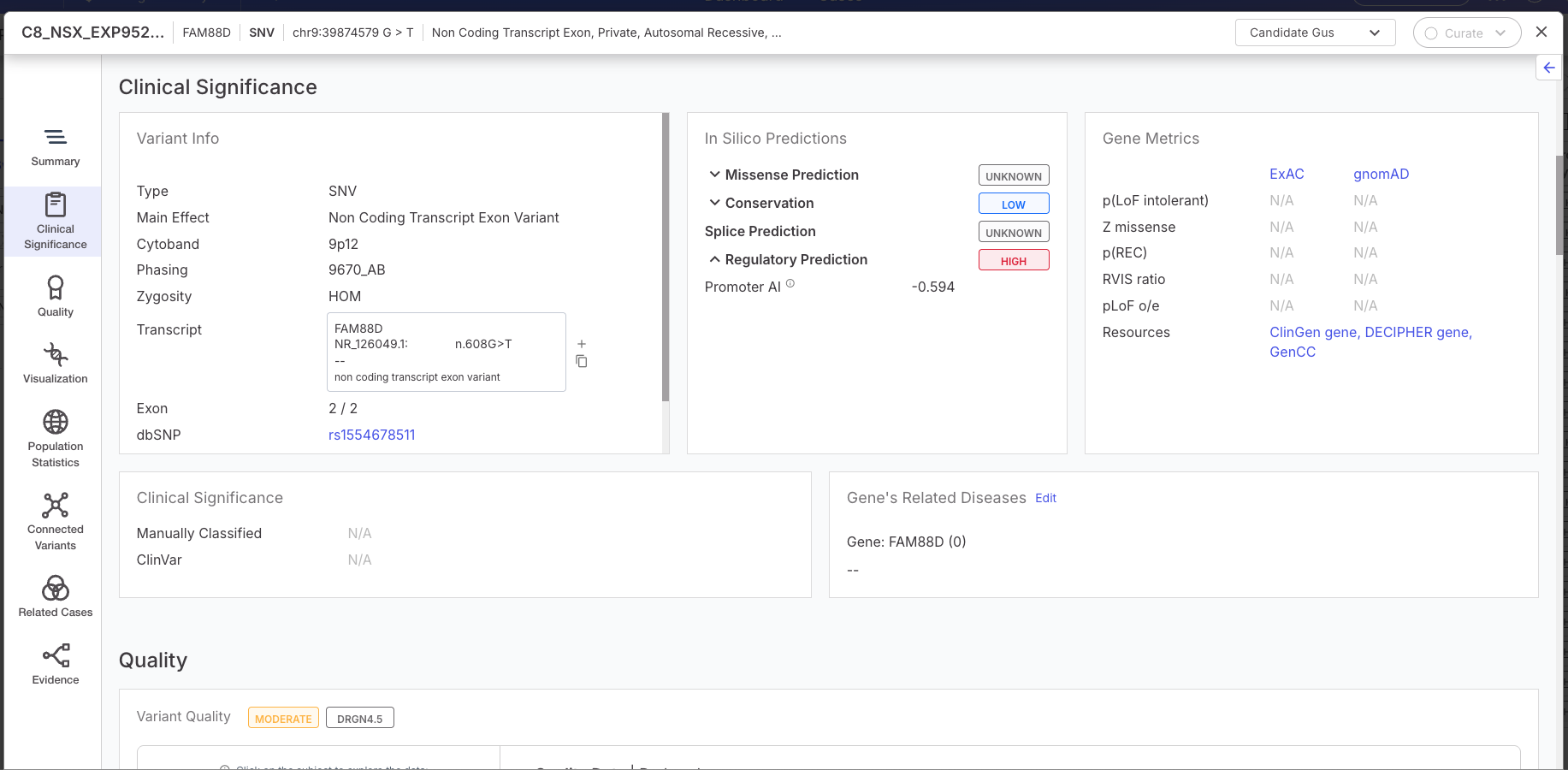
llumina’s proprietary PromotorAI score added to In Silico Predictions
Emedgene v100.40.0 integrates PromoterAI*, a deep learning model that predicts the regulatory impact of promoter variants on gene expression. SNV variants are annotated with precomputed PromoterAI scores ranging from −1 to +1, where negative values indicate potential under-expression and positive values indicate over-expression, selecting the most severe score per variant.
These scores feed into a new Regulatory Prediction severity classification (High ≤ −0.5, Moderate ≥ 0.5, Low between ±0.1 and ±0.5, Unknown within ±0.1) that contributes to the overall variant severity calculation. A "Regulatory Prediction" label (High, Moderate, Low) is displayed on the Variant Page under In Silico Predictions in both the Clinical Significance and Summary tabs.
* Kishore Jaganathan et al., Predicting expression-altering promoter mutations with deep learning. Science 389, eads7373 (2025). DOI:10.1126/science.ads7373
Future enhancements will add the ability to filter on and export PromotorAI scores.

More efficient visualization settings: Save per user; per organization & IGV pop out to a new window
Save your visualization track selection and order per user and per organization
Users can now configure their track selection and order within the Analysis Tools and Variant Page IGV component for a persistent visualization view that will reduce clicks and time per visualized variants. A new Track Manager button allows individual users to toggle tracks on and off, and also reorder tracks by dragging them within the manager. These per-user preferences persist across variants and cases, overriding the organization default until the user clicks "Reset tracks to default". Tracks that are unavailable for a given case are automatically hidden from the list.

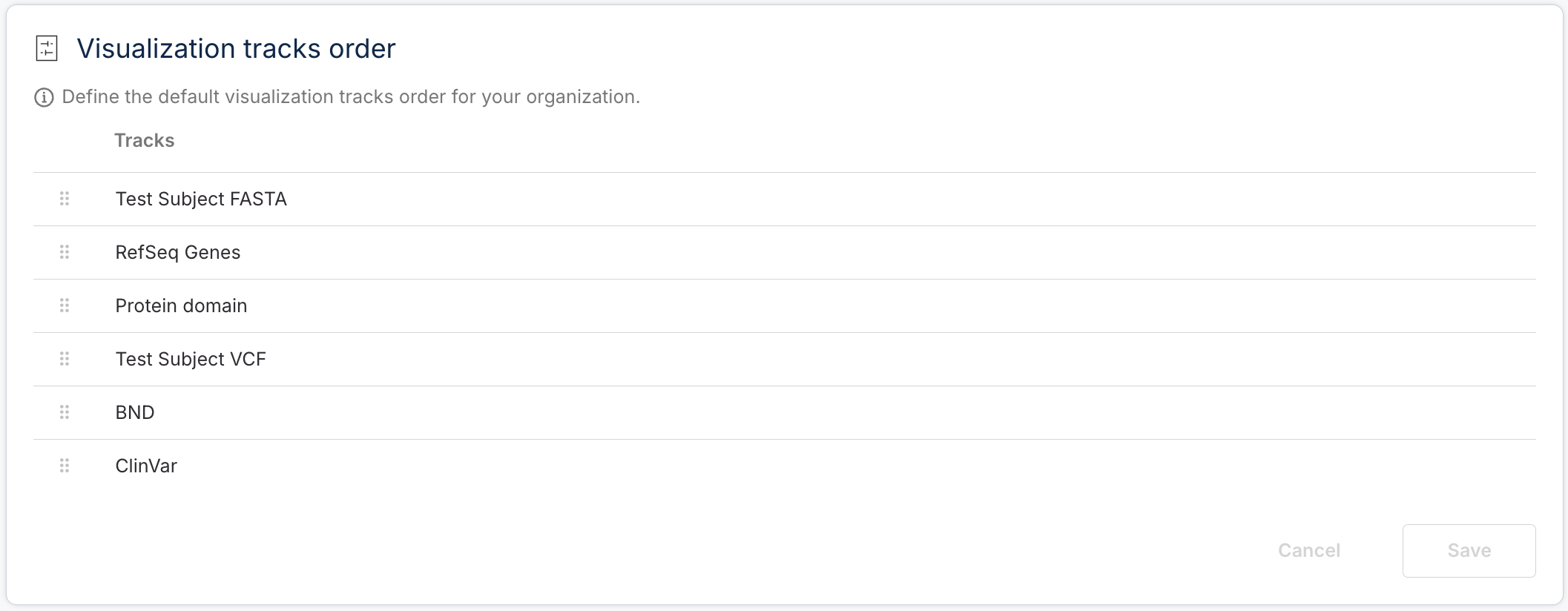
Administrators with the new "manage_track_order" role can now configure the default track selection and ordering for the entire organization via a new "Visualization tracks order" card in Organization Settings under Environment, where tracks can be reordered by drag-and-drop and all changes are logged in the Organization Settings activity feed.

Embedded IGV can be popped-out to a new window
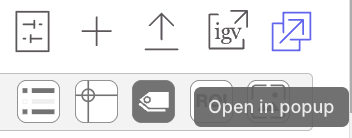
Users can now pop out the embedded IGV visualization into a separate, movable window that can also be dragged to a second monitor for a multi-screen workflow. From the new Analysis Tools combination variant table and visualization, a new button on the visualization component ‘Open in popup’ will move the visualization to a connected window while the in-page visualization panel is hidden. The detached window remains fully synchronized with the Analysis Tools Table, so navigating between variants will continue to update the visualization window in real time. Users can close the detached window at any time to return the visualization to its original inline position.

Voice of Customer Features
As always, a dedicated percentage of each release is allocated to customer feature requests.
Cases Page: Case progress visibility, case resolution column
Users now have real-time visibility into case pipeline progress directly from the Cases Page. Cases with "In progress," "Re-analyze," or "Issue Reported" statuses now display a five-step progress bar - Normalization, Annotations, Indexing, Quality Check, AI Shortlist - in the status column. Tooltips show elapsed run time and the estimated total time based on the pipeline version and test type.

Cases queued but not yet started show an empty progress bar labeled "In Progress".
Cases running a secondary pipeline display a striped bar. If an error occurs, the bar stops at the failed step and turns red for secondary analysis failures.

The case status dropdown and grouping headers have been refreshed with updated visuals, the "Issue Reported" error indicator has been relocated from below the case ID into the status column for better visibility.
Progress data does not refresh automatically, please refresh page if an update is needed.
Note: As part of this effort case status management has been moved from the Management Page to Organization Settings under Environment.
The cases page also has a new column available, the Case Resolution column. This column and filter can be used to enhance efficiency in panel cases, in conjunction with negative case automations.
Related Cases now displays two-way overlap for CNVs
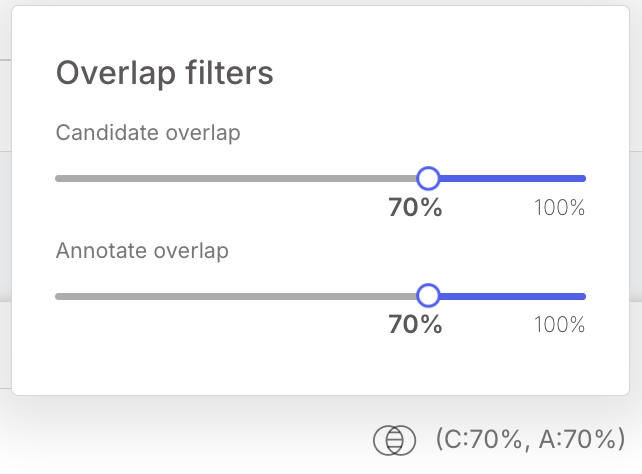
The Related Cases component (both in the Variant Page and Curate) now shows directional overlap percentage values in two directions for CNV variants.
Candidate Overlap - the length of overlap between the variant and the variants in related cases divided by the variant length.
Annotation Overlap - the overlap length divided by the length of the related cases variants.
Each direction can be filtered independently, allowing users to explore related cases more efficiently.

Emedgene displays more quality metrics for DRAGEN SV caller outputs
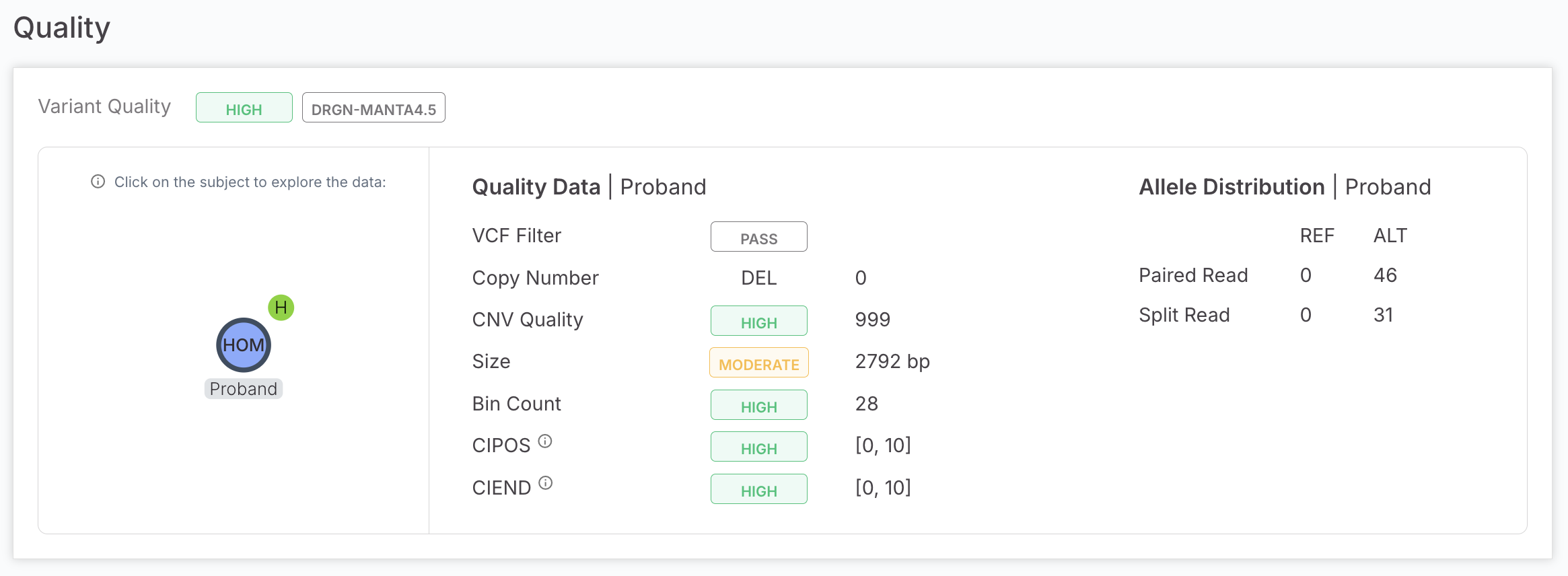
The Variant Page Quality tab for DRAGEN structural variants from the SV caller now has four new quality metrics from the VCF that improve breakpoint precision assessment and allele support, enabling more confident assessment of SV calls.
CIPOS and CIEND breakpoint confidence intervals are now displayed on the left-hand side of the Quality panel alongside existing metrics, each shown as a [lower, upper] integer pair with a colour-coded confidence label -- High (green, interval width 0–20 bp), Moderate (yellow, 21–100 bp), or Low (red, >100 bp) -- evaluated independently for both start and end positions.
On the right-hand side, under "Allele Distribution | Proband," Paired Read (PR) and Split Read (SR) support counts are displayed as raw reference and alternate allele counts without additional interpretation logic, giving users direct visibility into the read evidence supporting each SV call.

DRAGEN Report direct ingestion supported via API/batch upload
For customers running DRAGEN outside of Emedgene, ingestion of DRAGEN reports has been complex. We now support a simplified addition of a DRAGEN HTML link via API or batch upload.
Report must be in a <name>.report.html format.
Under Visualization Files, simply add a file path e.g. /DRGN_report/HG02.report.html.
Assign case participants while accessioning a case via API/batch upload
For customers who would like to assign case participants during case creation, we have added this option via API and batch upload.
A new optional field "Assignee ID" accepts a list of user IDs to assign as participants at creation time. Validation ensures each user belongs to the target organization or has it listed among their possible organizations.
The User IDs can be retrieved via a GET /api/organization/users/ to check the value of each id under the "hits" object.
WGS pipeline speed down to 1.5 hours
Annotation time for WGS has been reduced to ~1.5 hours. Customers using VCF+BAM flows will experience longer run times, but V100.40 will deliver a marked speed improvement for this flow.
Curate batch upload enhancements
Previous releases have enhanced Curate capabilities with an ability to Update variant interpretation and also to store ACMG classifications. These features are now supported from the Curate batch upload.
Analysis Tools | Multiselect, now supports export to Curate
The multi-select variants option now also supports export to Curate.
Cytogenetic Interpretation Flow Improvements
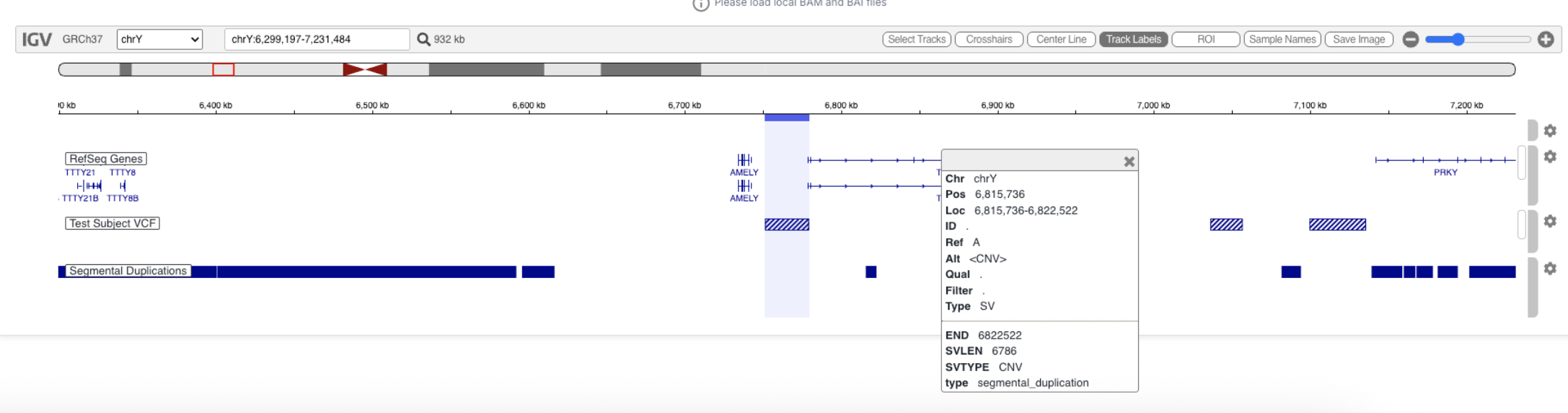
New: Visualize segmental duplications in IGV
Segmental duplications can now be visualized within IGV, helping to interpret CNVs in repetitive regions and distinguish true copy number changes from mapping artifacts.

General
Limitations:
Login | Emedgene does not support accents in User Names, despite support for these in IAM console. Users will not be able to login to the software.
Add New Case | No validation that input files are uncorrupted, case will be created and fail.
Add New Case | Selecting a disease should automatically suggest phenotypes, however, some diseases available for selection are from sources without phenotypes, and in that case, no phenotypes will be suggested.
Add New Case | Adding metrics.tar.gz files is not supported from BSSH.
Add New Case | API/Batch/UI discrepancies: Cannot add phenotypes for unaffected parent in batch upload.
Add New Case | API/Batch/UI discrepancies: Cannot use the same gVCF file for multiple samples from the UI.
Add New Case | API/Batch/UI discrepancies: No validation for sample name in array JSON from batch upload/API.
Add New Case | BSSH | Human readable BSSH paths in batch upload do not work for some customers with large BSSH accounts.
Add New Case | File name can be at most 255 characters.
Edit Case | Reanalysis | Custom disease is not saved when a case is reanalyzed.
Pipeline | All samples with unknown sex are treated in the pipeline as female. Therefore, the presence of two X chromosome copies is treated as the reference (REF) condition. Customers can toggle on a 'Keep ref variants' setting to view these variants.
Candidates Page | Compound het SNV-CNV variants will not display the automated CNV classification. Workaround - view variants from analysis table.
Candidates, Variant Page, Curate | Evidence graph & ACMG automation will not be calculated for CNVs over 20MB. They will not have a gene related disease card in Curate.
Candidates, Variant Page | After editing the evidence graph, phenotypic match strength indications are missing from the sidecar and variant page.
Candidates | Evidence Graph | Changing the disease in the evidence graph will not automatically change the inheritance mode, that needs to be manually edited as well.
Lab Tab | Peddy contamination calculations may be inaccurate for panels due to small number of variants.
Genome View | Only the largest 500 variants are displayed.
Analysis Tools | Manually Added Variants | STRs | Format is not aligned with format of STRs on the software, e.g. missing variant length.
Analysis Tools | Filters | ACMG pathogenicity filters don't support CNVs.
Analysis Tools | Filters | MNV variants in mtDNA genes will not show up in a filter restricted to mtDNA variants.
Analysis Tools | Presets | Preset filters v1 schema is deprecated, please upgrade to V2 prior to moving to any version over 37.
Analysis Tools | Custom Presets & Settings | Presets - Cannot save custom and preset filters with {} in name.
Analysis Tools | Search for CNVs by position does not consider end, only start.
Variant Page | Quality | Likelihood ratio (DRAGEN WES) will show as 0 even when not available.
Curate | Pathogenicity sort does not sort by most to least pathogenic.
Curate | Some CNV variants will not get a Network icon in the search despite having network variants.
Webhooks | Cannot be triggered on internal software statuses such as 'In Progress' 'Reanalysis'.
Reporting | PMIDs will only work if there is an author on link, no support for books.
Export to excel is limited to 32KB per cell, which may prevent exports with very large CNVs. Organization Settings | BED upload | Validation on the UI component does not check the following. No validation at all for API uploads: All lines in the BED must contain the same number of columns; No duplicate lines; No trailing whitespaces.
Organization Settings | BED upload | No validation on ChrM.
Settings | Add PON to Kit | File browser BSSH integration does not support searching by file name.
Organization Settings | Add PON to Kit | No pagination, making it difficult to add files without knowing their exact path.
Organization Settings | API Gene Lists | Does not support NCBI only export/import. This is supported from the UI.
Management | Download of gene lists with special characters does not work from UI, only API.
Fixed Issues:
Lab Tab | Fixed an issue causing gene regions query to fail for large gene lists.
Report | Reporting service has been updated, this fixes some spacing errors in report.
Report/Export | Fixed an issue with gnomAD Max_AF in the export not matching UI.
Curate | Fixed an issue where batch upload fails without an error message.
Organization Settings | Gene Lists | For organizations with thousands of gene lists, UI component might time out occasionally.
Known Issues:
Add New Case | API | When sending due date please use UTC time, customer time zone is not taken into account with API, only through the UI.
Add New Case | Rarely occuring issue where DRAGEN 4.4 targeted.json files cannot be accessioned. Planned fix in April 26 patch.
Add New Case | Rarely occuring issue where DRAGEN array json files cannot be accessioned. Planned fix in April 26 patch.
Add New Case | Replacing a sample in the UI will not change the visible sample name.
Add New Case, Edit Case | The virtual panel, boosted gene, carrier analysis selector is clickable on the entire row and not just the radio button and text.
Edit Case | Reanalysis | If HPO terms were updated between analyses, the reanalysis will not automatically map previous HPO terms to new ones.
Pipeline | For customers using DRAGEN joint calling, the displayed quality is for the variant and not the sample.
Pipeline | Intermittent case failures for organizations using ICA Runner.
Pipeline | Variants annotated with EFF as a fall back and not VEP are missing NCBI IDs and this might affect transcript prioritization.
Cases | API users can change the status of Issue Reported cases, causing cases that should have failed to be delivered.
Cases Page | Illumina Clouds | Users that have been removed from workgroups in IAM can still be added as participants to a case. They will not have access to the software, and there is no security/access risk.
Lab Tab | % BP calculation can be slightly and rarely misleading due to pipeline rounding calculation to two decimal points.
Lab Tab | Open in IGV desktop only works if case has been previously linked to IGV desktop from the analysis tools.
Analysis Tools | Advanced filter operators | Zygosity filters inherit from group operator and don't work as intended when starting with OR operator. Planned fix for April 2026 patch.
Analysis Tools | Filters | Filtering by User Tags will return AI results.
Analysis Tools | Filters | Not all AI modes are available for filtering in Evidence & Tags, advanced mode. Missing Carrier Analysis and Incidental.
Analysis Tools | Search | Searching for 'chromosome: position ref > alt' is not yet implemented for CNVs.
Variant Page | ACMG Automation | When manually changing a tag status from inactive to active and back again, tag status might be incorrect.
Variant Page | Clinical Significance | Gene-related disease component shows matching/unmatching disease phenotypes, but can also show patient phenotypes erroneously.
Variant Page | Connected Variants | Some compound heterozygous connections spanning multiple genes might not be shown in component. They will be captured in filters.
Variant Page | Evidence | PP5 exclusion in organization setting isn't applied to score, only to overall ACMG pathogenicity calculation.
Variant Page | Evidence | There is an issue annotating some variants with Curated ACMG tags due to versioning misalignment.
Variant Page | Evidence | When writing notes in the ACMG component, using the arrow key will move between variants and not in the text as expected.
Variant Page | Gene-related disease & Evidence Graph | For CNVs, editing the gene-related disease does not change in evidence graph despite a warning message that it will.
Variant Page | Quality | Allele distribution chart for reference variants does not work for non-proband case members.
Variant Page | Summary Tab | gnomAD AF, Max AF and hom/hemi counts for SV INS variants are missing from summary tab but available in Population Statistics section.
Variant Page | Users can't add a variant interpretation for Manually Added Variants. Work around: Tag/untag the variant.
Variant Page | Variant Interpretation | Load from Curate | Only a variant is displayed in this component, even if there are several overlapping variants.
Variant Page | Visalizations | Improving performance limitations that originate from a known Google Chrome cache bug.
Variant Page | Visualization | Simple/Advanced selectors will not work for locally uploaded BAM files.
Report/Export | FOR Chromosome X, father zygosity HEMI will appear as HOM on CSV export.
Export | MiniVCF is missing some annotations for mtDNA, STR, SV variants.
API | sample_validation_info does not work in V38 and above.
Network activities are saved but not displayed. Fix planned in April 26 patch.
Curate | ACMG | Does not store tag strength, questions and supporting evidence for cases that were run with pipeline V35 and V36.
Curate | Duplicate variants may appear if importing a variant from a case on a previous VEP version.
Curate | Large CNVs do not have a gene-related disease card even if a gene related disease appears in Analyze.
Curate | Orphanet link structure has changed and does not work in Curate (fixed in Analyze).
Curate | Searching for a variant causes the related cases to disappear even when search is removed. Workaround is to refresh.
Dashboard | Diagnostic Yield includes Uncertain as Resolved.
Organization Settings | API Gene Lists | Does not support NCBI only export/import. This is supported from the UI.
Organization Settings | Set mandatory fields - does not work from the UI. Please contact support if you'd like to configure these fields for your account.
Organization Settings | Setting analysis column order, some columns are missing: AI rank, Variant length, Manual classification, Network classification, Historic AF %, Historic AF #, Noise AF %, Noise AF #.
Last updated
Was this helpful?