> For the complete documentation index, see [llms.txt](https://help.connected.illumina.com/llms.txt). Markdown versions of documentation pages are available by appending `.md` to page URLs; this page is available as [Markdown](https://help.connected.illumina.com/emedgene/release-notes/workbench-and-pipeline-updates/new-in-emedgene-v100_41.md).

# New in Emedgene V100.41.0 (August 19th, 2026)

### Introduction

These Release Notes detail the key new features, enhancements, and bug fixes available in Emedgene v100.41.0.

{% hint style="info" %}
Important: The reporting service has been updated in V100.40, please thoroughly test all reports for compatibility before upgrading. Contact Illumina bioinformatics support if you encounter any issues.
{% endhint %}

Release highlights:

* Get more out of your TruPath or short read genomes with support for TRA, INV and BNDs, per-copy interpretation for TruPath phased MRJD data, support for ingesting STR GraphAlignment images, and an expanded STR catalog.
* Voice of Customer (VOC): Every release we prioritize the top voted requests on Canny. For this release we’ve added support for gnomAD data including UK Biobank, we’re showing preset variant count to reduce clicks on empty presets, and have added Curate notes and gene interpretation in Analyze.
* Curate improvements:
  * Support for add/search by c. or p. which was a high voted Canny request
  * Variants gain a curation status which can be used to improve interpretation efficiency by clearly noting which variants have approved curations, versus those that require time spent to curate.
  * Curate has a new article curation module, which allows for streamlined curation.
* Advanced operators in Preset filters gains preset content preview, support for compound heterozygous queries as well as search.
* Cytogenetics flow improvements: Manually added variants are now annotated, IGV performance improvements, added Decipher known variants track, changed case quality failures to warnings.
* More features listed in the release notes.

V37 will become obsolete on September 30<sup>th</sup>, 2026. Please plan your upgrade ahead of this date.

The software release includes the following components, which can be selected independently:

* Workbench 100.41
* Pipeline 100.41

### Get more out of your TruPath or short read genome​

Get more out of your TruPath or short read genomes with support for TRA, INV and BNDs, per-copy interpretation for TruPath phased MRJD data, support for ingesting STR GraphAlignment images, and an expanded STR catalog.

#### Added support for additional structural variants: Inversions, Translocations and BNDs

Emedgene supports interpretation of translocation (TRA) and inversion (INV) structural variants and viewing and filtering of breakends records (BND). Starting with DRAGEN 4.5, the Emedgene V100.41 pipeline converts relevant DRAGEN breakends (BND) into translocation and inversion variants, in addition to ingesting BNDs. These variant types are annotated and available for filtering, visualization, and reporting throughout the platform.

The Emedgene pipeline analyzes pairs of BND variants and classifies them into TRA or INV variant types based on their breakpoint orientations (for more information, see the official VCF Specification document).

A translocation is identified when a genomic segment is joined to a breakpoint at a different genomic location on another chromosome (intrachromosomal translocation). The translocations are represented by a pair of reciprocal breakends that connect the affected loci and describe the orientation of the newly formed adjacency.

A balanced translocation is expected to produce two translocation events, one on each of the chromosomes involved. In contrast, an unbalanced translocation is typically represented by a single translocation event. However, in such cases, a corresponding large deletion or duplication is also expected and can provide supporting evidence for the validity of the translocation call.

An inversion is identified when two reciprocal breakpoints connect the same genomic loci and exhibit the relevant breakend orientation, indicating that the intervening DNA segment has been rejoined in the reverse-complement orientation relative to the reference genome.

All BNDs that do not fit a relevant pattern are provided with basic annotation and available for review in the BND record list.

**Variant Page, Analysis Tools and Filters**

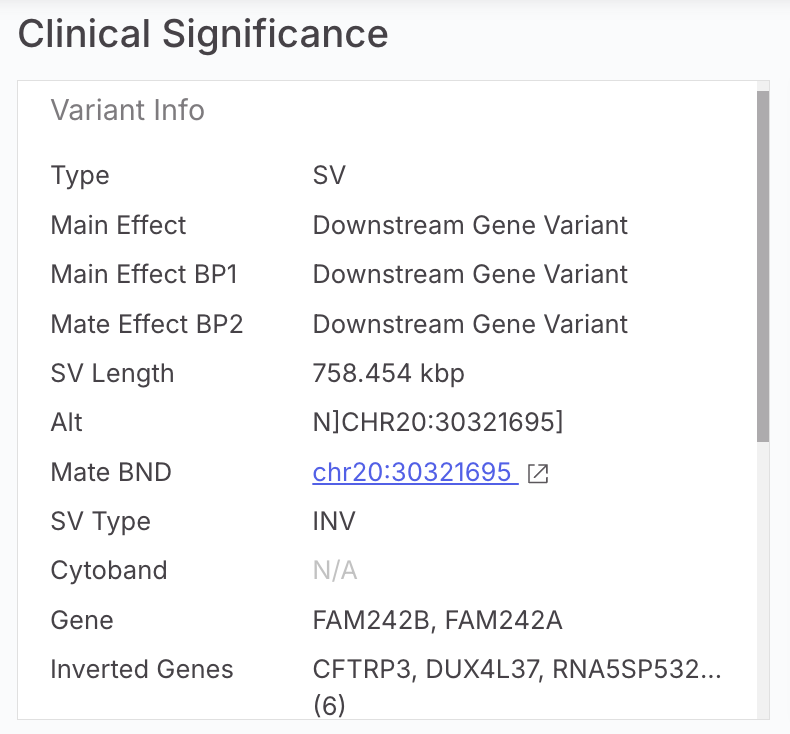
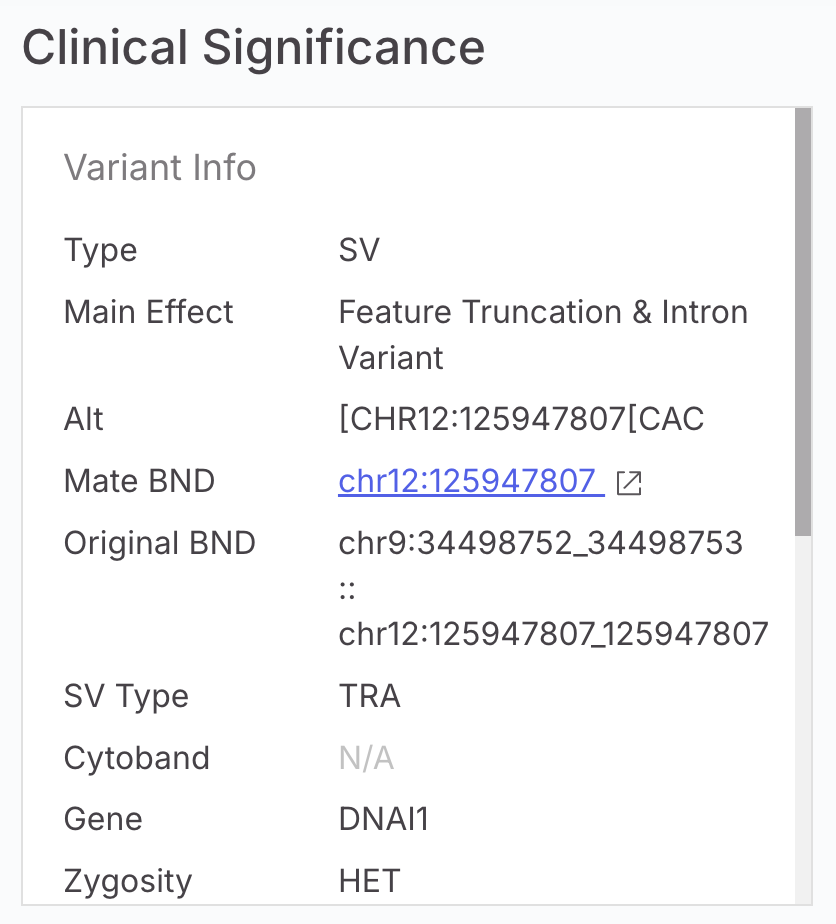
TRA, INV, and BND variants appear in the Analysis Tools variant table alongside other structural variant types. Each new variant type has a dedicated Variant Page with type-specific information:

* TRA displays both breakpoint positions (ChrA:StartA\_EndA :: ChrB:StartB\_EndB), affected genes at each breakpoint, and a link to the mate BND.
* INV displays the inverted region length (SVLEN in kb), main genes and inverted genes, and a link to the mate BND.
* BND displays the single breakpoint position, main gene, and a link to the mate BND which was converted to a TRA or INV variant if available.

<div><figure><img src="https://1131024994-files.gitbook.io/~/files/v0/b/gitbook-x-prod.appspot.com/o/spaces%2FGCW0DnLlE7QjoZPNmKIi%2Fuploads%2Fgit-blob-7f51b199ab7cfe0171478c13beca8e61bdb15d1e%2Finv%20variant.png?alt=media" alt="" width="375"><figcaption></figcaption></figure> <figure><img src="https://1131024994-files.gitbook.io/~/files/v0/b/gitbook-x-prod.appspot.com/o/spaces%2FGCW0DnLlE7QjoZPNmKIi%2Fuploads%2Fgit-blob-d230f644e5c7f774f7f8e2478946b7c0df6ddb41%2Ftra%20var.png?alt=media" alt="" width="375"><figcaption></figcaption></figure></div>

<figure><img src="https://1131024994-files.gitbook.io/~/files/v0/b/gitbook-x-prod.appspot.com/o/spaces%2FGCW0DnLlE7QjoZPNmKIi%2Fuploads%2Fgit-blob-027131c291ad4102817d24475a36485c8d174a20%2Fcomplex%20sv%20filter.png?alt=media" alt=""><figcaption></figcaption></figure>

Gene-related diseases are shown for genes at each breakpoint position for TRA and INV.

For TRA and INV, effects are calculated at both breakpoint positions, and the most severe effect is applied as the main aggregated effect. Feature truncation results in High severity; all other effects are designated as Modifier.

Quality:

<table data-header-hidden><thead><tr><th width="178.12109375" valign="top"></th><th valign="top"></th></tr></thead><tbody><tr><td valign="top">BND, TRA, INV SVs</td><td valign="top"><p>A BND variant will be designated as High quality if:</p><p>· FILTER=PASS and INFO/NORMALIZED_COLOC_SUM exists</p><p>All other BND variants will be designated as Low quality.<br><br></p><p><br>A TRA/INV variant will be designated as High quality if:</p><p>· Both component BNDs is designated High quality</p><p>A TRA/INV variant will be designated as Moderate quality if:</p><p>· One component BNDs is designated as High quality</p><p>All other TRA/INV variants will be designated as Low quality</p></td></tr></tbody></table>

Population Statistics are available from gnomAD SV 4.1 for translocations. Inversions will be added in 100.41.100 patch. Population statistics are not available for BND variants.

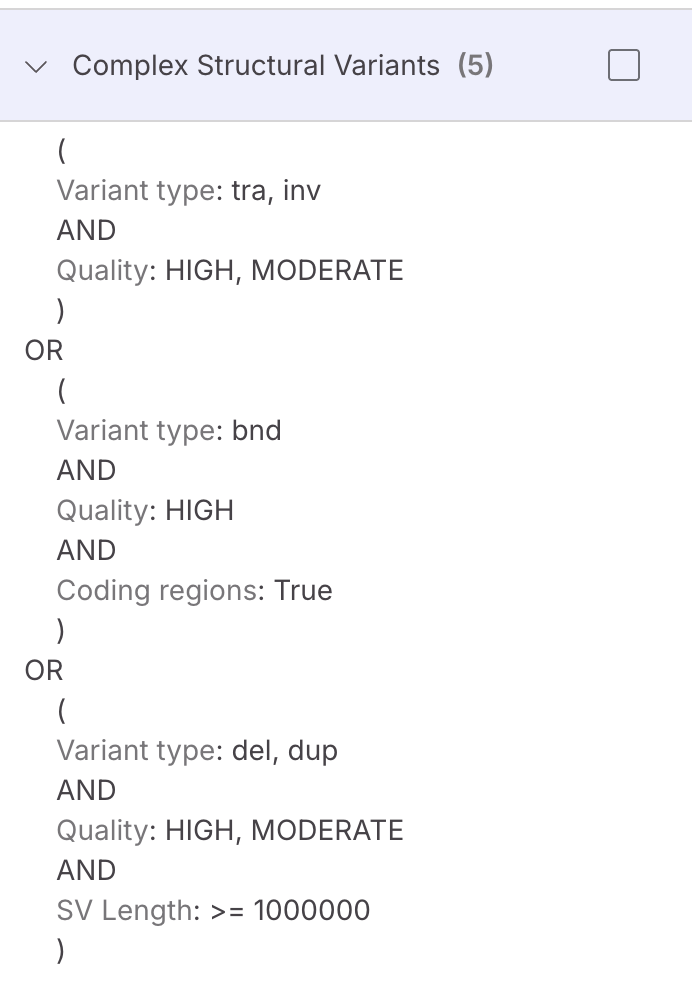
New filters capabilities were added under the Variant Type filters, TRA and INV are under 'SV and CNV', BND under 'Others'. These new variant types are supported in all other filters, except compound heterozygosity calculation with other variant types.

**IGV and Colocation Map Visualization**

**IGV Visualization in the Variant Page or Analysis Tools** is available for all 3 variant types, with translocations opening in IGV split-view mode, displaying both breakpoint positions in separate panels.

The gnomAD-SV track now also shows inversions.

**Colocation Map visualization in Genome View**

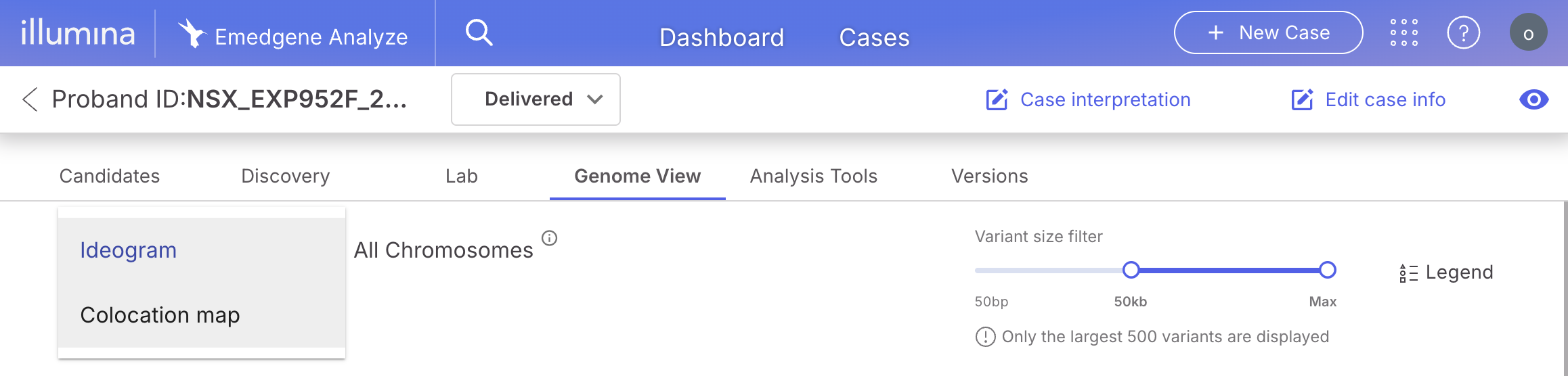
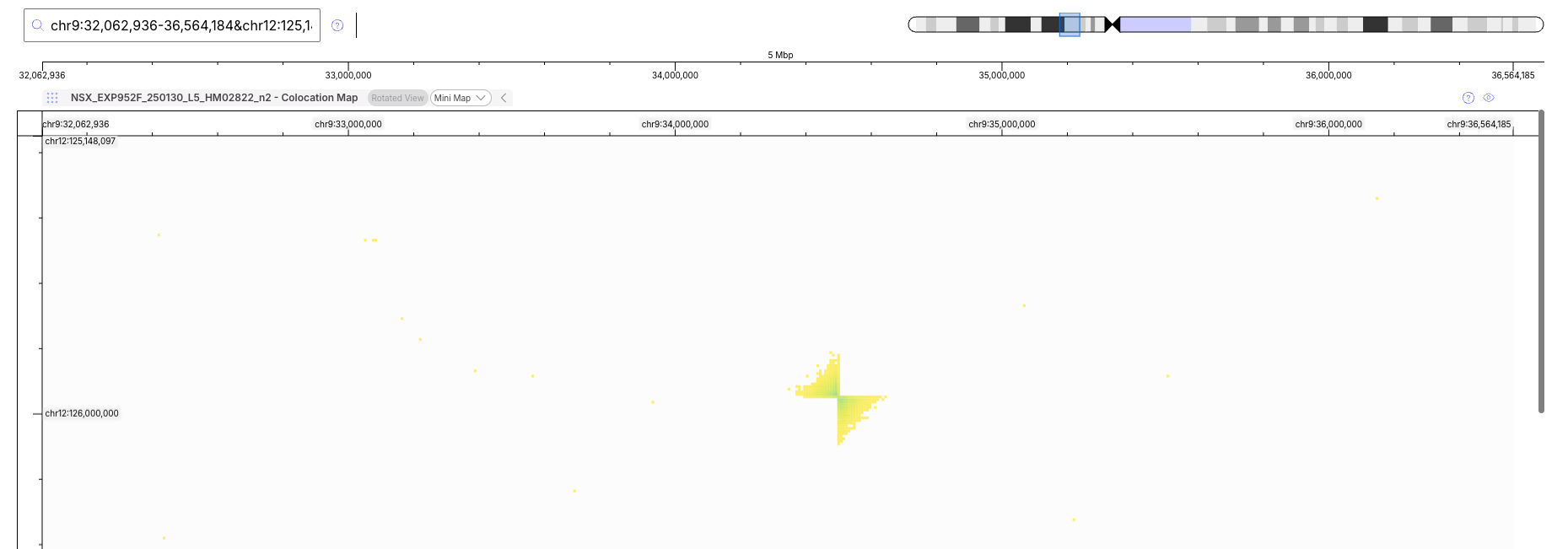
For cases ingested with TruPath colocation data (.hic file), a new Colocation Map track is available in the Genome View. Users can switch between the standard ideogram (showing LogR, BAF, and ROH tracks) and the new Colocation map, which displays the colocation map as a 2-dimensional whole-genome view.

<figure><img src="https://1131024994-files.gitbook.io/~/files/v0/b/gitbook-x-prod.appspot.com/o/spaces%2FGCW0DnLlE7QjoZPNmKIi%2Fuploads%2Fgit-blob-69153c8857761880f2862cf90c2f5bc7e546a8a6%2Fcolocation%20toggle.png?alt=media" alt="" width="563"><figcaption></figcaption></figure>

Users can scroll to see the full graph and use a 2-dimensional search to query regions of interest.

<figure><img src="https://1131024994-files.gitbook.io/~/files/v0/b/gitbook-x-prod.appspot.com/o/spaces%2FGCW0DnLlE7QjoZPNmKIi%2Fuploads%2Fgit-blob-70a5300f9bae5d1ccc8bf3034951accd9ee62509%2Fcolocation%20plot.png?alt=media" alt="" width="563"><figcaption></figcaption></figure>

The .hic file is ingested via batch upload or API as a visualization file. Note: This file is not produced by default on DRAGEN server, and a conversion script can be provided by Illumina Bioinformatics support teams.

Limitations:

* TRA, INV, and BND variants are not considered for compound heterozygosity (CH) calculation with other variant types.
* TRA, INV, and BND variants are not considered for AI shortlisting.
* These new variant types do not yet have cytoband and ISCN notations, which are planned for V100.42 (November 2026).
* Curate does not yet support TRA, INV variants.
* The .hic file supported by Emedgene colocation visualization is not produced by default on DRAGEN server and a conversion script can be provided by Illumina Bioinformatics support teams. This will be resolved with the DRAGEN 4.6 update.

#### Per-copy interpretation of TruPath MRJD data in Connected Variants and DRAGEN Report

The Variant Page now enables per-copy interpretation for MRJD genes from TruPath. MRJD outputs have been supported since V100.40.

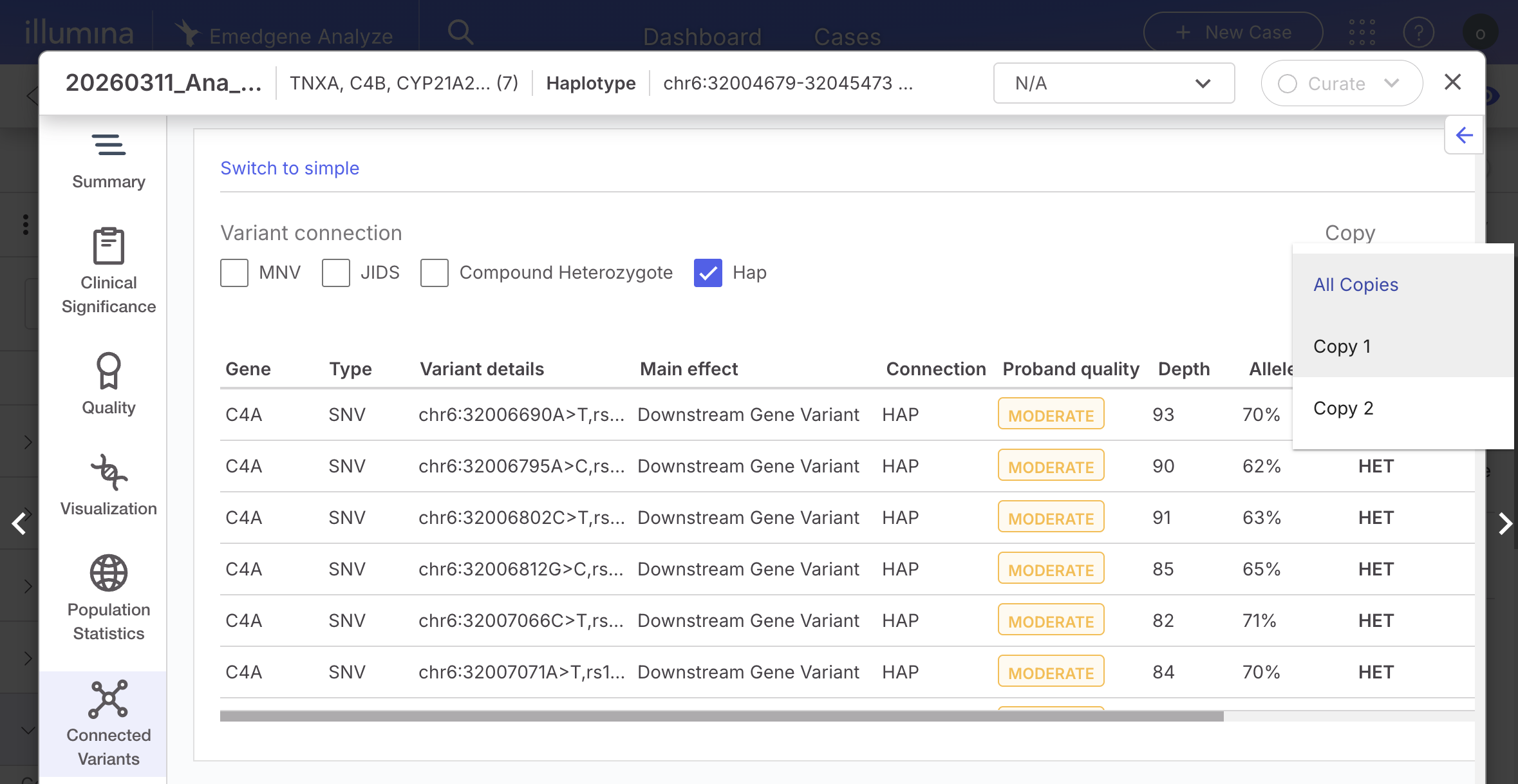
For any MRJD variant, haplotype, or CNV, the Connected Variants tab now provides an enhanced way to review and interpret haplotype/CNV and SNVs association.

In Advanced Mode, users can filter connected variants using the new ‘hap’ connection type and the new Copy selector. When a copy is selected, all variants associated with that copy are displayed together, providing a complete view of its connected variants.

To support faster assessment of copy functionality, the Known Variants column displays known variants within each copy alongside their SNV pathogenicity, making it easier to evaluate the potential functional impact of the copy.

<figure><img src="https://1131024994-files.gitbook.io/~/files/v0/b/gitbook-x-prod.appspot.com/o/spaces%2FGCW0DnLlE7QjoZPNmKIi%2Fuploads%2Fgit-blob-0c0ad5316d5a104ae86515e1d602863814c3f3d5%2Fmrjd%20per%20copy%20interpretation.png?alt=media" alt=""><figcaption></figcaption></figure>

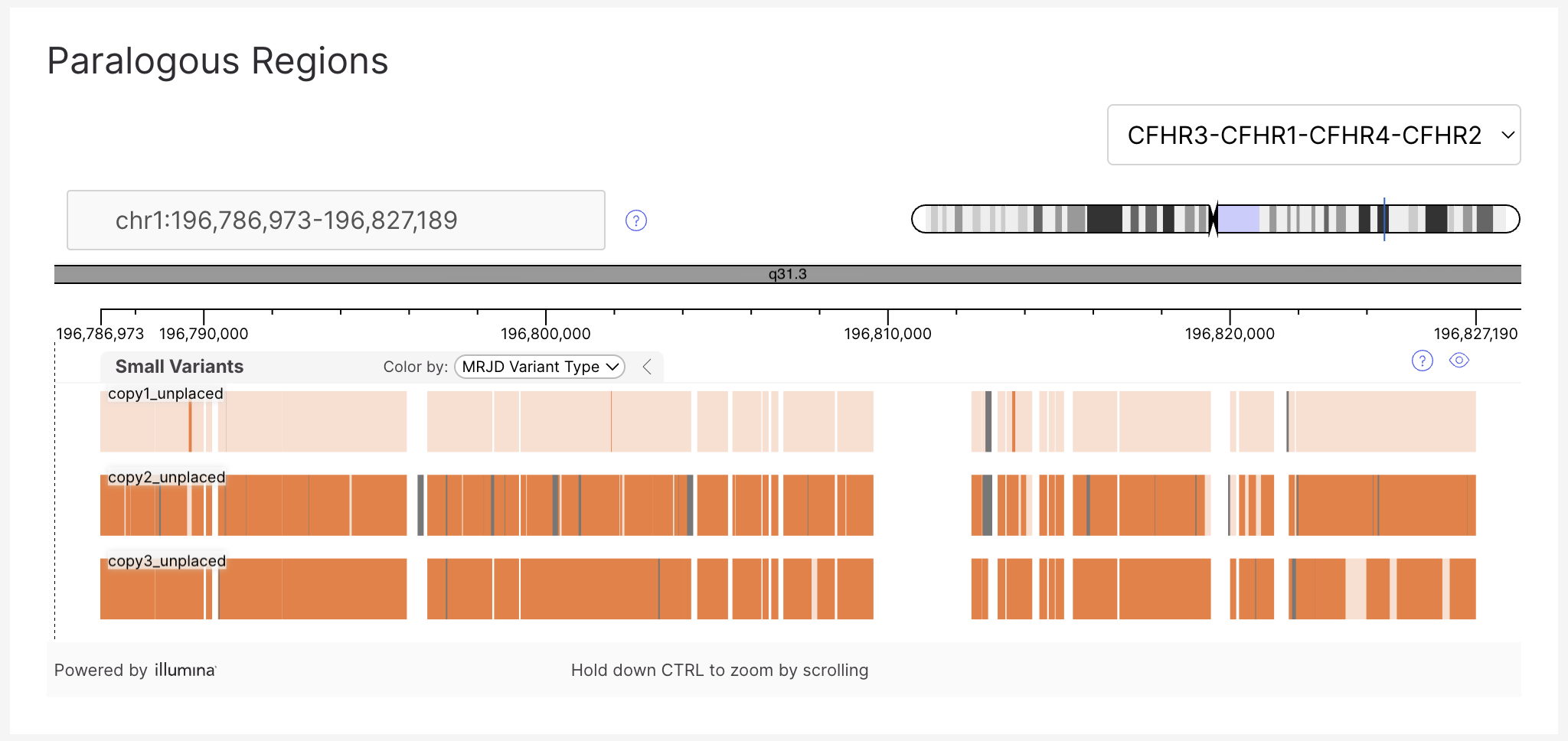
In addition, the DRAGEN Report has a new visualization in the Paralogs tab, allowing a per-copy view and comparison of results.

<figure><img src="https://1131024994-files.gitbook.io/~/files/v0/b/gitbook-x-prod.appspot.com/o/spaces%2FGCW0DnLlE7QjoZPNmKIi%2Fuploads%2Fgit-blob-787ba1c6b5b3a2d76e238d9b2b83a8a4d10a22b9%2Fdragen%20report%20mrjd.png?alt=media" alt=""><figcaption></figcaption></figure>

Limitations:

* Only 50 variants can be supported in the Connected Variants tab. In some cases, not all variants in a copy will be displayed.
* The Connected Variants columns are not sortable.

#### Expanded STR catalog

Emedgene now annotates STR variants using the latest gnomAD expansion library ([March 2025 release)](https://gnomad.broadinstitute.org/news/2025-03-known-disease-associated-tandem-repeat-pages/). The catalog has been expanded to cover 74 disease-associated loci across GRCh38 and GRCh37, including recently added genes such as AFF3, ZFHX3, THAP11, FGF14, EP400, and BCLAF3. This ensures that newly identified pathogenic repeat expansions are available for interpretation.

The full supported list:

ABCD3, AFF2, AR, ARX\_1, ARX\_2, ATN1, ATXN1, ATXN10, ATXN2, ATXN3, ATXN7, ATXN8OS, BEAN1, C9ORF72, CACNA1A, CBL, CNBP, COMP, CSTB, DAB1, DIP2B, DMPK, EIF4A3, EP400, FAM193B, FGF14, FMR1, FOXL2, FXN, GIPC1, GLS, HOXA13\_1, HOXA13\_2, HOXA13\_3, HOXD13, HTT, JPH3, LRP12, MARCHF6, NAXE, NIPA1, NOP56, NOTCH2NLC, NUTM2B-AS1, PABPN1, PHOX2B, PPP2R2B, PRDM12, PRE-MIR7-2, PRNP, RAPGEF2, RFC1, RILPL1, RUNX2, SAMD12, SOX3, STARD7, TBP, TBX1, TCF4, THAP11, TNRC6A, VWA1, XYLT1, YEATS2, ZFHX3, ZIC2, ZIC3

Non-pathogenic loci: BCLAF3,C11ORF80,FRA10AC1,CSNK1E,NOTCH2NLA, TMEM185A,DMD

Not supported in DRAGEN: RAI1, ZNF713. AFF3 is not supported in DRAGEN but is supported in EMG.

This expanded catalog is supported with annotations for both gnomAD STR population frequency as well as updated gnomAD STR pathogenicity ranges.

#### STR GraphAlignment visualization support

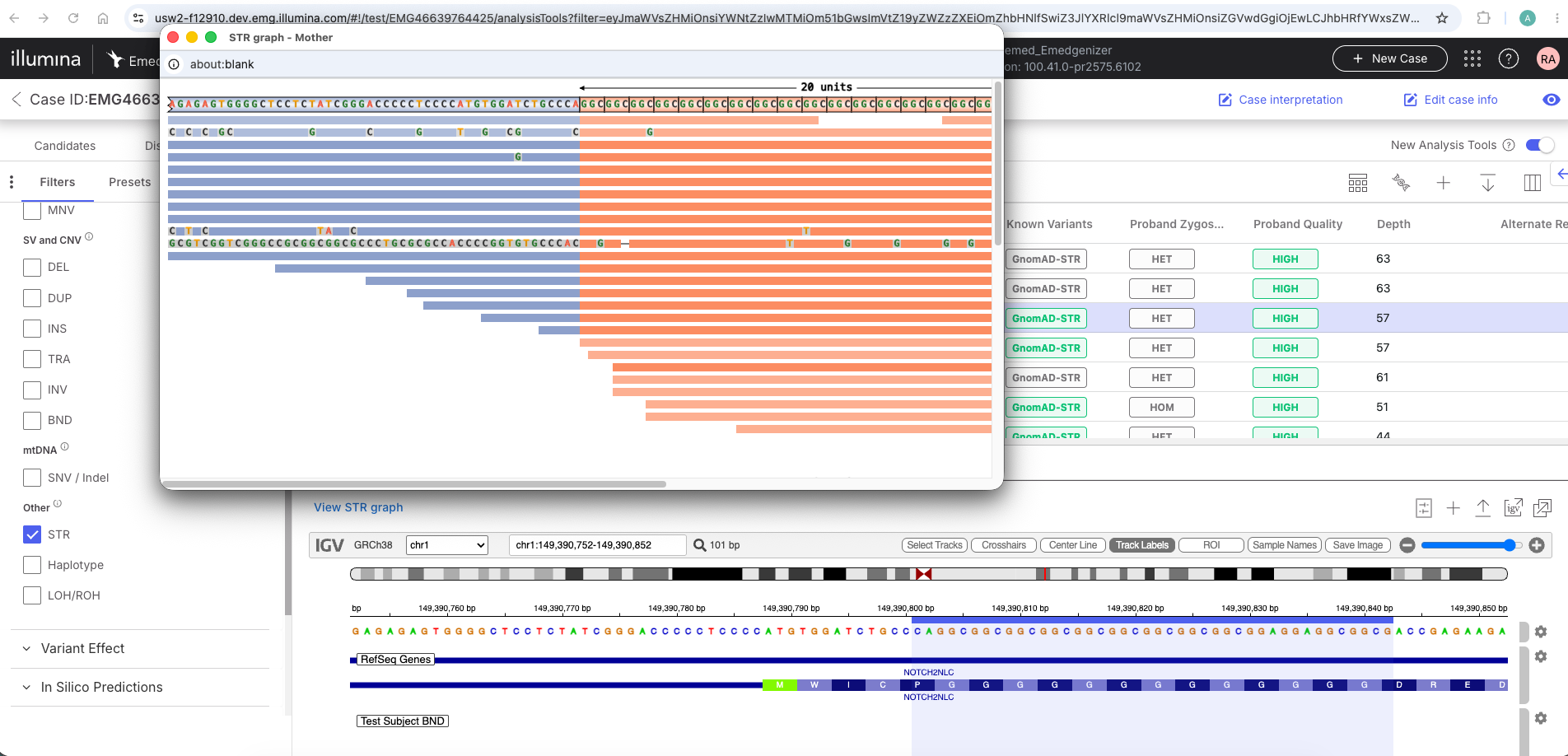
For STR variants called by DRAGEN, Emedgene now supports the GraphAlignmentViewer generated PNG image that visually summarizes the repeat structure and read alignments. This enhancement allows users to quickly and intuitively understand complex STR variants without leaving the variant page or interpreting raw alignment data.

The Variant Page Visualization section now displays a new "STR Graph" button. Pressing the button opens a popup window showing the STR GraphAlignment image for the specific STR locus, providing a visual summary of the repeat structure and read alignments without leaving the platform.

<figure><img src="https://1131024994-files.gitbook.io/~/files/v0/b/gitbook-x-prod.appspot.com/o/spaces%2FGCW0DnLlE7QjoZPNmKIi%2Fuploads%2Fgit-blob-15b69ab43171b19426d8fcf88cf8490807db832b%2Fgraphaligner.png?alt=media" alt=""><figcaption></figcaption></figure>

If multiple samples have visualization files for the same STR locus (e.g., proband, father, mother), a separate popup window opens for each sample. Each window header displays the sample relation (Proband, Father, Mother, Other) and the STR locus ID.

The GraphAlignment SVG files can be ingested via API and batch upload. Each file must match the STR locus name (gene name) for supported STR loci. Multiple files per sample are supported.

Limitation:

* Ingestion of STR graph alignment files from the Emedgene ICA Runner is not supported.

#### Additional DRAGEN 4.5 support improvements

Support for silent carrier outputs from SMN targeted caller:

When DRAGEN identifies a [silent carrier](https://help.dragen.illumina.com/dragen-v4.5/product-guides/dragen-v4.5/dragen-dna-pipeline/targeted-caller/smn-calling#smn-output-file\)) scenario for SMN1, the output is represented as a HET CNV variant with a minor copy number of 0 and a major copy number of 2. This allows users to identify the 2:0 silent carrier scenario directly in the variant results. The variant is also considered by the AI as part of the analysis.

### Voice of Customer: gnomAD all, show preset count and Curate notes/gene in Analyze

Every release we prioritize the top voted requests on [Canny](https://illumina.canny.io/emedgene-feature-requests). For this release we’ve added support for gnomAD data including UK Biobank as an organization setting allowing users to choose the gnomAD annotation they prefer. We’re showing preset variant count to increase interpretation efficiency. We’ve also added Curate notes and gene interpretation in Analyze.

#### Choose to use gnomAD 4.1 All dataset for GRCh38 SNV/Indels annotation

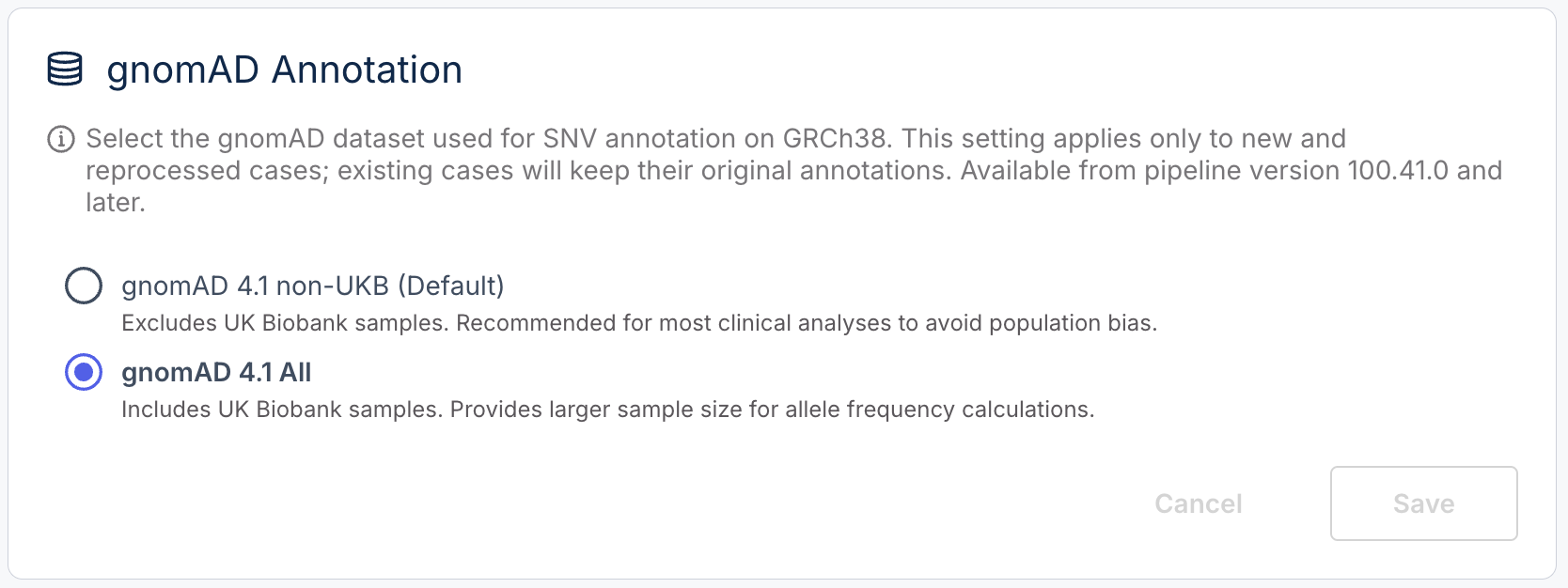
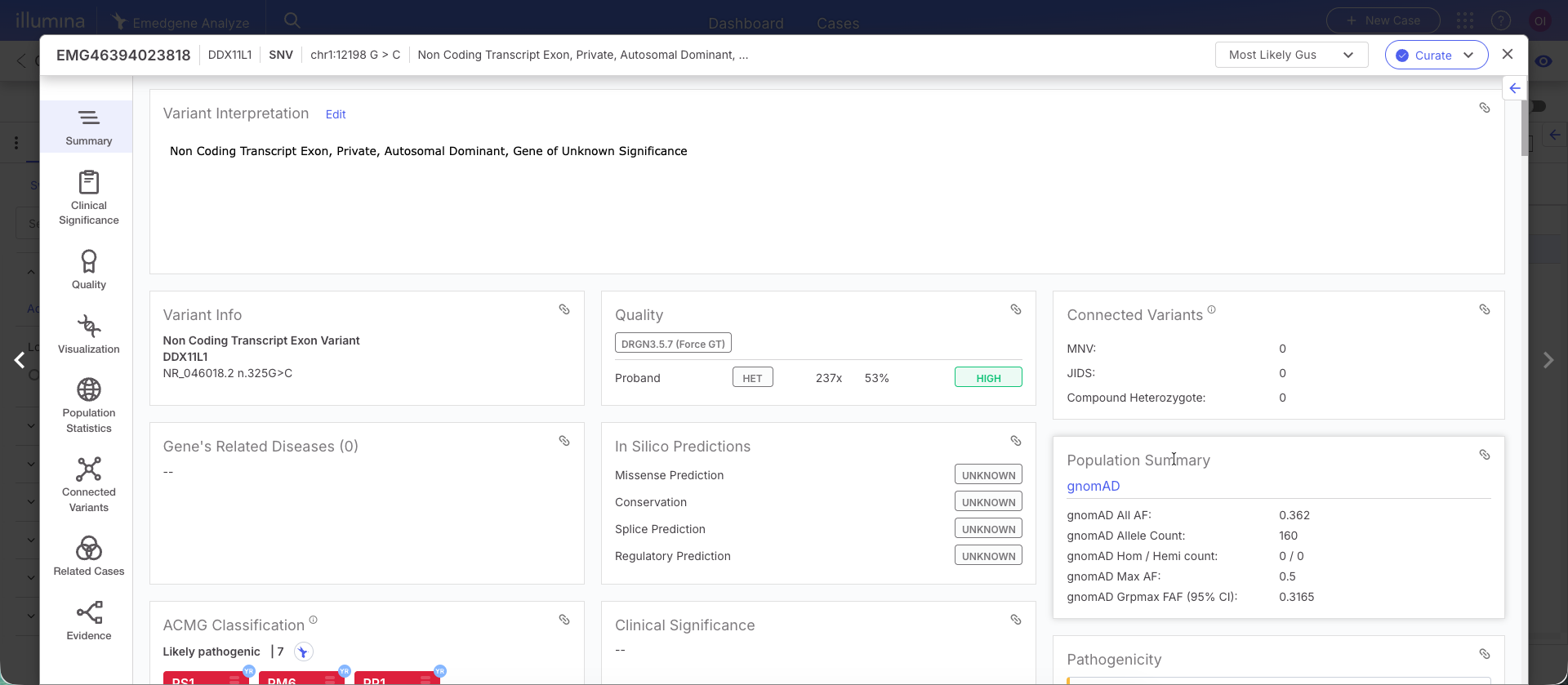
Emedgene now supports annotation with gnomAD 4.1 All (including UK Biobank samples) as an alternative to the default gnomAD 4.1 non-UKB dataset for GRCh38 SNV/InDel variants. The gnomAD All dataset provides a larger sample size for allele frequency calculations. Additionally, the gnomAD Grpmax Filtering Allele Frequency (FAF) at 95% CI is now displayed. This is the most conservative possible population allele frequency across all relevant ancestries, accounting for sampling uncertainty.

To use this new source, a new "gnomAD Annotation" section is available under Org Settings | Workbench & Pipeline, allowing administrators to select which gnomAD dataset is used for GRCh38 SNV/indel annotation.

<figure><img src="https://1131024994-files.gitbook.io/~/files/v0/b/gitbook-x-prod.appspot.com/o/spaces%2FGCW0DnLlE7QjoZPNmKIi%2Fuploads%2Fgit-blob-82a0107edeaf02710f49e56ff92b31e5dabb7bd6%2Fgnomadall%20org%20settings.png?alt=media" alt="" width="375"><figcaption></figcaption></figure>

Two new columns are available in the analysis tools, displaying the # and % for the gnomAD Grpmax Filtering Allele Frequency (FAF) at 95% CI.

<figure><img src="https://1131024994-files.gitbook.io/~/files/v0/b/gitbook-x-prod.appspot.com/o/spaces%2FGCW0DnLlE7QjoZPNmKIi%2Fuploads%2Fgit-blob-eb500b5798ff4c3b3aab545f10e4f942cd83de23%2Fgnomad%20all%20analysis%20tools.png?alt=media" alt=""><figcaption></figcaption></figure>

In the advanced filter query builder, an option to filter on the gnomAD Grpmax FAF (95% CI) has been added.

<figure><img src="https://1131024994-files.gitbook.io/~/files/v0/b/gitbook-x-prod.appspot.com/o/spaces%2FGCW0DnLlE7QjoZPNmKIi%2Fuploads%2Fgit-blob-0cc9a976080d5e453e59b46488caac95d85f8244%2Fgrpmax%20filter.png?alt=media" alt="" width="278"><figcaption></figcaption></figure>

In the Variant Page, the Population Summary card displays the ‘gnomAD Grpmax Filtering Allele Frequency (FAF) at 95% CI’ value, and links out to the full data set.

<figure><img src="https://1131024994-files.gitbook.io/~/files/v0/b/gitbook-x-prod.appspot.com/o/spaces%2FGCW0DnLlE7QjoZPNmKIi%2Fuploads%2Fgit-blob-1b1ec161e0001958a069f62de1790964d7c39fe3%2Fgrpmax%20var%20page1.png?alt=media" alt=""><figcaption></figcaption></figure>

The field is available for export and reporting.

#### Display the number of variants in each preset filter

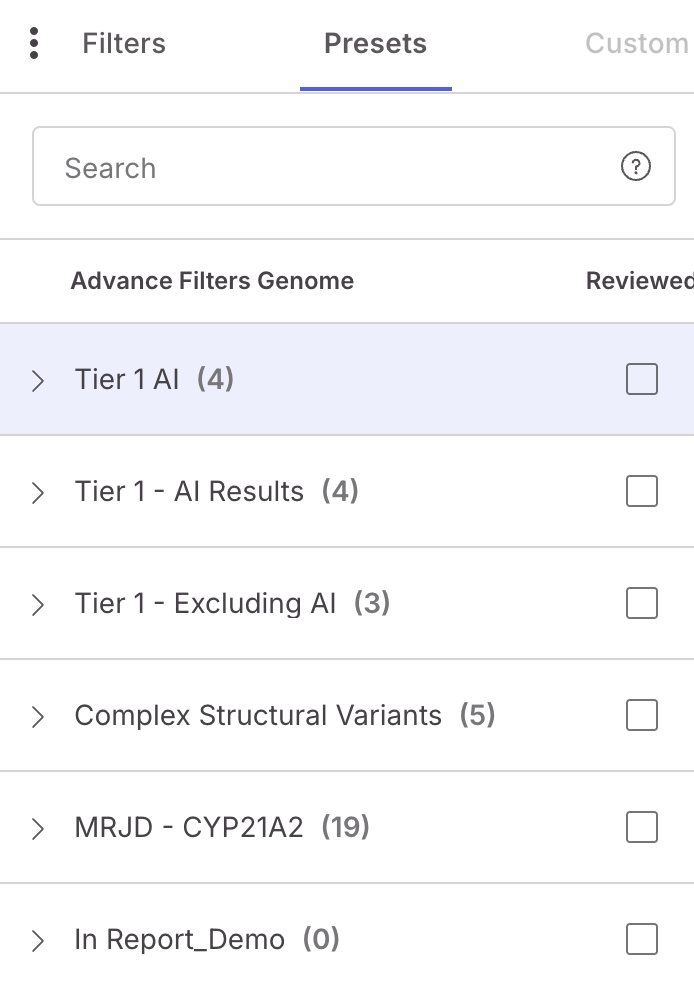
Users of Emedgene can utilize a large number of presets for highly granular filtering. However, many of these presets can be empty, depending on the case. In order to increase review efficiency, we’ve added the ability to see the number of variants in each preset from the Analysis Tools. This will save reviewers the time it takes to open the empty presets and focus on the analysis. This feature works for presets built with Quick Filters and also those using the Query Builder.

<figure><img src="https://1131024994-files.gitbook.io/~/files/v0/b/gitbook-x-prod.appspot.com/o/spaces%2FGCW0DnLlE7QjoZPNmKIi%2Fuploads%2Fgit-blob-8b42824b8901eb8df1999208d74fbba6174d080d%2Fshow%20preset%20variant%20count.png?alt=media" alt="" width="347"><figcaption></figcaption></figure>

Limitations:

* Presets containing Compound Heterozygous filters do not have counts available until the preset is selected.
* Presets containing user actions or evidence will only get true counts when the preset is selected.
* When searching over Presets, the count will only update when selecting a Preset filter.
* When editing a case, if the Preset Group is not modified and the case is not rerun, the Preset counts will not be updated.

#### Curate Gene Interpretation, Variant and Gene Notes available in Analyze

Users have requested a simpler way to view their gene interpretation and variant and gene notes while reviewing a variant. This can help capture while reviewing a variant existing gene curations and relevant notes on the variant and gene that don’t belong on the variant interpretation template. As a reminder, the Variant Interpretation card is only available for tagged variants.

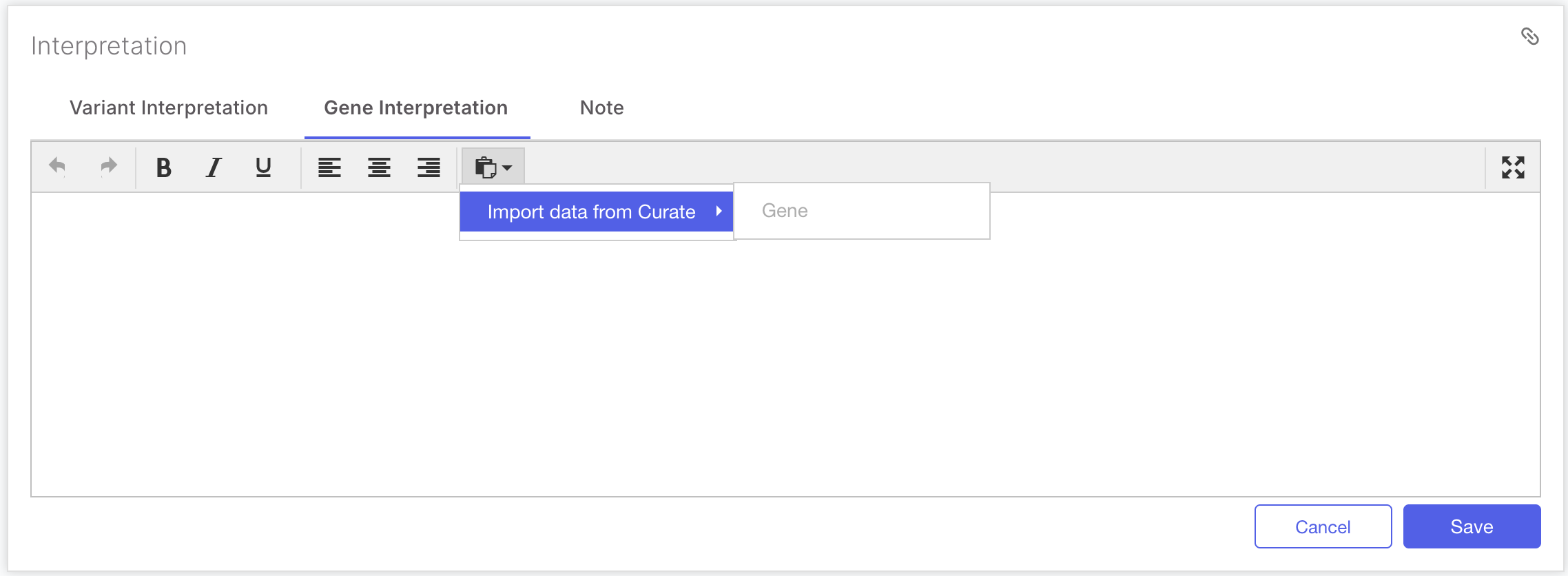
The Variant Interpretation section now contains two additional tabs. The Gene Interpretation tab allows you to import from Curate or write a Gene Interpretation.

<figure><img src="https://1131024994-files.gitbook.io/~/files/v0/b/gitbook-x-prod.appspot.com/o/spaces%2FGCW0DnLlE7QjoZPNmKIi%2Fuploads%2Fgit-blob-9de50f6b8d68654b726a656f28aa15f8cfad5017%2Fgene%20interpretation.png?alt=media" alt="" width="563"><figcaption></figcaption></figure>

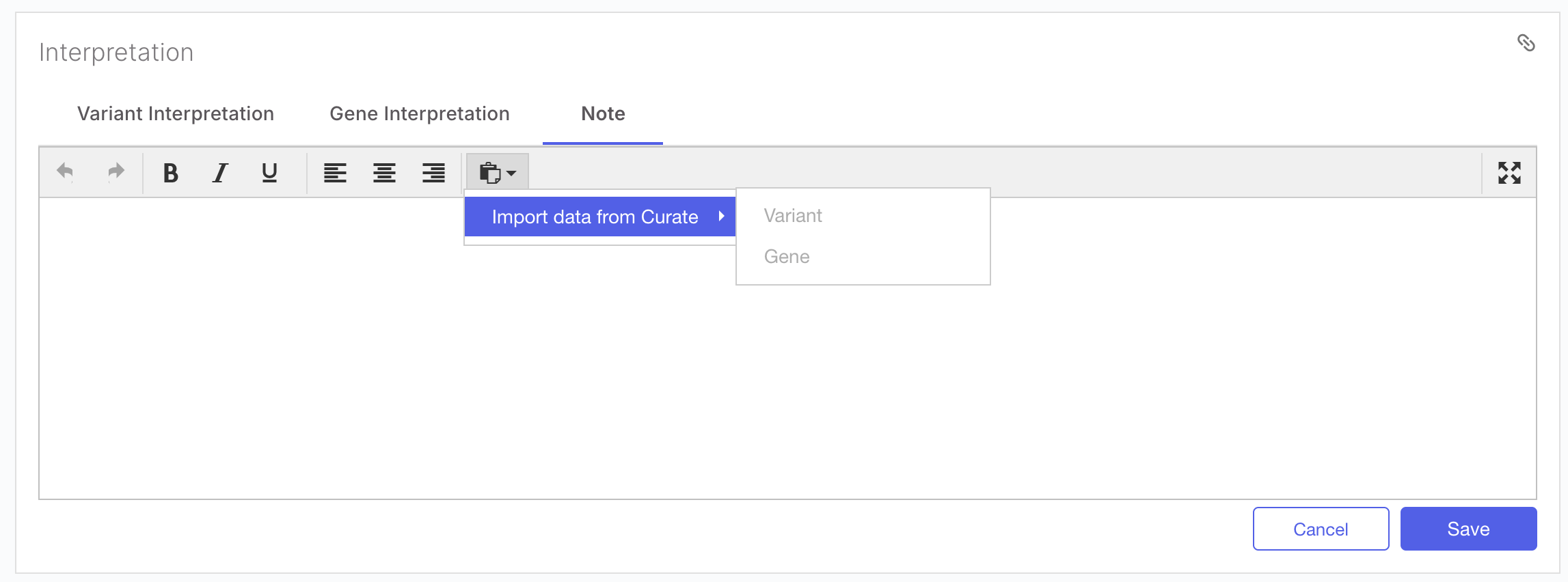
The Notes tab allows you to write notes, and also to import variant and gene notes from Curate.

<figure><img src="https://1131024994-files.gitbook.io/~/files/v0/b/gitbook-x-prod.appspot.com/o/spaces%2FGCW0DnLlE7QjoZPNmKIi%2Fuploads%2Fgit-blob-14bbcedd3239664e66784de60af9440657f06dd6%2Finterpretation%20notes.png?alt=media" alt="" width="563"><figcaption></figcaption></figure>

The information in both tabs is available in the report, export and variant interpretation APIs.

Limitation:

* Gene Interpretation as well as Variant and Gene Notes edits in Analyze do not update the relevant Curate entities in this release.

### Curate Enhancements: Easy add/search by c. p., a status for variant curations and a new module for LLM powered variant curation.

#### Easy add/search for variants in Curate with c. p. nomenclature

Curate users have requested the ability to create and search for variants using HGVS coding (c.) and protein (p.) nomenclature — a widely used standard in clinical genetics. Previously, variants could only be added by genomic position and searched by coordinates, requiring users to manually translate between nomenclatures. This feature streamlines the Curate workflow for labs that work primarily with c./p. notation.

The variant search now supports c. and p. queries. A single query can return multiple variants when the same c./p. value matches across different transcripts.

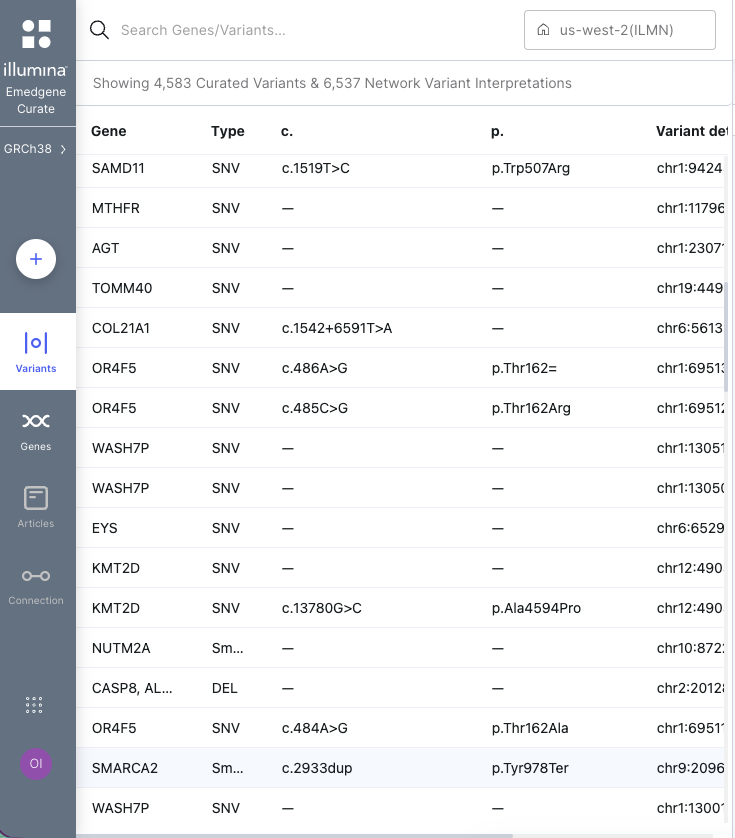
The Curate variant table has two new columns, displaying the c. and p. notation for all variants.

<figure><img src="https://1131024994-files.gitbook.io/~/files/v0/b/gitbook-x-prod.appspot.com/o/spaces%2FGCW0DnLlE7QjoZPNmKIi%2Fuploads%2Fgit-blob-9cec01caed9b4adb3601f3ffabe2ea82b8c5a71c%2Fcurate%20table%20with%20c%20p2.png?alt=media" alt="" width="368"><figcaption></figcaption></figure>

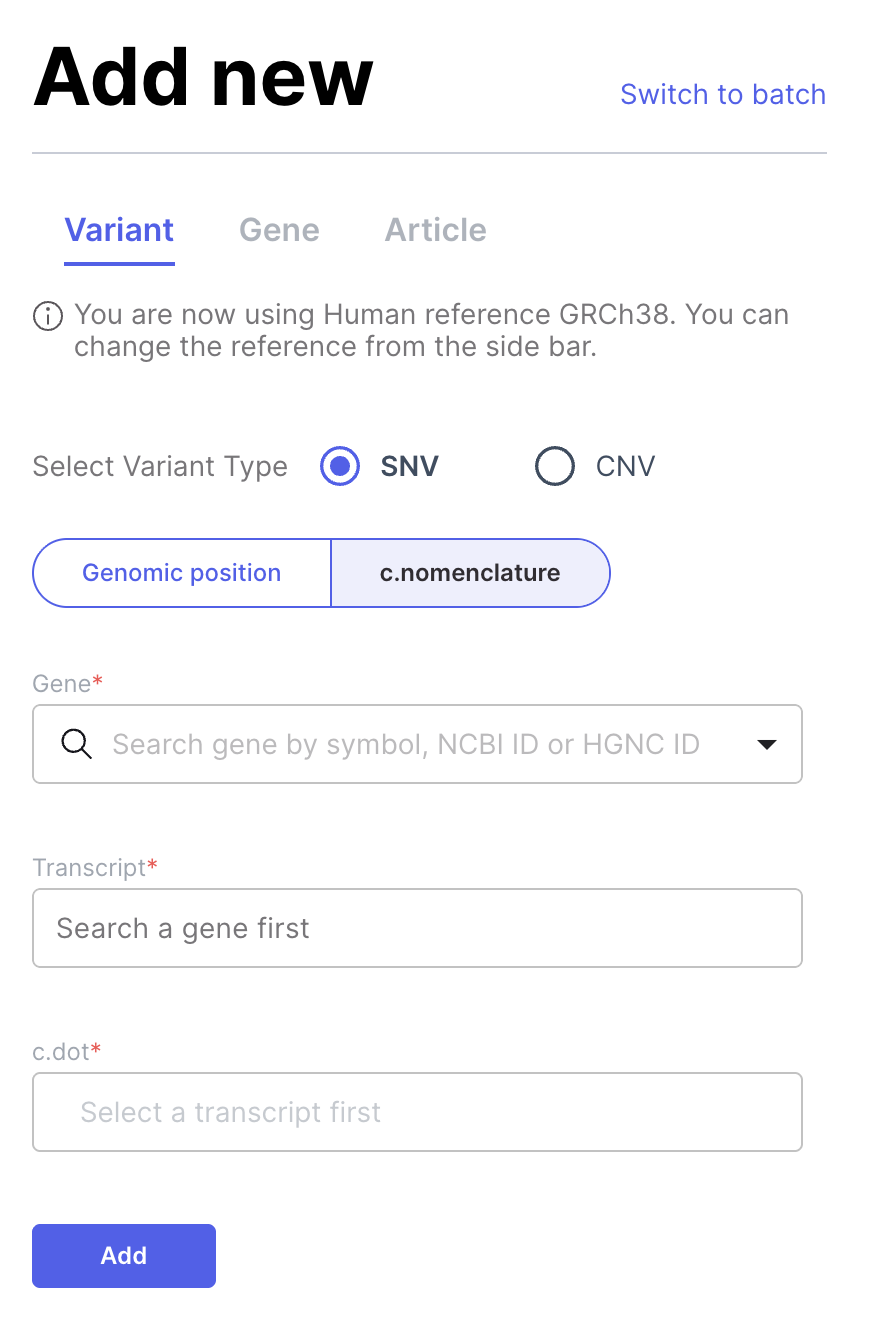
In Curate | Add Variant, users can now select to add a variant by c. nomenclature instead of genomic position. Three fields are required: Gene (searchable by gene symbol, NCBI ID, or HGNC ID), Transcript (auto-populated from the selected gene, with the preferred transcript pre-selected if configured), and c. value. Supported formats include SNV (e.g., c.123A>G), small insertions (e.g., c.100\_101insATG), and small deletions (e.g., c.100\_102del).

<figure><img src="https://1131024994-files.gitbook.io/~/files/v0/b/gitbook-x-prod.appspot.com/o/spaces%2FGCW0DnLlE7QjoZPNmKIi%2Fuploads%2Fgit-blob-7516d3872732e3db0675a87dbeaa09a1843ce888%2Fadd%20c.png?alt=media" alt="" width="188"><figcaption></figcaption></figure>

Limitation:

* Variant addition format is sensitive to capitalization, lower caps within the variant details will cause it to fail.
* Variant addition may fail if the variant is not included in the transcript selected from those available for the gene.
* Error messages for variant addition failures are unclear.

#### Utilize Curation Status to increase review efficiency

Currently in Curate, all curated data is automatically used for case annotation regardless of its review state — there is no way to distinguish between a draft curation and a fully reviewed, approved one. This feature introduces a curation status workflow that gives users control over which variants and genes are used for annotation, supporting a managed review process before curated data impacts case analysis.

**Curation status for Variants, Genes, and Articles**

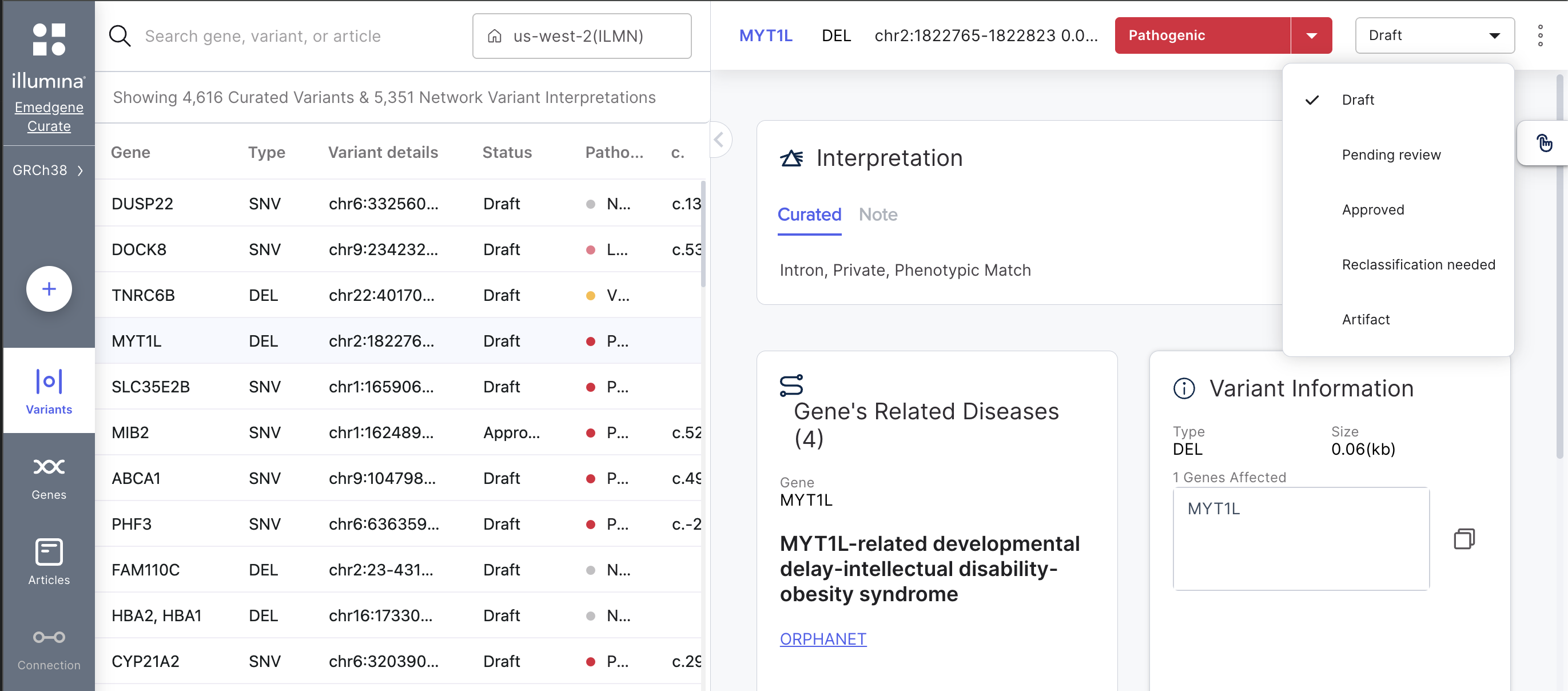
Curate now displays a curation status on each variant, gene, and article page. The status appears as a dropdown next to pathogenicity with the following options: Draft, Pending review, Approved, Reclassification needed, and Artifact. All existing curated items are migrated with "Approved" status for backward compatibility. All newly created items (via add new, batch creation, or export from Analyze) default to "Draft" status.

For variants that exist only in the network, the status field is disabled and displays “NA”.

A new "Status" column is available in both the Curate variant and the Curate gene table. The column supports sorting and repositioning like other columns.

<figure><img src="https://1131024994-files.gitbook.io/~/files/v0/b/gitbook-x-prod.appspot.com/o/spaces%2FGCW0DnLlE7QjoZPNmKIi%2Fuploads%2Fgit-blob-a4d6d4de34590f3f824bf2930522a60d8769e9d0%2Fcuratestatus2.png?alt=media" alt=""><figcaption></figcaption></figure>

**Batch upload to Curate with status**

The Curate batch upload template now includes a "Status" column. The column is optional, if not provided, the default status is "Draft". During validation, values are checked against the defined curation status options.

**Using the Curate Status in Analyze**

Organization Settings | Curate Annotation:

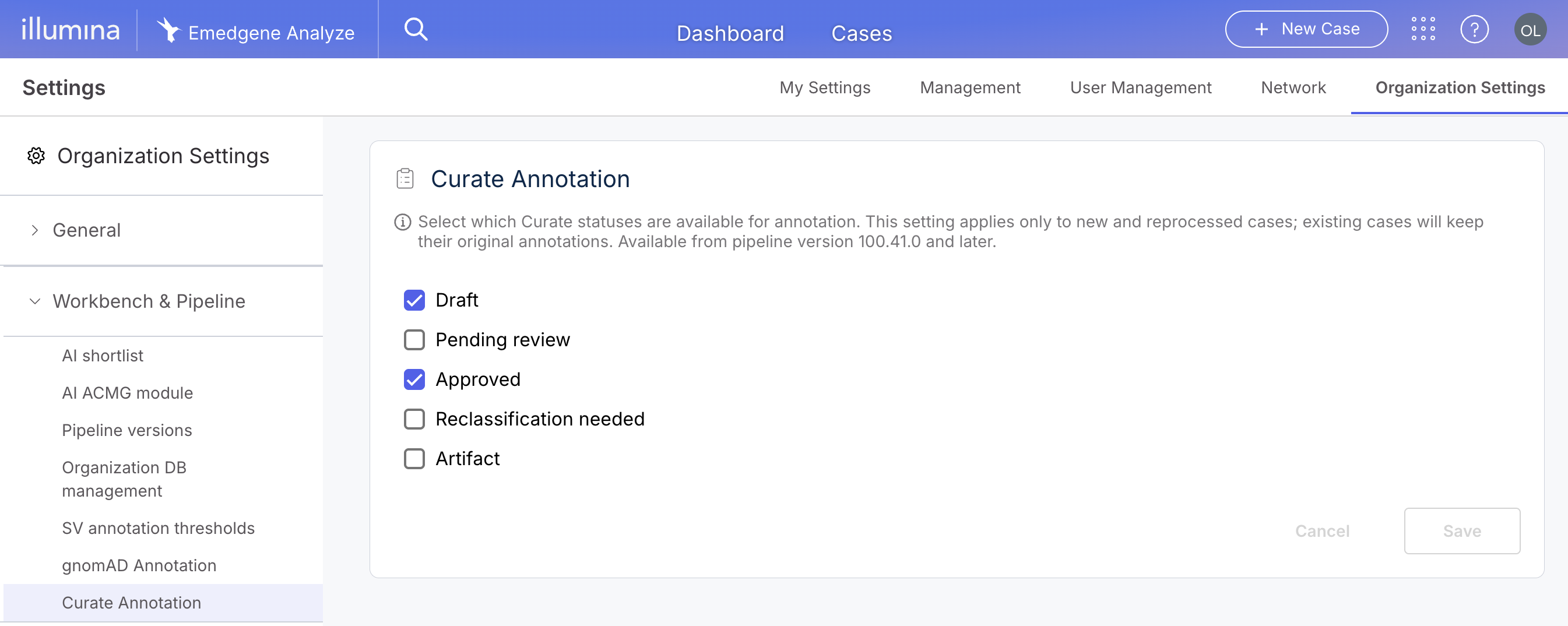
A new Curate Annotation section is available under Org Settings | Workbench & Pipeline, allowing administrators to select which curation statuses qualify for annotation. By default, "Draft" and "Approved" are selected. At least one status must be selected. The setting applies only to new and reanalyzed cases; existing cases retain their original annotations.

<figure><img src="https://1131024994-files.gitbook.io/~/files/v0/b/gitbook-x-prod.appspot.com/o/spaces%2FGCW0DnLlE7QjoZPNmKIi%2Fuploads%2Fgit-blob-7f33ed96f9f59f96382c99bdf3a9bb8e91221997%2Fcurate%20annotation%20org%20settings.png?alt=media" alt=""><figcaption></figcaption></figure>

Case annotation by curation status:

The annotation pipeline now filters curated variants based on their curation status. Only variants whose status matches the organization’s configured annotation statuses are used for known-variant annotation.

Curation status in Variant Page:

The Curate track in the Variant Page Visualization now displays the curation status when clicking on a curated variant.

Limitation:

* Filtering known variants by Curate status in the Analysis Tools filter panel is not yet available. This is currently planned for V100.42 (November 2026).
* The Variant Page | Clinical Significance tab Curate card will display the curation status in V100.42 (November 2026).

#### New! Curate article curation module

Genomics interpretation requires curators to maintain evidence from scientific literature to support variant and gene-disease classifications. Currently, users manually track relevant publications across multiple tools (PubMed, reference managers, notes) without a unified system for managing literature evidence within the platform. The Article Curation feature provides a centralized literature management system integrated with variant and gene-disease curation workflows, enabling users to import articles from PubMed, extract key findings, and link articles to curated variants and gene-disease connections.

**Article section in Curate**

A new "Articles" section is available in the main Curate navigation alongside Variants and Genes. The article table lists all curated articles with columns for PMID (hyperlinked to PubMed), Title, Authors (first author et al.), Journal, and Year. All columns support sorting, and the table defaults to showing the most recently added articles first. Free text search is available across PMID, Title, Authors, Year, and Journal with partial match support.

**Add article by PubMed ID**

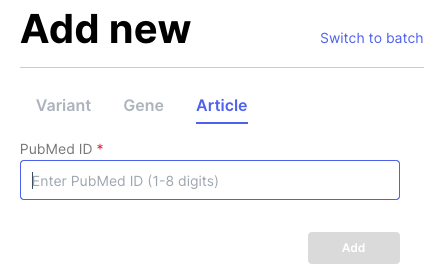
Users can add articles via the "Add New" button by entering a PubMed ID. The system validates the PMID, checks for duplicates within the organization, and automatically imports the article’s Title, Authors, Journal, Year, Abstract, and DOI from the PubMed API.

<figure><img src="https://1131024994-files.gitbook.io/~/files/v0/b/gitbook-x-prod.appspot.com/o/spaces%2FGCW0DnLlE7QjoZPNmKIi%2Fuploads%2Fgit-blob-97dc11bbf150f830203217814d09c7bc96aa2e2d%2Fadd%20article.png?alt=media" alt="" width="223"><figcaption></figcaption></figure>

**Article curation page**

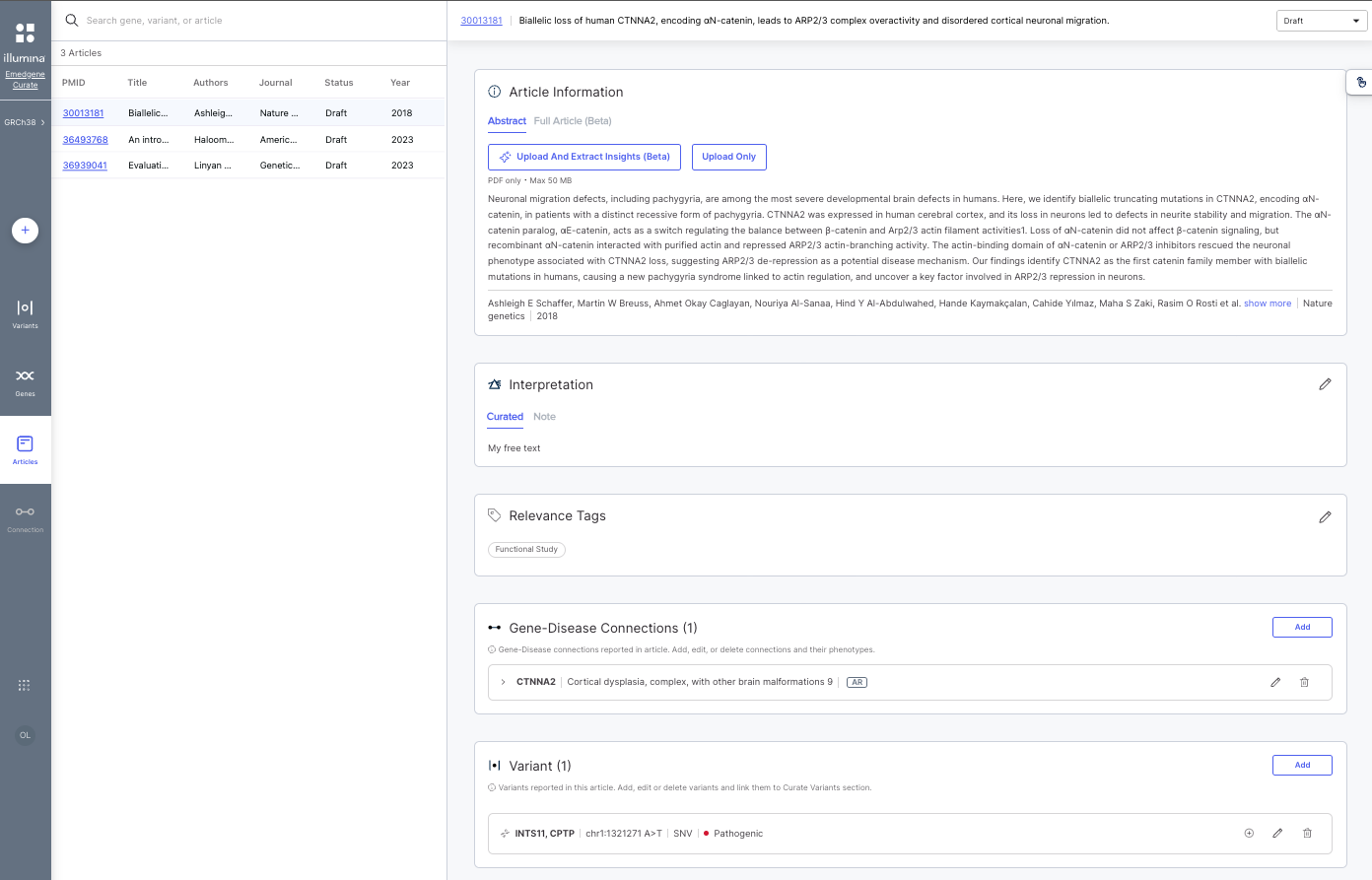
Each article has a dedicated curation page which includes the following components:

* Article Information card with a Summary tab showing the full author list, journal name, publication year, and abstract.
* Interpretation card with Curated and Note tabs, both provide rich text editors with the same formatting capabilities as Variant and Gene interpretation. A Relevance Tag section allows classifying articles with tags such as ‘Functional Study’, ‘Case Report’, ‘Population Study’, ‘Review Article’, "Clinical Guidelines’, ‘In Silico Prediction’, ‘Animal Model’, and ‘Cell Line Study’.
* In the Gene-Disease Connections card Users can add, edit, and delete Gene-Disease Connections linked to an article. Each connection includes a Gene (searchable by gene symbol, NCBI ID, or HGNC ID), Disease (auto-populated from the knowledgebase or custom entry), and optional Inheritance Mode (multi-select: AD, AR, XLR, XLD, YL, MT, SO, SC). Phenotypes can be added to each connection with optional Frequency and Severity values using HPO terms.
* In the Linked Variants card Users can add variants to an article using the same Add Variant flow as in Curate (supporting SNV by coordinates or c. notation, and CNV by coordinates). Variants can be pushed to Curate Variants via the Add to Curate button. Variants can also be deleted from an article without affecting the Curate variants database.

<figure><img src="https://1131024994-files.gitbook.io/~/files/v0/b/gitbook-x-prod.appspot.com/o/spaces%2FGCW0DnLlE7QjoZPNmKIi%2Fuploads%2Fgit-blob-740111e960704f11c8fc6cf56b12f8c7e46d4b23%2Farticle%20page%20curate.png?alt=media" alt="" width="563"><figcaption></figcaption></figure>

### New capabilities for Presets with advanced operators

Advanced presets have been renamed ‘Query Builder’ and you can conveniently switch from simple to advanced filter operators from the ellipsis menu in the filters component. New features are now available for use in your advanced operators filters: view filter content, search, including compound heterozygous filters and Phenomeld score and weights.

#### Show preset content now works for Query Builder filters

The preset content is rendered in a structured format including logical operators and nesting.

<figure><img src="https://1131024994-files.gitbook.io/~/files/v0/b/gitbook-x-prod.appspot.com/o/spaces%2FGCW0DnLlE7QjoZPNmKIi%2Fuploads%2Fgit-blob-9e76d1aae76253baa63e6d466f34f991ebebb714%2Fshow%20preset%20content.png?alt=media" alt="" width="346"><figcaption></figcaption></figure>

#### Include compound heterozygous queries in Query Builder

The Autosomal Recessive – Compound Heterozygous (ARCH) filter is now available in Query Builder with some limitations. The filter has a single selectable value ("True") and produces results consistent with the ARCH filter in simple mode across all variant types and case types including singleton and trio.

The ARCH filter can be added only once and only at the root level (not within any group or subgroup). The Exclude option is not available for this filter.

Limitation:

* The ARCH filter can be added only once and only at the root level (not within any group or subgroup).
* The Exclude option is not available for this filter.

#### Include search queries in Query Builder

The Search filter is now available within Query Builder (advanced filtering mode), supporting the same functionality as in simple mode — including gene, gene list, batch genes, phenotype, disease, inheritance mode, and free text searches. Search can be placed at any group or nesting level and used more than once.

#### Include Phenomeld score and phenotype weights in Query Builder

The new phenotypes filters have been added to Query Builder and include Phenomeld score threshold (greater-than/equal filter type) and phenotype selection, and per-phenotype weight adjustments are also now available. The proband’s phenotypes are pre-selected with default weights and cannot be removed. Users can add additional phenotypes and assign custom weights.

Limitations:

* This filter is available only at the root level.
* This filter can be added only once.
* The Exclude option is not available for this filter.

### Cytogenetics workflow enhancements: Annotation for manually added variants, performance improvements and more

#### Full annotations for Manually Added Variants!

Adjustment of segments is common in cytogenetics workflow. In Emedgene, call adjustment is performed through manually adding a variant. Starting in V100.41, all Manually Added Variants (SNV/indel, CNV, STR, LOH/ROH, UPD) will go through a full pipeline annotation, utilizing the latest available pipeline version, regardless of the organization pipeline selection. The pipeline version used for the annotation is recorded in the Activity.

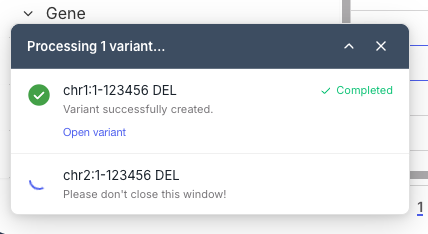
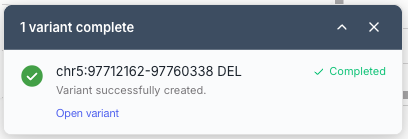
The annotation is performed asynchronously. The platform notifies the user via pop-up that annotation has started, and a second notification appears when annotation is completed with an option to open the Variant Page. Users can continue working on the case while annotation is in progress, however, it’s not possible to finalize a case while the annotation of a Manually Added Variant is in progress.

<div><figure><img src="https://1131024994-files.gitbook.io/~/files/v0/b/gitbook-x-prod.appspot.com/o/spaces%2FGCW0DnLlE7QjoZPNmKIi%2Fuploads%2Fgit-blob-1d0f896d4d54408e7af7f430ecef522c0103deda%2FQueue%20for%20several%20MAVs.png?alt=media" alt="" width="214"><figcaption></figcaption></figure> <figure><img src="https://1131024994-files.gitbook.io/~/files/v0/b/gitbook-x-prod.appspot.com/o/spaces%2FGCW0DnLlE7QjoZPNmKIi%2Fuploads%2Fgit-blob-c33e60fd6fe2f1929f5787dc2ba9c90fa215813b%2FToast%20for%20completed%20MAV2.png?alt=media" alt="" width="204"><figcaption></figcaption></figure></div>

#### Simplified Manually Added Variant creation with quality metrics

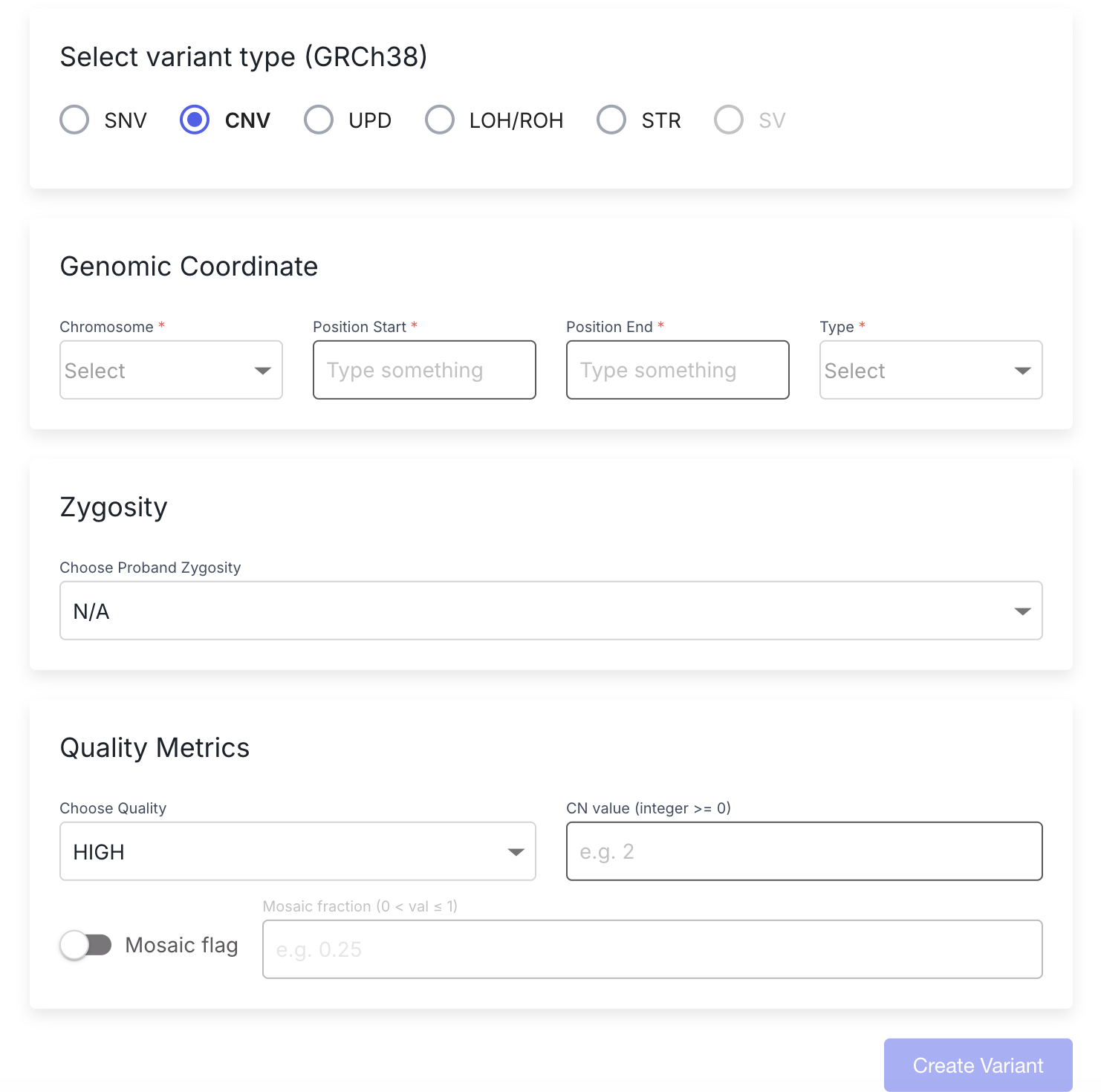
For manually added variants of types CNV, LOH/ROH, and UPD, the "REF" field is no longer required.

Additionally, users can now add quality metrics when creating these variant types, and populate this data to reports:

* Variant quality: HIGH, MED, or LOW (default: HIGH)
* CN value: Integer equal to or greater than 0
* Mosaic flag: True/false
* Mosaic fraction: Positive decimal between 0 and 1

<figure><img src="https://1131024994-files.gitbook.io/~/files/v0/b/gitbook-x-prod.appspot.com/o/spaces%2FGCW0DnLlE7QjoZPNmKIi%2Fuploads%2Fgit-blob-b3fcd634004744fa568ffd88ed76cd303163c23a%2Fmanually%20added%20variant%20with%20quality.png?alt=media" alt="" width="375"><figcaption></figcaption></figure>

#### Performance improvements in IGV and upgrades to both IGV, GenomeView

In V100.41 both the embedded IGV (Analysis Tools, Variant Page) and the GenomeView visualizations have been ugraded to improve performance and expand visualization capabilities.

Benefits from the IGV upgrade:

* Loading time for IGV has been reduced by \~40% through multiple efficiency enhancing updates.
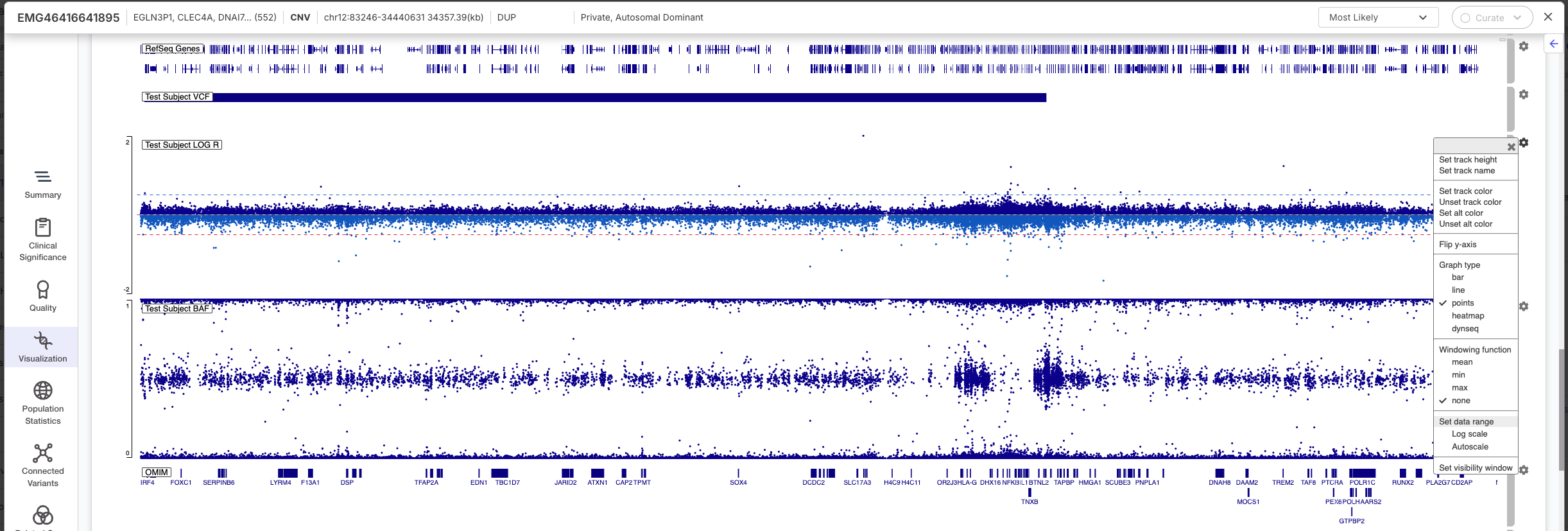
* Users can now adjust the Y-axis setting for tracks like BAF, LogR, TNS. This can be done by selecting the ‘SET Data Range’ and adjusting the range. Limitation: This is not a yet saved as a persistent user setting.

<figure><img src="https://1131024994-files.gitbook.io/~/files/v0/b/gitbook-x-prod.appspot.com/o/spaces%2FGCW0DnLlE7QjoZPNmKIi%2Fuploads%2Fgit-blob-3a77f4e6024e41fb603fd71f4a7ff0317953bba6%2Fyaxis%20igv.png?alt=media" alt="" width="563"><figcaption></figcaption></figure>

Benefits from the GenomeView upgrade:

* Ability to switch from Ideogram view to colocation map explorer for TruPath data.
* Ability to reorder and hide tracks in the Ideogram view.

#### New Decipher known variants track

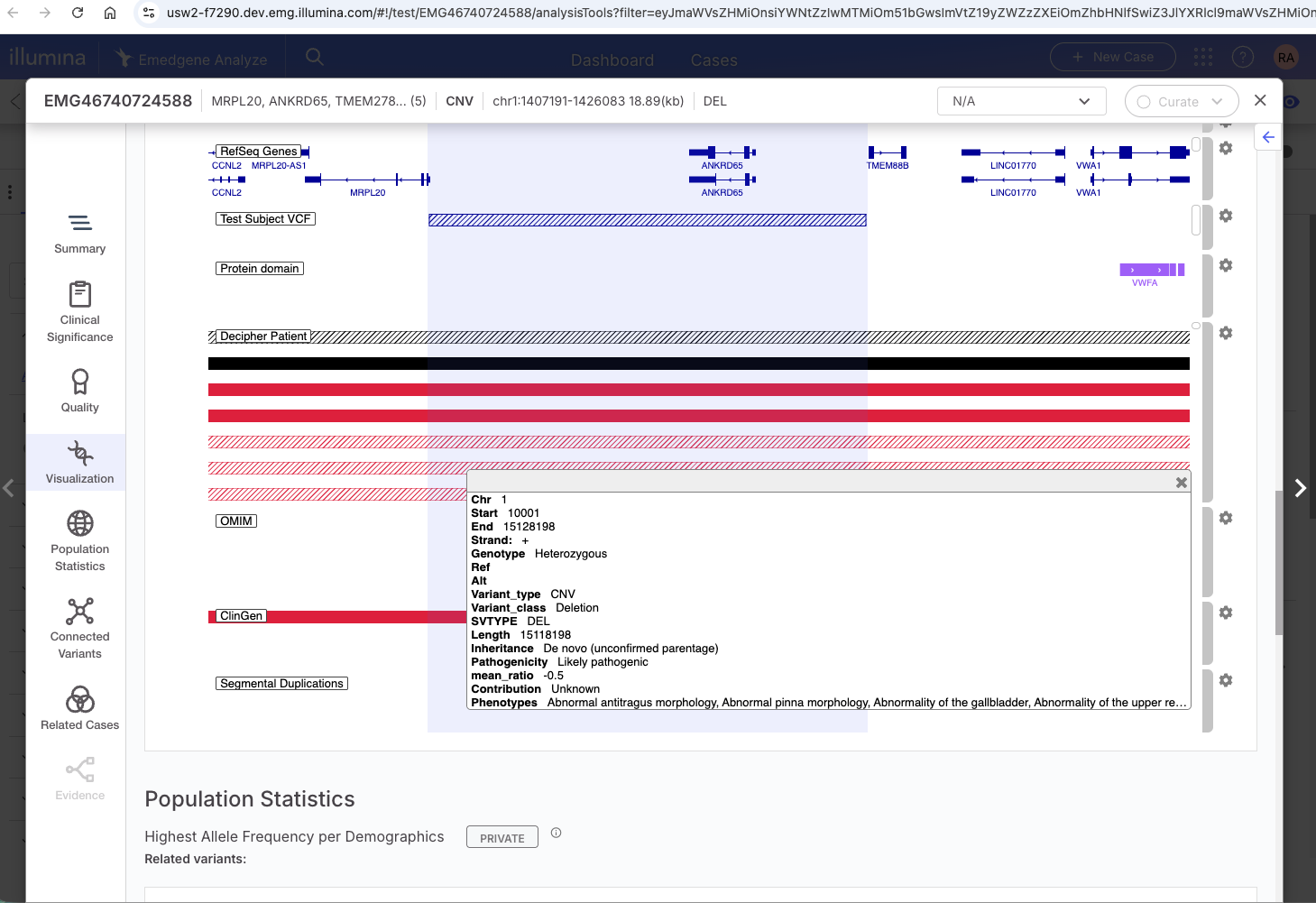
The DECIPHER database contains patient-contributed structural variant data that supports interpretation of copy number variants. Adding DECIPHER as a visualization track allows analysts to quickly compare their case CNVs against known pathogenic and likely pathogenic variants from this rich Decipher dataset.

The track is selectable in IGV and is only available with knowledgebases released after April 2026, independent of the pipeline version.

<figure><img src="https://1131024994-files.gitbook.io/~/files/v0/b/gitbook-x-prod.appspot.com/o/spaces%2FGCW0DnLlE7QjoZPNmKIi%2Fuploads%2Fgit-blob-f13c38adbf5edebc97705316c985f84f66724678%2Fdecipher%20track.png?alt=media" alt="" width="563"><figcaption></figcaption></figure>

#### Lab quality alerts modified to better support cytogenetic and panel cases

Labs have reported that Case Quality validation failures can be overly alarming for situations that do not necessarily indicate a quality problem, particularly for cases with low variant counts like cytogenetics and panel cases. These changes reduce unnecessary noise by downgrading case-level quality failures to warnings, and skipping irrelevant validations, allowing analysts to focus on true quality issues.

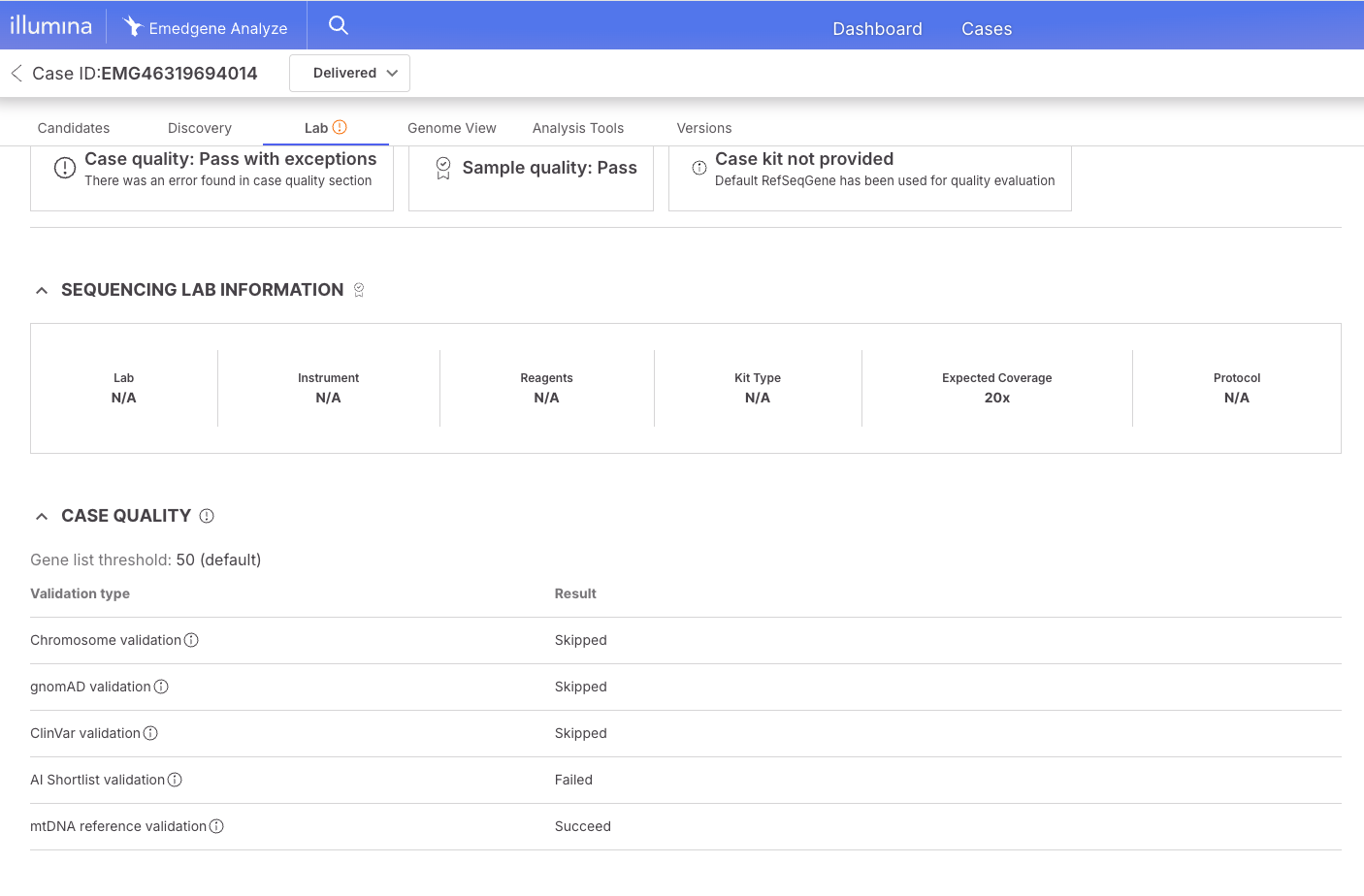
When case quality validation does not pass, the system now marks it as "Pass with exceptions" rather than a hard failure. This change applies across the platform.

In addition, the pipeline now skips Peddy-based pedigree, contamination and ploidy sample quality validations when a sample/case contains fewer than 10,000 variants, and they are marked as N/A. This prevents false quality failures on cases with a small number of variants where Peddy cannot produce reliable results.

<figure><img src="https://1131024994-files.gitbook.io/~/files/v0/b/gitbook-x-prod.appspot.com/o/spaces%2FGCW0DnLlE7QjoZPNmKIi%2Fuploads%2Fgit-blob-c816b1c5b4ddf8ed734b62d28f120291568d6e1d%2FCase%20Quality%20exceptions%20.png?alt=media" alt="" width="563"><figcaption></figcaption></figure>

### Additional improvements

* Pipeline speed improvements: WGS cases now run in \~45 min and WES cases in \~20 minutes.
* VEP annotation was updated to 113.4 to address limitations in the previous VEP 113.0.
* New self-serve capabilities:
  * Users can self-configure the Additional Information Fields per case under the Organization Settings | Case Settings card.
  * Users can now self-manage BED annotation databases through the Organization Settings | Workbench & Pipeline | Organization DB management card. A new wizard will guide you through the creation, upload and application per variant type with defined overlap and fields. Limitation: Only edit and download are possible, delete is not available even for unused databases.
* The AI mode for tagging carrier variants has been expanded to support deletions and duplications. Please contact your Illumina Bioinformatics support team to enable this option in your organization.
* PromotorAI scores can now be exported and reported.
* The new analysis tools table that allows a split view with IGV is now the default table. Users can still revert to previous table.

### General

#### Limitations

* Login | Emedgene does not support accents in User Names, despite support for these in IAM console. Users will not be able to login to the software.
* Add New Case | Selecting a disease should automatically suggest phenotypes, however, some diseases available for selection are from sources without phenotypes, and in that case, no phenotypes will be suggested.
* Add New Case | No validation that input files are uncorrupted; case will be created and fail.
* Add New Case | API/Batch/UI discrepancies: Cannot add phenotypes for unaffected parent in batch upload.
* Add New Case | API/Batch/UI discrepancies: No validation for sample name in array JSON from batch upload/API.
* Add New Case | File name can be at most 255 characters.
* Edit Case | Reanalysis | Custom disease is not saved when a case is reanalyzed.
* Pipeline | All samples with unknown sex are treated in the pipeline as female. Therefore, the presence of two X chromosome copies is treated as the reference (REF) condition. Customers can toggle on a 'Keep ref variants' setting to view these variants.
* Candidates Page | Compound het SNV-CNV variants will not display the automated CNV classification. Workaround - view variants from analysis table.
* Candidates, Variant Page, Curate | Evidence graph & ACMG automation will not be calculated for CNVs over 20MB. They will not have a gene related disease card in Curate.
* Candidates, Variant Page | After editing the evidence graph, phenotypic match strength indications are missing from the sidecar and variant page.
* Candidates | Evidence Graph | Changing the disease in the evidence graph will not automatically change the inheritance mode, that needs to be manually edited as well.
* Genome View | Only the largest 500 variants are displayed.
* Analysis Tools | Filters | MNV variants in mtDNA genes will not show up in a filter restricted to mtDNA variants.
* Analysis Tools | Search for CNVs by position does not consider end, only start.
* Analysis Tools | Custom Presets & Settings | Presets - Cannot save custom and preset filters with {} in name.
* Analysis Tools | Filters | ACMG pathogenicity filters don't support CNVs.
* Analysis Tools | Presets | Preset filters v1 schema is deprecated, please upgrade to V2 prior to moving to any version over 37.
* Variant Page | Quality | Likelihood ratio (DRAGEN WES) will show as 0 even when not available.
* Curate | Some CNV variants will not get a Network icon in the search despite having network variants.
* Webhooks | Cannot be triggered on internal software statuses such as 'In Progress' 'Reanalysis'.
* Reporting | PMIDs will only work if there is an author on link, no support for books.
* Export to excel is limited to 32KB per cell, which may prevent exports with very large CNVs.
* Organization Settings | BED upload | Validation on the UI component does not check the following. No validation at all for API uploads: All lines in the BED must contain the same number of columns; No duplicate lines; No trailing whitespaces.
* Organization Settings | BED upload | No validation on ChrM.
* Organization Settings | API Gene Lists | Does not support NCBI only export/import. This is supported from the UI.
* Settings | Add PON to Kit | File browser BSSH integration does not support searching by file name.
* Settings | Add PON to Kit | No pagination, making it difficult to add files without knowing their exact path.

#### Fixed Issues

* Network | Fixed an issue where if POC was missing, network couldn't be created.
* \[Hotfix] Curate | Fixed an issue where the ACMG tag version was saved incorrectly.
* Curate | Fixed the sort by pathogenicity and network pathogenicity.
* API Integrations | Fixed minor errors in the Curate and Cases swagger.
* Visualization | Updated RefSeq IGV track.

#### Known Issues

* Add New Case | API | When sending due date please use UTC time, customer time zone is not taken into account with API, only through the UI.
* Add New Case | Replacing a sample in the UI will not change the visible sample name.
* Edit Case | Reanalysis | If HPO terms were updated between analyses, the reanalysis will not automatically map previous HPO terms to new ones.
* Pipeline | Variants annotated with snpEFF as a fall back and not VEP are missing NCBI IDs and this might affect transcript prioritization.
* Cases Page | Illumina Clouds | Users that have been removed from workgroups in IAM can still be added as participants to a case. They will not have access to the software, and there is no security/access risk.
* Lab Tab | % BP calculation can be slightly and rarely misleading due to pipeline rounding calculation to two decimal points.
* Lab Tab | Open in IGV desktop only works if case has been previously linked to IGV desktop from the analysis tools.
* Analysis Tools | Filters | Filtering by User Tags will return AI results.
* Analysis Tools | Filters | Not all AI tags are available for filtering in Evidence & Tags, advanced mode. Missing Carrier Analysis and Incidental.
* Analysis Tools | Search | Searching for 'chromosome: position ref > alt' is not yet implemented for CNVs.
* Variant Page | Summary Tab | gnomAD AF, Max AF and hom/hemi counts for SV INS variants are missing from summary tab but available in Population Statistics section.
* Variant Page | Variant Interpretation | Load from Curate | Only a single CNV variant is displayed in this component, even if there are several overlapping variants.
* Variant Page | gnomAD constraint link in Gene Metrics card mistakenly leads to gnomAD 3.1.2.
* Variant Page | Inheritance modes from GeneCC is aggregated from all genes for a given disease instead of being gene-disease specific.
* Variant Page | In silico predictions card closes when switching between variants.
* Variant Page | Quality | Allele distribution chart for reference variants does not work for non-proband case members.
* Variant Page | Visualizations | Load to desktop IGV | Test subject VCF does not load.
* Variant Page | Visualization | Simple/Advanced selectors will not work for locally uploaded BAM files.
* Variant Page | Visualizations | Curate link isn't working for Curate track variants.
* Variant Page | Connected Variants | Some compound heterozygous connections spanning multiple genes might not be shown in component. They will be captured in filters.
* Variant Page | ACMG Automation | When manually changing a tag status from inactive to active and back again, tag status might be incorrect.
* Variant Page | Gene-related disease & Evidence Graph | For CNVs, editing the gene-related disease does not change in evidence graph despite a warning message that it will.
* Report/Export | For Chromosome X, father zygosity HEMI will appear as HOM on CSV export.
* Export | MiniVCF is missing some annotations for mtDNA, STR, SV variants.
* API | sample\_validation\_info does not work in V38 and above.
* Network activities are saved but not displayed.
* Curate | ACMG | Does not store tag strength, questions and supporting evidence for cases that were run with pipeline V35 and V36.
* Curate | Large CNVs do not have a gene-related disease card even if a gene related disease appears in Analyze.
* Curate | Gene entities do not use MANE transcript by default as in the rest of the platform.
* Curate | Orphanet link structure has changed and does not work in Curate (fixed in Analyze).
* Dashboard | Diagnostic Yield includes Uncertain as Resolved.
* Organization Settings | Intermittent issues edit presets in the table after sorting. Fix planned for V100.41.100 (September 2026).
* Organization Settings | Set mandatory fields - does not work from the UI. Please contact support if you'd like to configure these fields for your account.


---

# Agent Instructions
This documentation is published with GitBook. GitBook is the documentation platform designed so that both humans and AI agents can read, navigate, and reason over technical content effectively. Learn more at gitbook.com.

## Querying This Documentation
If you need additional information that is not directly available in this page, you can query the documentation dynamically by asking a question.

Perform an HTTP GET request on the current page URL with the `ask` query parameter, and the optional `goal` query parameter:

```
GET https://help.connected.illumina.com/emedgene/release-notes/workbench-and-pipeline-updates/new-in-emedgene-v100_41.md?ask=<question>&goal=<endgoal>
```

`ask` is the immediate question: it should be specific, self-contained, and written in natural language.
`goal` is optional and describes the broader end goal you are ultimately trying to accomplish on behalf of the user. GitBook uses it to tailor the answer towards what is most useful for that goal.

The response will contain a direct answer to the question and relevant excerpts and sources from the documentation.

Use this mechanism when the answer is not explicitly present in the current page, you need clarification or additional context, or you want to retrieve related documentation sections.