> For the complete documentation index, see [llms.txt](https://help.connected.illumina.com/llms.txt). Markdown versions of documentation pages are available by appending `.md` to page URLs; this page is available as [Markdown](https://help.connected.illumina.com/getting-started/rg-faq.md).
# FAQ
Frequently Asked Questions
## Order Registration
## **Q: What types of Illumina Software require order registration?**
A: Order registration is used to activate software purchased through an Illumina sales representative. There are two types:
* Software Subscriptions
1. BaseSpace Professional Subscriptions
2. BioInsight Platform Core Professional, BioInsight Platform Core Enterprise, Illumina Connected Insights, Connected Multiomics Subscriptions, etc.
* Software Consumables
1. Examples: BioInsight Credits (BIC), Genome Equivalent Samples, Illumina Complete Long Reads cloud analysis, Consumption billing
## **Q: Why is selecting workgroups or domains required?**
A: Workgroups and Domains are used by Illumina software to control access to different customers' data and assets. Examples of a domain are dcehealth.Illumina.com or coreseqinc.Illumina.com.
Choosing a domain is required when registering BaseSpace Enterprise, BioInsight Platform Core, or Cohorts Subscriptions. Choosing a workgroup is required when registering BaseSpace Professional. Software consumables (such as BIC) can be applied to either domains or workgroups of active subscriptions.
Below is a description of how workgroups and domains are used by Illumina software.
| Subscription Type | Location for BIC | Description |
| ----------------------------------------------------------- | ---------------- | --------------------------------------------------------------------------------------- |
| All other software products (Platform Core, ICI, ICM, etc.) | Domain | All other software subscriptions use domains to control access to software consumables. |
| BaseSpace Sequence Hub Professional | Workgroup | BaseSpace Pro subscriptions use workgroups to control access to software consumables. |
## **Q: Why do I not see my orders listed on the Order Registration page?**
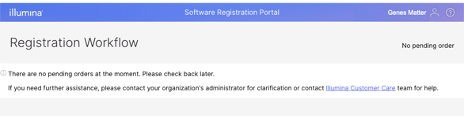
A: If you arrive at the Software Registration Portal page and see no orders listed, this means that the orders have not been associated with your email address.\\
You have most likely been forwarded an Illumina registration email and clicked on the link to get to the registration portal. The portal does not recognize your email because the person that forwarded the message did not request that your email be assigned to register new products.
The solution for this is to ask the person who forwarded the email to you to log into the registration portal and add your email address using the "Assign User" button. If this does not resolve the issue or you are unable to locate your order after logging in, please contact or click on the [FAQ](https://support.illumina.com/support-content/NoPendingReg.html) link on the Registration Page.
## **Q: I completed my registration, why can I not access my software?**
A: After registration is completed, a notification will be sent to your email address to confirm the account details.
Provisioning of your software in the cloud can take up to 15-30 minutes after registration is complete. When provisioning is completed, you will receive a welcome notification that includes getting started information about your subscription.
---
# Agent Instructions
This documentation is published with GitBook. GitBook is the documentation platform designed so that both humans and AI agents can read, navigate, and reason over technical content effectively. Learn more at gitbook.com.
## Querying This Documentation
If you need additional information that is not directly available in this page, you can query the documentation dynamically by asking a question.
Perform an HTTP GET request on the current page URL with the `ask` query parameter, and the optional `goal` query parameter:
```
GET https://help.connected.illumina.com/getting-started/rg-faq.md?ask=&goal=
```
`ask` is the immediate question: it should be specific, self-contained, and written in natural language.
`goal` is optional and describes the broader end goal you are ultimately trying to accomplish on behalf of the user. GitBook uses it to tailor the answer towards what is most useful for that goal.
The response will contain a direct answer to the question and relevant excerpts and sources from the documentation.
Use this mechanism when the answer is not explicitly present in the current page, you need clarification or additional context, or you want to retrieve related documentation sections.