# Adding a Variant Annotation Database

Click the **+ Add variant annotations** button under the *Variant annotations* section header on the [library file management page](broken://spaces/5WPPw051cYE3Zthy5U7m/pages/9npv9u7RcPWHiXftGkmn).

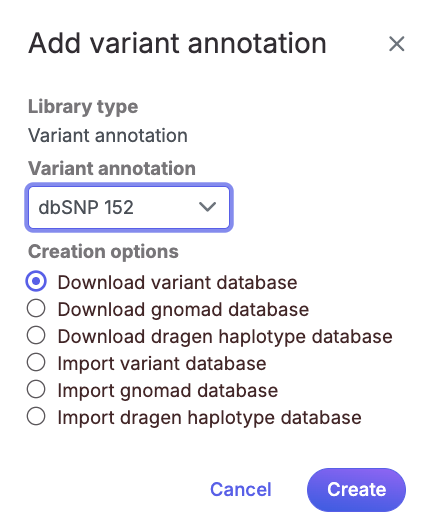
If you are using a human - hg38 assembly, variant annotation databases from various sources will appear in the *Variant annotation* drop-down list (Figure 1). Available variant annotation database sources include:

* dbSNP
* ClinVar
* gnomad
* Illumina DRAGEN haplotype

Multiple versions of the above databases are available. For human - hg38, only dbSNP and ClinVar is currently available. This list is periodically updated.

<div align="center"><figure><img src="/files/cjAHAVJKzQ1hAjkYTJoC" alt="" width="333"><figcaption><p align="center">Figure 1. For human - hg38, automatic downloads of various variant annotation databases are available from the Connected Multiomics repository.</p></figcaption></figure></div>

Choose a database from the drop-down list, select the **Download variant database** radio button and click **Create**.

If you prefer to add a custom variant annotation database, perhaps from another source or 'gold-standard' validated variants, choose **Add variant database** from the *Variant annotation* drop-down list (Figure 2). Name the variant annotation database by typing into the *Custom Name* box and click **Create**. Characters such as $ \* | \ : " < > ? / % cannot be used in custom names. A variant annotation database can be added from from your local computer by clicking the option of *My Computer*. Only the files with relevant file extensions will be visible (.vcf and various compressed formats).

<figure><img src="/files/wG9O2A19zGtyJgsBGNjy" alt=""><figcaption><p align="center">Figure 2. Add a custom variant annotation database</p></figcaption></figure>


---

# Agent Instructions: Querying This Documentation

If you need additional information that is not directly available in this page, you can query the documentation dynamically by asking a question.

Perform an HTTP GET request on the current page URL with the `ask` query parameter:

```
GET https://help.connected.illumina.com/icm/analyses/analysis-functionality/settings/library-file-management/adding-a-variant-annotation-database.md?ask=<question>
```

The question should be specific, self-contained, and written in natural language.
The response will contain a direct answer to the question and relevant excerpts and sources from the documentation.

Use this mechanism when the answer is not explicitly present in the current page, you need clarification or additional context, or you want to retrieve related documentation sections.
