> For the complete documentation index, see [llms.txt](https://help.connected.illumina.com/llms.txt). Markdown versions of documentation pages are available by appending `.md` to page URLs; this page is available as [Markdown](https://help.connected.illumina.com/icm/analyses/analysis-functionality/task-menu/classification/sctype.md).
# ScType
ScType is "a fully-automated and ultra-fast cell-type identification based solely on a given scRNA-seq data, along with a comprehensive cell marker database as background information."\[1]. It allows accurate cell typing in scRNAseq and spatial transcriptome data\[2]. Our implementation builds on the original tool, but allows for improved performance on larger datasets.
### ScType cell classification
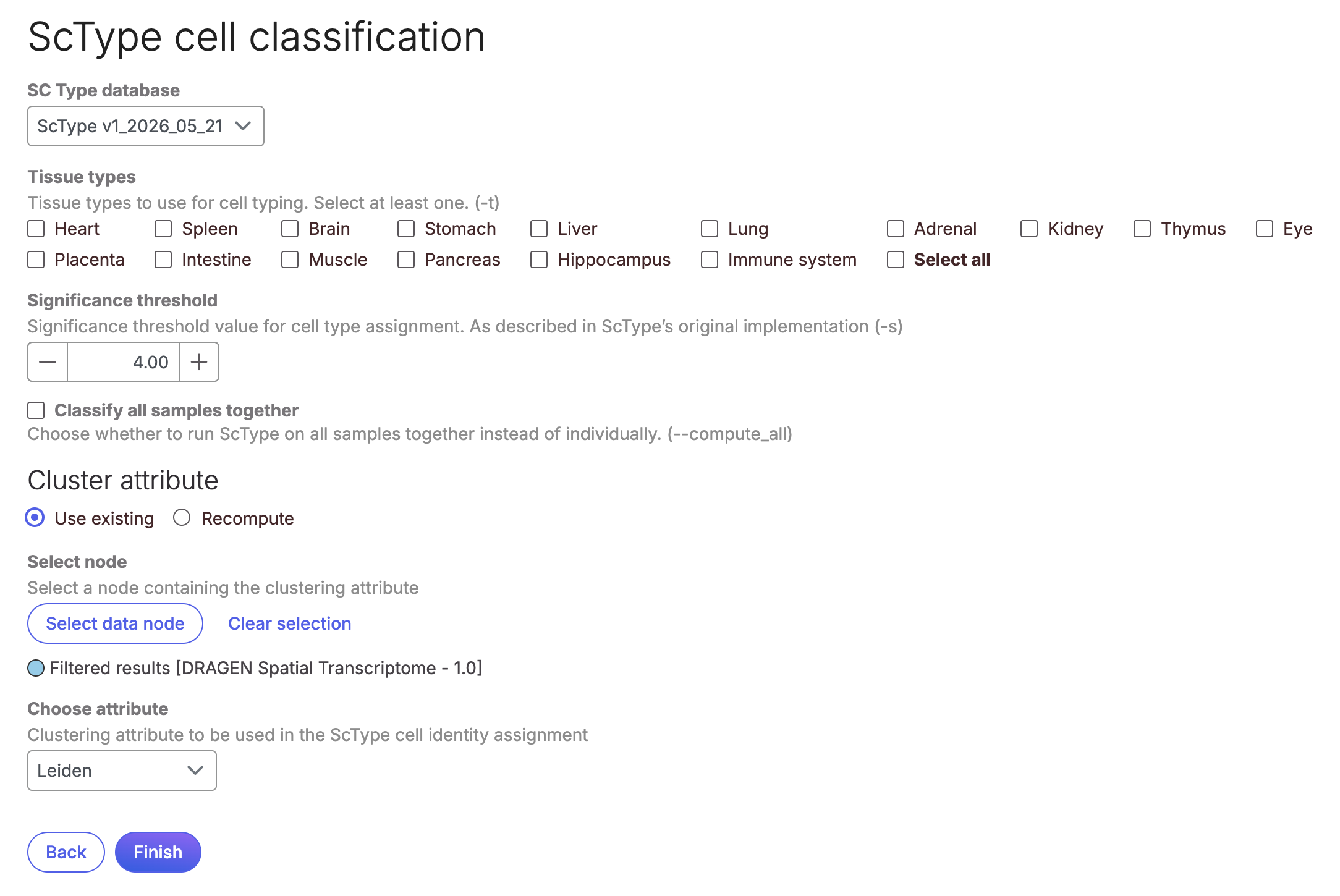
The task can be called from any non-normalised counts node, in the *Classification* menu on the right.
* Click on the Counts node.
* Click on *Classification> ScType cell classification* in the toolbox.
* Select the marker database from the **SC Type database** drop-down.
* Use the **Tissue** selector to the select the appropriate tissue or tissues by checking the boxes. The options are automatically identified from the marker database provided.
* You can choose **Classify all samples together** if you want the task to consider all your observations (cells) as one sample, for example if the clustering attribute was computed on all samples at once.
* The task can use an existing attribute for the classification, select the node contains the attribute to use for cell clustering. Choose the specific attribute from the *Choose attribute* drop-down list.
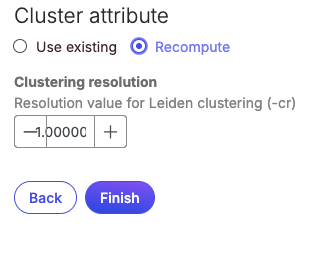
* You can choose to recompute the clustering attribute within the task by selecting **Recompute.**
* Select the appropriate resolution parameter for the Leiden clustering.
* Click **Finish** to run the task.
The task outputs an annotation for each cell in the dataset. If a cell does not pass the significance threshold it will be classified as 'unknown'. The annotation is saved as 'sctype\_classification', and is available from the node. You can use *Annotation/Metadata>Publish cell attributes to project* in the toolbox to make the attribute available at the Analysis level.
### ScType marker database
Our implementation of ScType allows the user to provide their own marker databases for classification. Please ensure that the gene names used in the marker database match the names in the annotation used for the dataset. In principle, this can be used to classify cells from any species. The marker database present by default supports human and mouse only.
#### Database formatting
The task expects a marker database file in either .txt or .tsv format. If you are using the original ScType marker database as a template, please save the resulting file in either of these formats.
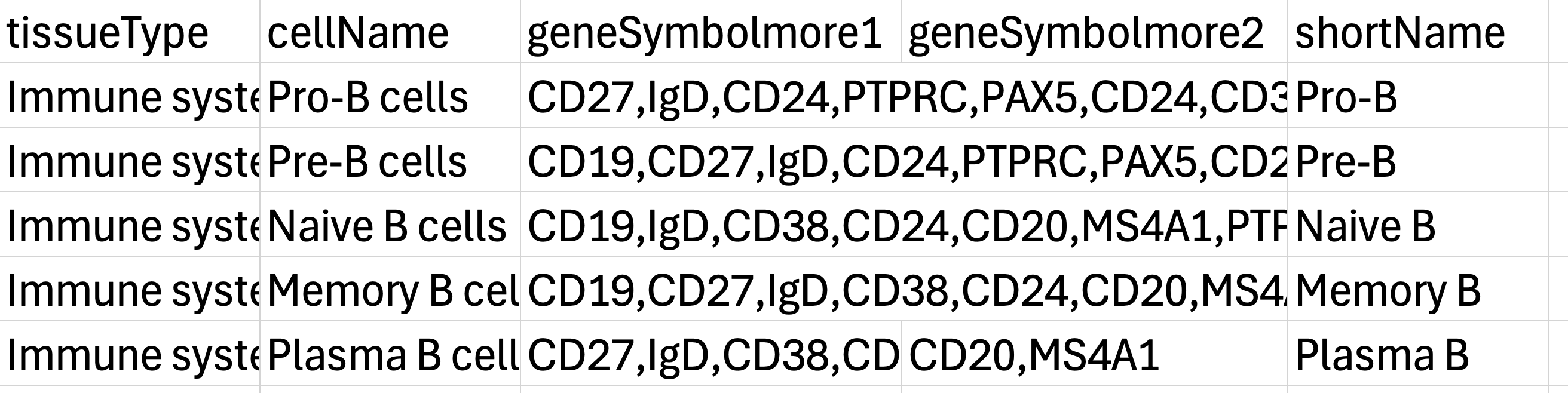
The file should have 5 columns: tissueType, cellName, geneSymbolmore1, geneSymbolmore2, shortName.
* tissueType: Contains tissues being typed. This column will be parsed te determine the Tissue options in the task.
* cellName: Contains the name of each cell type in each tissue. If a cell type is found in more than one tissue, it will be found more than once in this column.
* geneSymbolmore1: Contains the positive markers for the cell type in that tissue, comma separated.
* geneSymbolmore2: Contains the negative markers for the cell type in that tissue, comma separated.
* shortName: Contains the cell type short name.
#### Adding a database
To add a ScType marker database, first upload it to your ICA project as described [here](https://help.ica.illumina.com/project/p-data#ui-upload). After creating your Study and linking it to the correct ICA project:
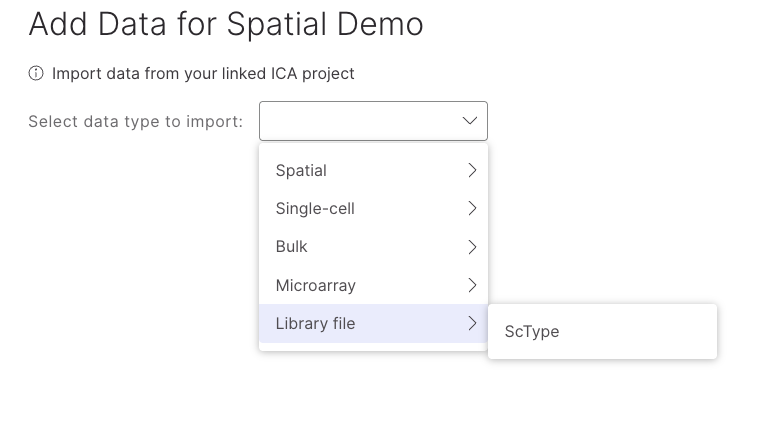
* Click on the **Add Data** button.
* Then **Select from ICA project**.
* Select **Library file > ScType** from the drop down menu.
* Navigate to the file location and select the checkbox to the left of the file name.
* Click **Add selected data** at the bottom right of the page.
The newly added gene marker database will now be available form the dropdown menu in the task setup page.
### ScType outputs
Overall, the task works by assigning cell type labels (based on marker genes) to clusters. The max value of the typescore for cells within a cluster will define the assigned cell type. Scores for all cell type markers will be computed for each cluster, with the highest scoring cell type assigned to the cluster. Due to this, multiple clusters may be assigned the same cell type (eg. if the data was overclustered).
It is possible to get a cluster with an unknown cell type (e.g. using a custom sctype database where the gene names are not canonical such that the gene names do not match the dataset). Or if the cluster does not meet the significance threshold.
The scType algorithm task results are consistent with the python implementation of scType given the same input and defaults described. The scType webapp has different default methods and parameters, so comparisons may not be consistent.
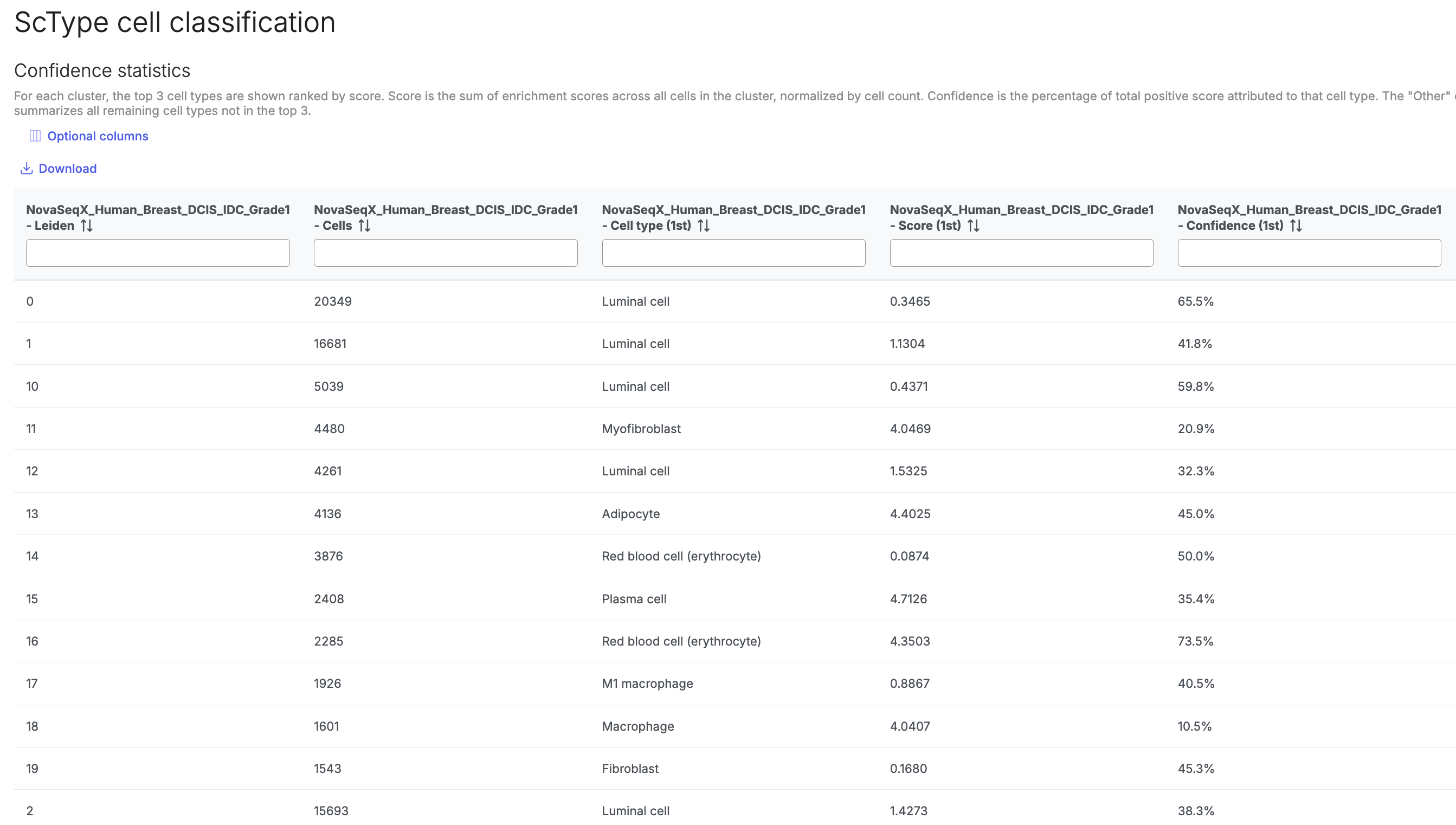
A table of results for the cell typing scores can be viewed in the task report page. For each cluster, the top 3 cell types are shown ranked by score. Score is the sum of enrichment scores across all cells in the cluster, normalized by cell count. Confidence is the percentage of total positive score attributed to that cell type. The "Other" column summarizes all remaining cell types not in the top 3.
{% hint style="warning" %}
[Publish the cell attributes ](/icm/analyses/analysis-functionality/task-menu/annotation-metadata/publish-cell-attributes-to-project.md)to the project so that you can use the classification throughout the analysis. You can also download this table.
{% endhint %}
## References
\[1] Ianevski, A., Giri, A. K., & Aittokallio, T. (2022). Fully-automated and ultra-fast cell-type identification using specific marker combinations from single-cell transcriptomic data. Nature communications, 13(1), 1246.
\[2] Nader, K., Tasci, M., Ianevski, A., Erickson, A., Verschuren, E. W., Aittokallio, T., & Miihkinen, M. (2024). ScType enables fast and accurate cell type identification from spatial transcriptomics data. Bioinformatics, 40(7), btae426.
---
# Agent Instructions
This documentation is published with GitBook. GitBook is the documentation platform designed so that both humans and AI agents can read, navigate, and reason over technical content effectively. Learn more at gitbook.com.
## Querying This Documentation
If you need additional information that is not directly available in this page, you can query the documentation dynamically by asking a question.
Perform an HTTP GET request on the current page URL with the `ask` query parameter, and the optional `goal` query parameter:
```
GET https://help.connected.illumina.com/icm/analyses/analysis-functionality/task-menu/classification/sctype.md?ask=&goal=
```
`ask` is the immediate question: it should be specific, self-contained, and written in natural language.
`goal` is optional and describes the broader end goal you are ultimately trying to accomplish on behalf of the user. GitBook uses it to tailor the answer towards what is most useful for that goal.
The response will contain a direct answer to the question and relevant excerpts and sources from the documentation.
Use this mechanism when the answer is not explicitly present in the current page, you need clarification or additional context, or you want to retrieve related documentation sections.