> For the complete documentation index, see [llms.txt](https://help.connected.illumina.com/llms.txt). Markdown versions of documentation pages are available by appending `.md` to page URLs; this page is available as [Markdown](https://help.connected.illumina.com/icm/analyses/analysis-functionality/task-menu/exploratory-analysis/banksy-spatial-domain-identification.md).

# BANKSY - Spatial Domain Identification

Spatial domains are regions within a tissue that exhibit coherent gene expression patterns and often correspond to distinct anatomical or functional areas. Spatial domain identification analysis can:

* Reveal tissue architecture and micro-environments.
* Enable downstream analyses like differential expression and pathway enrichment.
* Support integration with histology for biological interpretation.

BANKSY is a method for clustering spatial transcriptomic data by augmenting the transcriptomic profile of each cell with an average of the transcriptomes of its spatial neighbors \[1].

### Running BANKSY

The 'BANKSY - Spatial domain Identification' task can be run from any **non-normalised** node containing spatial data. It is recommended to run the task after filtering low quality cells and low expression genes. The analysis is species-agnostic.

* Select the data node
* Click **Exploratory analysis** > **BANKSY - Spatial Domain Identification**
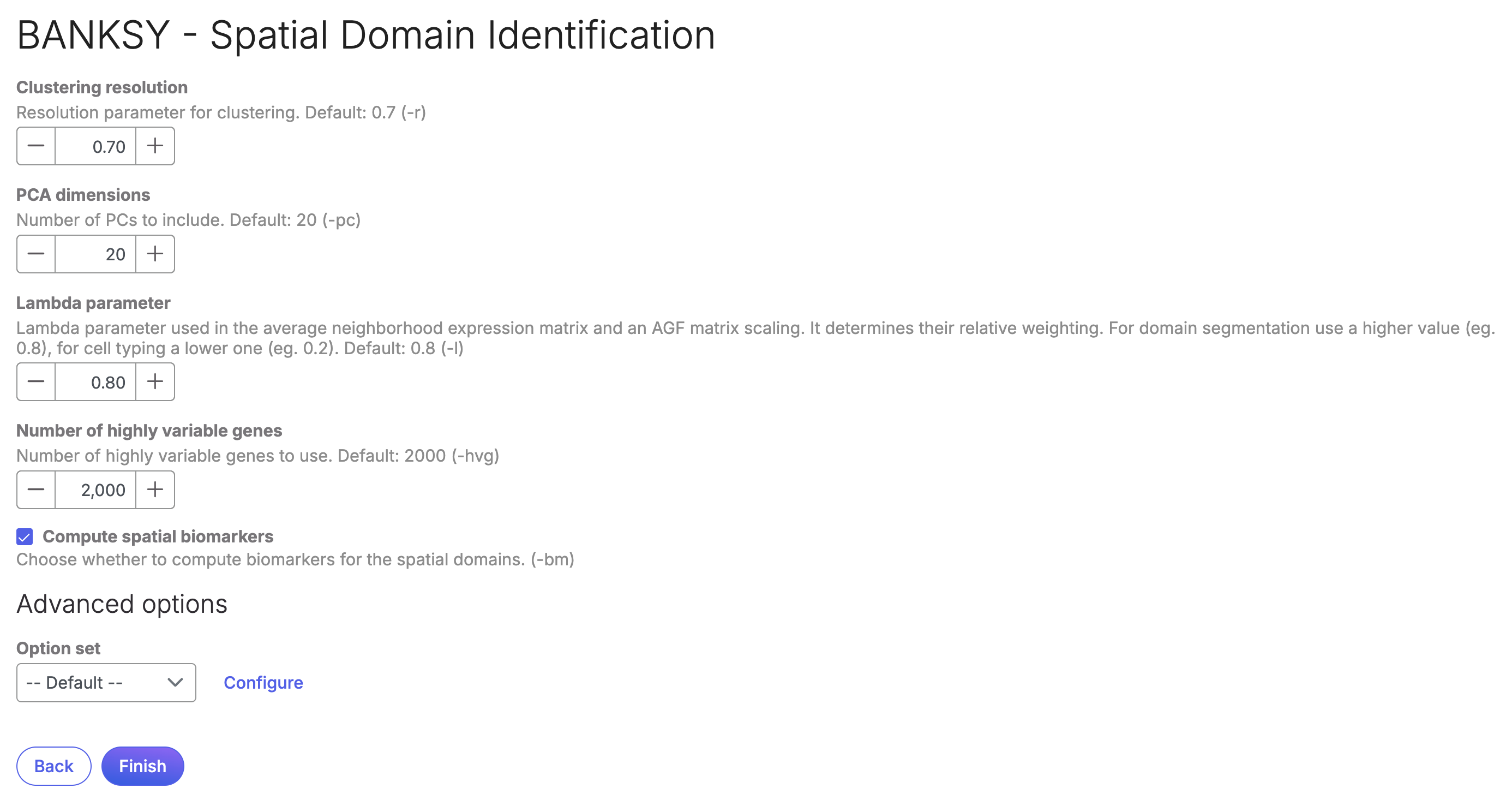
* Adjust the task parameters as needed. Note particularly the **Clustering resolution** and **Lambda parameter**, more information on these can be found in the original publication \[1].
* By default the task uses a subset of highly variable genes to improve performance on large datasets. Note that changing the **Number of highly variable genes** can greatly increase the task memory usage and runtime. Please evaluate changes based on the specific dataset.
* You can uncheck the **Compute spatial biomarkers** task if you prefer. If the option is checked (default) the task will compute differentially expressed genes between each of the spatial domains identified, similarly to the '**Compute biomarkers**' task found in the **'Statistics'** menu.

<figure><img src="/files/25ikhbGBlo5eKRV5pmvM" alt=""><figcaption><p>Figure 1. BANKSY task setup screen</p></figcaption></figure>

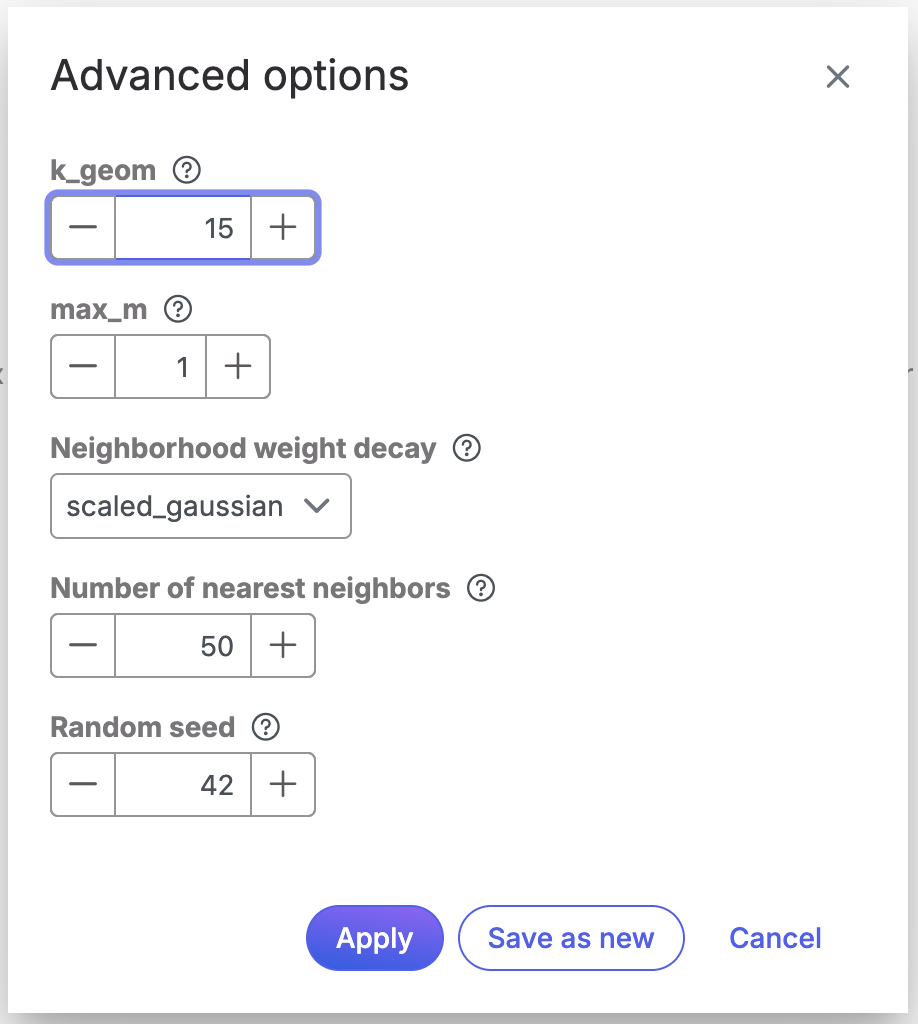
* Configure the **Advanced options** if needed

<figure><img src="/files/FBPbf8KAzxCdJ9phtbgS" alt=""><figcaption><p>Figure 2. BANKSY task advanced options</p></figcaption></figure>

* Click **Finish**

### **Task report and visualisation**

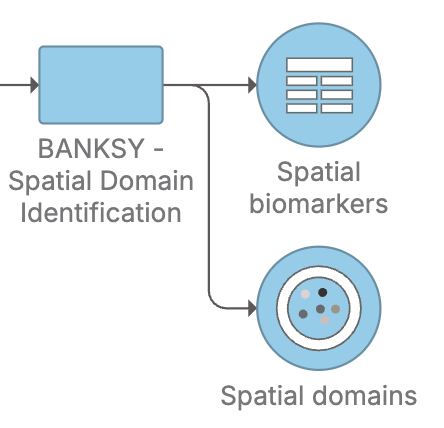
If the '**Compute spatial biomarkers**' option was checked the task will produce two separate nodes:

<figure><img src="/files/T4cIGL6Nj0X7GQRMY4s9" alt=""><figcaption><p>Figure 3. BANKSY task output nodes. If the Compute spatial biomarkers option was left unchecked, the task will only produce the Spatial Domains node</p></figcaption></figure>

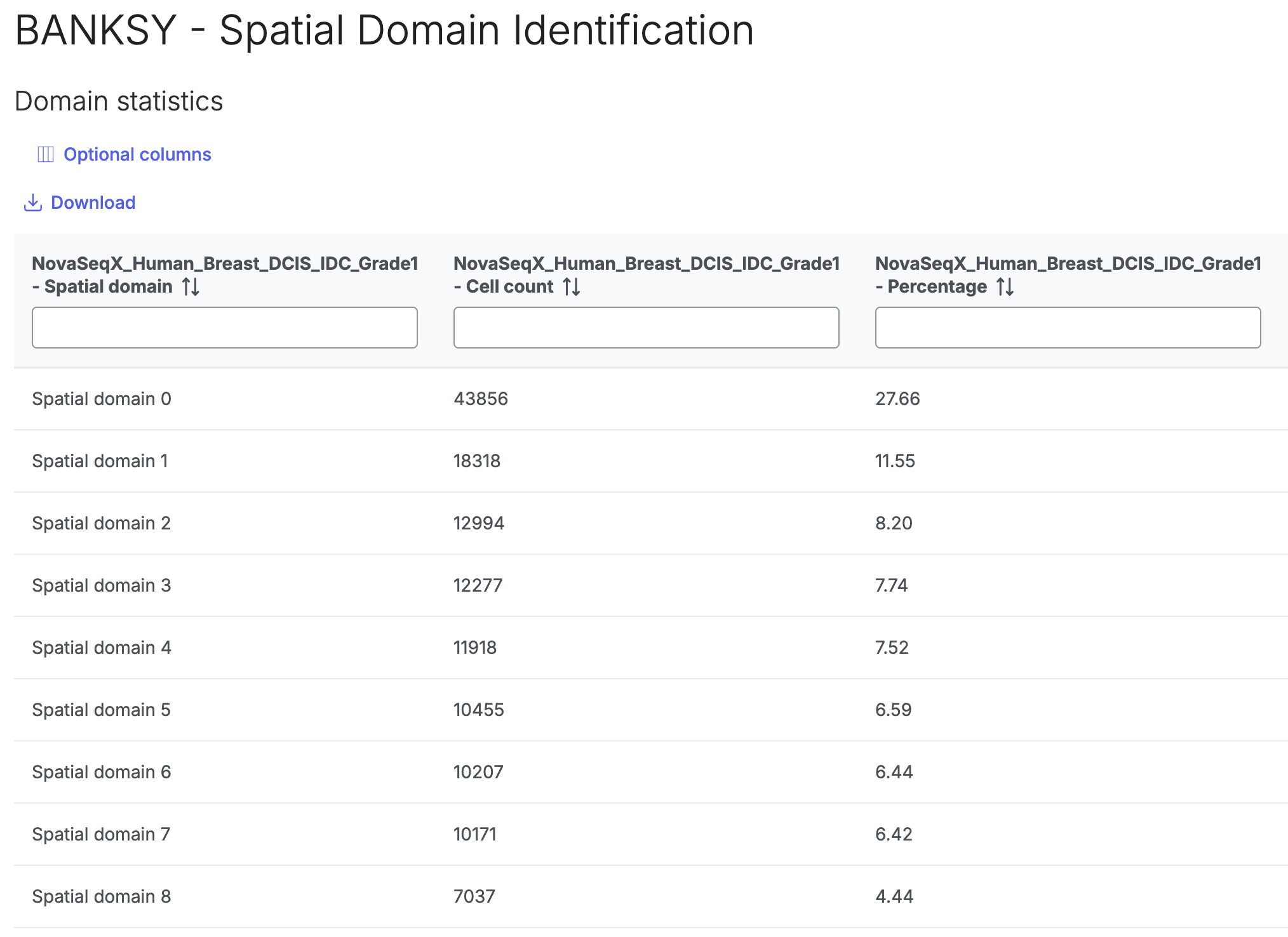
Clicking twice on the **Spatial domains** node will open a table containing the domain statistics for each sample in the analysis.

<figure><img src="/files/PEjucBi9m49UnfeXOmkL" alt=""><figcaption><p>Figure 4. Domain statistics table</p></figcaption></figure>

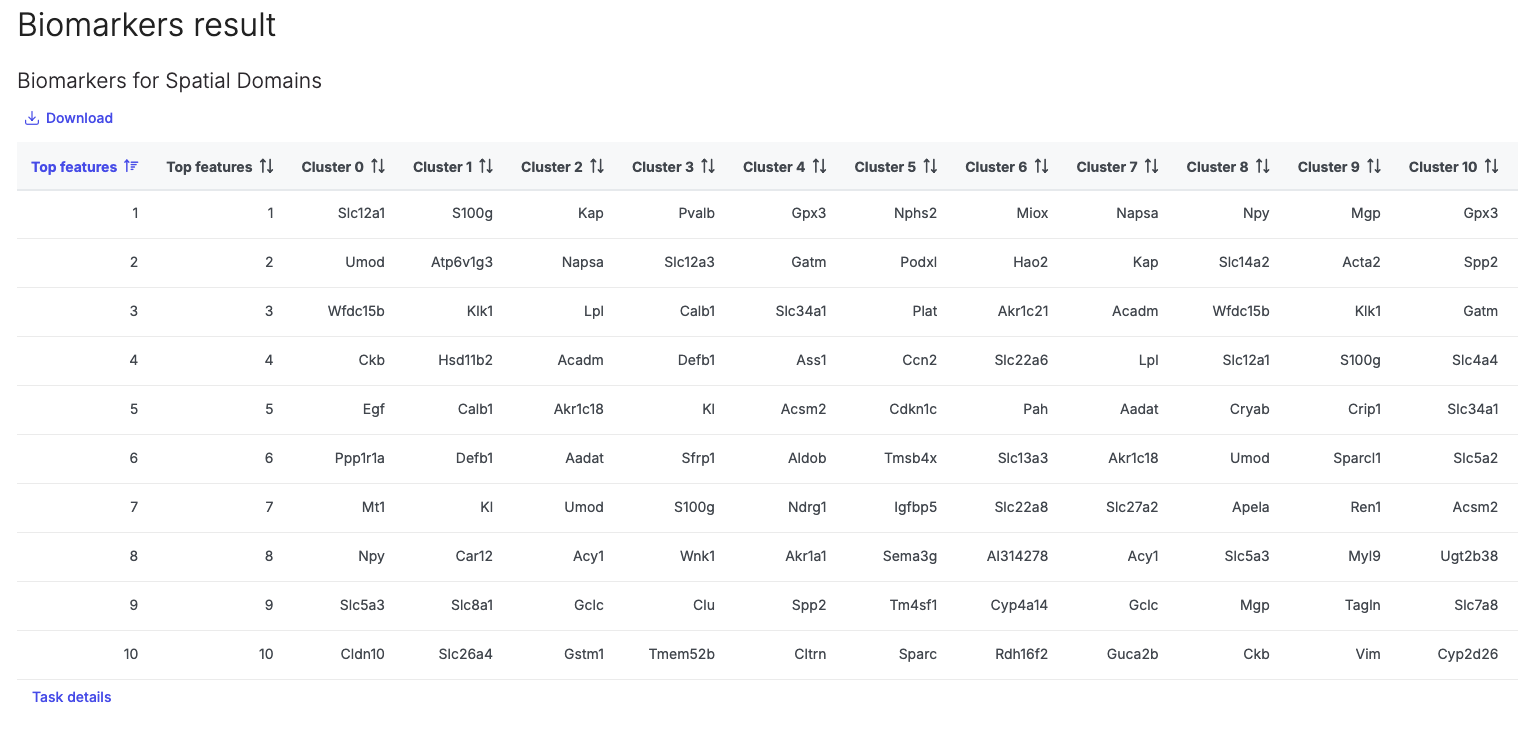
Clicking twice on the **Spatial biomarkers** node will open a table of differentially expressed genes per cluster:

<figure><img src="/files/W4LmVGDJbPHRkjev3Nz1" alt=""><figcaption><p>Figure 5. Table of Spatial biomarkers outputted by the BANKSY task</p></figcaption></figure>

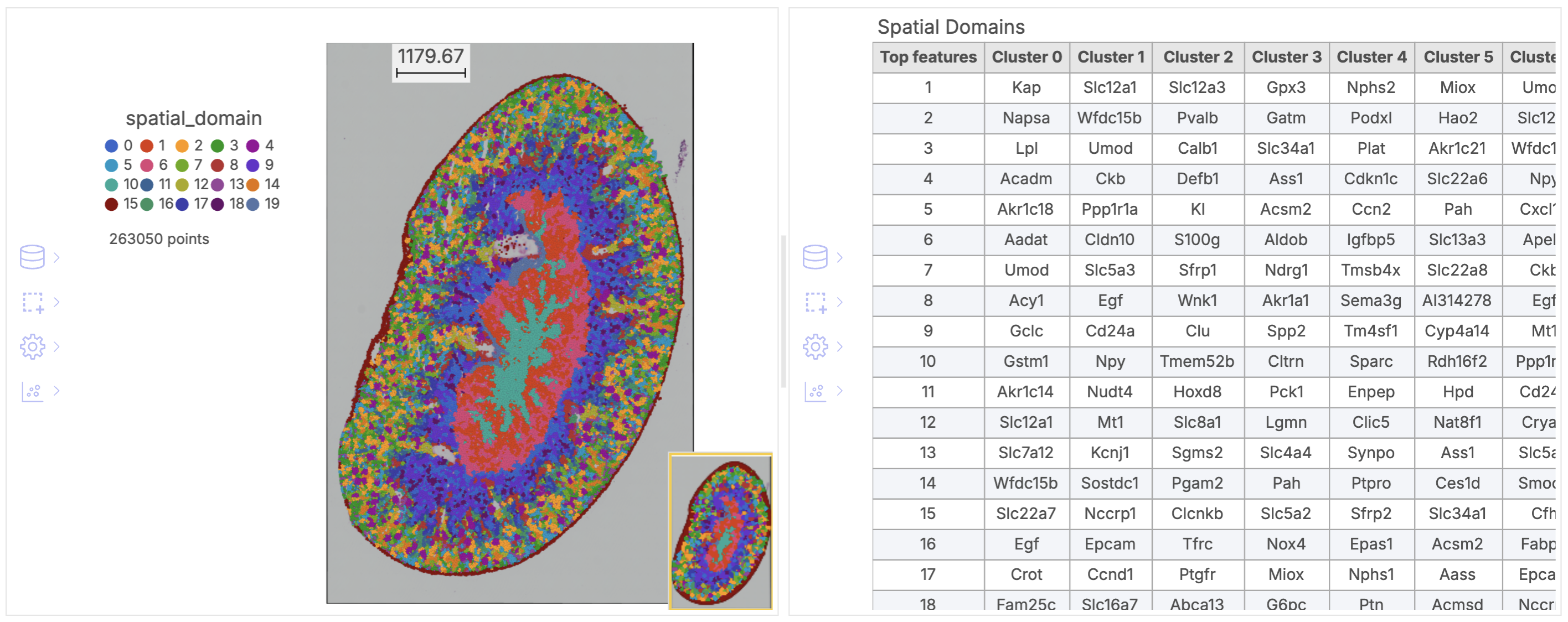
Additionally the task results can be visualised in the **Data viewer** section of your **Analysis,** common visualisations may be plotting the spatial data colored by the spatial\_domain attribute (note this will only be available in the **Spatial domains** node), and a table of spatial biomarkers:

<figure><img src="/files/R3BdacNzaaTg47x1hzgE" alt=""><figcaption><p>Figure 6. Common visualisations for the output of a spatial domains analysis</p></figcaption></figure>

#### References

\[1] Singhal, Vipul, et al. "BANKSY unifies cell typing and tissue domain segmentation for scalable spatial omics data analysis." *Nature genetics* 56.3 (2024): 431-441. <https://www.nature.com/articles/s41588-024-01664-3>


---

# Agent Instructions
This documentation is published with GitBook. GitBook is the documentation platform designed so that both humans and AI agents can read, navigate, and reason over technical content effectively. Learn more at gitbook.com.

## Querying This Documentation
If you need additional information that is not directly available in this page, you can query the documentation dynamically by asking a question.

Perform an HTTP GET request on the current page URL with the `ask` query parameter, and the optional `goal` query parameter:

```
GET https://help.connected.illumina.com/icm/analyses/analysis-functionality/task-menu/exploratory-analysis/banksy-spatial-domain-identification.md?ask=<question>&goal=<endgoal>
```

`ask` is the immediate question: it should be specific, self-contained, and written in natural language.
`goal` is optional and describes the broader end goal you are ultimately trying to accomplish on behalf of the user. GitBook uses it to tailor the answer towards what is most useful for that goal.

The response will contain a direct answer to the question and relevant excerpts and sources from the documentation.

Use this mechanism when the answer is not explicitly present in the current page, you need clarification or additional context, or you want to retrieve related documentation sections.