> For the complete documentation index, see [llms.txt](https://help.connected.illumina.com/llms.txt). Markdown versions of documentation pages are available by appending `.md` to page URLs; this page is available as [Markdown](https://help.connected.illumina.com/icm/analyses/analysis-functionality/task-menu/pre-analysis-tools/generate-beta-value.md).
# Generate beta value
This task is only available on imported microarray methylation data node. The microarray methylation node contains probe methylated/unmethylated signal intensities on green/red channels on each sample. Beta value needs to be generated for each probe in each sample, which represents the ratio of methylation at a CpG site \[1]: methylated intensity divided by the total intensity. The range of beta value is between 0 and 1.
Information about which array type needs to be retrieved from the manifest file, select the chip name from the drop-down list.
During the conversion, probe filtering can be performed. Depends on the study, probes on X/Y chromosomes can be filtered out to reduce the data size.
When check *Exclude probes using detection p-value* option, specify the p-value cutoff and number of samples.
Choose one of the normalization method:[ NOOB](http://bioconductor.org/packages/release/bioc/html/minfi.html), [Functional](https://bioconductor.org/packages/release/bioc/html/minfi.html), or None and corresponding parameter settings.
Click **Finish** to run the task, it will generate *Methylation beta data node*.
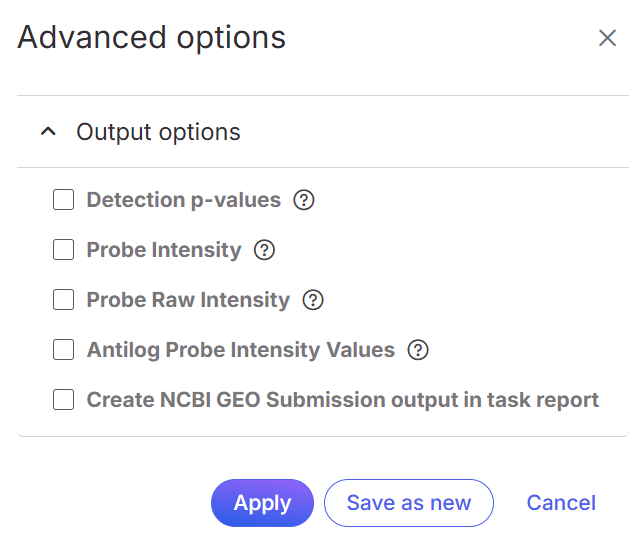
In the Advanced options configure dialog, there are options to output more values of each probe besides beta value:
Each check option will result a .tsv file. The extra information can only be downloaded. After the task is finished, click on the Microarray methylation task (rectangle) and choose Task details > View output files to retrieve the file(s).
## Reference
1.
---
# Agent Instructions
This documentation is published with GitBook. GitBook is the documentation platform designed so that both humans and AI agents can read, navigate, and reason over technical content effectively. Learn more at gitbook.com.
## Querying This Documentation
If you need additional information that is not directly available in this page, you can query the documentation dynamically by asking a question.
Perform an HTTP GET request on the current page URL with the `ask` query parameter, and the optional `goal` query parameter:
```
GET https://help.connected.illumina.com/icm/analyses/analysis-functionality/task-menu/pre-analysis-tools/generate-beta-value.md?ask=&goal=
```
`ask` is the immediate question: it should be specific, self-contained, and written in natural language.
`goal` is optional and describes the broader end goal you are ultimately trying to accomplish on behalf of the user. GitBook uses it to tailor the answer towards what is most useful for that goal.
The response will contain a direct answer to the question and relevant excerpts and sources from the documentation.
Use this mechanism when the answer is not explicitly present in the current page, you need clarification or additional context, or you want to retrieve related documentation sections.
.png?alt=media)