> For the complete documentation index, see [llms.txt](https://help.connected.illumina.com/llms.txt). Markdown versions of documentation pages are available by appending `.md` to page URLs; this page is available as [Markdown](https://help.connected.illumina.com/icm/analyses/analysis-functionality/task-menu/statistics/differential-analysis/kruskal-wallis.md).
# Welch's ANOVA
Welche's ANOVA\[1] is similar to one-way ANOVA, but it doesn't have equal variance assumption. It applies to data with an attribute has more than two groups, but the variances among the groups are not equal. It is based on weighted means. When the attribute has only two groups, it is equivalent to the unequal variance t-Test (also known as Welch's t-Test).
## Running the task
To invoke Welch's ANOVA, select any count-based data nodes, these include:
* Gene counts
* Transcript counts
* Normalized counts
After clicking on the chosen node:
* Select *Statistics > Differential analysis* in the context-sensitive menu.
* Select Welch's ANOVA*.*
* Select a specific factor for analysis and click the **Next** button to setup the comparisons.
* Define the comparisons by dragging and dropping each group in the *Denominator* and *Numerator* boxes and click **Add comparison**
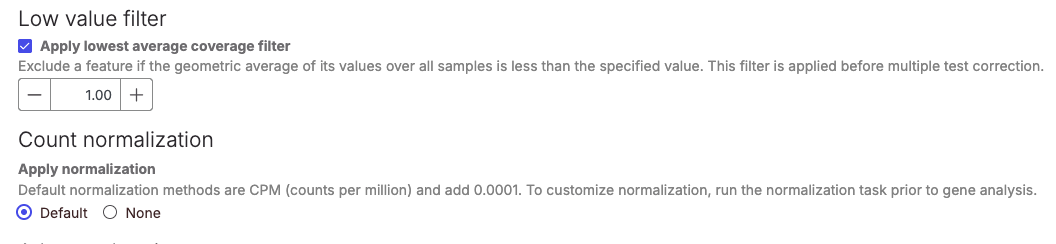
If the data has not been filtered upstream the **Low value filter** box will be checked by default. Similarly, the **Default** normalisation will be selected if the software detects that the data as not been previously normalised.
## Advanced option
Advanced options configuration allows to choose different multiple test correct and report options
The results of the analysis will appear similar to other [ANOVA/LIMMA-trend/LIMMA-voom](/icm/analyses/analysis-functionality/task-menu/statistics/differential-analysis/anova-limma-trend-limma-voom.md). However, the column to indicate mean expression levels for each group will display the median instead for Kruskal-Wallis.
## References
1. Welch, B. L. (1951). On the comparison of several mean values: An alternative approach. *Biometrika*, 38(3/4), 330-336.
---
# Agent Instructions
This documentation is published with GitBook. GitBook is the documentation platform designed so that both humans and AI agents can read, navigate, and reason over technical content effectively. Learn more at gitbook.com.
## Querying This Documentation
If you need additional information that is not directly available in this page, you can query the documentation dynamically by asking a question.
Perform an HTTP GET request on the current page URL with the `ask` query parameter, and the optional `goal` query parameter:
```
GET https://help.connected.illumina.com/icm/analyses/analysis-functionality/task-menu/statistics/differential-analysis/kruskal-wallis.md?ask=&goal=
```
`ask` is the immediate question: it should be specific, self-contained, and written in natural language.
`goal` is optional and describes the broader end goal you are ultimately trying to accomplish on behalf of the user. GitBook uses it to tailor the answer towards what is most useful for that goal.
The response will contain a direct answer to the question and relevant excerpts and sources from the documentation.
Use this mechanism when the answer is not explicitly present in the current page, you need clarification or additional context, or you want to retrieve related documentation sections.
%20(1)%20(1).png?alt=media)
.png?alt=media)
.png?alt=media)