> For the complete documentation index, see [llms.txt](https://help.connected.illumina.com/llms.txt). Markdown versions of documentation pages are available by appending `.md` to page URLs; this page is available as [Markdown](https://help.connected.illumina.com/icm/analyses/analysis-functionality/task-menu/statistics/differential-methylation.md).
# Differential methylation
Differential methylation is used to detect differentially methylated CpG loci (DML) or regions (DMR) between two conditions. The method is based on Bioconductor package DSS (Dispersion Shrinkage for Sequencing data), it is a count-based test. Detailed implementation can be found [here](https://www.bioconductor.org/packages/devel/bioc/vignettes/DSS/inst/doc/DSS.html#3_Using_DSS_for_BS-seq_differential_methylation_analysis).
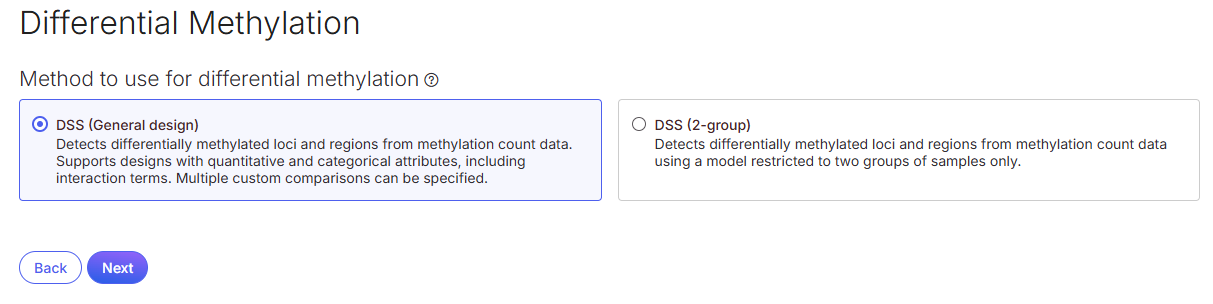
In the Connected Multiomics, two methods from DSS are available:
* **DSS general experimental design**: Supports multiple factors in a model, including covariates and interaction term. Multiple comparisons can be specified per analysis.
* **DSS two-group**: Supports only one factor in a model. Limited to one comparison per analysis.
## Running Differential Methylation
This task can be invoked from the imported 5-base Methylation data node, which contains total read count and methylated read count for each CpG site.
* Click on **5-base Methylation** data node, choose **Statistics** > **Differential Methylation**.
* Choose a **DSS method** for differential methylation, click **Next**.
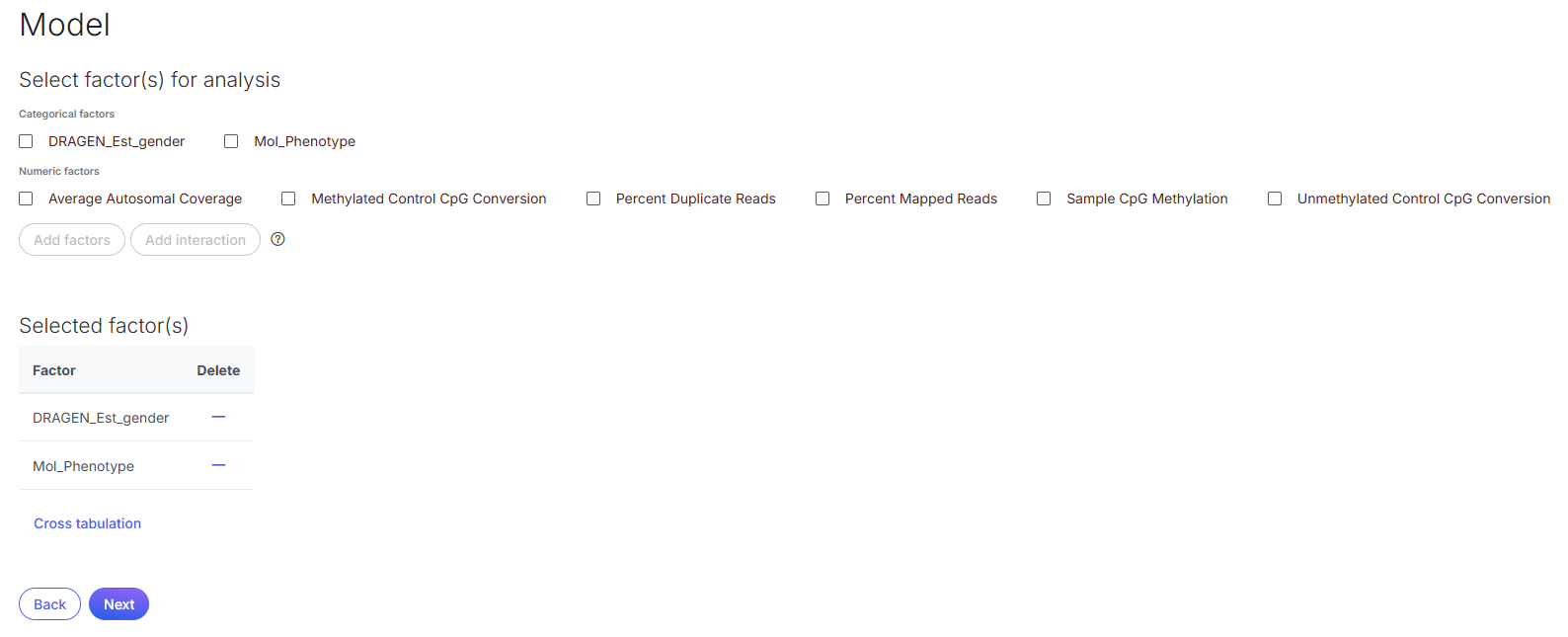
* **Select and add factor**(s) for analysis, click **Next**.
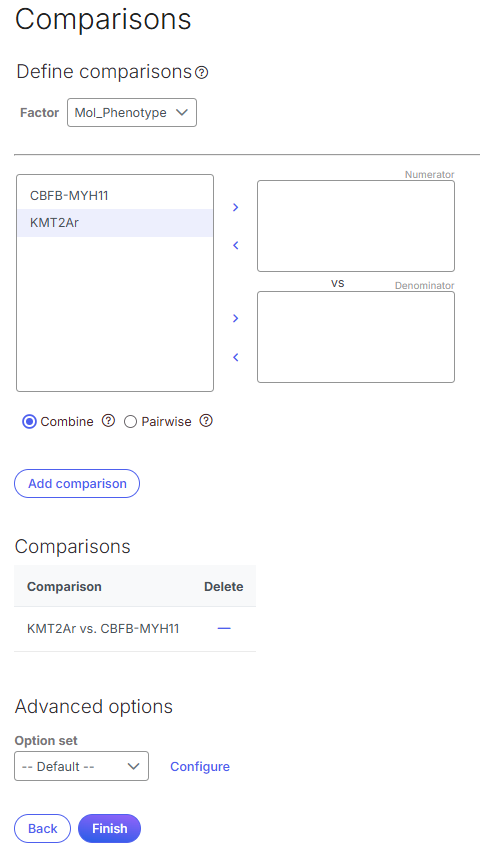
* Setup the **comparison**(s) based on the factor selected. The subgroups of the factor are displayed in the left panel; click to select one and move it to one of the boxes on the right, then click **Add comparison** to add the comparison.
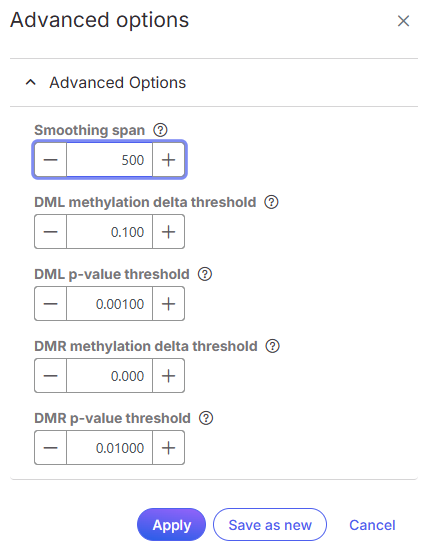
* Optionally, click on **Configure** in **Advanced options**, smoothing span can be customized, the default value is 500. Methylation delta and p-value for DML and DMR setting will be used to filter the results.
* After apply the advanced options, click **Finish** to run the task.
## Differential Methylation Report
The task will generate two data nodes: *DML* and *DMR* which represent the differential methylation at loci level and region level, respectively.
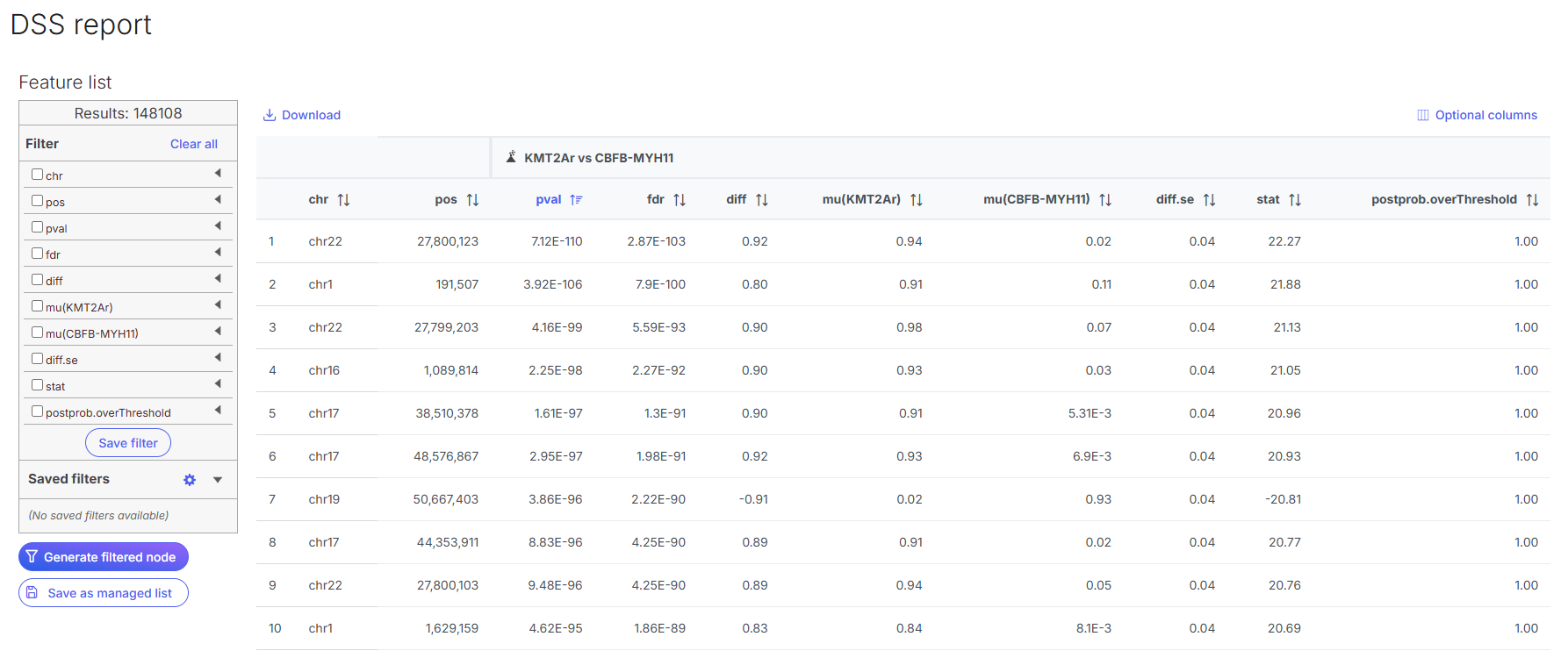
Double click on **DML** node to open the report:
In this report, each row is a locus which passed the p-value cutoff set in the advanced dialog:
* chr: Chromosome where the CpG site is located
* pos: Genomic base pair location of the CpG site
* pval: Raw p-value from the Wald test for the differential methylation at this site
* fdr: Adjusted p-value based on Benjamini-Hochberg method
* diff: Difference in methylation level between the groups. Positive values indicate higher methylation in group 1; negative value indicate higher methylation in group 2.
* mu(group name): Average methylation level in the stated group
* diff.se: Is the standard error of the estimated methylation difference between the two groups
* stat: Wald test statistics used to assess significance of methylation difference
* postprob.overThreshold: Posterior probability that the methylation difference between the two groups exceeds a specified threshold--delta
The left filter panel usage is the same as [GSA report](/icm/analyses/analysis-functionality/task-menu/statistics/differential-analysis/gsa.md#gsa-report)
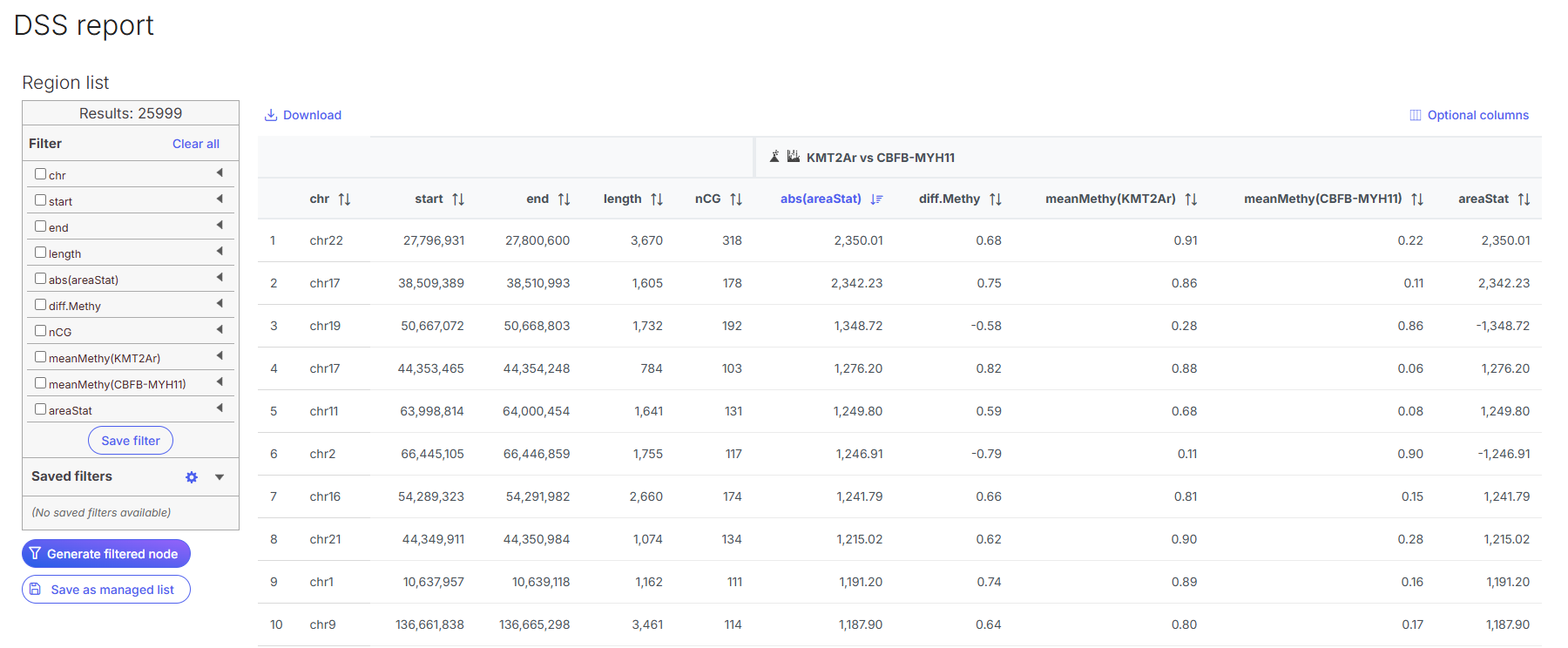
Double click to open DMR report. This result is based on DML results.
In this report, each row is a region of a cluster of CpG loci that show consistent differential methylation between the comparison.
* chr: Chromosome where the region is located
* start: Start position of the region in base pairs
* end: Stop position of the region in base pairs
* length: Length of the region in base pairs
* nCG: Number of CpG sties within the region
* abs(areaStat): Absolute value of the areaStat. Large value indicates strong evidence of differential methylation
* diff.Methy: Difference in average methylation between the two groups
* meanMethy(group name): Average methylation level across the region in the stated group
* areaStat: Sum of the test statistics (stat in DML) across all the CpG sites in the region.
### References
1. Feng, Hao, Karen N Conneely, and Hao Wu. 2014. “A Bayesian Hierarchical Model to Detect Differentially Methylated Loci from Single Nucleotide Resolution Sequencing Data.” *Nucleic Acids Research* 42 (8): e69–e69.
2. Park, Yongseok, and Hao Wu. 2016. “Differential Methylation Analysis for Bs-Seq Data Under General Experimental Design.” *Bioinformatics* 32 (10): 1446–53.
3. Wu, Hao, Chi Wang, and Zhijin Wu. 2012. “A New Shrinkage Estimator for Dispersion Improves Differential Expression Detection in Rna-Seq Data.” *Biostatistics* 14 (2): 232–43.
4. Wu, Hao, Tianlei Xu, Hao Feng, Li Chen, Ben Li, Bing Yao, Zhaohui Qin, Peng Jin, and Karen N Conneely. 2015. “Detection of Differentially Methylated Regions from Whole-Genome Bisulfite Sequencing Data Without Replicates.” *Nucleic Acids Research* 43 (21): e141–e141.
---
# Agent Instructions
This documentation is published with GitBook. GitBook is the documentation platform designed so that both humans and AI agents can read, navigate, and reason over technical content effectively. Learn more at gitbook.com.
## Querying This Documentation
If you need additional information that is not directly available in this page, you can query the documentation dynamically by asking a question.
Perform an HTTP GET request on the current page URL with the `ask` query parameter, and the optional `goal` query parameter:
```
GET https://help.connected.illumina.com/icm/analyses/analysis-functionality/task-menu/statistics/differential-methylation.md?ask=&goal=
```
`ask` is the immediate question: it should be specific, self-contained, and written in natural language.
`goal` is optional and describes the broader end goal you are ultimately trying to accomplish on behalf of the user. GitBook uses it to tailor the answer towards what is most useful for that goal.
The response will contain a direct answer to the question and relevant excerpts and sources from the documentation.
Use this mechanism when the answer is not explicitly present in the current page, you need clarification or additional context, or you want to retrieve related documentation sections.