
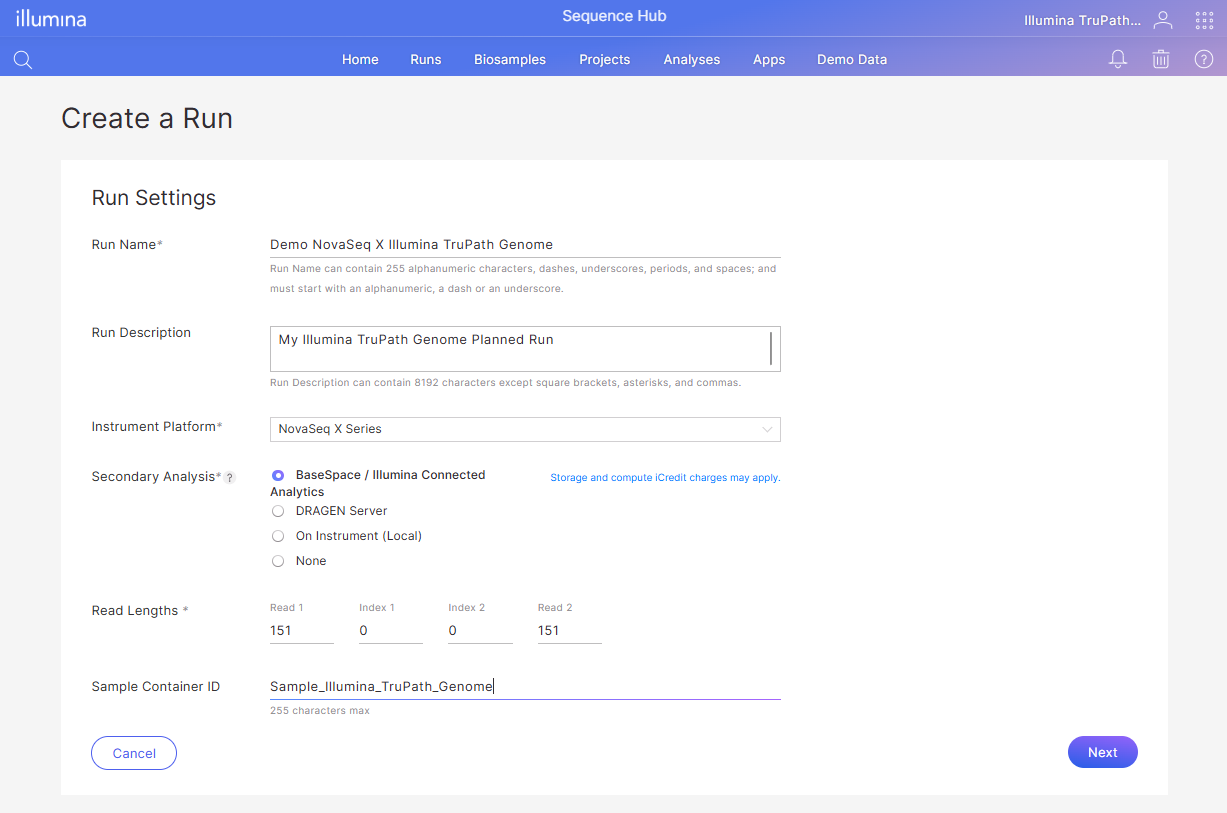
| Parameter Name | Required? | Description |
|---|---|---|
| Run Name | Required | Run Name can contain 255 alphanumeric characters, dashes, underscores, periods, and spaces; and must start with an alphanumeric character, a dash or an underscore. |
| Run Description | Optional | Run Description can contain 8192 characters except square brackets, asterisks, and commas. |
| Instrument Platform | Required | Select "NovaSeq X Series" from the dropdown. |
| Secondary Analysis | Required | Select "BaseSpace / BioInsight Platform Core" from the dropdown. |
| Read 1 | Required | 151 for DRAGEN Germline analysis. |
| Index 1 | Required | Set to "0" Indexing is not supported. |
| Index 2 | Required | Set to "0" Indexing is not supported. |
| Read 2 | Required | 151 for DRAGEN Germline Analysis. |
| Sample Container ID | Optional | Unique identifier for the container that holds the sample. |
.png?alt=media)
| Parameter Name | Required? | Description |
|---|---|---|
| Application | Required | Select "DRAGEN Germline - 4.5.2" for compatibility with Illumina TruPath Genome. Note that a message will appear to use the Illumina TruPath Genome kit and flow cell with this application version. |
| Description | Optional | Optional Text Field |
| Library Prep Kit | Required | Select "Illumina TruPath Genome Prep (C2, 2 Samples" or "Illumina TruPath Genome Prep (C8, 8 Samples)" from the dropdown. |
| Index Adapter Kit | Required | Select "Not Applicable" as indexing is not supported. |
| Reference Genome | Required | Select "Homo sapiens [1000 Genomes] hg38 v6" from the dropdown. Note that TruPath is only compatible with Hg38 reference. |
| Read 1 | Required | 151 for DRAGEN Germline Analysis. |
| Index 1 | Required | Set to "0" Indexing is not supported. |
| Index 2 | Required | Set to "0" Indexing is not supported. |
| Read 2 | Required | 151 for DRAGEN Germline Analysis. |
| Sample Container ID | Optional | Unique identifier for the container that holds the sample. |
.png?alt=media)
| Parameter Name | Required? | Description |
|---|---|---|
| Description | Optional | Optional Text Field |
| Library Prep Kit | Required | Auto-populated from previous step |
| Index Adapter Kit | Required | Auto-populated from previous step |
| Reference Genome | Required | Auto-populated from previous step |
| Variant Callers | Required | Select "None" for running Mapping/Align only. Select "Small" for a subset of Variant Callers. Select "All" for running all Variant Callers. For more information on the supported callers for Autolaunch, refer to this section. |
| QC Coverage Regions 1 | Optional | File in BED format used to generate a QC coverage region report |
| QC Coverage Regions 2 | Optional | File in BED format used to generate a QC coverage region report |
| QC Coverage Regions 3 | Optional | File in BED format used to generate a QC coverage region report |
| QC Cross Contamination Variants | Optional | QC file in VCF file format |
| Adapter Read 1 | Required | Pre-populated with default setting |
| Adapter Read 2 | Required | Pre-populated with default setting |
| Sample Table | Required | Lanes and Sample ID should be filled out based on how the sample will be prepared. Please refer to the Illumina TruPath Genome Assay Guide for additional information.
|
| Map / Align Output Format | Required | Select "BAM" |
| Enable Proximity Analysis | Required | Select "Yes" New analysis setting which enables the proximity analysis workflow in DRAGEN Germline. Required for use with Illumina TruPath Genome workflow. |
| Enable Proximity Visualization | Optional | Optional setting used for outputting *.hic files for visualization. Additional run time and compute may be incurred. Refer to Visualizations section here: Visualize in HiGlass |