# Viewing DESeq2 results and creating a gene list

Once we have performed DESeq2 to identify differentially expressed genes, we can create a list of significantly differentially expressed genes using cutoff thresholds.

* Double click the **DESeq2** data node to open the task report

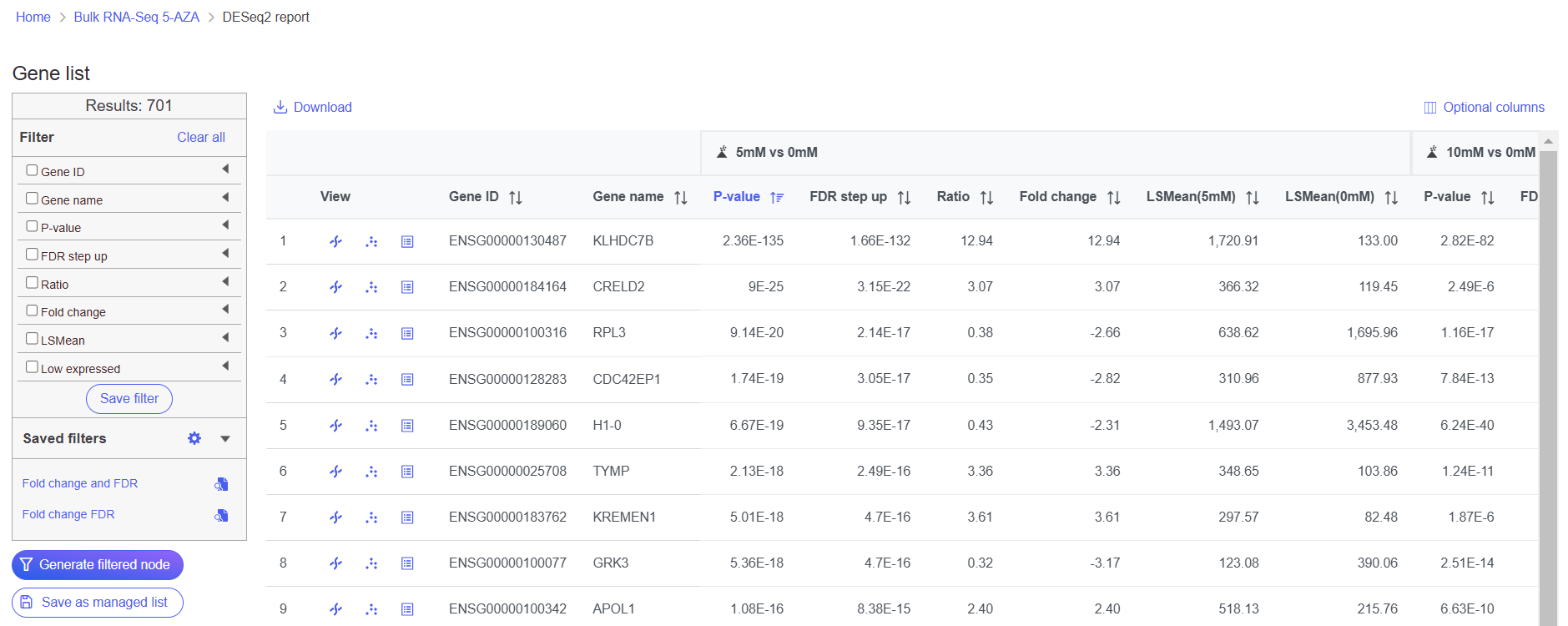
The task report shows genes on rows and the results of the DESeq2 on columns (Figure 1).

<figure><img src="https://1384254481-files.gitbook.io/~/files/v0/b/gitbook-x-prod.appspot.com/o/spaces%2FJVEESmJAPppJ3ijFq5aR%2Fuploads%2Fgit-blob-0d28e35017496120aeb3bd2682c1aed708ad304a%2Fbulk%20seq%20tut%20deseq2%20output%20results.png?alt=media" alt=""><figcaption><p><em>Figure 1. Viewing the DESeq2 task report</em></p></figcaption></figure>

To get a sense of what filtering thresholds to set, we can view a volcano plot for a comparison.

* Click ![Volcano icon](https://1384254481-files.gitbook.io/~/files/v0/b/gitbook-x-prod.appspot.com/o/spaces%2FJVEESmJAPppJ3ijFq5aR%2Fuploads%2Fgit-blob-0356976f14f78eaf8131d71634d7494c100b8750%2Fvolcano-icon.png?alt=media) next to the 5uM vs. 0uM comparison

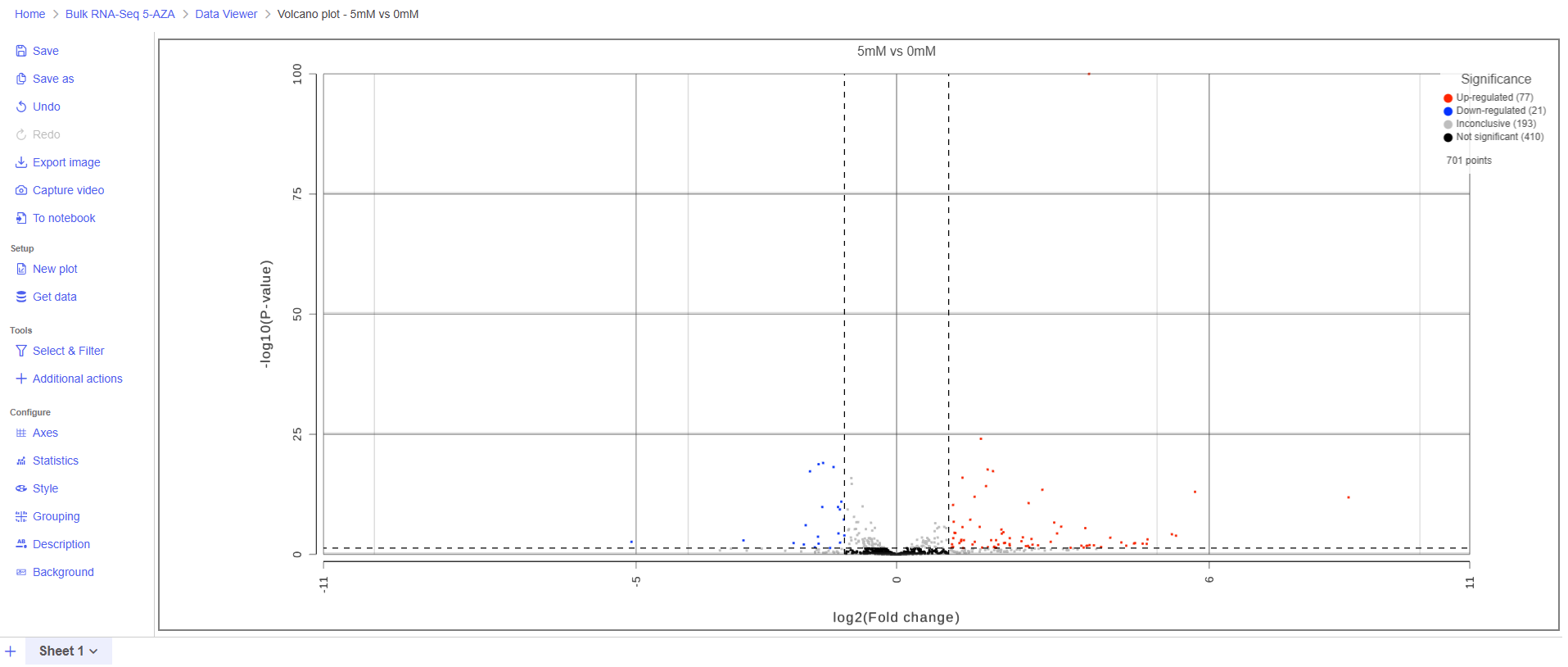
A volcano plot will open showing p-value on the y-axis and fold-change on the x-axis (Figure 2). If the gene labels are on (not shown), click on the plot to turn them off.

<figure><img src="https://1384254481-files.gitbook.io/~/files/v0/b/gitbook-x-prod.appspot.com/o/spaces%2FJVEESmJAPppJ3ijFq5aR%2Fuploads%2Fgit-blob-00c158593a3083b46e3dd66731c2559f9da303fd%2Fnulk%20seq%20tut%205vs0%20volcano%20plot.png?alt=media" alt=""><figcaption><p><em>Figure 2. Viewing DESeq2 results with a volcano plot</em></p></figcaption></figure>

Thresholds for the cutoff lines are set using the Statistics card (Left panel > Configure > Statistics). The default thresholds are |2| for the X axis and 0.05 for the Y axis.

* Switch to the browser tab showing the DESeq2 report
* Click **FDR step up**
* Click the triangle next to FDR step up to open the FDR step up options
* Leave **All contrasts** selected
* Set the cutoff value to **0.05**. Hit **Enter**.

This will include genes that have a FDR step up value of less than or equal to 0.05 for all three contrasts, 5μM vs. 0μM, 10μM vs. 0μM and 5μM:10μM vs. 0μM. FDR step up is the false discovery rate adjusted p-value used by convention in microarray and next generation sequencing data sets in place of unadjusted p-value.

* Click **Fold-change**
* Click the triangle next to Fold-change to open the Fold-change options
* Leave **All contrasts** selected
* Set to From **-2** to **2** with **Exclude range** selected. Hit **Enter**.

Note that the number of genes that pass the filter is listed at the top of the filter menu next to Results: and will update to reflect any changes to the filter. Here, 28 genes pass the filter (Figure 3). Depending on your settings, the number may be slightly different.

<figure><img src="https://1384254481-files.gitbook.io/~/files/v0/b/gitbook-x-prod.appspot.com/o/spaces%2FJVEESmJAPppJ3ijFq5aR%2Fuploads%2Fgit-blob-0fc1a02b7ffc1e111e766d8b6f12b9908e323fd3%2Fbulk%20seq%20tut%20filter%20features%20report.png?alt=media" alt=""><figcaption><p><em>Figure 3. Applying filters to the DESeq2 results</em></p></figcaption></figure>

* Click <img src="https://1384254481-files.gitbook.io/~/files/v0/b/gitbook-x-prod.appspot.com/o/spaces%2FJVEESmJAPppJ3ijFq5aR%2Fuploads%2Fgit-blob-868d66c2dae86d2f1264efbe21ddddcef252e568%2Fgenerate%20filtered%20node%20button.png?alt=media" alt="Generate filtered node button" data-size="line"> to create a data node with only the genes that pass the filter

This creates a Filter list task node and a Filtered feature list data node (Figure 4).

<figure><img src="https://1384254481-files.gitbook.io/~/files/v0/b/gitbook-x-prod.appspot.com/o/spaces%2FJVEESmJAPppJ3ijFq5aR%2Fuploads%2Fgit-blob-8f2659bb5fdfe6338797093003e8c8fc1498144f%2Fbulk%20seq%20tut%20filtered%20report%20resrults%20task%20graph.png?alt=media" alt=""><figcaption><p><em>Figure 4. Filter list and a new Feature list node are added to the pipeline</em></p></figcaption></figure>

## Additional Assistance

If you need additional assistance, please visit [our support page](http://www.partek.com/support) to submit a help ticket or find phone numbers for regional support.