> For the complete documentation index, see [llms.txt](https://help.connected.illumina.com/llms.txt). Markdown versions of documentation pages are available by appending `.md` to page URLs; this page is available as [Markdown](https://help.connected.illumina.com/partek/partek-flow/user-manual/task-menu/batch-removal/general-linear-model.md).
# General linear model
* [Advanced options](#advanced-options)
This method is based on general linear model, much like ANOVA in reverse, it calculates the variation attributed to the factor(s) being removed then adjusting the original values to remove the variation.
By including batch in the differential analysis model, the variability due to the batch effect is accounted for when calculating p-values. In this sense, batch effects are best handled as part of the differential analysis model. However, clustering data or visualizing biological effects can be very difficult if batch effects are present in the original data. We transform the original values to remove the batch effect using this tool.
We recommend normalizing your data prior to removing batch effects, but the task will run on any counts data node.
* Click the counts data node
* Click the **Batch removal** section of the toolbox
* Click **General linear model**
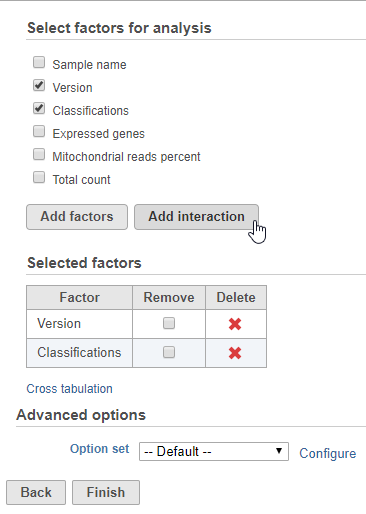
The batch effect removal dialog is similar to the dialog for ANOVA. To set up the model, you need to choose which attributes should be considered. Here, you should include the batch attribute, any attributes that interact with batch, and the interactions between these attributes.
For example, in the case where you have different cell types and batch may have a different effect on different cell types, you would need to include both batch, cell type, and the interaction between batch and cell type. Here, batch is the attribute *Version* and cell type is the attribute *Classification*.
* Click **Version** and **Classification**
* Click **Add factors**
* Click **Version** and **Classification**
* Click **Add interaction** (Figure 1)
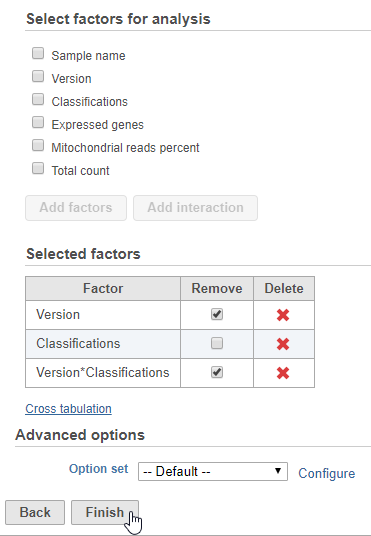
To remove the batch effect and its interaction with cell type, we can click the *Remove* checkbox for both *Version* and *Version\*Classification*.
* Click the *Remove* checkbox for **Version** and **Version\*Classification**
* Click **Finish** to run (Figure 2)
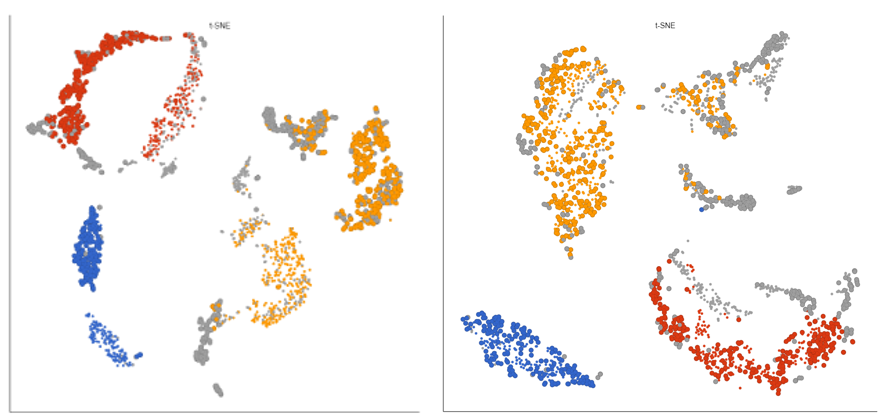
The output of is a new data node, *Batch effect adjusted counts.* This data node contains the batch effect corrected values can be used as the input for downstream tasks such as clustering and UMAP (Figure 3).
## Advanced options
The advanced options for *Remove batch effect* are shared by [ANOVA/LIMMA-trend/LIMMA-voom](/partek/partek-flow/user-manual/task-menu/differential-analysis/anova-limma-trend-limma-voom.md).
---
# Agent Instructions
This documentation is published with GitBook. GitBook is the documentation platform designed so that both humans and AI agents can read, navigate, and reason over technical content effectively. Learn more at gitbook.com.
## Querying This Documentation
If you need additional information that is not directly available in this page, you can query the documentation dynamically by asking a question.
Perform an HTTP GET request on the current page URL with the `ask` query parameter, and the optional `goal` query parameter:
```
GET https://help.connected.illumina.com/partek/partek-flow/user-manual/task-menu/batch-removal/general-linear-model.md?ask=&goal=
```
`ask` is the immediate question: it should be specific, self-contained, and written in natural language.
`goal` is optional and describes the broader end goal you are ultimately trying to accomplish on behalf of the user. GitBook uses it to tailor the answer towards what is most useful for that goal.
The response will contain a direct answer to the question and relevant excerpts and sources from the documentation.
Use this mechanism when the answer is not explicitly present in the current page, you need clarification or additional context, or you want to retrieve related documentation sections.