> For the complete documentation index, see [llms.txt](https://help.connected.illumina.com/llms.txt). Markdown versions of documentation pages are available by appending `.md` to page URLs; this page is available as [Markdown](https://help.connected.illumina.com/clarity-lims/instruments-and-integrations/references/rsync-file-transfer.md).
# Transfer Files using Rsync Between Hosted Clarity Instance and Customer File Server For File-Based Integrations
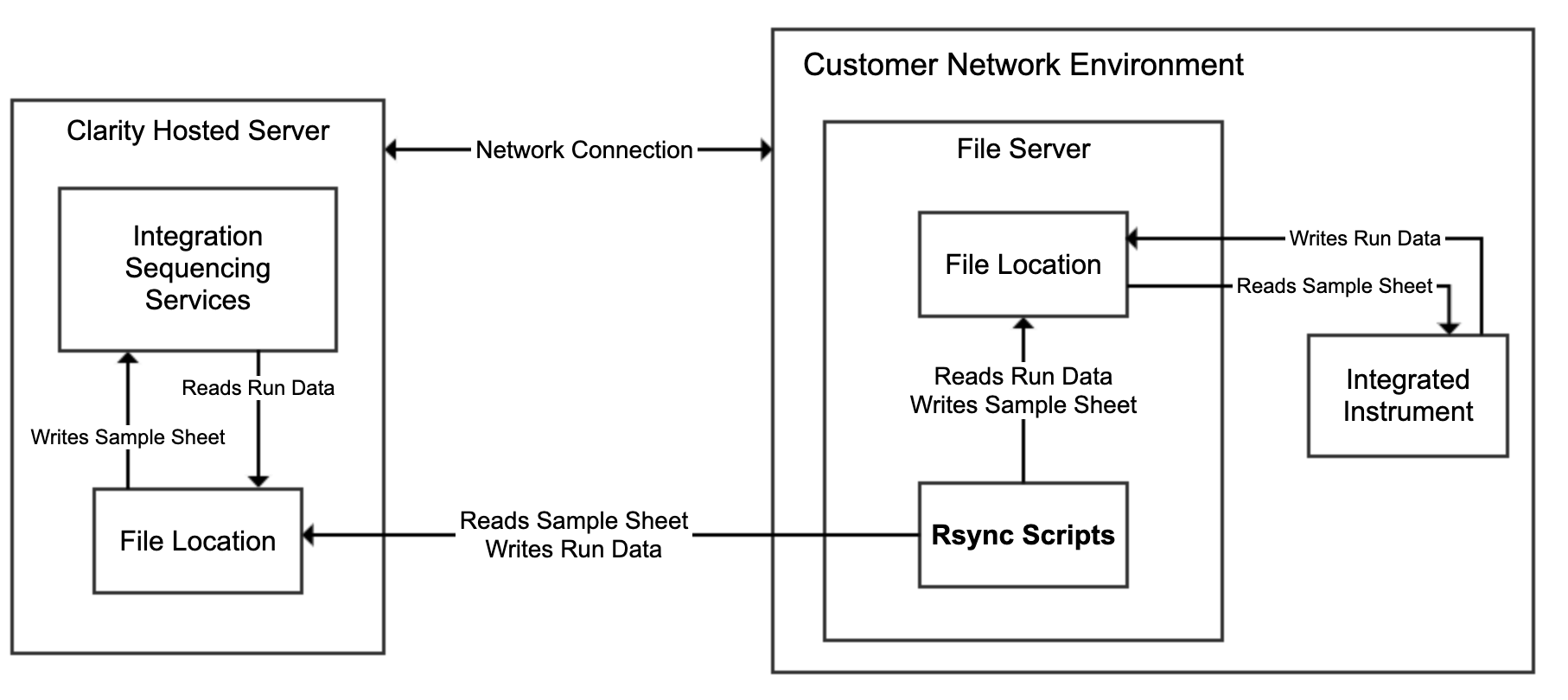
In Clarity file-based integrations such as NextSeq 500/550, there may be a need for file transfer between hosted Clarity LIMS instance and Customer File Server.
Examples of file transfer scenarios:
* Transfer of sample sheet from Clarity LIMS instance to Customer File Server
* Transfer of sequencing/analysis run data from Customer File Server to Clarity LIMS instance
## Rsync-based File Transfer
Rsync can be used as an alternative to VPN for transferring files between Clarity LIMS instance and Customer File Server. Rsync is a command-line tool to copy and synchronize files and directories between two locations and leverages SSH network protocol through port 22.
### Prerequisites
1. Same version of Rsync should be installed on both Clarity LIMS instance and Customer File Server.
* Install Rsync by running either commands as root user:
apt install rsync
     yum install rsync
* Check the rsync version and protocol version:
rsync --version
2. SSH (port 22) on the Clarity LIMS instance must be accessible from the Customer's instance where the rsync script will be run.
3. Requires appropriate permissions:
* Read permissions to the source directory and files in the Clarity LIMS instance
* Write permissions to the destination directory in the Clarity LIMS instance
It is recommended to use /opt/gls/clarity/customextensions directory.
### Command
* Transfer file from customer file server to Clarity LIMS instance.
The destination directory to transfer the file must exist in the Clarity LIMS instance and the user must have write permissions to this directory.
rsync {File To Transfer} {user}@{Clarity LIMS Instance Name}.claritylims.com:{Target Path}
* Transfer file from Clarity LIMS instance to customer file server.
The file to transfer must exist in the Clarity LIMS instance and the executing user must have read permissions to the source directory containing the file and the file itself.
rsync {user}@{Clarity LIMS Instance Name}.claritylims.com:{File To Transfer} {Target Path}
Refer to for detailed information on *rsync*
### Example
Transfer sample sheet from Clarity LIMS instance to customer file server
* transfer\_samplesheet.sh:
transfer\_samplesheet.sh:
{% file src="/files/WA0OwCUVSB6tNUmdtOsp" %}
transfer\_run\_data.sh:
{% file src="/files/env8doktE3Dx7wQ6xbbs" %}
## Data Clean Up
{% hint style="danger" %}
The Clarity LIMS instance is able to perform at the same efficiency up till storage is full. However, it is recommended to clean up files before storage capacity is full. Upon reaching maximum capacity, Clarity LIMS UI will not be functional and will throw an error, prompting user to approach their admin.
{% endhint %}
Clean up old files in the Clarity LIMS instance
* cleanup\_rundata.sh:
Delete unwanted files in target folder during rsync file transfer
* The flag *--delete* can be added to the rsync command to delete any files in the target directory that is not in the source directory.
Rsync --delete ...
* When unwanted files are cleaned up on the customer file server, Rsync will also clean up those files on the Clarity LIMS instance.
cleanup\_rundata.sh:
{% file src="/files/78JF9uO2JY657S0SGbEb" %}
## Automated Bash Script
Crontab can be used to automatically schedule bash scripts to run at a given set interval.
**Example**
1. Run the following command to open and edit the current cron jobs for the current user.
crontab -e
2. Add the following lines to run the transfer scripts every 15 minutes.
{% hint style="danger" %}
Ensure that bash and script locations are correctly specified.
{% endhint %}
{% hint style="info" %}
For more information on crontab, refer to the official documentations:
{% endhint %}
---
# Agent Instructions
This documentation is published with GitBook. GitBook is the documentation platform designed so that both humans and AI agents can read, navigate, and reason over technical content effectively. Learn more at gitbook.com.
## Querying This Documentation
If you need additional information that is not directly available in this page, you can query the documentation dynamically by asking a question.
Perform an HTTP GET request on the current page URL with the `ask` query parameter, and the optional `goal` query parameter:
```
GET https://help.connected.illumina.com/clarity-lims/instruments-and-integrations/references/rsync-file-transfer.md?ask=&goal=
```
`ask` is the immediate question: it should be specific, self-contained, and written in natural language.
`goal` is optional and describes the broader end goal you are ultimately trying to accomplish on behalf of the user. GitBook uses it to tailor the answer towards what is most useful for that goal.
The response will contain a direct answer to the question and relevant excerpts and sources from the documentation.
Use this mechanism when the answer is not explicitly present in the current page, you need clarification or additional context, or you want to retrieve related documentation sections.