> For the complete documentation index, see [llms.txt](https://help.connected.illumina.com/llms.txt). Markdown versions of documentation pages are available by appending `.md` to page URLs; this page is available as [Markdown](https://help.connected.illumina.com/icm/analyses/walkthroughs/correlation-engine-for-gene-discovery.md).
# Correlation Engine for Gene Discovery
This tutorial walks you through how to export differentially expressed genes or proteins from Connected Multiomics and upload them into Correlation Engine (CE) for deeper biological interpretation.
Connected Multiomics (ICM) enables you to explore and analyze your own multiomic datasets. [Correlation Engine](https://www.illumina.com/products/by-type/informatics-products/connected-analytics/modules/correlation-engine.html) (CE) complements this by aggregating signals across experiments, tissues, and conditions to uncover robust co-expression patterns. Together, they allow for context-specific network analysis, helping identify gene modules, regulatory relationships, and potential biomarkers.
Once you’ve identified differentially expressed genes in Connected Multiomics, we recommend importing them into Correlation Engine for deeper biological interpretation.
Here's how:
### **Step 1: Export Genes or Proteins of Interest from ICM**
1. In the Task Graph of your Analysis in Connected Multiomics, navigate to and click the data node containing the significantly differentially expressed genes (Figure 1A)
2. Click the "Download data" button at the bottom of task menu (Figure 1B).
3. Uncheck the “Include counts” option before clicking "Download." This ensures compatibility with CE, which does not require raw counts.
4. Open the downloaded text file on your local computer. To simplify import into CE, retain only the following columns:
1. Gene ID
2. P-value
3. Fold change
*(See Figure 1C for example formatting.)*
Figure 1. Download the file of genes of inter*est from ICM.*
### ***Step 2: Upload to Correlation Engine***
Now you are ready to upload your genes or proteins of interest to CE.
To switch to CE is easy
1. From the ICM Studies page, click the Product dashboard icon on the top right to open all the applications in your current workgroup
2. Select Correlation Engine from your list of applications.
3. On the CE homepage, click “Import Your Data”. (See Figure 2A)
4. In the import wizard:
1. follow the prompts and provide the requested metadata
2. Click “Next Step” to proceed (Figure 2B).
*Note: it is possible to upload multiple files simultaneously, but column headers must match exactly.*
5. On the next page, map your columns using the dropdowns:
1. Gene ID
2. P-value
3. Fold change
6. Review your submission and click “Finish”.
Figure 2. Interface of data uploading in CE.
### Step 3: Explore Results in CE
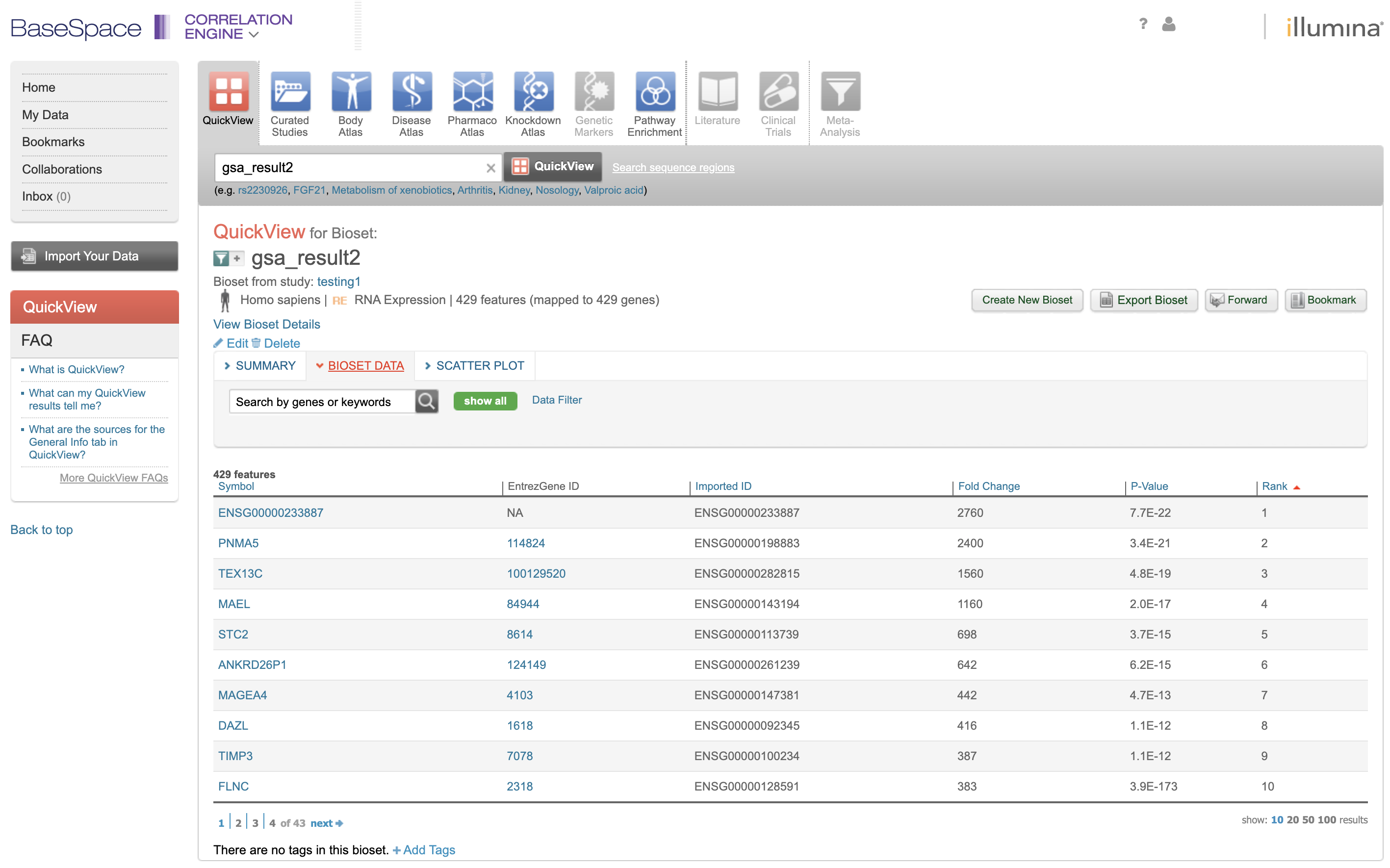
You will receive an email notification once CE completes the import and analysis. A new study will be created in your private project. You can start exploring the ‘Pathway Enrichment’ and more (Figure 3, top panel) after clicking on the “BIOSET DATA” in the study.
Figure 3. Explore CE with your own analysis results from ICM.
### Example Use Case
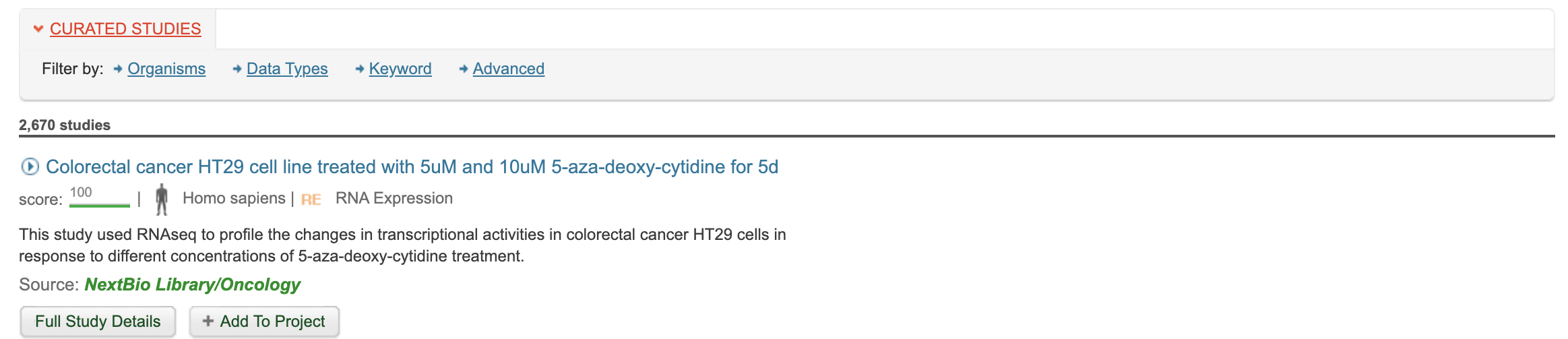
This tutorial uses data from HT-29 colon cancer cells treated by 5-aza-deoxy-cytidine (5 AZA) with different dosages (10um,5 um, 0um). Without any other background information provided, CE correctly infers the most correlated public study *"Colorectal cancer HT29 cell line treated with 5uM and 10uM 5-aza-deoxy-cytidine for 5d” (See Figure 4)*
Figure 4. The most correlated study by CE is linked to the query data used.
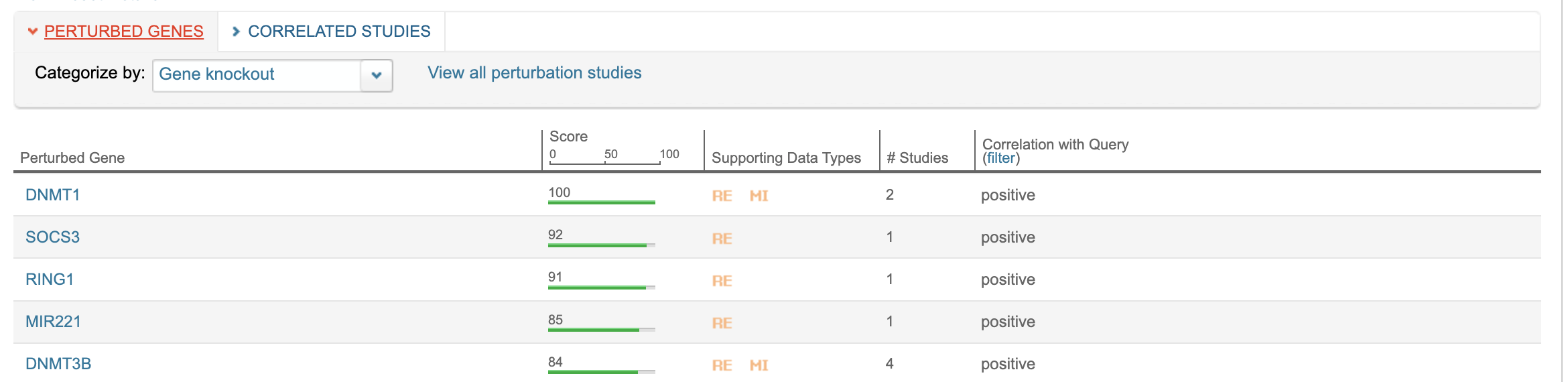
Querying in Knockdown Atlas also shows that CE identifies DNMT1 as the top perturbed gene, consistent with 5 AZA’s role as a DNA methyltransferase inhibitor. (See Figure 5)
This demonstrates the precision and power of combining Connected Multiomics with Correlation Engine
Figure 5. The top 5 pertured genes infered by CE with the example query data.
### Summary
By exploring the same datatset in both Connected Multiomics and Correlation engine, you can:
* Move from differential analysis to biological interpretation
* Leverage curated public datasets for context
* Discover novel gene functions and biomarkers
---
# Agent Instructions
This documentation is published with GitBook. GitBook is the documentation platform designed so that both humans and AI agents can read, navigate, and reason over technical content effectively. Learn more at gitbook.com.
## Querying This Documentation
If you need additional information that is not directly available in this page, you can query the documentation dynamically by asking a question.
Perform an HTTP GET request on the current page URL with the `ask` query parameter, and the optional `goal` query parameter:
```
GET https://help.connected.illumina.com/icm/analyses/walkthroughs/correlation-engine-for-gene-discovery.md?ask=&goal=
```
`ask` is the immediate question: it should be specific, self-contained, and written in natural language.
`goal` is optional and describes the broader end goal you are ultimately trying to accomplish on behalf of the user. GitBook uses it to tailor the answer towards what is most useful for that goal.
The response will contain a direct answer to the question and relevant excerpts and sources from the documentation.
Use this mechanism when the answer is not explicitly present in the current page, you need clarification or additional context, or you want to retrieve related documentation sections.
.png?alt=media)
 on the top right to open all the applications in your current workgroup
2. Select Correlation Engine from your list of applications.
3. On the CE homepage, click “Import Your Data”. (See Figure 2A)
4. In the import wizard:
1. follow the prompts and provide the requested metadata
2. Click “Next Step” to proceed (Figure 2B).
*Note: it is possible to upload multiple files simultaneously, but column headers must match exactly.*
5. On the next page, map your columns using the dropdowns:
1. Gene ID
2. P-value
3. Fold change
6. Review your submission and click “Finish”.
on the top right to open all the applications in your current workgroup
2. Select Correlation Engine from your list of applications.
3. On the CE homepage, click “Import Your Data”. (See Figure 2A)
4. In the import wizard:
1. follow the prompts and provide the requested metadata
2. Click “Next Step” to proceed (Figure 2B).
*Note: it is possible to upload multiple files simultaneously, but column headers must match exactly.*
5. On the next page, map your columns using the dropdowns:
1. Gene ID
2. P-value
3. Fold change
6. Review your submission and click “Finish”.
.png?alt=media)