> For the complete documentation index, see [llms.txt](https://help.connected.illumina.com/llms.txt). Markdown versions of documentation pages are available by appending `.md` to page URLs; this page is available as [Markdown](https://help.connected.illumina.com/connected-insights/interpret-and-report/cm-overview-tab.md).
# Results / Overview Tab
{% tabs %}
{% tab title="Results (5.3+)" %}
The **Results tab** is your command center for insights! It delivers a clear, high-level snapshot of the most critical findings - like **variants, TMB, MSI, and GIS** - so you can zero in on what matters most. You'll also spot any **quality control alerts** (think run performance, sample integrity, or gene coverage that needs a closer look) and track **case interpretation progress at a glance** - see which findings are already reviewed and which are waiting for your attention. Everything you need, all in one streamlined view!
### Disease
This section displays the disease for the case.
### Case Interpretation Progress
Track your progress with ease. This section shows exactly where you stand in reviewing case findings. A dynamic progress bar gives you instant visual feedback, while the toggle lets you switch between **Needs Review** and **All** to focus on what matters most. Stay in control and keep your workflow moving forward.
A finding is considered reviewed if it has been opened or has been automatically reported according to [Report Automation](/connected-insights/configure/configuration/c-automation.md).
### Lab QC
This section gives you a quick, at-a-glance overview of key quality metrics under the [Lab QC tab](/connected-insights/interpret-and-report/cm-lab-qc-tab.md), including:
* Metric - What's being measured
* Value - The actual result
* Status - Pass or fail
Want to customize what appears here? For details on configuring metrics and setting thresholds, check out [Pipeline and QC Configuration](/connected-insights/configure/configuration/c-pipeline-and-qc-configuration.md).
### Monitoring
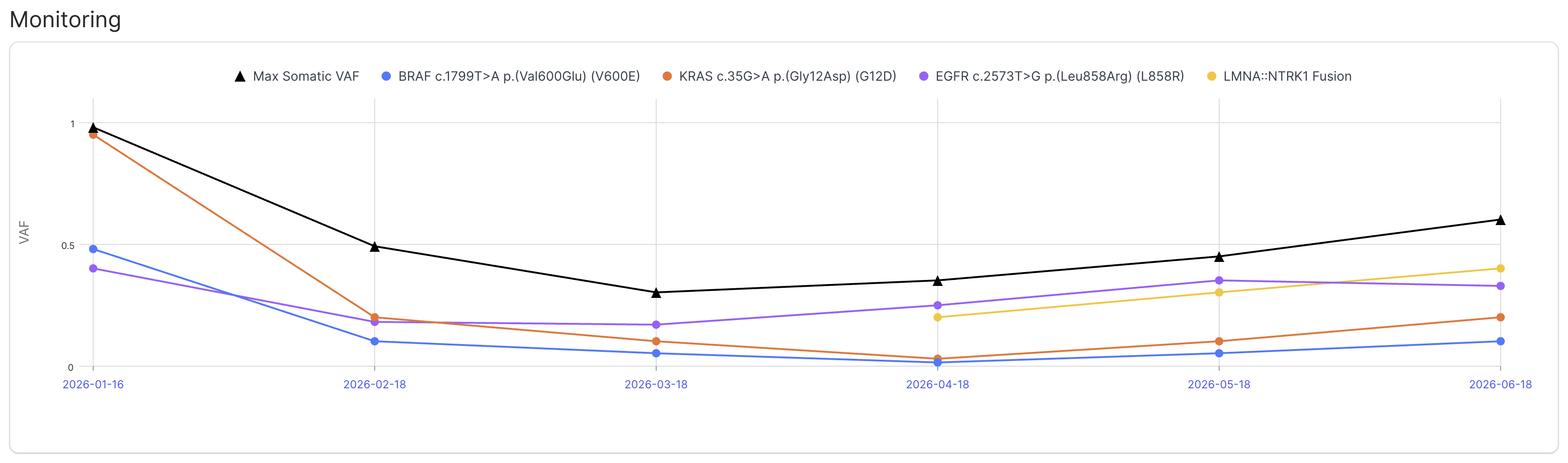
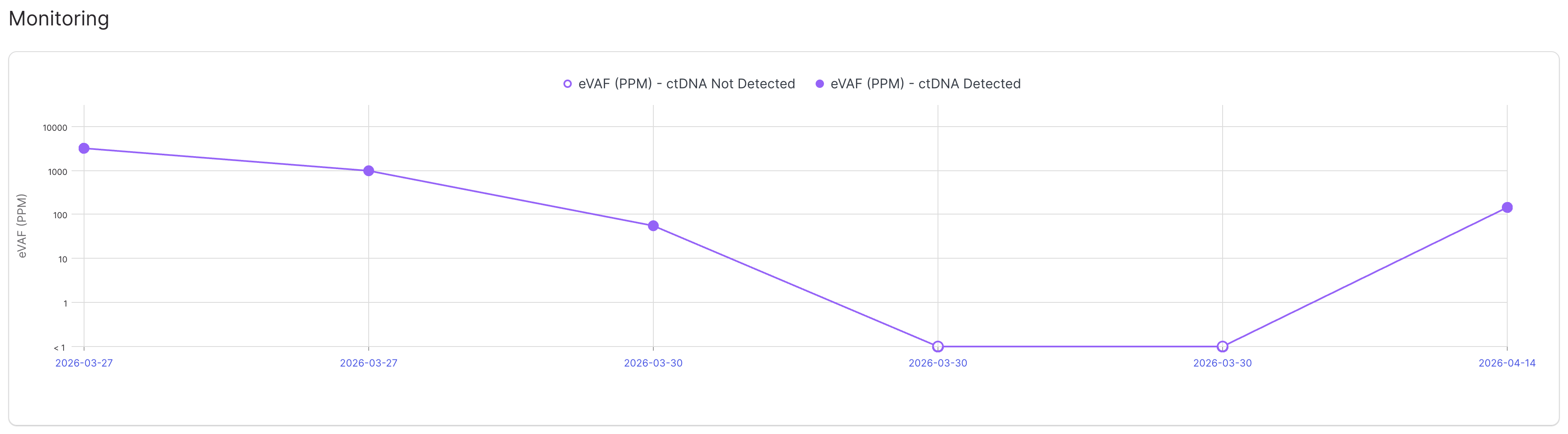
Monitor tumor progression over time with a longitudinal view. Track MRD scores (eVAF), maximum somatic VAF, and individual monitored variant VAFs across related cases. Visualize trends with interactive plots displaying up to 50 cases per subject.
Select a variant to monitor by clicking the flag icon and selecting **Monitor Variant**.
### Classification & Risk Stratification Prediction
For more information, refer to [Classification & Risk Stratification Prediction](/connected-insights/interpret-and-report/cm-overview-tab/classification-and-risk-stratification-prediction.md).
### Karyotype
**Karyotype**
The Karyotype section lets you provide detailed chromosomal information in **ISCN format**, supplementing sequencing results for [Classification & Risk Stratification Prediction](/connected-insights/interpret-and-report/cm-overview-tab/classification-and-risk-stratification-prediction.md). Built-in validation ensures your entries are error-free, helping you catch and correct manual mistakes instantly.
Example:
```
48,XX,+3,+5,t(9;22)(q34;q11.2)[20]/47,XX,+3,t(9;22)(q34;q11.2)[5]
```
**Tumor Purity and Ploidy Metrics**
Get a clear picture of your sample with **Estimated Tumor Purity (%)** and **Estimated Tumor Ploidy**. These metrics help you understand the complexity and composition of the tumor for interpretation.
## Monitoring
This section displays a longitudinal plot of variant allele frequency (VAF) for variant detection cases and estimated variant allele frequency (eVAF) for MRD detection cases.
For variant detection cases, the max somatic VAF and VAF of each monitored variant is plotted for each case for the associated subject. If the given pipeline produces max somatic VAF that value is recorded, otherwise the maximum VAF among small variants with FILTER = PASS and Predicted Origin = Somatic is recorded instead. See [Variant Grid Columns - Reported - Flags](/connected-insights/interpret-and-report/inter-variant-grid.md#variant-grid-columns) for details on how to monitor a variant for a subject.
For MRD detection cases, the eVAF (in PPM) is plotted for each case for the associated subject. Each data point is marked based on whether ctDNA was detected or not detected for that case.
## Signatures
This section showcases the key biological markers that drive interpretation, all sourced from secondary analysis files and displayed for quick reference.
For variant detection cases:
* Tumor Mutational Burden (TMB) - Displays the TMB in **mut/MB**, along with **TMB-Low** or **TMB-High** status.
* Microsatellite Instability (MSI) - Displays the MSI as **percent unstable sites** (e.g., TSO 500) or **sumJSD** (e.g., TSO 500 ctDNA), plus **MS-Stable** and **MSI-High** statuses.
* Genomic Instability Score (GIS) - Displays the GIS **value**, along with **GIS-Low** and **GIS-High** statuses.
For whole genome T/N cases, we take it a step further: related mutations signatures are displayed right next to each relevant biomarker - for example, **ID1 and ID2 signatures appear alongside MSI** - giving you deeper insight into the underlying genomic patterns.
Want to fine-tune biomarker thresholds? Head to [Disease Configuration](/connected-insights/configure/configuration/c-disease-configuration.md).
For MRD fingerprint cases: the timestamp and status of the MRD fingerprint are shown:
For MRD detection cases: the MRD score, eVAF, and ctDNA detected/not detected status are shown:
> If the associated MRD fingerprint case for an MRD detection case is ingested in the system a link to the MRD fingerprint is provided.
Ready to dive deeper? Click **Review** or **View** to explore biomarker details. For step-by-step guidance, see [Interpret a Biomarker](/connected-insights/interpret-and-report/inter-interp-a-variant.md).
### Disease Genes
This section brings together disease-specific genes, coverage details, and findings for a complete picture.
For more information on how to set up disease-specific genes, refer to [Disease Configuration](/connected-insights/configure/configuration/c-disease-configuration.md).
**Gene Coverage**
Gene coverage visualization shows the following data in a linear plot:
* **Transcript exons and introns** ([preferred](/connected-insights/configure/configuration/c-preferred-transcripts.md), MANE Select RefSeq, or RefSeq Select transcript)
* **Coverage depth** on the y-axis (e.g., 50X) along with [thresholds](/connected-insights/configure/configuration/c-pipeline-and-qc-configuration.md)
* **Hotspots** from [Cancer Hotspots](https://www.cancerhotspots.org/#/home) database
* **Variants** that pass [test filters](/connected-insights/configure/configuration/c-test-definition-setup.md)
When coverage is below the threshold, the specific region is reported automatically as having low coverage, along with any hotspots that fall within the region, and the gene is not reported as a pertinent negative.
**Findings**
Findings - such as variants, HLA alleles, [biomarkers](/connected-insights/resources-and-references/a-introduction/a-case-apis.md#add-biomarkers) (e.g., IHC, FISH) - for each gene are shown with a summary of [Biological Classification](/connected-insights/interpret-and-report/viewdetails-introduction/viewdetails-biological-classification-assertions.md) and [Actionability](/connected-insights/interpret-and-report/viewdetails-introduction/viewdetails-actionability.md) from knowledge bases, such as OncoKB, CKB, CIViC, and MyKB.
To interpret variants from the Overview tab, select **Review** or **View**. For more information, refer to [Interpret a Biomarker](/connected-insights/interpret-and-report/inter-interp-a-variant.md).
Gene expression is also shown in transcripts per million (TPM) if provided by the secondary analysis pipeline (e.g., DRAGEN RNA), which we will enable interpretation of in a future release!
### Other Findings
Other variants passing test filters but **do not appear in a disease-specific gene** are displayed in the Other Findings section.
{% endtab %}
{% tab title="Overview (<5.3)" %}
The Overview tab displays a high-level view of the most relevant variants in the case. This tab contains a list of genes and shows variants detected in that case within those genes. The variants in this list are filtered according to the filter that was selected as part of the test definition. The key genes are predefined by Connected Insights based on cancer type.
### Lab QC
The Lab QC section provides an overview of the following information contained under the Lab QC tab:
* Metric
* Value
* Status (Pass/Fail)
For more information on configuring metrics that display in the Lab QC section and their thresholds, refer to [Pipeline and QC Configuration](/connected-insights/configure/configuration/c-pipeline-and-qc-configuration.md).
### Tumor Characteristics
#### Tumor Content and Ploidy Metrics
View the % Estimated Tumor Purity and Estimated Tumor Ploidy in the Overview tab. This information displays under Tumor Characteristics.
#### Biomarkers
The following biomarkers provide an overview of the measurable biological markers. The content in these fields comes from secondary analysis files and is displayed here.
* **Tumor Mutational Burden (TMB)** — Displays the TMB in mut/MB and TMB-Low and TMB-High statuses.
* **Microsatellite Instability (MSI)** — Displays the MSI as a percentage and MS-Stable and MSI-High statuses.
* **Genomic Instability Score (GIS)** — Displays the GIS and GIS-Low and GIS-High statuses.
* **Minimal Residual Disease (MRD)** - Displays the timestamp and status of the MRD fingerprint for an MRD fingerprint case and MRD score, eVAF, and ctDNA detected/not detected status for an MRD detection case. If the associated MRD fingerprint case for an MRD detection case is ingested in the system a link to the MRD fingerprint is provided.
For more information on setting thresholds for the statuses, refer to [Disease Configuration](/connected-insights/configure/configuration/c-disease-configuration.md).
Select Interpret to open the biomarker details. For more information, refer to [Interpret a Biomarker](/connected-insights/interpret-and-report/inter-interp-a-variant.md).
#### User Determined Karyotype
Karyotype can be provided in ISCN format and is used for [Classification & Risk Stratification Prediction](/connected-insights/interpret-and-report/cm-overview-tab/classification-and-risk-stratification-prediction.md). Validation is provided to help fix manual errors.
For example,
```
48,XX,+3,+5,t(9;22)(q34;q11.2)[20]/47,XX,+3,t(9;22)(q34;q11.2)[5]
```
### Classification & Risk Stratification Prediction
For more information, refer to [Classification & Risk Stratification Prediction](/connected-insights/interpret-and-report/cm-overview-tab/classification-and-risk-stratification-prediction.md).
### Key Findings
This section provides information on genes specific to the disease, gene coverage, and variants.
**Genes Specific to the Disease**
For more information on how to set up genes specific to the disease, refer to [Disease Configuration](/connected-insights/configure/configuration/c-disease-configuration.md).
**Gene Coverage**
Gene coverage tracks show the following data in a graph:
* **Transcript exons and introns** — Transcript is the preferred transcript (if specified) or the RefSeq transcript. For more information on specifying a preferred transcript for a gene, refer to [Preferred Transcripts](/connected-insights/configure/configuration/c-preferred-transcripts.md).
* **Gene coverage** — The Y-axis indicates the gene coverage (for example, 50X).
* **Hotspots** — Hotspots are plotted along the X-axis and are derived from the Cancer Hotspots website.
* **Variants** — Variants in the gene that pass default filters. For more information on how to set up a default filter, refer to [Test Definition Setup](/connected-insights/configure/configuration/c-test-definition-setup.md).
**Gene Expression**
Gene expression is shown in transcripts per million (TPM) if provided by the secondary analysis pipeline (e.g., DRAGEN RNA).
**Variants**
Variants for each gene are shown with My Knowledge Base, Other Knowledge Base assertions, and the default filters that show the variant.
My Knowledge Base assertions include the following classifications:
* Highest biological classification across all diseases
* Highest actionability classification, including:\
– Therapeutic classifications across case and ancestor diseases\
– Prognostic classifications across the case and ancestor diseases\
– Diagnostic classifications across all diseases
Other Knowledge Base assertions include the following classifications and filters:
* Highest biological classification across all diseases for OncoKB
* Highest actionability classifications for OncoKB, CKB, CIViC, including:\
– Therapeutic classifications across case and ancestor diseases\
– Prognostic classifications across the case and ancestor diseases\
– Diagnostic classifications across all diseases
To interpret variants from the Overview tab, select **Interpret**. For more information, refer to [Interpret a Biomarker](/connected-insights/interpret-and-report/inter-interp-a-variant.md).
{% endtab %}
{% endtabs %}
---
# Agent Instructions
This documentation is published with GitBook. GitBook is the documentation platform designed so that both humans and AI agents can read, navigate, and reason over technical content effectively. Learn more at gitbook.com.
## Querying This Documentation
If you need additional information that is not directly available in this page, you can query the documentation dynamically by asking a question.
Perform an HTTP GET request on the current page URL with the `ask` query parameter, and the optional `goal` query parameter:
```
GET https://help.connected.illumina.com/connected-insights/interpret-and-report/cm-overview-tab.md?ask=&goal=
```
`ask` is the immediate question: it should be specific, self-contained, and written in natural language.
`goal` is optional and describes the broader end goal you are ultimately trying to accomplish on behalf of the user. GitBook uses it to tailor the answer towards what is most useful for that goal.
The response will contain a direct answer to the question and relevant excerpts and sources from the documentation.
Use this mechanism when the answer is not explicitly present in the current page, you need clarification or additional context, or you want to retrieve related documentation sections.

.png?alt=media)
.png?alt=media)
.png?alt=media)
.png?alt=media)
.png?alt=media)
.png?alt=media)
.png?alt=media)


.png?alt=media)
.png?alt=media)
.png?alt=media)