> For the complete documentation index, see [llms.txt](https://help.connected.illumina.com/llms.txt). Markdown versions of documentation pages are available by appending `.md` to page URLs; this page is available as [Markdown](https://help.connected.illumina.com/icm/analyses/analysis-functionality/task-menu/biological-interpretation/gsea-1.md).
# Gene set ANOVA
Gene set ANOVA allows user to perform 1-way ANOVA to compare different groups at gene set level. This method takes normalized gene expression count matrix, a gene set is a group of genes based on database specified, like GO term, KEGG pathway etc.
Like setup [ANOVA](/icm/analyses/analysis-functionality/task-menu/statistics/differential-analysis/anova-limma-trend-limma-voom.md) \[1] model for gene expression analysis, but only one factor can be added to the model. In addition, the following extra terms will be added to the model by the task automatically:
* **Gene ID** - Since not all genes in a functional group express at the same level, gene ID is added to the model to account for gene-to-gene differences
* **Factor \* Gene ID** - Interaction of gene ID with the factor is added to detect changes within the expression of a gene set with respect to different levels of the factor, referred to disruption. For instance, in a gene set, maybe some genes showing up-regulation in treatment group, but some other genes showing down-regulation in the treatment group, we call it gene set disruption.
## Running Gene set ANOVA
Select the data node with normalized data and then go to **Biological interpretation > Gene set ANOVA**
Use the first dialog to specify gene sets database. You can rung gene set ANOVA on pathways (currently based on Kyoto Encyclopedia of Genes and Genomes ([KEGG](https://www.genome.jp/kegg/)) pathways) or on other gene set databases. The *Gene set size* option allows you to restrict your analysis on gene sets of certain size (i.e. number of genes). Make sure the feature identifier in the data contains gene symobl/gene name, which is used to map to the database. Click **Next**.
Once your choices are made, push **Next** to proceed.
In the second part of the set up, pick the experimental factor, only one factor can be selected.
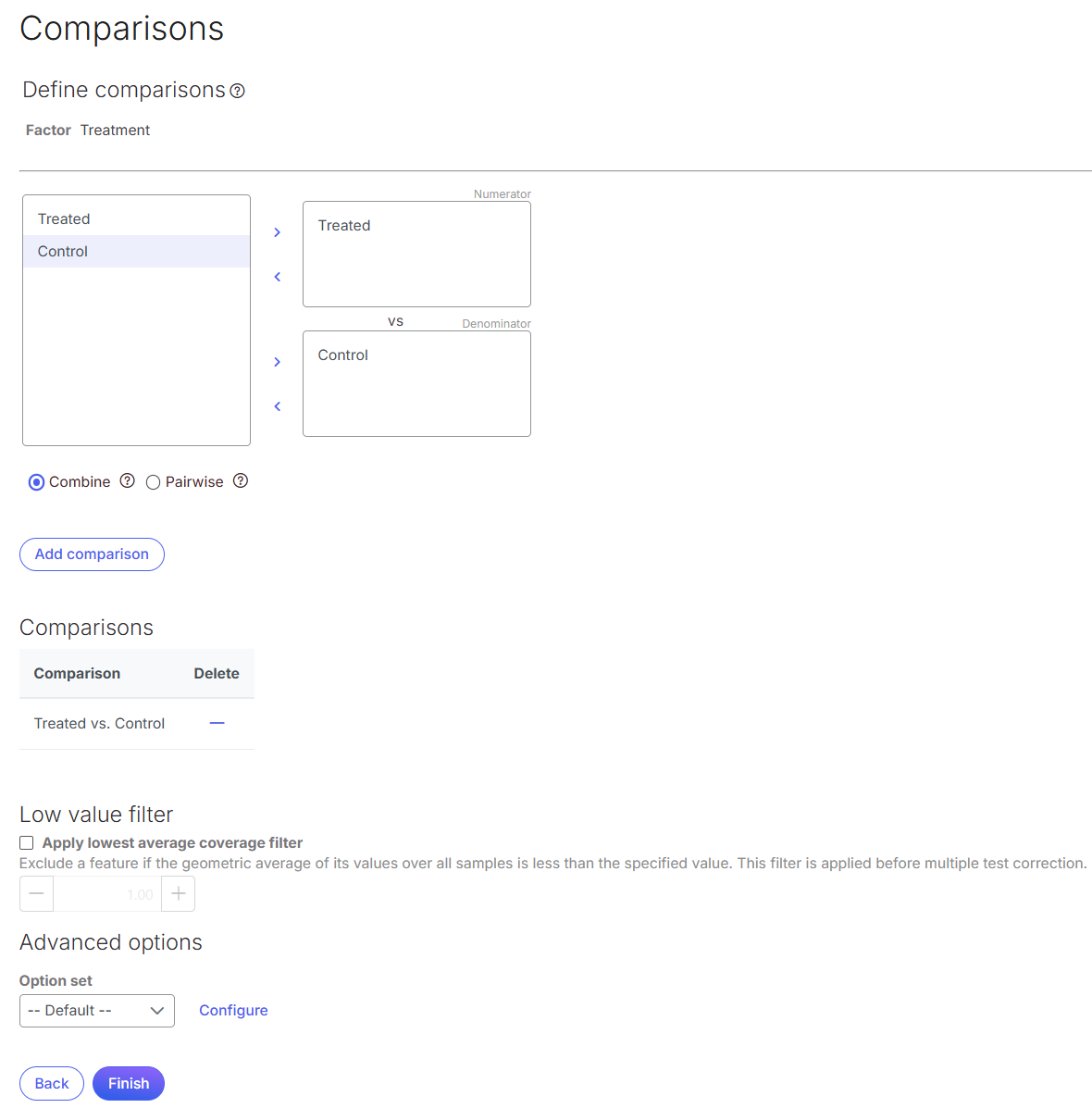
Click **Next** to setup comparisons:
The box on the left side displays the categories of the selected factor (shown as *Factor*). Use the arrow buttons (**>**) to move one of the factors to the *Denominator* box (that factor should be interpreted as the reference category) and the other factor to the *Numerator* box. Confirm your selection by pushing the **Add comparison** button and the comparison will be added to the *Comparisons* table.
Click **Finish** to run. Each comparison will be performed individually and generate its own section in the report.
Click on the **Configure** icon to access the advanced options.
## Gene Set ANOVA Results
When the task completes, double click on the **Gene Set ANOVA** node to view the report.
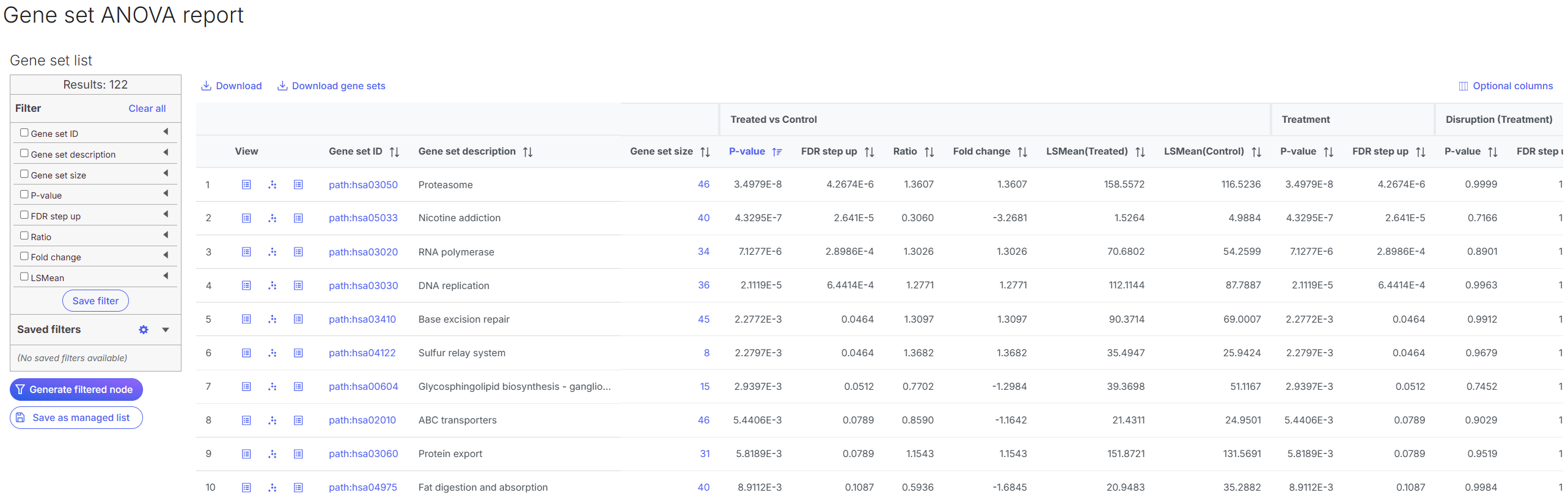
Like [ANOVA ](/icm/analyses/analysis-functionality/task-menu/statistics/differential-analysis/anova-limma-trend-limma-voom.md)report, the report consists of two parts: the GSEA result table on the right and the filter panel on the left.
The comparison (i.e. Denominator vs. Numerator) is given at the top of the table. Each row of the table corresponds to one gene set (pathway) and the gene sets are ranked by the first comparison's p-value in ascending order.
* *View*. The icons in the *View* column open the dot plot (%20\(1\).png?alt=media)) or the extra details report (.png?alt=media) ) (explanations below).
* *Gene set ID*. The Gene set IDs are based on the gene set file that was selected during set up. Each ID is a link to the details of he selected set.
* *Gene set size*. Number of genes in the set (as specified in the gene set file), click on the number to download the list of genes.
* For each comparison, there are p-value, FDR, ratio, fold change and LSmean of each comparison group reported
* Disruption: is the factor and gene ID interaction term, p-value and FDR are reported on this term too.
Click on the dot plot icon to open the viewer
The plot display the genes of the gene set selected. X-axis represents genes within the gene set, Y-axis represents the mean value of gene expression, each dot represent of the group in the comparison.
Click on the **View extra details** icon () to open a gene set-specific report page, the model used for the computation is included in this report.
## Reference
1. Fisher, R. A. (1935). The Design of Experiments. Edinburgh: Oliver and Boyd. (Established ANOVA within the broader framework of experimental design.)
---
# Agent Instructions
This documentation is published with GitBook. GitBook is the documentation platform designed so that both humans and AI agents can read, navigate, and reason over technical content effectively. Learn more at gitbook.com.
## Querying This Documentation
If you need additional information that is not directly available in this page, you can query the documentation dynamically by asking a question.
Perform an HTTP GET request on the current page URL with the `ask` query parameter, and the optional `goal` query parameter:
```
GET https://help.connected.illumina.com/icm/analyses/analysis-functionality/task-menu/biological-interpretation/gsea-1.md?ask=&goal=
```
`ask` is the immediate question: it should be specific, self-contained, and written in natural language.
`goal` is optional and describes the broader end goal you are ultimately trying to accomplish on behalf of the user. GitBook uses it to tailor the answer towards what is most useful for that goal.
The response will contain a direct answer to the question and relevant excerpts and sources from the documentation.
Use this mechanism when the answer is not explicitly present in the current page, you need clarification or additional context, or you want to retrieve related documentation sections.
) (explanations below).
* *Gene set ID*. The Gene set IDs are based on the gene set file that was selected during set up. Each ID is a link to the details of he selected set.
* *Gene set size*. Number of genes in the set (as specified in the gene set file), click on the number to download the list of genes.
* For each comparison, there are p-value, FDR, ratio, fold change and LSmean of each comparison group reported
* Disruption: is the factor and gene ID interaction term, p-value and FDR are reported on this term too.
Click on the dot plot icon to open the viewer
The plot display the genes of the gene set selected. X-axis represents genes within the gene set, Y-axis represents the mean value of gene expression, each dot represent of the group in the comparison.
Click on the **View extra details** icon () to open a gene set-specific report page, the model used for the computation is included in this report.
## Reference
1. Fisher, R. A. (1935). The Design of Experiments. Edinburgh: Oliver and Boyd. (Established ANOVA within the broader framework of experimental design.)
---
# Agent Instructions
This documentation is published with GitBook. GitBook is the documentation platform designed so that both humans and AI agents can read, navigate, and reason over technical content effectively. Learn more at gitbook.com.
## Querying This Documentation
If you need additional information that is not directly available in this page, you can query the documentation dynamically by asking a question.
Perform an HTTP GET request on the current page URL with the `ask` query parameter, and the optional `goal` query parameter:
```
GET https://help.connected.illumina.com/icm/analyses/analysis-functionality/task-menu/biological-interpretation/gsea-1.md?ask=&goal=
```
`ask` is the immediate question: it should be specific, self-contained, and written in natural language.
`goal` is optional and describes the broader end goal you are ultimately trying to accomplish on behalf of the user. GitBook uses it to tailor the answer towards what is most useful for that goal.
The response will contain a direct answer to the question and relevant excerpts and sources from the documentation.
Use this mechanism when the answer is not explicitly present in the current page, you need clarification or additional context, or you want to retrieve related documentation sections.
%20(1).png?alt=media)
%20(1).png?alt=media)
%20(1).png?alt=media)