> For the complete documentation index, see [llms.txt](https://help.connected.illumina.com/llms.txt). Markdown versions of documentation pages are available by appending `.md` to page URLs; this page is available as [Markdown](https://help.connected.illumina.com/emedgene/emedgene-analyze-manual/variant_page/clinical_significance_section/variant-info/transcript.md).
# Transcript
The Transcript field displays variant description according to the Human Genome Variation Society (HGVS) standard for coding DNA and protein changes.
Some transcripts are marked with one or both indicators:
* **Checkmark** .png?alt=media) : Canonical transcript
* **Curate icon**
: Canonical transcript
* **Curate icon**.png?alt=media) : Transcript selected in your [Curate](broken://pages/JHmO0TJUuneVcw5IzKwJ) database.
Emedgene automatically selects a reference transcript according to predefined [prioritization rules](/emedgene/emedgene-analyze-manual/tertiary-analysis-pipeline/how_does_emedgene_analyze_prioritize_transcripts.md). The reference transcript determines:
* Main affected gene
* Main variant effect
* Coding DNA change and resulting protein change
## Changing the reference transcript
If the automatically selected transcript does not match your reporting preference, you can:
* **Select a different transcript\*** from the Transcript dropdown menu
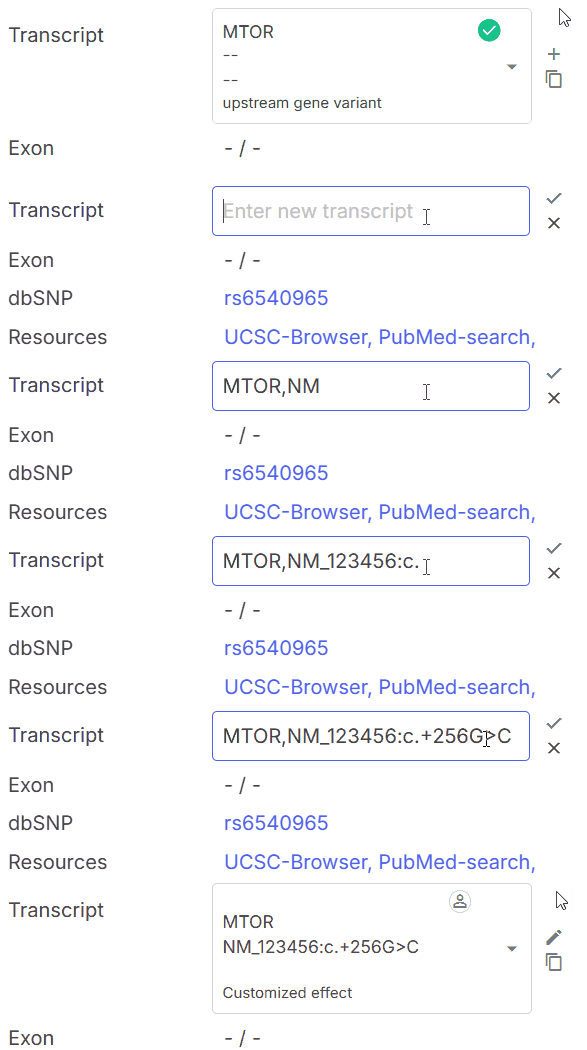
* **Add a custom transcript** as part of a custom HGVS variant description (see below). You may need to add a custom HGVS variant description in the following cases:
* The required transcript is not available in the suggested options
* Certain variants, such as upstream or downstream gene variants, may be lacking an automatic HGVS description
{% hint style="info" %}
## **\*Transcript selection restriction to maintain variant-gene consistency**
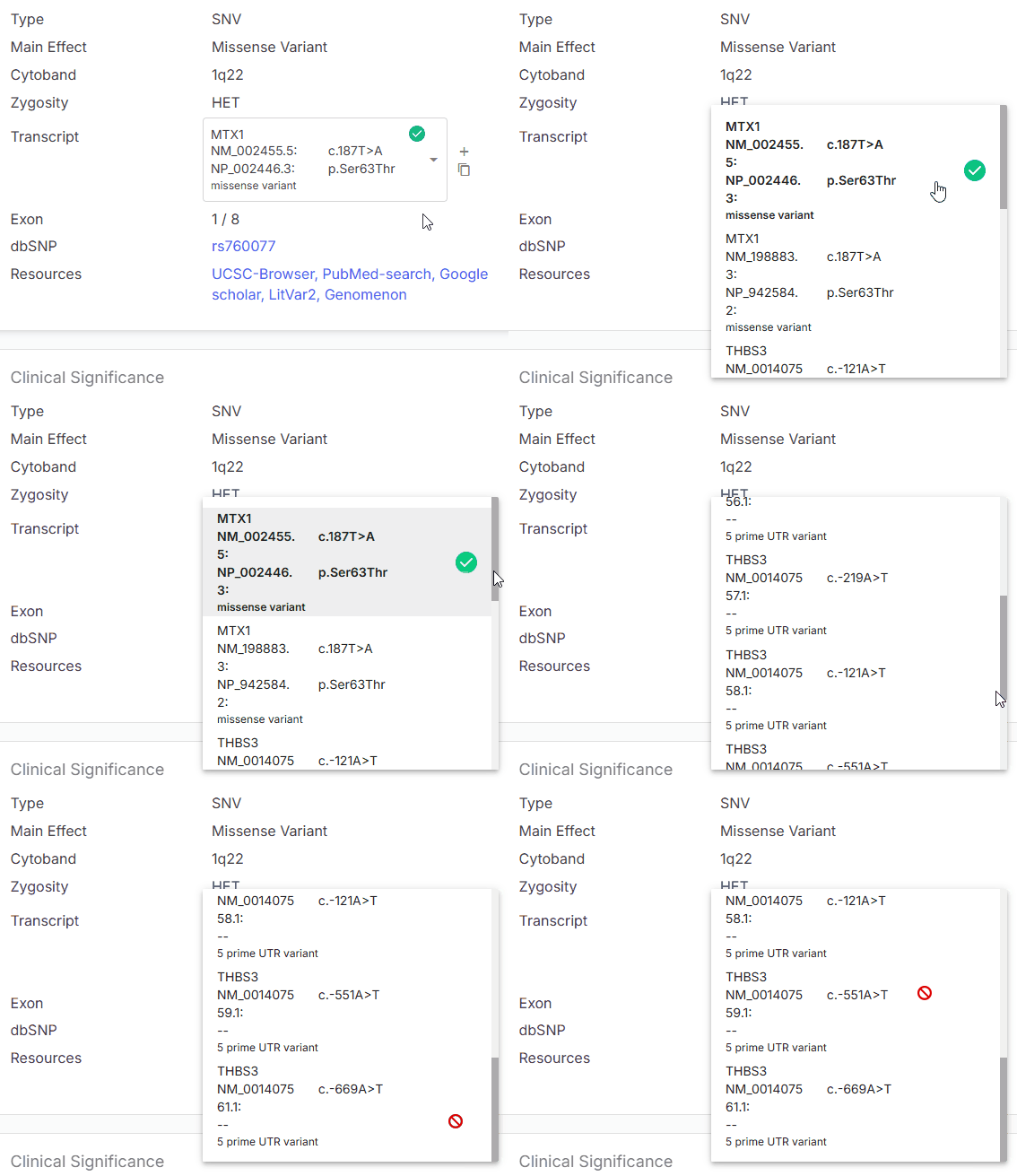
When a variant occurs in a region shared by transcripts from different genes, Emedgene enforces a rule:
**You cannot select a transcript that belongs to a different gene than the variant's primary gene.**
This restriction prevents mismatches between the variant and its gene context, which could lead to incorrect interpretation. If you try to select a transcript from a non-primary gene, the option is blocked.
: Transcript selected in your [Curate](broken://pages/JHmO0TJUuneVcw5IzKwJ) database.
Emedgene automatically selects a reference transcript according to predefined [prioritization rules](/emedgene/emedgene-analyze-manual/tertiary-analysis-pipeline/how_does_emedgene_analyze_prioritize_transcripts.md). The reference transcript determines:
* Main affected gene
* Main variant effect
* Coding DNA change and resulting protein change
## Changing the reference transcript
If the automatically selected transcript does not match your reporting preference, you can:
* **Select a different transcript\*** from the Transcript dropdown menu
* **Add a custom transcript** as part of a custom HGVS variant description (see below). You may need to add a custom HGVS variant description in the following cases:
* The required transcript is not available in the suggested options
* Certain variants, such as upstream or downstream gene variants, may be lacking an automatic HGVS description
{% hint style="info" %}
## **\*Transcript selection restriction to maintain variant-gene consistency**
When a variant occurs in a region shared by transcripts from different genes, Emedgene enforces a rule:
**You cannot select a transcript that belongs to a different gene than the variant's primary gene.**
This restriction prevents mismatches between the variant and its gene context, which could lead to incorrect interpretation. If you try to select a transcript from a non-primary gene, the option is blocked.
 {% endhint %}
### How to add a custom HGVS variant description
{% stepper %}
{% step %}
Click the plus icon next to the HGVS description box.
{% endstep %}
{% step %}
In the field, enter the notation in the correct format. Do not include spaces.
* **Coding change only:** `GENE,NM_123456:c.-123A>C`
* **Coding and protein change:** `GENE,NM_123456:c.123G>A,p.123Arg>His`
{% endstep %}
{% endstepper %}
Once added, a custom description becomes available for [reporting](/emedgene/emedgene-analyze-manual/case-completion-and-reporting/clinical_report.md).
---
# Agent Instructions
This documentation is published with GitBook. GitBook is the documentation platform designed so that both humans and AI agents can read, navigate, and reason over technical content effectively. Learn more at gitbook.com.
## Querying This Documentation
If you need additional information that is not directly available in this page, you can query the documentation dynamically by asking a question.
Perform an HTTP GET request on the current page URL with the `ask` query parameter, and the optional `goal` query parameter:
```
GET https://help.connected.illumina.com/emedgene/emedgene-analyze-manual/variant_page/clinical_significance_section/variant-info/transcript.md?ask=&goal=
```
`ask` is the immediate question: it should be specific, self-contained, and written in natural language.
`goal` is optional and describes the broader end goal you are ultimately trying to accomplish on behalf of the user. GitBook uses it to tailor the answer towards what is most useful for that goal.
The response will contain a direct answer to the question and relevant excerpts and sources from the documentation.
Use this mechanism when the answer is not explicitly present in the current page, you need clarification or additional context, or you want to retrieve related documentation sections.
{% endhint %}
### How to add a custom HGVS variant description
{% stepper %}
{% step %}
Click the plus icon next to the HGVS description box.
{% endstep %}
{% step %}
In the field, enter the notation in the correct format. Do not include spaces.
* **Coding change only:** `GENE,NM_123456:c.-123A>C`
* **Coding and protein change:** `GENE,NM_123456:c.123G>A,p.123Arg>His`
{% endstep %}
{% endstepper %}
Once added, a custom description becomes available for [reporting](/emedgene/emedgene-analyze-manual/case-completion-and-reporting/clinical_report.md).
---
# Agent Instructions
This documentation is published with GitBook. GitBook is the documentation platform designed so that both humans and AI agents can read, navigate, and reason over technical content effectively. Learn more at gitbook.com.
## Querying This Documentation
If you need additional information that is not directly available in this page, you can query the documentation dynamically by asking a question.
Perform an HTTP GET request on the current page URL with the `ask` query parameter, and the optional `goal` query parameter:
```
GET https://help.connected.illumina.com/emedgene/emedgene-analyze-manual/variant_page/clinical_significance_section/variant-info/transcript.md?ask=&goal=
```
`ask` is the immediate question: it should be specific, self-contained, and written in natural language.
`goal` is optional and describes the broader end goal you are ultimately trying to accomplish on behalf of the user. GitBook uses it to tailor the answer towards what is most useful for that goal.
The response will contain a direct answer to the question and relevant excerpts and sources from the documentation.
Use this mechanism when the answer is not explicitly present in the current page, you need clarification or additional context, or you want to retrieve related documentation sections.
.png?alt=media)