> For the complete documentation index, see [llms.txt](https://help.connected.illumina.com/llms.txt). Markdown versions of documentation pages are available by appending `.md` to page URLs; this page is available as [Markdown](https://help.connected.illumina.com/icm/analyses/analysis-functionality/task-menu/region-analysis/annotate-regions.md).
# Annotate Regions
ATAC-seq and 5-base DNA methylation analysis generate regions in genome. To better understand roles of the regions in regulating gene expression, we can use Annotate regions task to add information about overlapping or nearby genomic features to the regions.
## Running Annotate regions
The input for Annotate regions task is a region data node.
* Click to select a **regions** data node.
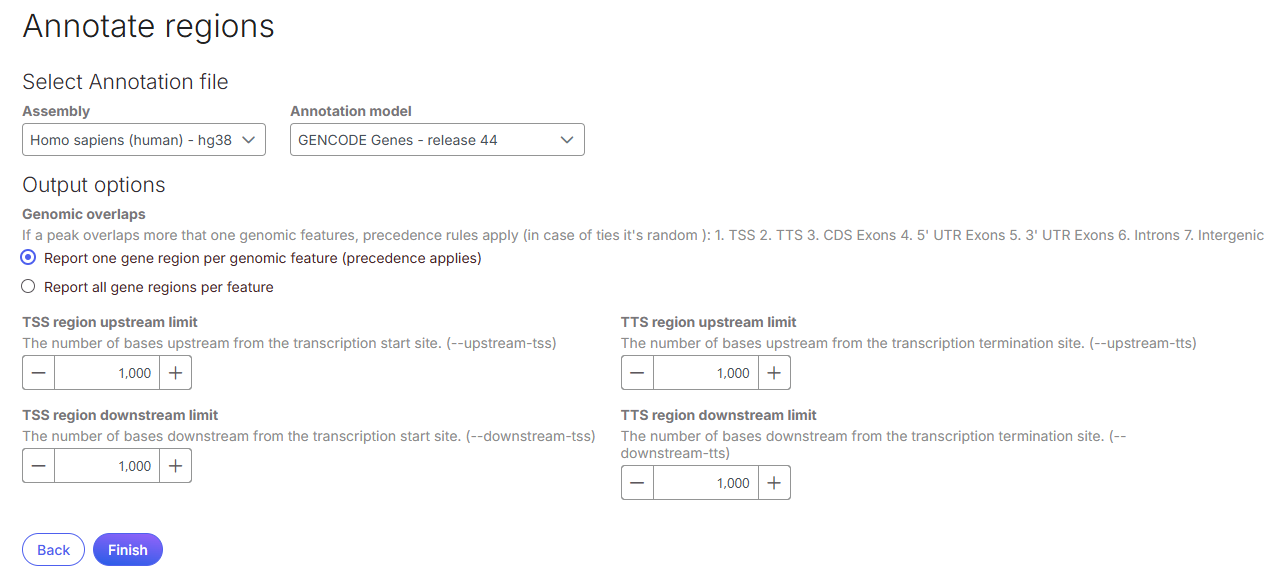
* Select **Region analysis** from context-sensitive menu, select **Annotate regions.**
* Select an **Assembly** and A**nnotation model.**
* Select an option for **Genomics overlaps**:
* Report one gene region per genomic feature (precedence applies): chooses one gene section for each region using the precedence order when more than one gene section overlaps a region. The order of precedence is TSS, TTS, CDS Exon, 5' UTR Exon, 3' UTR Exon, Intron, Intergenic.
* Report all gene regions per features: creates a row for each gene section that overlaps a region in the task report.
* Define **transcription start site (TSS)** and **transcription termination site (TTS) limit** in the unit of bp.
* Click **Finish** to run.
## Annotate regions output
When completed, an **Annotate regions** task node and an **Annotated regions** data node are generated. Double-click on the **Annotated regions** data node to open task report. The report consists of a pie chart and a table. The pie chart shows breakdown on gene section among the regions. The table show annotated information, if run with the option to report all gene sections per region, each region will have a row for each gene section it overlaps; if run with the option to report one gene section per region, each region will have one row with the gene section it overlaps chosen using the order of precedence. The table can be sorted by any of its columns.
Click on the **Optional columns** on the upper-left corner of the table to add more information on each region.
## Gene sections
**TSS**
Transcription start site (TSS) is -1000bp and +1000bp (default setting) from the TSS for a transcript
**TTS**
Transcription termination site (TTS) is -1000bp and +1000bp (default setting) from the TTS for a transcript
**CDS Exon**
Coding sequence (CDS) Exon is overlapping a coding exon in a transcript
**5' UTR Exon**
5' Untranslated Region (UTR) Exon is overlapping an exon in the 5' UTR of a transcript
**3' UTR Exon**
3' Untranslated Region (UTR) Exon is overlapping an exon in the 3' UTR of a transcript
**Intron**
Intron is overlapping an intron in a transcript
**Intergenic**
Intergenic is not located within 1000bp of a transcript
---
# Agent Instructions
This documentation is published with GitBook. GitBook is the documentation platform designed so that both humans and AI agents can read, navigate, and reason over technical content effectively. Learn more at gitbook.com.
## Querying This Documentation
If you need additional information that is not directly available in this page, you can query the documentation dynamically by asking a question.
Perform an HTTP GET request on the current page URL with the `ask` query parameter, and the optional `goal` query parameter:
```
GET https://help.connected.illumina.com/icm/analyses/analysis-functionality/task-menu/region-analysis/annotate-regions.md?ask=&goal=
```
`ask` is the immediate question: it should be specific, self-contained, and written in natural language.
`goal` is optional and describes the broader end goal you are ultimately trying to accomplish on behalf of the user. GitBook uses it to tailor the answer towards what is most useful for that goal.
The response will contain a direct answer to the question and relevant excerpts and sources from the documentation.
Use this mechanism when the answer is not explicitly present in the current page, you need clarification or additional context, or you want to retrieve related documentation sections.
.png?alt=media)